<?xml version="1.0" encoding="utf-8"?>
<feed xmlns="http://www.w3.org/2005/Atom">
    <id>https://mlflow.org/articles/</id>
    <title>MLflow Blog</title>
    <updated>2026-05-15T00:00:00.000Z</updated>
    <generator>https://github.com/jpmonette/feed</generator>
    <link rel="alternate" href="https://mlflow.org/articles/"/>
    <subtitle>MLflow Blog</subtitle>
    <icon>https://mlflow.org/img/mlflow-favicon.ico</icon>
    <entry>
        <title type="html"><![CDATA[Managing AI model serving latency: a developer's guide]]></title>
        <id>https://mlflow.org/articles/managing-ai-model-serving-latency-a-developers-guide/</id>
        <link href="https://mlflow.org/articles/managing-ai-model-serving-latency-a-developers-guide/"/>
        <updated>2026-05-15T00:00:00.000Z</updated>
        <summary type="html"><![CDATA[Master managing AI model serving latency with our comprehensive guide. Improve performance, retain users, and optimize your infrastructure today!]]></summary>
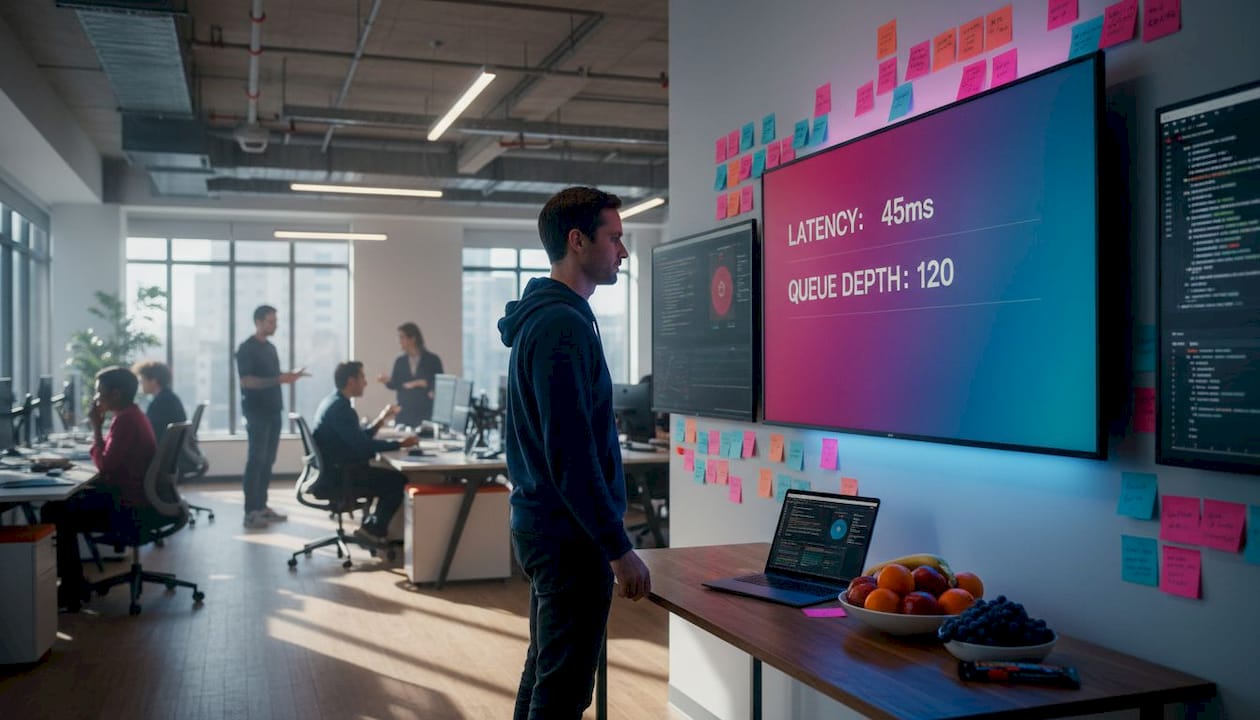
        <content type="html"><![CDATA[<p><img decoding="async" loading="lazy" src="https://csuxjmfbwmkxiegfpljm.supabase.co/storage/v1/object/public/blog-images/organization-30814/1778726770405_Developer-analyzing-model-serving-latency-workspace.jpeg" alt="Developer analyzing model serving latency workspace" class="img_ev3q"></p>
<p>When a user submits a prompt to your GenAI application and waits two seconds for the first token, they notice. When that delay spikes to eight seconds during peak traffic, they leave. Managing AI model serving latency is not just a performance concern — it directly shapes user retention, infrastructure costs, and your team’s ability to scale confidently. This guide walks you through the full arc: measuring what actually matters, configuring your environment for observability, tuning your pipeline, surviving autoscaling events, and verifying that your changes hold up in production.</p>
<h2 class="anchor anchorTargetStickyNavbar_Vzrq" id="table-of-contents">Table of Contents<a href="https://mlflow.org/articles/managing-ai-model-serving-latency-a-developers-guide/#table-of-contents" class="hash-link" aria-label="Direct link to Table of Contents" title="Direct link to Table of Contents" translate="no">​</a></h2>
<ul>
<li class=""><a href="https://mlflow.org/articles/managing-ai-model-serving-latency-a-developers-guide/#understanding-latency-metrics-and-baseline-measurement" class="">Understanding latency metrics and baseline measurement</a></li>
<li class=""><a href="https://mlflow.org/articles/managing-ai-model-serving-latency-a-developers-guide/#preparing-your-serving-environment-tools-metrics-and-infrastructure-setup" class="">Preparing your serving environment: tools, metrics, and infrastructure setup</a></li>
<li class=""><a href="https://mlflow.org/articles/managing-ai-model-serving-latency-a-developers-guide/#optimizing-latency-through-model-serving-pipeline-tuning" class="">Optimizing latency through model serving pipeline tuning</a></li>
<li class=""><a href="https://mlflow.org/articles/managing-ai-model-serving-latency-a-developers-guide/#mitigating-cold-starts-and-autoscaling-latency-spikes" class="">Mitigating cold-starts and autoscaling latency spikes</a></li>
<li class=""><a href="https://mlflow.org/articles/managing-ai-model-serving-latency-a-developers-guide/#verifying-and-troubleshooting-ai-serving-latency-in-production" class="">Verifying and troubleshooting AI serving latency in production</a></li>
<li class=""><a href="https://mlflow.org/articles/managing-ai-model-serving-latency-a-developers-guide/#why-focusing-only-on-the-model-misses-critical-latency-sources" class="">Why focusing only on the model misses critical latency sources</a></li>
<li class=""><a href="https://mlflow.org/articles/managing-ai-model-serving-latency-a-developers-guide/#explore-mlflows-ai-platform-for-scalable-low-latency-model-serving" class="">Explore MLflow’s AI platform for scalable, low-latency model serving</a></li>
<li class=""><a href="https://mlflow.org/articles/managing-ai-model-serving-latency-a-developers-guide/#frequently-asked-questions" class="">Frequently asked questions</a></li>
</ul>
<h2 class="anchor anchorTargetStickyNavbar_Vzrq" id="key-takeaways">Key Takeaways<a href="https://mlflow.org/articles/managing-ai-model-serving-latency-a-developers-guide/#key-takeaways" class="hash-link" aria-label="Direct link to Key Takeaways" title="Direct link to Key Takeaways" translate="no">​</a></h2>
<table><thead><tr><th>Point</th><th>Details</th></tr></thead><tbody><tr><td>Tail latency metrics</td><td>Monitor p90, p95, and p99 latency percentiles to understand the worst user experiences during AI model serving.</td></tr><tr><td>Baseline profiling</td><td>Establish latency baselines with isolated model benchmarks using tools like trtexec before system-level optimization.</td></tr><tr><td>Integrated observability</td><td>Combine inference time, queue size, batching, and cold-start metrics for accurate latency diagnostics.</td></tr><tr><td>Pipeline tuning</td><td>Use cache-aware routing, continuous batching, and smart scheduling to reduce serving latency beyond model improvements.</td></tr><tr><td>Cold start mitigation</td><td>Address latency spikes from autoscaling zero instances with keep-alives and adapter size optimizations.</td></tr></tbody></table>
<h2 class="anchor anchorTargetStickyNavbar_Vzrq" id="understanding-latency-metrics-and-baseline-measurement">Understanding latency metrics and baseline measurement<a href="https://mlflow.org/articles/managing-ai-model-serving-latency-a-developers-guide/#understanding-latency-metrics-and-baseline-measurement" class="hash-link" aria-label="Direct link to Understanding latency metrics and baseline measurement" title="Direct link to Understanding latency metrics and baseline measurement" translate="no">​</a></h2>
<p>To reduce serving latency effectively, you must first understand how to measure and benchmark it accurately. Not all latency metrics tell the same story, and optimizing for the wrong one can leave your worst user experiences untouched.</p>
<p><strong>Tail latency</strong> (p90, p95, p99) is the metric that most closely reflects what real users experience. Average latency can look healthy while your p99 sits at 12 seconds. <a href="https://www.mirantis.com/blog/inference-latency/" target="_blank" rel="noopener noreferrer" class="">Tracking tail latency</a> paired with pipeline metrics like queue depth and batching helps spot regressions before GPU utilization shows anomalies. If you are only watching mean response time, you are watching the wrong number.</p>
<p><strong>Time to First Token (TTFT)</strong> deserves its own dashboard. For streaming applications, TTFT is the latency users feel most acutely. A model that generates tokens quickly but takes three seconds to start feels broken, even if its throughput is excellent. Track TTFT separately from total generation time.</p>
<p>Here are the core metrics to instrument from day one:</p>
<ul>
<li class=""><strong>TTFT</strong> (Time to First Token): critical for streaming UX</li>
<li class=""><strong>Time per output token (TPOT)</strong>: measures generation throughput</li>
<li class=""><strong>Queue depth</strong>: requests waiting for an available worker</li>
<li class=""><strong>Batch size</strong>: actual vs. configured maximum</li>
<li class=""><strong>Cold-start frequency</strong>: how often instances initialize from zero</li>
<li class=""><strong>p90/p95/p99 latency</strong>: tail behavior across the request distribution</li>
</ul>
<p>For baseline measurement, <a href="https://developer.nvidia.com/blog/how-to-eliminate-pipeline-friction-in-ai-model-serving/" target="_blank" rel="noopener noreferrer" class="">NVIDIA recommends</a> establishing a latency/throughput baseline using "trtexec` with the model run in isolation, then profiling with Nsight Systems to find bottlenecks beyond raw inference latency. This two-step approach separates what the model itself costs from what your pipeline adds around it.</p>
<table><thead><tr><th>Metric</th><th>What it reveals</th><th>Tool</th></tr></thead><tbody><tr><td>p99 latency</td><td>Worst-case user experience</td><td>Prometheus, Grafana</td></tr><tr><td>TTFT</td><td>Streaming responsiveness</td><td>Custom instrumentation</td></tr><tr><td>Queue depth</td><td>Scheduling pressure</td><td>Serving framework metrics</td></tr><tr><td>GPU utilization</td><td>Compute saturation (not a scaling trigger)</td><td>NVIDIA DCGM</td></tr><tr><td>Cold-start rate</td><td>Infrastructure readiness</td><td>Cloud provider metrics</td></tr></tbody></table>
<p>Pro Tip: Run <code>trtexec</code> with <code>--percentile=99</code> to capture p99 latency during your baseline benchmark. This gives you a reproducible number to compare against after every pipeline change.</p>
<p>Good <a href="https://mlflow.org/genai/observability" target="_blank" rel="noopener noreferrer" class="">model serving observability</a> starts at this layer. Before you touch a single configuration knob, know your baseline tail latency, your TTFT distribution, and your queue behavior under load. Everything else builds from there.</p>
<h2 class="anchor anchorTargetStickyNavbar_Vzrq" id="preparing-your-serving-environment-tools-metrics-and-infrastructure-setup">Preparing your serving environment: tools, metrics, and infrastructure setup<a href="https://mlflow.org/articles/managing-ai-model-serving-latency-a-developers-guide/#preparing-your-serving-environment-tools-metrics-and-infrastructure-setup" class="hash-link" aria-label="Direct link to Preparing your serving environment: tools, metrics, and infrastructure setup" title="Direct link to Preparing your serving environment: tools, metrics, and infrastructure setup" translate="no">​</a></h2>
<p>With baselines and metrics defined, the next step is to configure your environment to track and respond to latency effectively. This is where many teams underinvest, and it costs them later when a regression surfaces in production with no clear cause.</p>
<p>Integrated observability tracking inference time, tail latency, queue depth, and cold-start signals is essential to quickly narrow down causes of latency degradation. Set up end-to-end tracing before you deploy to production, not after your first incident. The <a href="https://mlflow.org/blog/ai-observability-mlflow-tracing" target="_blank" rel="noopener noreferrer" class="">AI observability tracing techniques</a> you put in place now will save hours of guesswork later.</p>
<p><img decoding="async" loading="lazy" src="https://csuxjmfbwmkxiegfpljm.supabase.co/storage/v1/object/public/blog-images/organization-30814/1778726973742_Engineer-checking-latency-metrics-on-dashboard.jpeg" alt="Engineer checking latency metrics on dashboard" class="img_ev3q"></p>
<p>Infrastructure choices matter more than most teams realize. Sticky routing, which sends requests from the same session or prefix to the same replica, allows KV cache reuse and can cut TTFT dramatically for multi-turn conversations. If your load balancer uses pure round-robin, you are throwing away free latency gains. Choose infrastructure that supports session-aware routing from the start.</p>
<p><a href="https://www.digitalocean.com/community/tutorials/serverless-fine-tuned-llms" target="_blank" rel="noopener noreferrer" class="">Serverless or autoscaled hosting</a> often causes cold-start latency spikes affecting TTFT, which must be accounted for in system design. Plan for this explicitly. If your serving platform scales to zero during low-traffic periods, your first request after a quiet window will pay the full initialization cost.</p>
<p>Key environment configuration checklist:</p>
<ul>
<li class="">Enable distributed tracing on every inference endpoint</li>
<li class="">Export queue depth and batch size as real-time metrics</li>
<li class="">Configure autoscaling triggers on queue depth, not GPU utilization</li>
<li class="">Set up alerting on p95 and p99 thresholds, not just average latency</li>
<li class="">Test cold-start behavior explicitly during load testing</li>
<li class="">Use sticky routing where KV cache reuse is possible</li>
</ul>
<p>Your <a href="https://mlflow.org/genai/ai-gateway" target="_blank" rel="noopener noreferrer" class="">serving platform infrastructure</a> should expose these signals natively. If it does not, instrument them yourself before you go further. You cannot manage what you cannot see.</p>
<p>Pro Tip: During load testing, deliberately trigger a scale-to-zero event and measure the resulting TTFT spike. Document this number. It becomes your cold-start SLA baseline and informs decisions about minimum replica counts.</p>
<h2 class="anchor anchorTargetStickyNavbar_Vzrq" id="optimizing-latency-through-model-serving-pipeline-tuning">Optimizing latency through model serving pipeline tuning<a href="https://mlflow.org/articles/managing-ai-model-serving-latency-a-developers-guide/#optimizing-latency-through-model-serving-pipeline-tuning" class="hash-link" aria-label="Direct link to Optimizing latency through model serving pipeline tuning" title="Direct link to Optimizing latency through model serving pipeline tuning" translate="no">​</a></h2>
<p>Having prepared your environment, you can now execute pipeline tuning techniques to reduce serving latency effectively. This is where the biggest gains typically live, and also where the most common mistakes happen.</p>
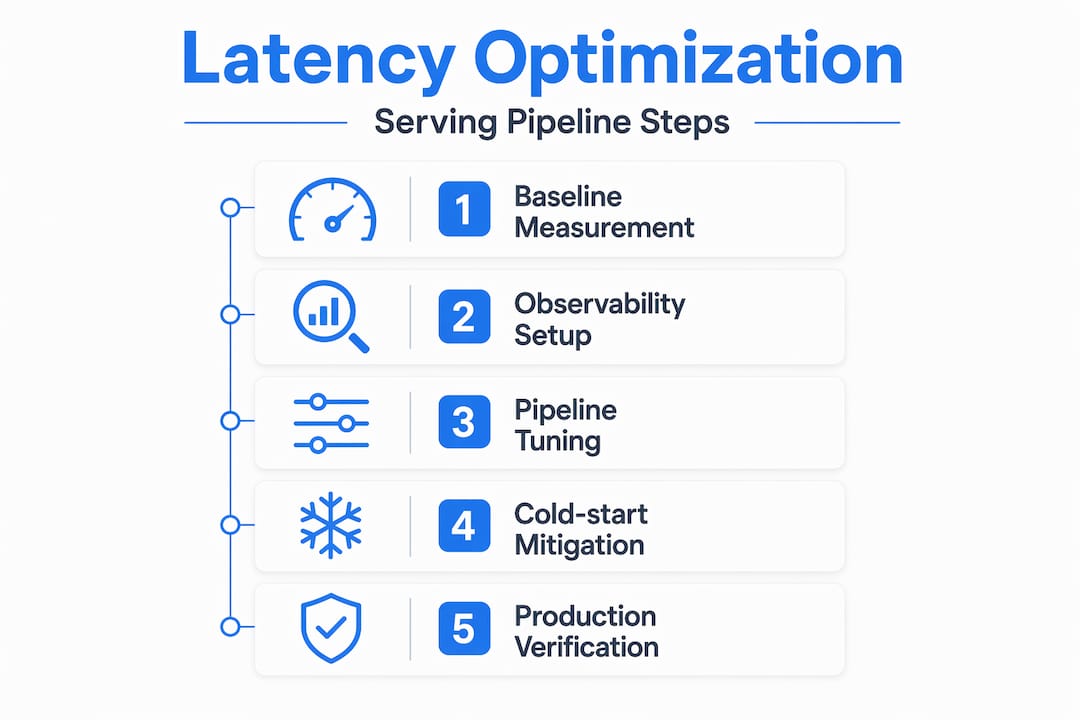
<ol>
<li class=""><strong>Switch to continuous batching.</strong> Fixed batching holds requests until a batch fills, adding queuing delay for every request. Continuous batching processes tokens as they complete, reducing head-of-line blocking and improving both throughput and tail latency simultaneously.</li>
<li class=""><strong>Deploy PagedAttention-based serving.</strong> <a href="https://www.snowflake.com/en/engineering-blog/llm-model-serving-vllm-inference/" target="_blank" rel="noopener noreferrer" class="">vLLM’s tail latency improvements</a> stem from PagedAttention techniques and continuous batching, resulting in 2.2x to 2.3x better p99 latency and TTFT over alternative approaches. If you are not using a PagedAttention-based engine, this is your highest-leverage change.</li>
<li class=""><strong>Implement cache-aware routing.</strong> Cache-aware routing avoids redundant prefill, reducing latency dramatically compared to round-robin, by sending requests to replicas holding relevant context. For applications with shared system prompts or multi-turn sessions, this can eliminate the prefill cost entirely on subsequent requests.</li>
<li class=""><strong>Align dynamic batching with your optimization profile.</strong> If your model was compiled with TensorRT at a specific batch size, serving requests at a different batch size forces recompilation or suboptimal execution. Match your runtime batch configuration to your model’s optimization profile.</li>
<li class=""><strong>Scale on queue depth, not GPU utilization.</strong> GPU utilization lags behind actual demand, especially for memory-bandwidth-bound decoding workloads. By the time utilization spikes, your queue is already backing up. Use the inference routing best practices that treat queue depth as the primary autoscaling signal.</li>
</ol>
<table><thead><tr><th>Technique</th><th>Latency impact</th><th>Complexity</th></tr></thead><tbody><tr><td>Continuous batching</td><td>High (reduces head-of-line blocking)</td><td>Low</td></tr><tr><td>PagedAttention (vLLM)</td><td>Very high (2x+ p99 improvement)</td><td>Medium</td></tr><tr><td>Cache-aware routing</td><td>High (eliminates prefill for cached prefixes)</td><td>Medium</td></tr><tr><td>TensorRT compilation</td><td>Medium (faster per-token compute)</td><td>High</td></tr><tr><td>Queue-based autoscaling</td><td>High (prevents tail latency spikes)</td><td>Low</td></tr></tbody></table>
<p>Pro Tip: When evaluating <a href="https://mlflow.org/blog/memalign" target="_blank" rel="noopener noreferrer" class="">batching and memory techniques</a>, measure p99 latency at your target concurrency level, not just average latency at low load. Optimizations that look great at 10 concurrent requests often behave differently at 200.</p>
<p><img decoding="async" loading="lazy" src="https://csuxjmfbwmkxiegfpljm.supabase.co/storage/v1/object/public/blog-images/organization-30814/1778726822314_Vertical-infographic-showing-latency-optimization-steps.jpeg" alt="Vertical infographic showing latency optimization steps" class="img_ev3q"></p>
<h2 class="anchor anchorTargetStickyNavbar_Vzrq" id="mitigating-cold-starts-and-autoscaling-latency-spikes">Mitigating cold-starts and autoscaling latency spikes<a href="https://mlflow.org/articles/managing-ai-model-serving-latency-a-developers-guide/#mitigating-cold-starts-and-autoscaling-latency-spikes" class="hash-link" aria-label="Direct link to Mitigating cold-starts and autoscaling latency spikes" title="Direct link to Mitigating cold-starts and autoscaling latency spikes" translate="no">​</a></h2>
<p>In addition to tuning pipeline steps, mitigating cold starts and autoscaling spikes is critical to maintaining low latency during traffic fluctuations. This is the category of latency that surprises teams most in production.</p>
<p>Cold starts cause latency spikes primarily in Time to First Token, typically a few hundred milliseconds for LoRA adapter loads after scaling to zero. For applications where TTFT is a core UX metric, even a 300ms spike on the first request of a session is noticeable. For applications with strict SLAs, it can be a violation.</p>
<p>The sources of cold-start latency break down as follows:</p>
<ul>
<li class=""><strong>Model weight loading</strong>: the base model must transfer from storage to GPU memory</li>
<li class=""><strong>LoRA adapter initialization</strong>: fine-tuned adapters load on top of base weights</li>
<li class=""><strong>KV cache allocation</strong>: memory pages must be allocated before generation begins</li>
<li class=""><strong>Container startup</strong>: the serving process itself must initialize</li>
</ul>
<p><a href="https://www.zartis.com/scaling-llm-workloads-on-kubernetes-a-production-engineers-guide/" target="_blank" rel="noopener noreferrer" class="">Autoscaling based on GPU metrics alone</a> can be too slow. Queue depth metrics per replica enable proactive scaling to avoid tail latency regressions. The goal is to scale <em>before</em> requests start queuing, not after they have already waited.</p>
<p>Practical mitigation strategies:</p>
<ul>
<li class="">Set a minimum replica count of at least 1 to avoid full scale-to-zero events for latency-sensitive endpoints</li>
<li class="">Use periodic keep-alive requests (a lightweight ping every 30 to 60 seconds) to prevent instance hibernation</li>
<li class="">Pre-load LoRA adapters at startup rather than loading them on first request</li>
<li class="">Monitor <a href="https://mlflow.org/blog/mlflow-modal-deploy" target="_blank" rel="noopener noreferrer" class="">serverless deployment latency</a> separately from steady-state latency in your dashboards</li>
</ul>
<p>Pro Tip: If you must allow scale-to-zero for cost reasons, implement a warm-up endpoint that fires immediately after a new instance starts. This pre-allocates KV cache memory and loads adapters before the first real user request arrives.</p>
<h2 class="anchor anchorTargetStickyNavbar_Vzrq" id="verifying-and-troubleshooting-ai-serving-latency-in-production">Verifying and troubleshooting AI serving latency in production<a href="https://mlflow.org/articles/managing-ai-model-serving-latency-a-developers-guide/#verifying-and-troubleshooting-ai-serving-latency-in-production" class="hash-link" aria-label="Direct link to Verifying and troubleshooting AI serving latency in production" title="Direct link to Verifying and troubleshooting AI serving latency in production" translate="no">​</a></h2>
<p>After implementing optimization and mitigation steps, verifying latency behavior in production ensures sustained performance and rapid diagnosis of new issues.</p>
<p>Average latency is a trap. A deployment that improves mean response time by 40% while worsening p99 by 20% is a regression for your worst-affected users. Always verify improvements by comparing tail latency percentiles before and after each change.</p>
<p>Distributed tracing with tools like OpenTelemetry enables detailed visibility of each inference step, unraveling latency spikes that average metrics hide. A trace that spans tokenization, queue wait, prefill, decode, and detokenization tells you exactly where time is going on a per-request basis.</p>
<p>Here is a verification workflow we recommend for every optimization cycle:</p>
<ol>
<li class="">Record p90, p95, and p99 latency plus TTFT before making any change</li>
<li class="">Deploy the change to a canary slice (10 to 20% of traffic)</li>
<li class="">Run a load test at your target concurrency level against the canary</li>
<li class="">Compare tail latency percentiles and TTFT between canary and baseline</li>
<li class="">Check queue depth behavior under the same load profile</li>
<li class="">Monitor for at least 24 hours before full rollout to catch time-of-day effects</li>
</ol>
<p>For ongoing production monitoring, configure alerts on these signals:</p>
<ul>
<li class="">p99 latency exceeds your SLA threshold for more than 60 seconds</li>
<li class="">Queue depth per replica exceeds your target maximum</li>
<li class="">TTFT spikes more than 2x the baseline for any 5-minute window</li>
<li class="">Cold-start rate increases following a deployment</li>
</ul>
<blockquote>
<p>“The goal of production latency verification is not to prove that your optimization worked once. It is to build confidence that it holds under the full range of traffic patterns your system will encounter.”</p>
</blockquote>
<p><a href="https://mlflow.org/llm-tracing" target="_blank" rel="noopener noreferrer" class="">AI model tracing with MLflow</a> gives you the per-request visibility to distinguish between a model-side slowdown and a pipeline-side regression. Without that granularity, you are guessing. With it, you can resolve most latency incidents in minutes rather than hours.</p>
<p>Pro Tip: Use tail-based sampling in your tracing setup. Capture 100% of requests that exceed your p99 threshold and 100% of errors, but sample routine fast requests at 1 to 5%. This keeps trace volume manageable while ensuring you never miss a slow request.</p>
<h2 class="anchor anchorTargetStickyNavbar_Vzrq" id="why-focusing-only-on-the-model-misses-critical-latency-sources">Why focusing only on the model misses critical latency sources<a href="https://mlflow.org/articles/managing-ai-model-serving-latency-a-developers-guide/#why-focusing-only-on-the-model-misses-critical-latency-sources" class="hash-link" aria-label="Direct link to Why focusing only on the model misses critical latency sources" title="Direct link to Why focusing only on the model misses critical latency sources" translate="no">​</a></h2>
<p>Here is the uncomfortable truth most latency optimization guides skip: the model is rarely the bottleneck. Teams spend weeks squeezing inference time, compiling with TensorRT, and quantizing weights, then discover that CPU preprocessing and tokenization are adding more latency than the GPU step they just optimized.</p>
<p>NVIDIA frames serving latency as pipeline friction, where CPU preprocessing, synchronization, and scheduling often dominate over raw model inference latency. This is not a niche edge case. It is the default situation in most production serving stacks, and it only becomes visible through system-level profiling with tools like Nsight Systems.</p>
<p>The same pattern appears in autoscaling decisions. <a href="https://learn.microsoft.com/en-us/azure/databricks/machine-learning/model-serving/production-optimization" target="_blank" rel="noopener noreferrer" class="">Databricks’ guidance</a> highlights the central role of queue dynamics and concurrency provisioning rather than GPU utilization alarms in managing tail latency in production LLM serving. Teams that scale on GPU utilization are reacting to a lagging indicator. By the time utilization crosses a threshold, the queue has already grown and tail latency has already spiked.</p>
<p>We have seen this play out repeatedly. A team optimizes their model to run 30% faster in isolation, deploys it, and sees no improvement in production p99 latency. The reason: their queue was the bottleneck, not the model. Adding concurrency, not a faster model, was what they actually needed.</p>
<p>Effective latency management is a cross-layer problem. It requires coordinated tooling across the model, the serving framework, the routing layer, and the infrastructure. Advanced latency observability that spans all of these layers is not optional. It is the only way to know where time is actually going.</p>
<p>The teams that consistently maintain low tail latency in production are not the ones with the fastest models. They are the ones with the clearest visibility into their full serving stack.</p>
<h2 class="anchor anchorTargetStickyNavbar_Vzrq" id="explore-mlflows-ai-platform-for-scalable-low-latency-model-serving">Explore MLflow’s AI platform for scalable, low-latency model serving<a href="https://mlflow.org/articles/managing-ai-model-serving-latency-a-developers-guide/#explore-mlflows-ai-platform-for-scalable-low-latency-model-serving" class="hash-link" aria-label="Direct link to Explore MLflow’s AI platform for scalable, low-latency model serving" title="Direct link to Explore MLflow’s AI platform for scalable, low-latency model serving" translate="no">​</a></h2>
<p>Managing AI model serving latency across all of these layers — profiling, pipeline tuning, cold-start mitigation, and continuous verification — requires tooling that spans the full serving lifecycle. MLflow is built for exactly this challenge.</p>
<p><img decoding="async" loading="lazy" src="https://csuxjmfbwmkxiegfpljm.supabase.co/storage/v1/object/public/blog-images/organization-30814/1778726621079_mlflow.jpg" alt="https://mlflow.org" class="img_ev3q"></p>
<p>The <a href="https://mlflow.org/genai" target="_blank" rel="noopener noreferrer" class="">MLflow GenAI engineering</a> platform gives your team production-grade observability, deep tracing of every inference step, and a centralized <a href="https://mlflow.org/ai-gateway" target="_blank" rel="noopener noreferrer" class="">AI Gateway for serving</a> that supports cache-aware routing and queue-based autoscaling. With <a href="https://mlflow.org/ai-observability" target="_blank" rel="noopener noreferrer" class="">MLflow AI observability tools</a>, you can track tail latency, TTFT, and queue depth in a single pane, and connect trace data directly to the requests that caused your worst latency events. If your team is serious about reducing AI latency in production GenAI applications, MLflow gives you the infrastructure to do it systematically.</p>
<h2 class="anchor anchorTargetStickyNavbar_Vzrq" id="frequently-asked-questions">Frequently asked questions<a href="https://mlflow.org/articles/managing-ai-model-serving-latency-a-developers-guide/#frequently-asked-questions" class="hash-link" aria-label="Direct link to Frequently asked questions" title="Direct link to Frequently asked questions" translate="no">​</a></h2>
<h3 class="anchor anchorTargetStickyNavbar_Vzrq" id="what-is-tail-latency-and-why-is-it-important-in-ai-model-serving">What is tail latency and why is it important in AI model serving?<a href="https://mlflow.org/articles/managing-ai-model-serving-latency-a-developers-guide/#what-is-tail-latency-and-why-is-it-important-in-ai-model-serving" class="hash-link" aria-label="Direct link to What is tail latency and why is it important in AI model serving?" title="Direct link to What is tail latency and why is it important in AI model serving?" translate="no">​</a></h3>
<p>Tail latency measures the higher percentiles of request delays (p95, p99), representing the slowest requests your users experience. Tail latency captures delays many users experience and is key for spotting regressions early, making it a more reliable quality signal than average response time.</p>
<h3 class="anchor anchorTargetStickyNavbar_Vzrq" id="how-does-profiling-with-tools-like-trtexec-and-nsight-systems-help-reduce-latency">How does profiling with tools like trtexec and Nsight Systems help reduce latency?<a href="https://mlflow.org/articles/managing-ai-model-serving-latency-a-developers-guide/#how-does-profiling-with-tools-like-trtexec-and-nsight-systems-help-reduce-latency" class="hash-link" aria-label="Direct link to How does profiling with tools like trtexec and Nsight Systems help reduce latency?" title="Direct link to How does profiling with tools like trtexec and Nsight Systems help reduce latency?" translate="no">​</a></h3>
<p><code>trtexec</code> benchmarks isolated model inference performance to establish a clean baseline, while Nsight Systems reveals CPU and GPU pipeline bottlenecks beyond the model itself. Use trtexec for baseline and Nsight Systems for system-level profiling to find CPU bottlenecks and idle GPU time, enabling targeted optimizations that address the actual source of end-to-end latency.</p>
<h3 class="anchor anchorTargetStickyNavbar_Vzrq" id="what-causes-cold-start-latency-spikes-in-serverless-ai-model-serving">What causes cold start latency spikes in serverless AI model serving?<a href="https://mlflow.org/articles/managing-ai-model-serving-latency-a-developers-guide/#what-causes-cold-start-latency-spikes-in-serverless-ai-model-serving" class="hash-link" aria-label="Direct link to What causes cold start latency spikes in serverless AI model serving?" title="Direct link to What causes cold start latency spikes in serverless AI model serving?" translate="no">​</a></h3>
<p>Cold start spikes occur when autoscaled instances scale to zero and must reload model weights and LoRA adapters before serving the first request. Cold starts happen when workloads scale to zero and weights are reloaded, causing TTFT spikes primarily, typically in the range of a few hundred milliseconds.</p>
<h3 class="anchor anchorTargetStickyNavbar_Vzrq" id="why-is-queue-depth-a-better-scaling-metric-than-gpu-utilization-for-llm-serving">Why is queue depth a better scaling metric than GPU utilization for LLM serving?<a href="https://mlflow.org/articles/managing-ai-model-serving-latency-a-developers-guide/#why-is-queue-depth-a-better-scaling-metric-than-gpu-utilization-for-llm-serving" class="hash-link" aria-label="Direct link to Why is queue depth a better scaling metric than GPU utilization for LLM serving?" title="Direct link to Why is queue depth a better scaling metric than GPU utilization for LLM serving?" translate="no">​</a></h3>
<p>Queue depth directly measures how many requests are waiting, making it a leading indicator of tail latency degradation. Queue depth per replica signals sudden traffic surges sooner than GPU utilization, enabling proactive scaling to avoid tail latency regressions, especially in memory-bandwidth-bound decoding workloads where GPU utilization can appear stable even as queues grow.</p>
<h2 class="anchor anchorTargetStickyNavbar_Vzrq" id="recommended">Recommended<a href="https://mlflow.org/articles/managing-ai-model-serving-latency-a-developers-guide/#recommended" class="hash-link" aria-label="Direct link to Recommended" title="Direct link to Recommended" translate="no">​</a></h2>
<ul>
<li class=""><a href="https://mlflow.org/" target="_blank" rel="noopener noreferrer" class="">MLflow - Open Source AI Platform for Agents, LLMs &amp; Models</a></li>
<li class=""><a href="https://mlflow.org/classical-ml/serving" target="_blank" rel="noopener noreferrer" class="">ML Model Serving | MLflow AI Platform</a></li>
<li class=""><a href="https://mlflow.org/blog/typescript-enhancement" target="_blank" rel="noopener noreferrer" class="">AI Observability for Every TypeScript LLM Stack | MLflow</a></li>
<li class=""><a href="https://mlflow.org/blog/mlflow-modal-deploy" target="_blank" rel="noopener noreferrer" class="">Deploy MLflow Models to Serverless GPUs with Modal | MLflow</a></li>
</ul>]]></content>
        <category label="reducing AI latency" term="reducing AI latency"/>
        <category label="optimizing model serving" term="optimizing model serving"/>
        <category label="AI response time management" term="AI response time management"/>
        <category label="improving model inference speed" term="improving model inference speed"/>
        <category label="strategies for AI latency" term="strategies for AI latency"/>
        <category label="how to decrease model serving latency" term="how to decrease model serving latency"/>
        <category label="managing ai model serving latency" term="managing ai model serving latency"/>
    </entry>
    <entry>
        <title type="html"><![CDATA[What is LLM observability? A guide for AI ops teams]]></title>
        <id>https://mlflow.org/articles/what-is-llm-observability-a-guide-for-ai-ops-teams/</id>
        <link href="https://mlflow.org/articles/what-is-llm-observability-a-guide-for-ai-ops-teams/"/>
        <updated>2026-05-14T00:00:00.000Z</updated>
        <summary type="html"><![CDATA[Discover what LLM observability is and how it ensures robust AI model performance. Learn essential strategies for effective monitoring today!]]></summary>
        <content type="html"><![CDATA[<p><img decoding="async" loading="lazy" src="https://csuxjmfbwmkxiegfpljm.supabase.co/storage/v1/object/public/blog-images/organization-30814/1778726731304_AI-engineer-reviews-LLM-observability-dashboards.jpeg" alt="AI engineer reviews LLM observability dashboards" class="img_ev3q"></p>
<p>Deploying a large language model to production and assuming your existing monitoring stack will catch failures is one of the most common and costly mistakes AI ops teams make today. Understanding what is LLM observability, and why it differs fundamentally from traditional system monitoring, is now a core competency for any team running LLMs at scale. Your infrastructure dashboards can show green across the board while your model is confidently generating hallucinated facts, violating content policies, or drifting away from your intended use case. This guide breaks down what LLM observability actually covers, how to implement it, and why getting it right is non-negotiable for enterprise deployments.</p>
<h2 class="anchor anchorTargetStickyNavbar_Vzrq" id="table-of-contents">Table of Contents<a href="https://mlflow.org/articles/what-is-llm-observability-a-guide-for-ai-ops-teams/#table-of-contents" class="hash-link" aria-label="Direct link to Table of Contents" title="Direct link to Table of Contents" translate="no">​</a></h2>
<ul>
<li class=""><a href="https://mlflow.org/articles/what-is-llm-observability-a-guide-for-ai-ops-teams/#what-is-llm-observability-and-why-does-it-matter" class="">What is LLM observability and why does it matter?</a></li>
<li class=""><a href="https://mlflow.org/articles/what-is-llm-observability-a-guide-for-ai-ops-teams/#core-components-of-llm-observability-tracing-metrics-and-evaluations" class="">Core components of LLM observability: tracing, metrics, and evaluations</a></li>
<li class=""><a href="https://mlflow.org/articles/what-is-llm-observability-a-guide-for-ai-ops-teams/#why-traditional-monitoring-falls-short-for-large-language-models" class="">Why traditional monitoring falls short for large language models</a></li>
<li class=""><a href="https://mlflow.org/articles/what-is-llm-observability-a-guide-for-ai-ops-teams/#implementing-llm-observability-in-enterprise-environments" class="">Implementing LLM observability in enterprise environments</a></li>
<li class=""><a href="https://mlflow.org/articles/what-is-llm-observability-a-guide-for-ai-ops-teams/#why-traditional-ai-monitoring-approaches-wont-cut-it-for-llms" class="">Why traditional AI monitoring approaches won’t cut it for LLMs</a></li>
<li class=""><a href="https://mlflow.org/articles/what-is-llm-observability-a-guide-for-ai-ops-teams/#streamline-your-llm-observability-with-mlflow-ai-platform" class="">Streamline your LLM observability with MLflow AI platform</a></li>
<li class=""><a href="https://mlflow.org/articles/what-is-llm-observability-a-guide-for-ai-ops-teams/#frequently-asked-questions" class="">Frequently asked questions</a></li>
</ul>
<h2 class="anchor anchorTargetStickyNavbar_Vzrq" id="key-takeaways">Key Takeaways<a href="https://mlflow.org/articles/what-is-llm-observability-a-guide-for-ai-ops-teams/#key-takeaways" class="hash-link" aria-label="Direct link to Key Takeaways" title="Direct link to Key Takeaways" translate="no">​</a></h2>
<table><thead><tr><th>Point</th><th>Details</th></tr></thead><tbody><tr><td>LLM outputs require semantic monitoring</td><td>LLM observability tracks output quality and safety beyond traditional system health metrics.</td></tr><tr><td>Tracing links failures to root causes</td><td>Combining trace data with quality evaluations accelerates debugging and reduces investigation time.</td></tr><tr><td>Prompt tracking is crucial</td><td>Monitoring prompt templates and versions helps correlate changes to performance and output quality.</td></tr><tr><td>LLM observability improves reliability</td><td>Continuous monitoring of LLMs enables early anomaly detection and helps maintain alignment with business goals.</td></tr><tr><td>MLflow supports end-to-end observability</td><td>MLflow provides SDKs and tools for instrumentation, tracing, evaluation, and cost monitoring in production LLMs.</td></tr></tbody></table>
<h2 class="anchor anchorTargetStickyNavbar_Vzrq" id="what-is-llm-observability-and-why-does-it-matter">What is LLM observability and why does it matter?<a href="https://mlflow.org/articles/what-is-llm-observability-a-guide-for-ai-ops-teams/#what-is-llm-observability-and-why-does-it-matter" class="hash-link" aria-label="Direct link to What is LLM observability and why does it matter?" title="Direct link to What is LLM observability and why does it matter?" translate="no">​</a></h2>
<p>LLM observability is the practice of continuously monitoring, tracing, and evaluating the behavior of large language models across the full application lifecycle. It extends far beyond infrastructure metrics. As <a href="https://launchdarkly.com/blog/llm-observability/" target="_blank" rel="noopener noreferrer" class="">LaunchDarkly documents</a>, LLM observability analyzes how models behave across development, testing, and production by tracking inputs, outputs, latency, quality, safety, and cost.</p>
<p>The distinction from traditional observability is significant. With a conventional API or database, a successful response means the system did what it was supposed to do. With an LLM, a 200 OK response only tells you the model returned <em>something</em>. Whether that something is accurate, relevant, safe, or aligned with your business goals is an entirely separate question, and one that standard monitoring tools cannot answer.</p>
<p>The <a href="https://mlflow.org/ai-observability" target="_blank" rel="noopener noreferrer" class="">AI observability overview</a> from MLflow captures this well: observability for AI systems must account for the semantic dimension of outputs, not just the operational one. For enterprise teams, this means building monitoring pipelines that cover:</p>
<ul>
<li class=""><strong>Input tracking:</strong> Logging every prompt, including template versions and injected variables</li>
<li class=""><strong>Output evaluation:</strong> Assessing responses for correctness, relevance, toxicity, and hallucinations</li>
<li class=""><strong>Latency and throughput:</strong> Measuring end-to-end response times and throughput under load</li>
<li class=""><strong>Token usage and cost:</strong> Tracking per-request token consumption to manage spend</li>
<li class=""><strong>Safety and alignment checks:</strong> Detecting policy violations, off-topic responses, and prompt injections</li>
<li class=""><strong>Drift detection:</strong> Identifying when model behavior shifts over time, even without a code change</li>
</ul>
<p>Each of these dimensions addresses a failure mode that traditional monitoring simply cannot see. That is the core argument for LLM observability as a distinct practice.</p>
<h2 class="anchor anchorTargetStickyNavbar_Vzrq" id="core-components-of-llm-observability-tracing-metrics-and-evaluations">Core components of LLM observability: tracing, metrics, and evaluations<a href="https://mlflow.org/articles/what-is-llm-observability-a-guide-for-ai-ops-teams/#core-components-of-llm-observability-tracing-metrics-and-evaluations" class="hash-link" aria-label="Direct link to Core components of LLM observability: tracing, metrics, and evaluations" title="Direct link to Core components of LLM observability: tracing, metrics, and evaluations" translate="no">​</a></h2>
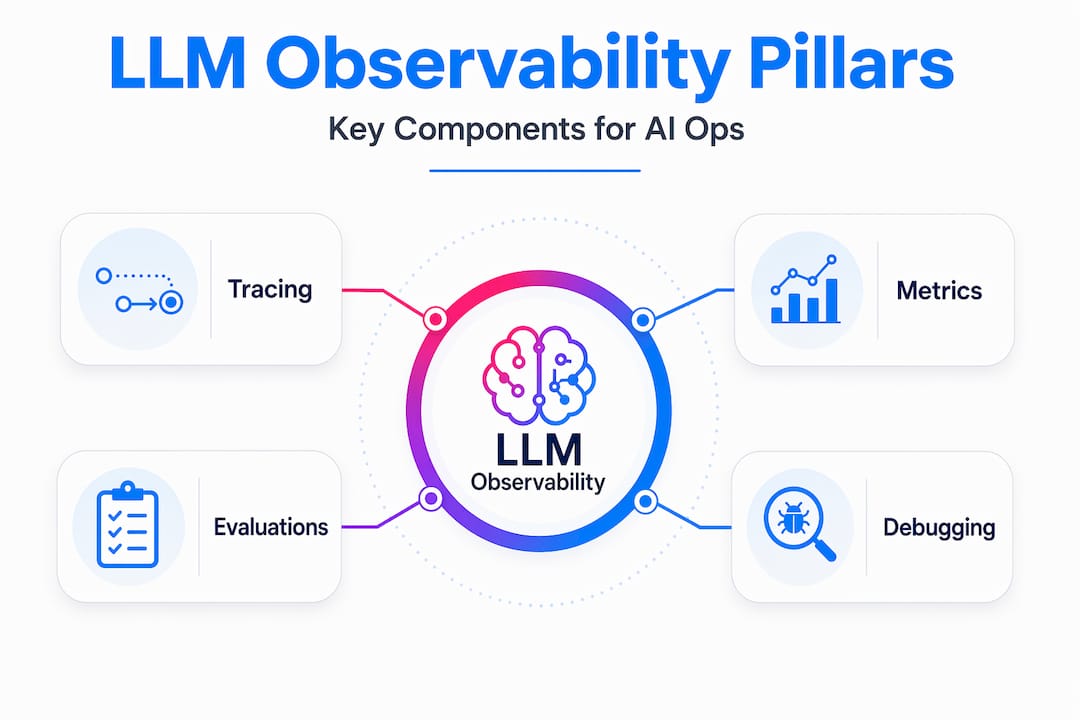
<p>Now that we’ve introduced the need for LLM observability, let’s look at the specific technical pillars that make this practice work in production. There are three primary components: tracing, metrics, and evaluations. Together, they give your team a complete picture of system health and output integrity.</p>
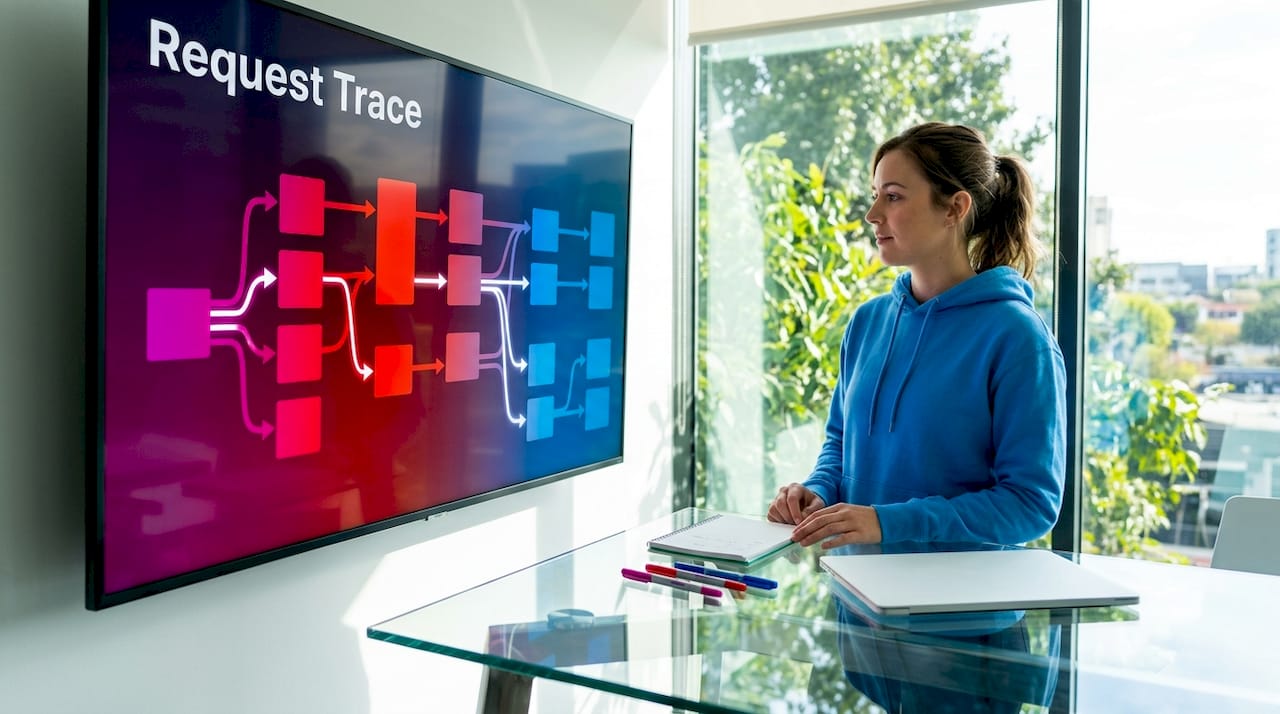
<p><strong>Tracing</strong> maps the full lifecycle of a request through your LLM application. This includes the initial prompt, any retrieval steps in a RAG pipeline, calls to external tools or APIs, sub-agent invocations, and the final model response. <a href="https://mlflow.org/llm-tracing" target="_blank" rel="noopener noreferrer" class="">LLM tracing techniques</a> are essential for root cause analysis because they let you pinpoint exactly where in a complex workflow something went wrong, rather than hunting through disconnected logs.</p>
<p><img decoding="async" loading="lazy" src="https://csuxjmfbwmkxiegfpljm.supabase.co/storage/v1/object/public/blog-images/organization-30814/1778726737369_Developer-examines-LLM-tracing-workflow-screen.jpeg" alt="Developer examines LLM tracing workflow screen" class="img_ev3q"></p>
<p><strong>Metrics</strong> are the quantitative signals your team needs to track continuously. As <a href="https://www.elastic.co/observability/llm-monitoring" target="_blank" rel="noopener noreferrer" class="">Elastic’s LLM observability documentation</a> outlines, LLM observability includes tracing each request through the stack, capturing token usage and cost, tracking latency and errors, and running quality and safety evaluations on outputs. On the instrumentation side, <a href="https://docs.datadoghq.com/llm_observability/instrumentation" target="_blank" rel="noopener noreferrer" class="">Datadog’s approach</a> supports capturing prompts and completions, token usage, latency, error info, and model parameters.</p>
<p><strong>Evaluations</strong> are what truly separate LLM observability from everything that came before. These are automated or human-in-the-loop assessments of whether model outputs meet defined quality criteria. <a href="https://mlflow.org/genai/evaluations" target="_blank" rel="noopener noreferrer" class="">Evaluations for LLMs</a> typically include:</p>
<ol>
<li class=""><strong>Relevance scoring:</strong> Does the response address what the user actually asked?</li>
<li class=""><strong>Faithfulness checks:</strong> In RAG systems, is the answer grounded in the retrieved context?</li>
<li class=""><strong>Hallucination detection:</strong> Did the model fabricate facts, names, or citations?</li>
<li class=""><strong>Toxicity and safety:</strong> Does the response contain harmful, biased, or policy-violating content?</li>
<li class=""><strong>Task-specific rubrics:</strong> Custom criteria aligned to your application’s business requirements</li>
</ol>
<p>Here is a quick reference for the three pillars and what each captures:</p>
<table><thead><tr><th>Component</th><th>What it captures</th><th>Why it matters</th></tr></thead><tbody><tr><td>Tracing</td><td>Request flow, spans, tool calls, sub-agents</td><td>Root cause analysis in complex workflows</td></tr><tr><td>Metrics</td><td>Token count, cost, latency, error rate</td><td>Operational health and spend management</td></tr><tr><td>Evaluations</td><td>Quality, relevance, safety, hallucinations</td><td>Output integrity and business alignment</td></tr></tbody></table>
<p><img decoding="async" loading="lazy" src="https://csuxjmfbwmkxiegfpljm.supabase.co/storage/v1/object/public/blog-images/organization-30814/1778726765776_Infographic-shows-hierarchy-of-LLM-observability-pillars.jpeg" alt="Infographic shows hierarchy of LLM observability pillars" class="img_ev3q"></p>
<p>Pro Tip: Wire your evaluations directly to individual traces, not just aggregate reports. When an evaluation flags a low-quality response, you want to jump straight to the exact prompt, context, and model parameters that produced it. Aggregate scoring alone tells you there is a problem. Trace-linked evaluation tells you <em>why</em>.</p>
<h2 class="anchor anchorTargetStickyNavbar_Vzrq" id="why-traditional-monitoring-falls-short-for-large-language-models">Why traditional monitoring falls short for large language models<a href="https://mlflow.org/articles/what-is-llm-observability-a-guide-for-ai-ops-teams/#why-traditional-monitoring-falls-short-for-large-language-models" class="hash-link" aria-label="Direct link to Why traditional monitoring falls short for large language models" title="Direct link to Why traditional monitoring falls short for large language models" translate="no">​</a></h2>
<p>Understanding these components helps clarify why traditional monitoring misses key LLM failure modes. The gap is not a matter of degree. It is structural.</p>
<p>Traditional monitoring was built around a simple contract: if the system returns a valid response within an acceptable time, the request succeeded. That contract holds for deterministic systems. An API that returns the wrong JSON is a bug you can catch. A database query that returns stale data triggers an alert. The failure is visible at the infrastructure layer.</p>
<p>LLMs break this contract entirely. As <a href="https://www.swept.ai/post/llm-observability-complete-guide" target="_blank" rel="noopener noreferrer" class="">Swept AI’s observability guide</a> notes, an LLM can have sub-second latency and 200 OK status yet produce fabricated, harmful, or off-topic content undetectable by traditional monitoring. Your uptime monitor sees a healthy system. Your user sees a confidently wrong answer.</p>
<blockquote>
<p>“Infrastructure metrics alone miss hallucinations and incorrect outputs even when requests technically succeed.” — Swept AI LLM Observability Guide</p>
</blockquote>
<p>The failure modes unique to LLMs include:</p>
<ul>
<li class=""><strong>Hallucinations:</strong> The model generates plausible-sounding but factually incorrect information</li>
<li class=""><strong>Topic drift:</strong> Responses gradually shift away from intended use cases without any code change</li>
<li class=""><strong>Prompt injection:</strong> Malicious inputs manipulate the model into ignoring system instructions</li>
<li class=""><strong>Refusal failures:</strong> The model refuses valid requests due to overly aggressive safety tuning</li>
<li class=""><strong>Bias amplification:</strong> Outputs reflect or amplify demographic or ideological biases present in training data</li>
</ul>
<p>None of these show up in your existing <a href="https://mlflow.org/cookbook/production-observability" target="_blank" rel="noopener noreferrer" class="">production observability challenges</a> tooling unless you build explicitly for them. A customer-facing LLM that starts hallucinating product specifications will not trigger a single alert in a traditional monitoring stack. The only signal you get is a surge in support tickets, or worse, a public incident.</p>
<h2 class="anchor anchorTargetStickyNavbar_Vzrq" id="implementing-llm-observability-in-enterprise-environments">Implementing LLM observability in enterprise environments<a href="https://mlflow.org/articles/what-is-llm-observability-a-guide-for-ai-ops-teams/#implementing-llm-observability-in-enterprise-environments" class="hash-link" aria-label="Direct link to Implementing LLM observability in enterprise environments" title="Direct link to Implementing LLM observability in enterprise environments" translate="no">​</a></h2>
<p>With these challenges in mind, let’s explore how enterprise teams actually build practical observability into their LLM deployments. The good news is that the implementation path is well-defined, even if the tooling is still maturing.</p>
<ol>
<li class=""><strong>Instrument your application with an observability SDK.</strong> The fastest path to tracing and metric collection is integrating an SDK that auto-instruments your LLM calls. <a href="https://mlflow.org/blog/ai-observability-mlflow-tracing" target="_blank" rel="noopener noreferrer" class="">Getting started with MLflow tracing</a> requires minimal code changes and immediately begins capturing spans, token counts, and latency for every request.</li>
<li class=""><strong>Treat prompts as versioned artifacts.</strong> Prompt templates are the primary lever teams use to change model behavior, but they are often managed as strings in a config file. <a href="https://www.datadoghq.com/blog/llm-prompt-tracking/" target="_blank" rel="noopener noreferrer" class="">Treating prompts as first-class observables</a> helps correlate prompt changes with latency, cost, and evaluation metrics. When a quality regression appears, you can immediately check whether a prompt version change preceded it.</li>
<li class=""><strong>Link evaluations to traces.</strong> Run automated evaluations on every response, or a statistically significant sample, and attach the results to the originating trace. <a href="https://www.datadoghq.com/blog/llm-observability-at-datadog-nlq/" target="_blank" rel="noopener noreferrer" class="">Datadog reports</a> a roughly 20x reduction in debugging time by correlating evaluator failures with trace-level context. That is the difference between knowing a problem exists and knowing exactly where to fix it.</li>
<li class=""><strong>Set up cost and safety dashboards with proactive alerts.</strong> Token costs can spike unexpectedly when users find creative ways to send long prompts. Safety violations can cluster around specific input patterns. Dashboards that surface these signals in real time, with alerts that fire before costs or risks escalate, are essential for production operations.</li>
</ol>
<p>Here is a practical breakdown of what to instrument at each stage of your deployment:</p>
<table><thead><tr><th>Deployment stage</th><th>Key observability actions</th><th>Primary benefit</th></tr></thead><tbody><tr><td>Development</td><td>Trace all LLM calls, log prompt versions</td><td>Catch regressions before they ship</td></tr><tr><td>Staging</td><td>Run <a href="https://mlflow.org/llm-as-a-judge" target="_blank" rel="noopener noreferrer" class="">LLM-as-a-Judge evaluations</a> on test sets</td><td>Validate quality against baselines</td></tr><tr><td>Production</td><td>Monitor cost, latency, safety, and drift</td><td>Detect failures before users report them</td></tr><tr><td>Post-incident</td><td>Replay traces with updated prompts</td><td>Confirm fixes without re-deploying</td></tr></tbody></table>
<p>Pro Tip: Do not wait for user complaints to discover quality regressions. Set up automated evaluation runs on a rolling sample of production traffic and alert on any statistically significant drop in your quality scores. This is the LLM equivalent of synthetic monitoring, and it catches problems hours or days before they surface in user feedback.</p>
<h2 class="anchor anchorTargetStickyNavbar_Vzrq" id="why-traditional-ai-monitoring-approaches-wont-cut-it-for-llms">Why traditional AI monitoring approaches won’t cut it for LLMs<a href="https://mlflow.org/articles/what-is-llm-observability-a-guide-for-ai-ops-teams/#why-traditional-ai-monitoring-approaches-wont-cut-it-for-llms" class="hash-link" aria-label="Direct link to Why traditional AI monitoring approaches won’t cut it for LLMs" title="Direct link to Why traditional AI monitoring approaches won’t cut it for LLMs" translate="no">​</a></h2>
<p>Here is the uncomfortable truth we have observed working with enterprise AI teams: most organizations treat LLM observability as something they will add later, once the model is “stable.” That framing misunderstands what stability means for probabilistic systems.</p>
<p>LLM outputs are probabilistic and drift over time, so teams must observe both system performance and model behavior to catch anomalies. A model does not need a code change to start behaving differently. A provider model update, a shift in user input distribution, or a subtle change in retrieved context can all alter output quality without touching a single line of your application code. If you are not observing outputs continuously, you will not know until the damage is done.</p>
<p>We also see teams conflate evaluation with testing. Running an eval suite before deployment is necessary but not sufficient. Production inputs are messier, more varied, and more adversarial than any test set. The <a href="https://mlflow.org/blog/llm-as-judge" target="_blank" rel="noopener noreferrer" class="">LLM evaluation perspective</a> we advocate is that evaluation is a continuous process, not a gate. It belongs in your monitoring pipeline, not just your CI/CD workflow.</p>
<p>The rise of autonomous LLM agents makes this even more critical. When a model is not just answering questions but taking actions, calling APIs, and making decisions in multi-step workflows, an undetected failure does not just produce a bad response. It can trigger a cascade of incorrect actions that are difficult to reverse. Observability at the agent level, tracing every reasoning step and tool call, is the only way to maintain meaningful oversight of these systems.</p>
<p>Output correctness is a separate dimension from system health. Treating them as the same problem is how teams end up with production LLMs that are technically healthy and operationally broken.</p>
<h2 class="anchor anchorTargetStickyNavbar_Vzrq" id="streamline-your-llm-observability-with-mlflow-ai-platform">Streamline your LLM observability with MLflow AI platform<a href="https://mlflow.org/articles/what-is-llm-observability-a-guide-for-ai-ops-teams/#streamline-your-llm-observability-with-mlflow-ai-platform" class="hash-link" aria-label="Direct link to Streamline your LLM observability with MLflow AI platform" title="Direct link to Streamline your LLM observability with MLflow AI platform" translate="no">​</a></h2>
<p>If you are building or scaling LLM applications in production, the gap between what your current monitoring covers and what LLM observability requires is real and consequential. MLflow was built to close that gap.</p>
<p><img decoding="async" loading="lazy" src="https://csuxjmfbwmkxiegfpljm.supabase.co/storage/v1/object/public/blog-images/organization-30814/1778726621079_mlflow.jpg" alt="https://mlflow.org" class="img_ev3q"></p>
<p><a href="https://mlflow.org/genai/observability" target="_blank" rel="noopener noreferrer" class="">MLflow LLM observability</a> gives your team end-to-end instrumentation with minimal code changes, capturing traces, token metrics, and evaluation results in a unified platform. You can correlate prompt versions with quality scores, drill into individual traces when evaluations flag failures, and monitor cost and safety signals from a single dashboard. For teams running complex agentic workflows, MLflow AI observability provides deep tracing of multi-step reasoning chains and sub-agent interactions. MLflow LLM tracing integrates with the frameworks your team already uses, so you get production-grade visibility without rebuilding your stack.</p>
<h2 class="anchor anchorTargetStickyNavbar_Vzrq" id="frequently-asked-questions">Frequently asked questions<a href="https://mlflow.org/articles/what-is-llm-observability-a-guide-for-ai-ops-teams/#frequently-asked-questions" class="hash-link" aria-label="Direct link to Frequently asked questions" title="Direct link to Frequently asked questions" translate="no">​</a></h2>
<h3 class="anchor anchorTargetStickyNavbar_Vzrq" id="what-is-the-difference-between-llm-observability-and-traditional-monitoring">What is the difference between LLM observability and traditional monitoring?<a href="https://mlflow.org/articles/what-is-llm-observability-a-guide-for-ai-ops-teams/#what-is-the-difference-between-llm-observability-and-traditional-monitoring" class="hash-link" aria-label="Direct link to What is the difference between LLM observability and traditional monitoring?" title="Direct link to What is the difference between LLM observability and traditional monitoring?" translate="no">​</a></h3>
<p>LLM observability includes monitoring of model outputs for quality, safety, and relevance, whereas traditional monitoring focuses mainly on system health metrics like uptime and latency. As LaunchDarkly’s guide notes, LLM observability extends traditional monitoring by tracking semantic output evaluations in addition to infrastructure metrics.</p>
<h3 class="anchor anchorTargetStickyNavbar_Vzrq" id="why-can-an-llm-response-be-a-failure-even-if-the-latency-and-error-rates-are-low">Why can an LLM response be a failure even if the latency and error rates are low?<a href="https://mlflow.org/articles/what-is-llm-observability-a-guide-for-ai-ops-teams/#why-can-an-llm-response-be-a-failure-even-if-the-latency-and-error-rates-are-low" class="hash-link" aria-label="Direct link to Why can an LLM response be a failure even if the latency and error rates are low?" title="Direct link to Why can an LLM response be a failure even if the latency and error rates are low?" translate="no">​</a></h3>
<p>Because LLMs generate probabilistic outputs, a response can be incorrect, hallucinatory, or unsafe even if the system returns quickly without errors. LLMs can produce fabricated or harmful content despite successful system performance signals like sub-second latency and HTTP 200 status.</p>
<h3 class="anchor anchorTargetStickyNavbar_Vzrq" id="how-does-tracing-help-reduce-debugging-time-for-llm-applications">How does tracing help reduce debugging time for LLM applications?<a href="https://mlflow.org/articles/what-is-llm-observability-a-guide-for-ai-ops-teams/#how-does-tracing-help-reduce-debugging-time-for-llm-applications" class="hash-link" aria-label="Direct link to How does tracing help reduce debugging time for LLM applications?" title="Direct link to How does tracing help reduce debugging time for LLM applications?" translate="no">​</a></h3>
<p>Tracing correlates evaluation failures with exact request and workflow details, enabling faster identification of issues within complex LLM workflows. Datadog reports 20x faster debugging by linking evaluator failures to trace-level context for LLM agents.</p>
<h3 class="anchor anchorTargetStickyNavbar_Vzrq" id="what-are-key-metrics-to-monitor-with-llm-observability">What are key metrics to monitor with LLM observability?<a href="https://mlflow.org/articles/what-is-llm-observability-a-guide-for-ai-ops-teams/#what-are-key-metrics-to-monitor-with-llm-observability" class="hash-link" aria-label="Direct link to What are key metrics to monitor with LLM observability?" title="Direct link to What are key metrics to monitor with LLM observability?" translate="no">​</a></h3>
<p>Important metrics include token usage and cost, latency, error rates, model parameters, and quality evaluations such as hallucination detection and topic relevance. Datadog’s instrumentation captures prompts, completions, token usage, costs, latency, errors, and model parameters including temperature and max tokens.</p>
<h3 class="anchor anchorTargetStickyNavbar_Vzrq" id="can-llm-observability-detect-prompt-injection-attacks-or-content-policy-violations">Can LLM observability detect prompt injection attacks or content policy violations?<a href="https://mlflow.org/articles/what-is-llm-observability-a-guide-for-ai-ops-teams/#can-llm-observability-detect-prompt-injection-attacks-or-content-policy-violations" class="hash-link" aria-label="Direct link to Can LLM observability detect prompt injection attacks or content policy violations?" title="Direct link to Can LLM observability detect prompt injection attacks or content policy violations?" translate="no">​</a></h3>
<p>Yes, observability tools can monitor prompts and responses for harmful content and detect injection attempts, helping enforce safety guardrails. Elastic’s LLM observability monitors for prompt injection attacks and tracks policy-based interventions with built-in guardrails support.</p>
<h2 class="anchor anchorTargetStickyNavbar_Vzrq" id="recommended">Recommended<a href="https://mlflow.org/articles/what-is-llm-observability-a-guide-for-ai-ops-teams/#recommended" class="hash-link" aria-label="Direct link to Recommended" title="Direct link to Recommended" translate="no">​</a></h2>
<ul>
<li class=""><a href="https://mlflow.org/ai-observability" target="_blank" rel="noopener noreferrer" class="">AI Observability for LLMs &amp; Agents | MLflow AI Platform</a></li>
<li class=""><a href="https://mlflow.org/llm-tracing" target="_blank" rel="noopener noreferrer" class="">LLM Tracing &amp; AI Tracing for Agents | MLflow AI Platform</a></li>
<li class=""><a href="https://mlflow.org/ai-monitoring" target="_blank" rel="noopener noreferrer" class="">AI Monitoring for LLMs &amp; Agents | MLflow AI Platform</a></li>
<li class=""><a href="https://mlflow.org/genai/evaluations" target="_blank" rel="noopener noreferrer" class="">Agent &amp; LLM Evaluation | MLflow AI Platform</a></li>
</ul>]]></content>
        <category label="what is llm observability" term="what is llm observability"/>
        <category label="llm monitoring tools" term="llm monitoring tools"/>
        <category label="importance of llm observability" term="importance of llm observability"/>
        <category label="how to implement llm observability" term="how to implement llm observability"/>
        <category label="challenges in llm observability" term="challenges in llm observability"/>
        <category label="llm performance metrics" term="llm performance metrics"/>
        <category label="best practices for llm observability" term="best practices for llm observability"/>
        <category label="what are llm metrics" term="what are llm metrics"/>
        <category label="understanding llm performance" term="understanding llm performance"/>
        <category label="llm observability framework" term="llm observability framework"/>
        <category label="role of observability in llm" term="role of observability in llm"/>
    </entry>
</feed>