Why Integrate AI into Applications: Developer Guide

Many developers assume integrating AI into an application means embedding a model, wiring up an API call, and calling it done. That assumption is why only 21% of companies have successfully adopted AI at an organizational level. The real question, why integrate AI into applications at all, deserves a more rigorous answer than "because competitors are doing it." This guide breaks down the concrete benefits, the architectural realities, and the measurement frameworks that separate successful AI integration from expensive experiments that quietly get shelved.
Table of Contents
- Key takeaways
- Why integrate AI into applications: the real case
- AI integration as an architecture problem
- How AI improves applications by removing friction
- Measuring AI integration success
- My take on where AI integration actually goes wrong
- How MLflow supports your AI integration
- FAQ
Key takeaways
| Point | Details |
|---|---|
| AI integration is architectural | Adding AI requires deliberate interface design between models and existing systems, not just API calls. |
| Measurable outcomes drive value | Tie every AI feature to specific KPIs like retention rate or task completion time before building. |
| AI gateways reduce coupling | Centralized gateways handle routing, security, and provider switching without rewriting application logic. |
| Friction removal beats feature showcasing | The best AI features quietly remove workflow friction rather than visibly promoting AI capability. |
| Four-week rule prevents bloat | If a feature does not improve a target KPI within four weeks, cut it before it compounds into technical debt. |
Why integrate AI into applications: the real case
The functional benefits of AI in apps are real, but they are not the whole story. Let's start with what actually moves the needle for users and businesses.
Automation of repetitive, rule-based tasks is the most immediate win. An AI model that pre-fills form fields based on user history, auto-categorizes support tickets, or drafts routine email responses removes cognitive load from users and reduces operating costs at scale. These are not flashy demonstrations. They are the kind of quiet improvements that show up in lower average handle time and higher user satisfaction scores.
Personalization at scale is where AI creates a compounding advantage. A recommendation engine that adapts to individual behavior patterns drives higher engagement and retention than any static content strategy. Consider how a FinTech application might use spending behavior to surface relevant financial products in real time. That context-awareness is only possible when AI is embedded in the data pipeline, not bolted on afterward.
Predictive analytics and real-time decision-making change the character of what applications can do. Fraud detection systems that flag anomalous transactions in milliseconds, demand forecasting tools that adjust inventory automatically, and dynamic pricing engines that respond to live market signals all depend on AI reasoning applied continuously against a live data stream. The impact on business metrics is direct: lower fraud losses, reduced stockouts, improved conversion rates.
- Chatbot and virtual assistant features reduce tier-1 support volume by handling a high percentage of routine queries without human escalation.
- Intelligent search surfaces relevant results even when the user's query is vague or misspelled, using semantic understanding rather than keyword matching.
- Anomaly detection in observability and security tooling catches issues that rules-based systems miss because they adapt to new patterns over time.
- Content moderation AI scales policy enforcement across millions of user-generated items per day, something no human review team can match at the same cost.
Pro Tip: Don't pick AI use cases based on what is technically impressive. Start from your highest-friction user workflow and work backward to the AI capability that removes the most friction per engineering hour invested.
The business impact of AI is only realized when AI features are tightly coupled to specific KPIs. Teams that deploy AI without a defined success metric are essentially building in the dark.
AI integration as an architecture problem
Here is the part most teams underestimate. AI integration is fundamentally an architecture problem requiring a controlled interface between AI models and the rest of your system. Developers who treat it as "add a library, call an API" end up with brittle integrations that break when a provider changes a model, shifts pricing, or experiences downtime.
The practical answer is an Anti-Corruption Layer. This design pattern isolates your AI logic from your core application, so a provider swap or model version change does not ripple across every service that touches AI output. It also gives you a clear boundary for testing, monitoring, and audit logging.
AI gateways take this further. Scaling AI requires gateways for model routing, governance, and uniform API access, specifically to avoid the tight coupling that makes large AI systems fragile. MLflow's AI Gateway is a production-grade example of this pattern: it manages provider routing, enforces rate limits, standardizes prompts, and handles authentication in one place. When you need to switch from one LLM provider to another, you change a configuration rather than refactoring application code.

| Integration approach | Risk level | Maintainability | Provider flexibility |
|---|---|---|---|
| Direct API calls in application code | High | Low | Low |
| Shared utility library with thin abstraction | Medium | Medium | Medium |
| Centralized AI gateway with routing layer | Low | High | High |
| Anti-Corruption Layer plus AI gateway | Low | Very high | Very high |
Data readiness is the other architectural gap that kills projects early. Most AI projects fail before the first model goes live due to poor strategy, unclear business value, and data readiness issues. Real-time model inference requires a real-time data pipeline. If your application relies on batch-processed data that is hours old, your AI features will produce recommendations or predictions that feel out of context.
Fallback mechanisms are not optional. AI gateways with fallback logic reduce latency and prevent downtime without requiring custom retry code in every service. When an LLM provider is unavailable, the gateway routes to a backup model or degrades gracefully to a non-AI response path, keeping the user experience intact.
Pro Tip: When you design your AI integration layer, standardize security with AI gateways from day one. Retrofitting authentication, rate limiting, and audit logging onto a sprawling direct-API integration is far more expensive than building it centrally at the start.
How AI improves applications by removing friction
There is a practical distinction between AI features that users notice and AI features that users benefit from. The best AI in apps is nearly invisible. Users experience AI as subtle, context-aware improvements rather than as an explicit AI interface they have to learn.
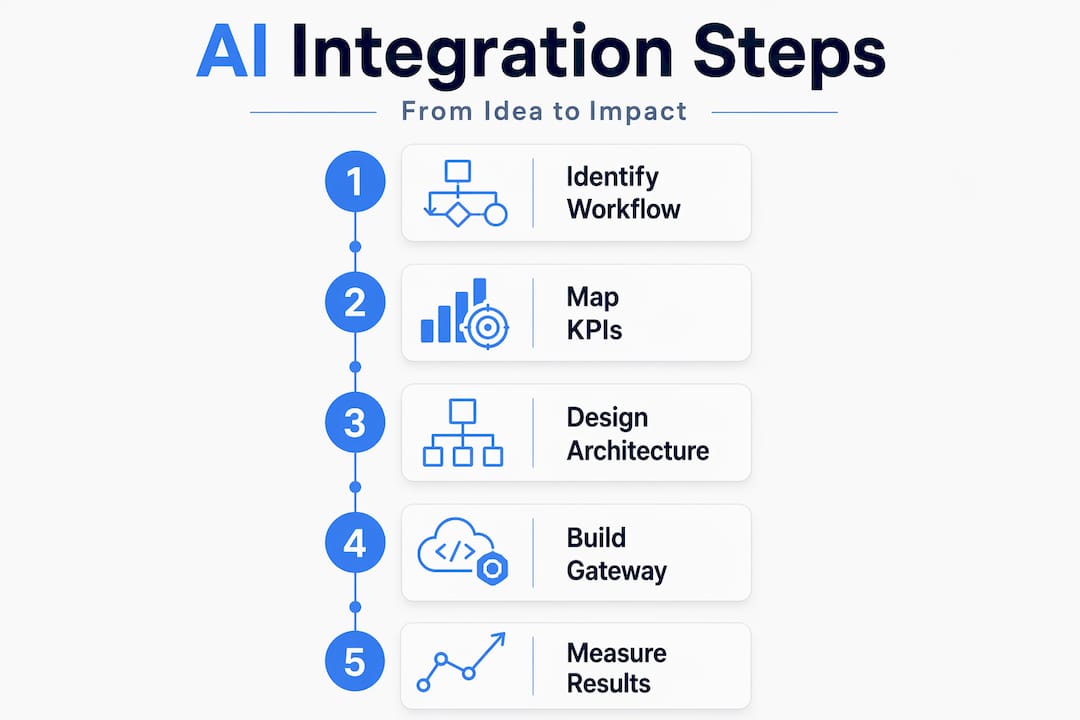
Think about predictive text in a mobile form. The user does not think "AI is helping me." They just notice the form is easier to complete. That invisibility is the goal. When AI surfaces the right document before the user searches for it, suggests the correct workflow step, or quietly auto-fills an address from prior context, it removes the micro-frictions that accumulate into user frustration and churn.
AI creates competitive advantage when it removes friction from existing workflows rather than showcasing capability. Concretely, this means:
- Smarter search that understands intent, handles typos, and surfaces contextually relevant results instead of exact keyword matches.
- Adaptive interfaces that reorder navigation, surface recent actions, or hide rarely-used options based on individual behavior patterns.
- Agentic task flows where AI executes multi-step workflows on behalf of the user, like scheduling a meeting across multiple calendars or generating a draft report from raw data inputs.
- Predictive form assistance that pre-populates fields, validates inputs in real time, and flags likely errors before submission.
- Dynamic content personalization that adjusts what the user sees based on their role, history, and current context rather than serving a static experience.
The retention and conversion implications are measurable. Users who complete their core task faster and with fewer errors are more likely to return. Support tickets decrease because fewer users hit dead ends. Cost to serve drops because automated AI-driven paths handle cases that previously required human intervention.
Pro Tip: When scoping AI features for UX improvement, run a workflow audit first. Map every step a user takes to complete their primary task and identify where they stop, backtrack, or ask for help. Those are the precise points where AI friction removal will generate measurable retention lift.
For teams building local AI workflows or edge-deployed applications, these principles apply with additional constraints around latency and device resources, making the gateway pattern even more important for offloading complexity.
Measuring AI integration success
Understanding why integrate AI into applications is only half the job. Knowing whether your integration is actually working is the other half. Here is a disciplined framework for measuring impact and managing risk over time.
-
Define KPIs before building. Each AI feature must map to at least one measurable outcome: day-30 retention rate, task completion time, average session duration, support ticket deflection rate, or revenue per user. Without a pre-defined KPI, you have no objective basis for deciding whether a feature is delivering value.
-
Run a four-week feature trial. An AI feature that fails to improve KPIs within four weeks should be reconsidered to prevent technical debt. This is a hard rule that protects your codebase from accumulating underperforming features that someone is always "planning to improve later."
-
Implement silent fallbacks. Silent fallback and graceful degradation keep the user experience intact when AI systems fail. A semantic search feature that falls back to keyword search when the model is unavailable is invisible to the user. An AI feature with no fallback delivers a broken experience and generates incidents.
-
Monitor post-launch behavior continuously. Latency, error rates, output quality, and user engagement with AI-driven components all need ongoing instrumentation. MLflow's AI monitoring tools provide the observability layer to track model performance and flag regression after deployment, not just during testing.
-
Cut features that do not perform. Technical debt from feature bloat is a major risk. If a feature did not hit its KPI target in the trial window and there is no clear hypothesis for why it will improve, remove it. Dead AI code that still runs in production consumes compute budget and adds surface area for security issues.
My take on where AI integration actually goes wrong
I've worked with enough teams to see a consistent pattern in failed AI integration projects. The failure is almost never technical. It's organizational and strategic.
In my experience, the teams that struggle most are the ones where engineering, data science, and business stakeholders are operating from completely different assumptions about what the AI feature is supposed to accomplish. Engineers measure inference latency. Data scientists optimize model accuracy. Business teams want to see a revenue number. Nobody assigned the same metric to all three groups, and so nobody wins.
What I've found actually works is forcing a single shared KPI before a single line of AI code gets written. Not a vague goal like "improve user experience." A specific, time-bound, measurable target: reduce form abandonment on the onboarding flow by 15% in 30 days. That shared definition creates alignment and it also creates accountability.
The other thing I've seen consistently underweighted is the fallback design. Teams spend months tuning model accuracy and almost no time designing what happens when the model is wrong or unavailable. In production, both things happen constantly. The teams that build graceful degradation into the architecture from the start are the ones whose users barely notice AI failures when they occur.
My honest view is that AI integration should be treated as ongoing system design work, not a project with a launch date and a celebration. The model landscape shifts. User behavior changes. What performed well in month one may need rethinking by month six. The organizations that treat AI as a living system component, rather than a shipped feature, are the ones that extract durable value from it.
— Kevin
How MLflow supports your AI integration
If the architectural and measurement challenges described here feel familiar, MLflow is built specifically to address them. MLflow's open-source AI platform gives development teams and decision-makers a centralized environment for managing the full AI lifecycle: from prompt engineering and agent orchestration to production monitoring and gateway-level governance.
MLflow's AI Gateway handles cross-provider routing, authentication, and rate limiting in one place, so your application logic stays decoupled from specific model providers. Its tracing and evaluation tools give you the observability needed to measure feature impact precisely, track latency and quality regression post-deployment, and make evidence-based decisions about which AI features to keep or cut. For teams moving from prototype to production with LLM applications and AI agents, MLflow's GenAI platform provides the infrastructure to do that reliably and at scale.
FAQ
Why integrate AI into applications rather than build standalone AI tools?
Integrating AI directly into your application puts intelligence at the point where users are already working, removing the friction of switching contexts. Standalone tools require behavior change; integrated AI accelerates existing workflows invisibly.
What is an AI gateway and why does it matter for integration?
An AI gateway is a centralized layer that handles model routing, authentication, rate limiting, and provider management across your application. It decouples your application logic from specific AI providers so you can swap models or add new ones without rewriting integration code.
How do I know if an AI feature is actually delivering value?
Tie each feature to a specific KPI before launch and run a four-week measurement window. If the target metric does not improve within that period, the feature should be reconsidered rather than left in production to accumulate technical debt.
What happens when an AI component fails in production?
Well-designed AI integrations include silent fallbacks, where the application transparently switches to a non-AI alternative like keyword search or a static response path. This keeps the user experience intact without exposing the failure to the end user.
What is the most common reason AI integration projects fail?
Most AI projects fail due to poor strategic alignment, vague success metrics, and data readiness gaps, not because of model quality. Cross-functional alignment on a shared, measurable KPI before development begins is the highest-leverage step a team can take.