Configuring AI Model Serving Endpoints: 2026 Guide

AI model serving endpoints are the production interfaces that expose trained models as callable REST APIs, and how you configure them determines inference reliability, cost, and governance at scale. Configuring AI model serving endpoints correctly means setting up access credentials, rate limits, traffic routing, autoscaling, and observability before your first request hits production. Databricks Unity AI Gateway, the MLflow Deployment API, and Mlflow's AI Gateway platform each play a distinct role in this stack. Get the configuration right upfront and you avoid the class of production failures that no amount of model quality can fix.
What are the prerequisites for configuring AI model serving endpoints?
Before you write a single line of configuration, you need the right permissions, credentials, and a clear decision about model type. Skipping this step is the most common reason endpoint deployments fail on day one.
Permissions and access

You need CAN MANAGE ACLs on the workspace to create or modify serving endpoints. For AI model access control at the group level, your IAM structure must be mapped before you configure rate limits. Group membership determines which limits apply, and overlapping policies resolve to the strictest applicable limit.
Model types and their constraints
Databricks model serving endpoints expose a unified REST API and integrate with the MLflow Deployment API and UI for endpoint management. The same endpoint supports real-time and batch inference. You choose from three model categories:
- Foundation models: Databricks-hosted models like DBRX or Llama accessed via pay-per-token APIs
- External models: Third-party APIs such as OpenAI GPT-4o or Anthropic Claude, proxied through your endpoint
- Custom models: Your own MLflow-packaged models registered in Unity Catalog
One constraint you must decide upfront: external model endpoints allow only one served entity and cannot be switched from non-external to external after creation. This is not a soft limitation. Attempting to add external_model to an existing endpoint post-creation is unsupported. Decide your model type before you create the endpoint.
Infrastructure checklist
| Prerequisite | Requirement |
|---|---|
| Workspace permissions | CAN MANAGE ACLs on target workspace |
| Provider credentials | API keys stored as secrets for external models |
| Unity Catalog | Enabled for usage tracking and Delta table logging |
| Model packaging | MLflow model format with valid signature |
| IAM/group structure | Defined before rate limit policy assignment |
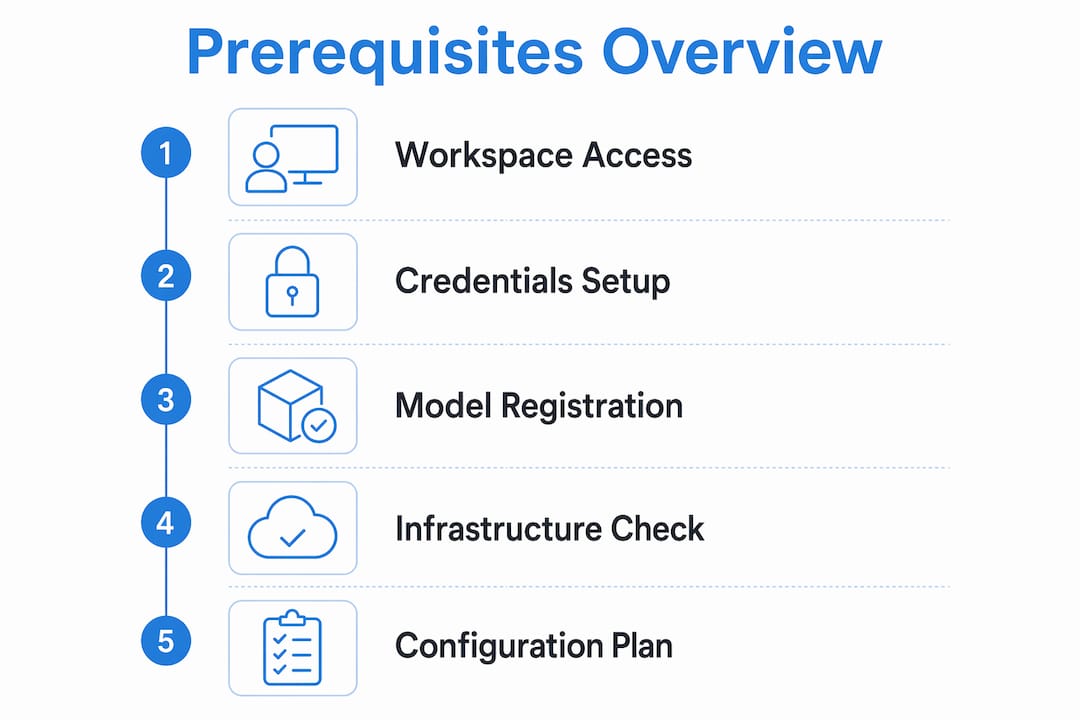
Pro Tip: Register your model in the MLflow Model Registry before creating the endpoint. Endpoints that reference unregistered or improperly versioned models fail silently during traffic routing.
How do you configure core unity AI gateway features?
Unity AI Gateway is the governance and routing layer that sits in front of your served models. Think of it as the control plane for your endpoint. It centralizes rate limiting, traffic splitting, fallback routing, usage tracking, and AI guardrails into a single configuration surface.
Step-by-step configuration process
- Enable Unity AI Gateway on the endpoint via the Databricks UI or REST API. You cannot configure gateway features on an endpoint where it is disabled.
- Set rate limits at the granularity you need. Unity AI Gateway rate limits apply at four levels: endpoint-wide, user default, custom user, and group-specific. Custom limits override user defaults. When limits conflict, the strictest one wins.
- Configure traffic splitting by assigning percentages across your served entities. Percentages must sum to exactly 100% before you enable fallback routing.
- Enable fallbacks only after traffic splitting is complete. Fallback routing is supported only on external models. Enabling fallbacks without a valid traffic split causes the fallback to never activate.
- Activate usage tracking to log requests and responses into Delta tables managed by Unity Catalog.
- Configure AI guardrails if your use case requires content filtering or PII detection at the gateway layer.
Rate limit types and their scope
Rate limits include queries per minute (QPM), input tokens per minute, and output tokens per minute. Requests exceeding token or query limits return HTTP 429, requiring clients to implement retry with exponential backoff. This is not optional. Without retry logic, a single burst from one user can cascade into application errors across your entire consumer base.
| Limit Type | Scope | Override Behavior |
|---|---|---|
| Endpoint-wide QPM | All traffic on the endpoint | Baseline cap |
| User default TPM | Per authenticated user | Overridden by custom user limit |
| Custom user limit | Named user | Overrides user default |
| Group limit | IAM group | Strictest limit applies on conflict |
Pro Tip: The Unity AI Gateway rate limiter records usage after sending the response, not before. This creates a burst-then-pause throttling pattern rather than smooth enforcement. Build your retry logic to handle short bursts above the limit followed by brief 429 windows.
Usage tracking and observability
Usage tracking logs requests and responses in Delta tables managed by Unity Catalog for observability and governance. Payload logging gives you a full audit trail of model inferences. This is the foundation for cost attribution, compliance reporting, and debugging unexpected model behavior in production. Mlflow's AI Gateway platform builds on these primitives to give you cross-provider governance from a single interface.
What production optimizations improve endpoint performance?
Getting a model to serve requests is not the same as getting it to serve requests reliably under load. Production optimization for AI serving endpoints centers on three levers: provisioned concurrency, autoscaling behavior, and external API throughput.
Provisioned concurrency
Provisioned concurrency and autoscaling govern request capacity. Exceeding limits causes queuing or HTTP 429 errors. Set a minimum concurrency value that covers your baseline traffic. If you set it too low, every traffic spike triggers a scale-up event, and scale-up takes time.
Autoscaling under traffic spikes
Autoscaling can cause queuing during sudden traffic spikes because provisioning new capacity takes time. Requests queue until capacity scales up. The practical implication: autoscaling is not a substitute for provisioned concurrency. It handles gradual growth well. It handles sudden spikes poorly without a warm baseline.
Best practices for production-grade endpoint configuration:
- Set minimum concurrency to handle your P95 baseline traffic, not your average
- Enable autoscaling with a maximum concurrency cap to control costs
- Implement client-side retry with exponential backoff for all 429 and 503 responses
- Monitor queue depth and latency percentiles, not just average response time
- Use route optimization to reduce hop count between your application and the serving endpoint
External API throughput as a latency driver
End-to-end latency depends on more than model inference speed. External API throughput and throttling often dominate total response time, requiring monitoring at the provider level, not just the endpoint level. If you are routing to OpenAI or Anthropic through an external model endpoint, your SLA is bounded by their rate limits. Factor that into your capacity planning. Mlflow's unified serving API gives you a consistent interface across providers so you can monitor and compare latency across the full routing path.
What are common troubleshooting pitfalls in endpoint deployment?
Even well-planned configurations produce unexpected behavior in production. These are the failure modes we see most often when deploying AI model serving endpoints.
Configuration update delays
Unity AI Gateway configuration updates typically apply within 20–40 seconds, but rate limiting updates can take up to 60 seconds. Do not test a rate limit change immediately after applying it. Wait at least 90 seconds before validating the new behavior. Capacity changes made during peak traffic windows can cause transient 429 errors even when the new limit is higher.
Traffic splitting and fallback misconfiguration
Traffic splitting percentages must sum to exactly 100% before fallbacks activate. This coupling trips up most teams on their first deployment. The symptom is a fallback that appears configured but never fires. Check your traffic split totals first before debugging the fallback logic itself.
External model structural constraints
External model endpoints are structurally immutable after creation regarding served entities. You cannot add external_model to an endpoint after it is created. If you discover mid-deployment that you need to switch a non-external endpoint to an external one, you must create a new endpoint. Plan your endpoint schema before provisioning.
Key constraint: External model endpoints support exactly one served entity. Attempting to add a second served entity to an external model endpoint will fail. Design your routing architecture around this limit from the start.
Rate limit conflicts from overlapping group policies
Map your IAM and group structures deliberately to rate limiting policies. Overlapping group memberships create unexpected throttling because the strictest applicable limit always wins. A user in two groups with different QPM limits will always be throttled to the lower value. Audit your group assignments before applying rate limit policies.
Pro Tip: When troubleshooting 429 errors, check whether the burst-then-pause pattern from the rate limiter is the cause before assuming you have hit a hard capacity ceiling. The limiter records usage post-response, so short bursts above the limit are expected and normal.
Key takeaways
Effective AI model serving endpoint configuration requires treating governance, performance, and reliability as equally critical concerns from the first deployment.
| Point | Details |
|---|---|
| Decide model type upfront | External model endpoints are immutable after creation; choose your schema before provisioning. |
| Rate limits resolve to strictest | Overlapping group and user limits always enforce the most restrictive applicable rule. |
| Traffic split before fallback | Percentages must total 100% before fallback routing activates on external models. |
| Provision for baseline, scale for spikes | Autoscaling handles growth but not sudden spikes; set minimum concurrency to your P95 baseline. |
| Config updates have propagation delay | Rate limit changes take up to 60 seconds to apply; avoid testing immediately after updates. |
Why configuration is risk management, not just performance tuning
I have worked through enough production AI deployments to say this clearly: most teams treat endpoint configuration as a performance problem and ignore it as a risk management problem. That framing is wrong, and it costs them.
The governance controls in Unity AI Gateway, including rate limits, usage tracking, and traffic splitting, are not optional features for mature teams. They are the controls that prevent a single misconfigured client from exhausting your token budget, exposing inference logs without an audit trail, or routing 100% of traffic to a model version that has not been validated. I have seen all three happen in production environments that had excellent model quality but poor endpoint configuration.
The advice I give every team starting a new deployment: configure your usage tracking and inference table logging before you send a single production request. You cannot retroactively audit what you did not log. Delta table payload logging through Unity Catalog gives you the observability foundation that makes every other troubleshooting conversation shorter.
On traffic splitting and fallbacks, treat gradual rollouts as the default, not the exception. Start new model versions at 10% traffic, monitor latency and error rates for 24 hours, then increment. The 20–40 second configuration propagation window means you can iterate quickly without downtime. Use that to your advantage.
The last thing I would tell any engineer configuring these endpoints: coordinate your IAM group structure with your ops team before you touch rate limit policies. The strictest-limit-wins resolution behavior is correct by design, but it produces confusing throttling behavior when group memberships are not audited. That is a people and process problem, not a technical one.
— Kevin
Take your AI endpoint governance further with Mlflow
Mlflow's AI Gateway gives you a production-grade control plane for governed, observable AI model serving. It centralizes rate limiting, usage tracking, traffic routing, and cross-provider governance into a unified interface that works across foundation models, external APIs, and custom deployments. You get the same observability primitives described in this guide, with the added benefit of Mlflow's deep tracing and LLM-as-a-Judge evaluation built directly into the serving layer. For teams moving from prototype to production, Mlflow's AI observability platform closes the gap between what your endpoint is doing and what you can actually see and act on.
FAQ
What permissions do i need to configure a serving endpoint?
You need CAN MANAGE ACLs on the Databricks workspace to create or modify model serving endpoints. Group-level rate limit policies also require your IAM structure to be defined before configuration.
How long do unity AI gateway configuration changes take to apply?
Standard configuration updates apply within 20–40 seconds. Rate limiting changes specifically can take up to 60 seconds to propagate, so wait at least 90 seconds before validating a new limit.
Can i add an external model to an existing endpoint after creation?
No. External model endpoints are structurally immutable after creation. You cannot add external_model to an endpoint that was not created as an external model endpoint from the start.
Why is my fallback routing not activating?
Fallback routing requires traffic splitting percentages to sum to exactly 100% before it activates. Fallbacks are also only supported on external model endpoints. Verify both conditions before debugging the fallback configuration itself.
How should clients handle HTTP 429 responses from serving endpoints?
Clients must implement retry logic with exponential backoff. The Unity AI Gateway rate limiter uses a burst-then-pause pattern, recording usage after the response is sent, so short bursts above the limit followed by brief 429 windows are expected behavior.