Optimizing AI Infrastructure Costs: 2026 Enterprise Guide

AI infrastructure cost optimization is the practice of aligning compute resources, model selection, and usage patterns with actual workload demand to reduce spend without degrading performance. Enterprise teams that apply four core tactics, including idle detection, spot instances, right-sizing, and baseline commitments, can achieve 50–60% cost reduction within the first 30 days. That figure is not theoretical. It reflects what teams see when they move from ad hoc provisioning to structured FinOps discipline. This guide covers the highest-impact strategies for optimizing AI infrastructure costs, the architectural decisions that underpin them, and the governance practices that keep savings compounding over time.
What are the highest-impact strategies to lower AI infrastructure spending?
The single biggest lever most teams ignore is idle GPU time. GPUs sitting unused for more than 30 minutes inflate costs significantly and deliver zero value. Implementing automatic shutdown policies for idle instances is the fastest win available to any team, regardless of cloud provider or model stack.
Beyond idle detection, four tactics deliver the most consistent returns:
- Right-sizing GPU instances: Match instance type to actual workload. A fine-tuning job that runs on an H100 when an A10G would suffice wastes money every hour it runs.
- Spot instances for training: Training workloads are bursty and fault-tolerant by design. Spot instances save 60–90% versus on-demand pricing for these jobs.
- Reserved instances and savings plans: Committing to discounted GPU pricing through convertible Reserved Instances and Savings Plans delivers 40–72% savings on your largest compute line items. The key is continuous laddering: review and adjust commitments every 30–60 days rather than making one annual purchase.
- Prompt caching and batch APIs: Prompt caching cuts input token costs by 50–95% on repetitive tasks. Batch APIs reduce costs roughly 50% for workloads that do not require real-time responses.
| Tactic | Typical savings | Best for |
|---|---|---|
| Idle GPU detection | High, variable | All teams |
| Spot instances | 60–90% | Training workloads |
| Reserved capacity | 40–72% | Steady inference |
| Prompt caching | 50–95% | Repetitive LLM calls |
| Batch API | ~50% | Non-real-time jobs |
Pro Tip: Start with idle detection and spot instances. Both require minimal architectural changes and produce visible savings within the first billing cycle.
How to architect AI infrastructure for efficient cost management
Architecture is where cost decisions become permanent. The most impactful structural choice is separating inference from training infrastructure. Separating these workloads reduces cloud spend by 35–50% because each workload type has fundamentally different resource profiles. Inference is steady-state and benefits from committed capacity discounts. Training is bursty and cost-efficient on spot instances or capacity blocks. Running both on the same provisioned cluster forces you to overprovision for the worst case.

Choosing the right GPU for each job
Not every workload needs an H100. A100s suit large-scale training and complex inference. H100s are justified for the most demanding transformer workloads. AWS Inferentia2 and Trainium chips offer strong performance per dollar for inference and training respectively on AWS. Matching chip to workload is not a minor tuning decision. It directly determines your cost floor.
Performance per watt has become a critical efficiency metric in AI compute planning. Power is a constrained resource alongside GPU cycles, and teams that ignore it pay for it in both energy and cooling costs.
Autoscaling and bin-packing
Autoscaling policies that respond to actual token throughput rather than CPU utilization prevent idle capacity from accumulating. Load bin-packing, which schedules multiple smaller inference jobs onto a single GPU, raises utilization rates and reduces the number of instances you need running at any moment.
AI gateways add another layer of control. They route simple requests to smaller, cheaper models and reserve large models for complex queries. Model routing via AI gateways can save 30–60% of system costs without blocking any workload from completing. Mlflow's AI Gateway supports this kind of dynamic routing with built-in batching and runtime governance.
| Architectural pattern | Cost benefit |
|---|---|
| Inference/training separation | 35–50% spend reduction |
| Spot instances for training | 60–90% vs. on-demand |
| GPU type matching | Reduces cost floor |
| Autoscaling on token throughput | Eliminates idle capacity |
| AI gateway model routing | 30–60% system cost savings |
Pro Tip: Deploy inference workloads on committed capacity and training workloads on spot or capacity blocks. Never mix them on the same reservation.
What governance and financial practices drive sustainable AI cost management?
Traditional cloud FinOps tools were built for fixed compute. AI costs are charged per token, not per instance, which makes standard cost allocation dashboards nearly useless for AI workloads. AI FinOps requires a different approach.
The foundation is granular attribution. Track costs at the level of feature, model, prompt, and tenant. Without that granularity, you cannot distinguish between a high-value production workload and a runaway experiment burning budget in the background. Mlflow's observability tools, including LLM tracing, give teams the per-request visibility needed to build this attribution layer.
Key governance practices for reducing AI infrastructure expenses include:
- Should-cost benchmarks: Set expected cost ranges per model call and flag deviations. Blunt cost caps suppress valuable workloads. Benchmarks let you investigate anomalies without blocking production.
- Token caps and rate limits via AI gateways: Runtime governance through AI gateways dynamically regulates usage and prevents runaway spend without requiring manual intervention.
- Shadow AI audits: Unauthorized or untracked AI usage is a hidden cost driver. Quarterly audits of API keys, third-party integrations, and developer tools surface costs that never appear in official budgets.
- FinOps KPIs and alerting: Monitor cost per inference, cost per active user, and token consumption trends. Set alerts at 80% of budget thresholds, not 100%.
Pro Tip: Assign cost ownership to individual teams or product lines, not just to infrastructure. Teams that see their own AI spend make better usage decisions.
How to implement step-by-step cost optimization in enterprise AI environments
Before making any changes, you need a clear baseline. Collect at least two weeks of GPU utilization data, model call logs, and cloud billing exports. Without this data, you are guessing at where the waste is.
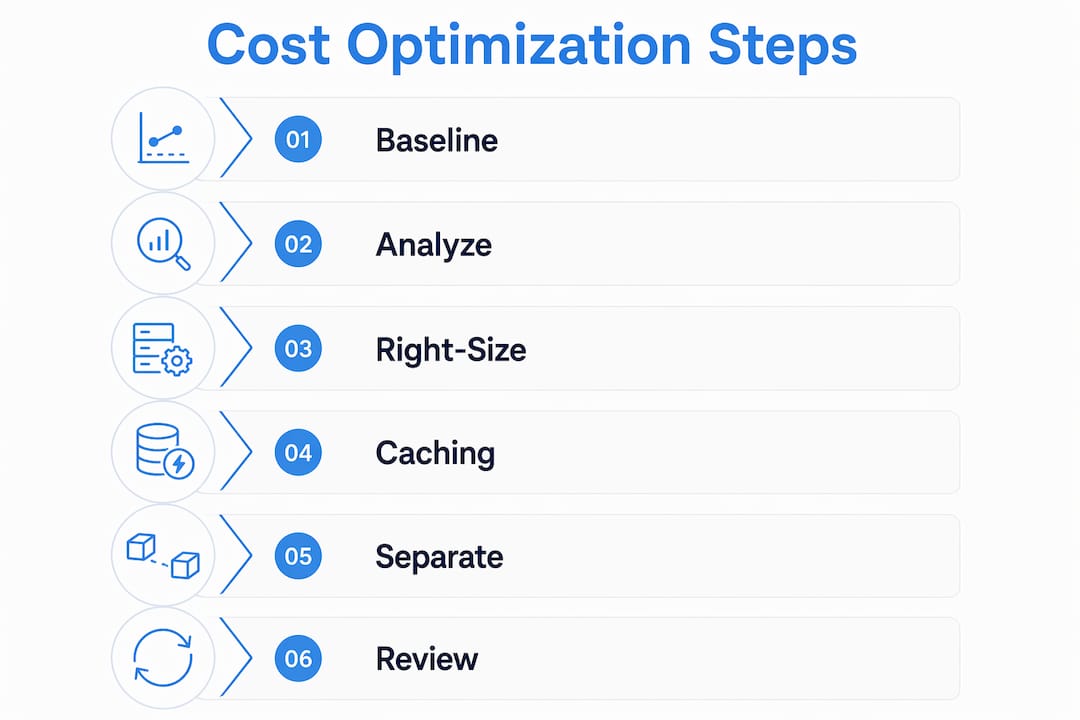
Step 1: Analyze baseline GPU and model usage patterns. Identify which instances run below 40% utilization consistently. Flag models that handle simple requests but run on large, expensive endpoints. Use AI observability tools to map token consumption by feature and team.
Step 2: Right-size and commit to discounted capacity. Replace overprovisioned instances with the smallest GPU type that meets latency requirements. Then commit to reserved capacity for your steady inference workloads. Apply dynamic laddering by reviewing commitments every 30–60 days to match actual growth.
Step 3: Deploy prompt caching and batch APIs. Audit your LLM call patterns for repeated system prompts or identical context blocks. Enable caching at the prompt registry level so repeated inputs hit the cache rather than the model. Route non-urgent workloads through batch APIs.
Step 4: Separate inference and training environments. Move training jobs to spot instances or capacity blocks. Provision a dedicated inference cluster on committed capacity. This single architectural change often produces the largest single-month cost reduction.
Step 5: Govern usage with AI gateways and FinOps reporting. Deploy an AI gateway to enforce token limits, route by model tier, and log every request with cost metadata. Build a weekly FinOps report that shows cost per model, cost per team, and trend lines. Review it with both engineering and finance.
Common mistakes to avoid:
- Overprovisioning "just in case" without a defined review cycle
- Delaying commitment adjustments when usage patterns shift
- Ignoring idle GPUs because they represent a small percentage of instances
- Applying static cost caps that block high-value production workloads
Pro Tip: The IT inefficiency costs from untracked AI usage compound quickly. Run a shadow AI audit in your first week before committing to any optimization plan.
Key Takeaways
Effective AI infrastructure budget optimization requires combining architectural separation, commitment management, prompt-level caching, and granular FinOps attribution into a single continuous practice.
| Point | Details |
|---|---|
| Idle GPU detection | Shut down instances idle for over 30 minutes to eliminate the fastest source of waste. |
| Separate inference and training | Architectural separation alone can cut cloud spend by 35–50% through better workload alignment. |
| Commit with dynamic laddering | Review reserved capacity every 30–60 days to maintain 40–72% discounts without overcommitting. |
| Use prompt caching and batch APIs | Caching repetitive inputs cuts token costs by up to 95%; batch APIs cut non-real-time costs by 50%. |
| Govern with AI-specific FinOps | Track costs per model, prompt, and tenant to find hidden waste without blocking valuable workloads. |
Where most teams get AI cost optimization wrong
The teams I see struggle most with AI cost management are not the ones lacking tools. They are the ones applying traditional IT cost-cutting logic to a fundamentally different cost structure. Cloud compute costs are mostly fixed per instance. AI costs are stochastic and per-token. That distinction changes everything about how you govern and forecast spend.
The instinct to set hard cost caps feels responsible. In practice, it suppresses the exact workloads that justify the AI investment in the first place. A production recommendation engine that drives revenue should never hit the same token limit as a developer's experimental notebook. Runtime governance through an AI gateway solves this. It lets you set differentiated limits by workload type, team, and priority tier rather than applying one blunt rule across the board.
The other blind spot I see consistently is delayed commitment management. Teams commit to reserved capacity once a year during budget season and then watch their utilization drift. Dynamic laddering, reviewing and adjusting commitments every 30–60 days, is the practice that keeps savings compounding as your workloads evolve. It requires discipline, but the 40–72% savings on compute are worth building the process around.
My honest advice: treat AI cost optimization as a continuous engineering practice, not a one-time project. The teams that build weekly FinOps reviews into their sprint cycles outperform the ones that run quarterly audits by a wide margin.
— Kevin
Mlflow gives enterprise teams the visibility to act on AI costs
Enterprise teams need more than billing dashboards to control AI spend. They need per-request tracing, prompt-level attribution, and gateway-enforced governance working together in one place.
Mlflow's AI platform connects these capabilities directly. The AI Gateway enforces token caps, routes requests by model tier, and logs cost metadata for every call. Prompt optimization tools maximize cache hit rates on repetitive inputs. And AI observability surfaces the per-model, per-team cost breakdowns that FinOps reporting requires. For enterprise teams building the infrastructure to sustain cost-effective AI operations at scale, Mlflow provides the production-grade foundation to make it work.
FAQ
What is the fastest way to cut AI infrastructure costs?
Idle GPU detection and automatic shutdown after 30 minutes of inactivity delivers the fastest savings with the least architectural change. Combined with spot instances for training workloads, these two tactics alone can reduce costs by 50–60% within 30 days.
How much can prompt caching save on LLM costs?
Prompt caching reduces input token costs by 50–95% on repetitive tasks. Batch APIs add another 50% reduction for workloads that do not require real-time responses.
What is AI FinOps and how does it differ from traditional cloud FinOps?
AI FinOps tracks costs at the level of individual tokens, prompts, models, and tenants rather than per instance. Traditional cloud FinOps tools were built for fixed compute and cannot attribute the variable, per-token cost structure of AI workloads accurately.
How often should enterprise teams review reserved capacity commitments?
Teams should review and adjust reserved capacity commitments every 30–60 days. This dynamic laddering approach maintains 40–72% compute discounts while avoiding overcommitment as workload patterns change.
Why should inference and training infrastructure be separated?
Inference workloads are steady-state and suited to committed capacity discounts. Training workloads are bursty and cost-efficient on spot instances. Running both on the same provisioned cluster forces overprovisioning and eliminates the savings available from matching each workload to its optimal pricing model.