Blue-Green AI Deployment: A Production Engineer's Guide

What is blue-green AI deployment?
Blue-green deployment maintains two identical, fully provisioned production environments: blue (currently live) and green (idle, staging the next version). When a new model is ready, you deploy it to green, validate it against production-grade traffic patterns, then atomically switch 100% of requests from blue to green at the load balancer. Blue stays warm. If anything breaks, one routing change reverts everything in seconds.
For traditional software, this is a solid release pattern. For AI and LLM applications, it's close to mandatory. Model updates can degrade output quality in ways that throw zero errors and barely move latency. Unit tests won't catch a prompt template that produces subtly worse reasoning. Only a production-identical environment with real inference workloads will.
Core components of a blue-green AI deployment:
- Two identical environments: Same hardware class, same GPU configuration, same serving stack, same feature pipelines
- Atomic traffic switch: Load balancer, DNS swap, or service mesh routes 100% of traffic in a single step
- Validation engine: Health checks, latency benchmarks, and prediction distribution comparisons run against green before cut-over
- Baking period: Both environments stay live post-switch while monitoring watches for anomalies (typically 30 minutes to 4 hours)
- Rollback controller: Automatically reverts to blue on alarm, completing the switch in seconds
Why blue-green deployment is critical for AI and LLM production
Non-deterministic AI model behavior is the core problem. A new LLM version or updated prompt template might produce responses that are less accurate, more verbose, or missing critical context without triggering a single 5xx error. Silent quality regressions are the failure mode that traditional deployment strategies simply cannot catch.
Blue-green gives you a production-identical environment to validate against before any user sees the new model. You're not testing in staging with synthetic traffic. You're running real inference workloads, measuring actual output distributions, and comparing them to the blue baseline.
Specific AI deployment challenges that blue-green directly addresses:
- Long model loading times: Rolling restarts are impractical when a GPU-backed model takes minutes to warm up. Green pre-loads and warms before the switch.
- Silent quality regressions: Output distribution comparisons catch degradation that latency and error-rate metrics miss entirely.
- Compliance and audit requirements: Revenue-critical systems (fraud detection, pricing models) need a documented, reversible deployment path.
- Cold-start latency spikes: Green runs dummy inference to prime GPU caches before receiving production traffic.
- Rollback speed: Redeployment under incident pressure takes too long. Blue stays warm so rollback is a single routing change.
How to implement blue-green deployment in modern AI infrastructure
The architecture has five subsystems working in sequence. Understanding each one is what separates a reliable blue-green setup from a fragile one.
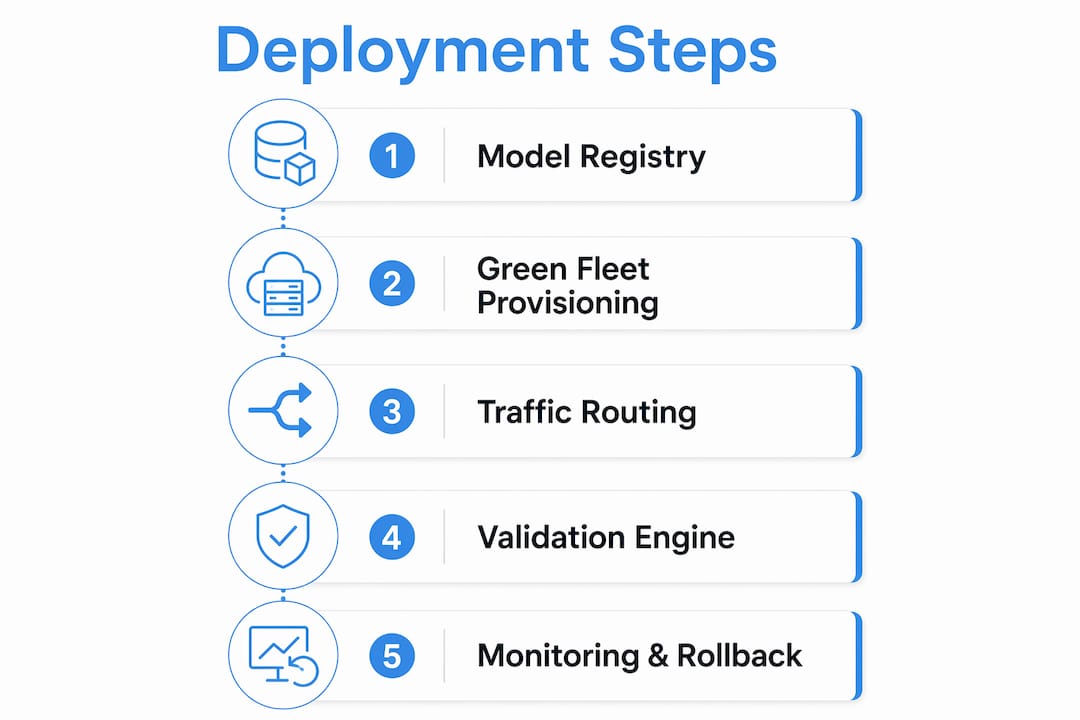
Environment manager provisions the green fleet from a validated model artifact in the model registry. It handles GPU allocation, container orchestration via Kubernetes, and model warm-up before any validation begins.
Traffic router controls the binary switch. In pure blue-green, this is 0% or 100%, implemented via Kubernetes Service selectors, AWS ALB target group weights, DNS CNAME swaps, or Istio virtual service routing rules.

Validation engine runs the pre-switch battery: health checks, latency benchmarks, prediction score distribution comparisons, and optional shadow traffic tests against the green environment.
Monitoring stack observes both environments during the baking period, tracking operational metrics (latency, error rate, throughput) alongside ML-specific signals (prediction score distributions, feature drift, null prediction rate).
Rollback controller listens to monitoring alarms and flips traffic back to blue within seconds if any threshold is breached.
Amazon SageMaker automates this entire flow: it provisions the green fleet, manages traffic shifting modes (all-at-once, canary, or linear), monitors via CloudWatch alarms during the baking period, and triggers auto-rollback if any alarm fires. Mlflow integrates at the validation and observability layers, providing LLM-as-a-Judge evaluation and deep tracing of agentic reasoning to power the validation engine and monitoring stack.
Pro Tip: Define your exit criteria before you provision green, not after. Document the specific thresholds for accuracy, latency p99, and error rate that green must hit. Without documented criteria, teams delay cut-over indefinitely, which defeats the speed advantage of the entire pattern.
How blue-green and canary deployments work better together
Blue-green and canary are complementary, not competing. Blue-green is a binary toggle: 100% blue or 100% green. Canary is a dimmer: 5%, then 25%, then 100%, with observation at each step. Each strategy covers a blind spot the other has.
Canary lets you expose a small fraction of users to the new model and observe quality metrics before full commitment. Blue-green gives you an instant, atomic rollback path once you do commit. Used together, they provide the highest risk mitigation available for production AI systems.
A common pattern experienced AI teams use: run canary to shift traffic gradually from no traffic to full traffic over a moderate period while watching output quality metrics, then retain the previous environment in blue-green standby for a defined period after full cut-over. The canary phase catches regressions early. The blue-green standby handles anything that only surfaces at full production load.
Benefits of combining both strategies:
- Gradual exposure limits the blast radius of a bad model update during canary phase
- Full atomic switch eliminates inconsistent user experiences from serving two model versions simultaneously
- Blue-green standby provides a fast recovery path for issues that emerge hours after full cut-over
- The combined workflow maps cleanly onto CI/CD pipeline stages with clear promotion gates between each phase
Best practices and common pitfalls in blue-green AI deployment
The pattern works. The pitfalls are predictable, and most teams hit the same ones.
Best practices:
- Maintain genuinely identical environments. GPU type, driver version, serving framework version, and feature pipeline configuration must match exactly. Environment drift between blue and green is the most common source of "works in green, fails in blue" incidents.
- Define exit criteria based on domain-specific metrics, not just generic infrastructure signals. For an LLM application, that means output quality scores from automated evaluation, not just p99 latency.
- Use Mlflow's AI production observability to instrument both environments during the baking period. Tracing agentic reasoning steps gives you visibility into failure modes that aggregate metrics obscure.
- Set a hard time limit on the baking period. Typical baking periods range from 30 minutes to 4 hours. Open-ended baking periods are a symptom of undefined exit criteria.
Common pitfalls:
- Infrastructure cost doubling: Maintaining two full GPU environments simultaneously is expensive. For resource-heavy AI clusters, this cost is non-trivial. Budget for it explicitly or use spot/preemptible instances for the idle environment where latency requirements allow.
- State drift during rollback: The load balancer switch is atomic, but your database is not. If green wrote data in a schema the blue model doesn't understand, rollback creates consistency problems. Common mitigations include read-only mode before cut-over, dual-writing during the baking period, or backward-compatible schema changes deployed separately.
- Indefinite baking periods: Without documented exit criteria, teams leave both environments running indefinitely, doubling costs and creating operational confusion about which environment is authoritative.
Pro Tip: For stateful LLM applications with user session context, implement session affinity at the load balancer during the baking period. This prevents a user from getting responses from green on one request and blue on the next, which produces incoherent conversation history.
Real-world examples of blue-green AI deployment
Production AI teams across the US market apply blue-green deployment to revenue-critical and safety-critical systems where the cost of a bad model update exceeds the cost of redundant infrastructure.
Fraud detection systems are the clearest case. A model update that silently degrades precision by a few percentage points translates directly to financial loss. Blue-green gives fraud teams the ability to validate the new model against live transaction patterns in green, compare prediction score distributions to the blue baseline, and roll back in seconds if the distribution shifts in a way that suggests the model is missing fraud signals.
Recommendation ranking systems at scale face a similar problem. A new ranking model might produce recommendations that are subtly less relevant without generating any errors. Running the new model in green with shadow traffic, comparing click-through rate distributions, and only switching after the green model matches or exceeds blue performance is the standard pattern. Mlflow's quality control frameworks support this validation workflow directly.
Pricing models at ride-sharing and e-commerce platforms use blue-green for compliance as much as reliability. Regulators and internal audit teams require a documented, reversible deployment path. Blue-green provides both: a clear record of when each model version went live and an instant rollback path if a pricing anomaly is detected post-switch.
Integrating blue-green deployment into AI CI/CD pipelines
Blue-green deployment sits at the end of the ML pipeline, after training, evaluation, and model registry registration. Integrating it into a CI/CD pipeline means treating the green environment provisioning, validation, and traffic switch as pipeline stages with explicit promotion gates.
A production-grade AI CI/CD pipeline with blue-green integration looks like this: model training and offline evaluation complete first, then the artifact is registered in the model registry with passing offline metrics. The pipeline then triggers green environment provisioning automatically, runs the validation engine battery (health checks, latency benchmarks, output distribution comparisons), and waits for all exit criteria to pass before promoting to the traffic switch stage.
Mlflow's lifecycle management capabilities connect the model registry to the serving layer, tracking artifact versions, evaluation results, and deployment status in a single platform. This gives your CI/CD pipeline a reliable source of truth for which model version is live, what its validation results were, and what the rollback target is. Tools like AWS CodeDeploy and Kubernetes with ArgoCD handle the infrastructure automation; Mlflow handles the model-specific evaluation and observability that generic CI/CD tools don't provide out of the box.
Key Takeaways
Blue-green AI deployment is the most reliable path from a validated model artifact to production, because it keeps the previous environment live and ready for instant rollback at every stage of the cut-over.
| Point | Details |
|---|---|
| Two environments, one switch | Blue stays live while green is validated; traffic switches atomically, with no gradual rollout and no downtime. |
| Silent regressions require production validation | Unit tests cannot predict LLM output variations; the green environment must run real inference before cut-over. |
| Exit criteria prevent indefinite baking | Document accuracy, latency, and error-rate thresholds before provisioning green, or deployments stall. Typical baking periods range from 30 minutes to 4 hours. |
| Canary plus blue-green covers both failure modes | Canary limits blast radius during gradual rollout; blue-green standby handles failures that emerge after full cut-over. |
| Infrastructure cost doubles during deployment | GPU-backed AI clusters make this cost significant; budget explicitly or use preemptible instances for the idle environment. |