When to Containerize AI Agent Workloads (and How to Start)
Containerize agent workloads the moment they move to networked, multi-user, or production settings. If your agent is still a notebook experiment running on your laptop, skip the overhead. Once it serves real requests, talks to other services, or needs to scale, package it.
Your first move is straightforward: build an OCI image with a working health endpoint, push it to an approved registry, and generate an SBOM (or AI-BOM, for models and prompt assets). That single step unlocks everything else, versioning, rollback, reproducible deploys.
Before that image goes anywhere near production, confirm:
- GPU support is configured correctly for your host driver version
- The image is signed with provenance attestation attached
- Observability hooks (OpenTelemetry traces, MLflow run logging) are wired in from the start
- The container runs with minimal permissions, non-root, no unnecessary syscalls
We'll walk through each of these in detail, but that checklist is the difference between an agent that behaves in staging and one that surprises you at 2 a.m. in production.
Key Takeaways
Containerizing AI agent workloads succeeds when teams pair standard OCI build and CI/CD discipline with agent-specific controls for GPU scheduling, short-lived credentials, and reasoning-level observability.
| Point | Details |
|---|---|
| Containerize at the production threshold | Move to OCI containers once an agent serves networked, multi-user, or production traffic. |
| Build signed, SBOM-backed images | Generate an SBOM/AI-BOM and sign every image before it reaches an approved registry. |
| Match GPU runtime to host drivers | Align CUDA versions and use the NVIDIA Container Toolkit to avoid runtime mismatches. |
| Issue action-scoped credentials | Replace permanent service accounts with short-lived tokens mapped to each agent action. |
| Trace reasoning end to end | Use OpenTelemetry and MLflow together to link distributed traces to run artifacts and evaluation scores. |
Table of Contents
- Packaging an AI Agent as an OCI Container
- GPU Support and Image Optimization for Agent Workloads
- How Should You Orchestrate and Scale Many Agents?
- Securing Agents With Sandboxing and Short-Lived Credentials
- Building Supply Chain Governance Into Your CI/CD Pipeline
- How Do You Trace and Evaluate Agent Reasoning in Production?
- A Concrete BYOC Deployment Sequence
- What Actually Trips Teams Up in Production
- How MLflow Fits Into Your Containerized Agent Stack
- Frequently Asked Questions
- Sources
Packaging an AI Agent as an OCI Container
An agent is not a script, it's a runtime with dependencies, model weights, and often a persistent connection to external tools. Treating it like a container image from day one means you inherit decades of software engineering discipline instead of reinventing deployment from scratch. Red Hat's guidance on containerizing AI workloads makes this point directly: package models, MCP servers, and agents as standard OCI containers so you can reuse existing CI/CD, registries, and supply chain security rather than building custom tooling.
Here's a practical build sequence:
- Use multi-stage Dockerfiles. Separate your build stage (compilers, dev dependencies, model conversion tools) from your runtime stage. The final image should carry only what's needed to execute, nothing else.
- Handle model artifacts deliberately. Bake small models directly into the image layer. For large ones, mount them as external volumes or lazy-fetch them at startup, baking multi-gigabyte weights into every image bloats your registry and slows every deploy.
- Add explicit
/healthand/readyroutes with structured JSON logging so orchestrators and observability tools can actually tell what's happening inside. - Run as a non-root user, set memory and CPU limits, and include a lightweight entrypoint script that handles SIGTERM gracefully so in-flight agent actions don't get killed mid-execution.
- Generate your SBOM during the build, not after, and sign the image before it ever touches a registry.
Pro Tip: Keep a dedicated "model layer" separate from your application code layer in the Dockerfile. When you update the agent logic but not the model, Docker's layer caching means you rebuild in seconds instead of minutes.
GPU Support and Image Optimization for Agent Workloads
CUDA version mismatches are the number one cause of "it works locally, fails in the cluster" reports. Match your base image's CUDA toolkit version to the host driver exactly, and test on identical driver/runtime combinations before promoting anything to production.
For Kubernetes environments, run the NVIDIA Container Toolkit or an equivalent runtime, and expose GPUs to pods through the device plugin rather than hand-rolling access.
A few things worth knowing before you commit to a GPU strategy:
- MIG (Multi-Instance GPU) partitioning works well for serving many small models concurrently, but it can fragment memory and hurt throughput for large models that need contiguous GPU memory.
- Warm pools and preloaded model weights cut cold-start latency dramatically compared to loading weights fresh on every pod start.
- Autoscale on GPU utilization, not CPU. CPU metrics tell you almost nothing about whether your inference pods are saturated.
Misconfigured GPU scheduling can double job completion time or leave expensive accelerators sitting idle, according to Mirantis's workload management research. Benchmark your fractional GPU strategy against your actual model sizes before locking it in.
How Should You Orchestrate and Scale Many Agents?
Kubernetes has become the default control plane for AI workloads because it already solves the hard problems: scheduling, portability, and reproducibility across environments. The pattern that works in practice looks like this:
- Separate node pools by resource profile. GPU nodes, CPU-heavy nodes, and memory-optimized nodes each get their own pool, labeled for topology-aware scheduling so the scheduler places pods intelligently instead of guessing.
- Use gang scheduling for distributed jobs. If an agent workflow spins up multiple cooperating pods that all need to start together, a batch operator or gang scheduler prevents partial starts that waste GPU time.
- Route asynchronous agent tasks through a queue. Not every agent action needs a live HTTP response. Queue-driven architectures decouple request intake from execution, which matters enormously when agent tasks have unpredictable duration.
- Autoscale on the signal that actually reflects load. Queue backlog depth, GPU utilization, and request latency are far better autoscaling triggers than raw CPU usage. Combine a standard Horizontal Pod Autoscaler with a custom queue-based scaler for the best of both.
- Segregate latency-sensitive inference from background agents. Put them in separate namespaces with separate resource quotas. A background summarization agent should never be able to starve your real-time customer-facing agent of GPU capacity.
- Rehearse your rollback before you need it. Canary deploys, blue/green cutovers, and versioned image tags all work, but only if you've actually tested the rollback path, not just the forward deploy.
Open-source schedulers and GPU operators, like those cataloged in IBM's genai-workload-manager project, can add fair queuing and GPU sharing on top of vanilla Kubernetes when your cluster hosts many competing agent workloads. Vanilla K8s scheduling assumes fairly homogeneous jobs; agent workloads rarely are.
Securing Agents With Sandboxing and Short-Lived Credentials
Agents are different from typical services in one critical way: they take autonomous action. That means the security model has to assume an agent might do something you didn't explicitly script, and design for containment rather than trust.
- Sandbox the container itself. Run as non-root, apply a seccomp profile to restrict syscalls, and lock down the filesystem to read-only where the agent doesn't need to write.
- Issue short-lived, action-scoped tokens, not long-lived service account keys. Each agent action gets its own credential, scoped to exactly what that action needs.
- Enforce network egress allowlists and apply Kubernetes NetworkPolicies alongside strict RBAC on every service account tied to an agent.
- Build in guardrails: require human approval for sensitive actions, rate-limit tool calls, and keep a runtime kill switch within reach.
- Send every action log and trace ID to centralized observability so a postmortem doesn't start with "we don't actually know what it did."
Teleport's research on agentic AI security makes the case bluntly: agent workloads change infrastructure state autonomously, so permanent high-privilege service accounts create a blast radius no team should accept. Short-lived, auditable credentials mapped to specific agent actions are the alternative.
Pro Tip: Map every issued token back to a trace ID at the moment of issuance. When an agent does something unexpected, you want to trace the exact credential, action, and reasoning step in one query, not three separate log systems.
Building Supply Chain Governance Into Your CI/CD Pipeline
A signed, policy-gated image doesn't happen by accident, it's a pipeline design choice. Your CI process should output a signed image, a full SBOM, and provenance metadata as standard build artifacts, not optional extras bolted on later.
- Run automated vulnerability scans and model/prompt-safety tests as pipeline gates, not manual checklist items.
- Use admission controllers in Kubernetes to reject any image that lacks a valid signature or attestation.
- Manage BYOC deployments through GitOps and infrastructure-as-code tools like Terraform, and keep build privileges separate from deploy privileges.
- Restrict production clusters to pull only from approved internal registries.
- Build rollback artifacts and smoke tests into the pipeline itself so a bad deploy has a tested exit path.
Red Hat's guidance on supply chain rigor treats agents as standard software artifacts precisely so teams can reuse this infrastructure instead of inventing parallel governance for AI.
How Do You Trace and Evaluate Agent Reasoning in Production?
Debugging an agent that misbehaved three hops into a multi-step reasoning chain is nearly impossible without structured tracing. Instrument every agent run with OpenTelemetry traces, and link each trace to an MLflow run ID so the distributed trace and the model-level record point to the same event.
Record prompts, model outputs, tool calls, and evaluation artifacts inside MLflow. That gives you both an audit trail and a baseline for catching regressions when you update a prompt or swap a model. Automated evaluation with LLM-as-a-judge frameworks, stored as MLflow evaluation artifacts, turns "does this still work" from a manual spot check into a repeatable test.
The core challenge with agentic systems isn't running them, it's knowing what they actually did. Correlating LLM outputs, tool calls, and each decision step into a single trace, with OpenTelemetry carrying the distributed trace and MLflow capturing the run artifacts and evaluations, is what turns a black box into something you can debug.
- Agent request comes in → OpenTelemetry captures the distributed trace → MLflow logs the run, artifacts, and evaluation score, all linked by ID.
The MLflow AI Gateway adds prompt version control and cost governance across model providers on top of that observability layer, so a team debugging behavior and a team watching the budget are looking at the same data.
A Concrete BYOC Deployment Sequence
Here's a sequence you can follow end to end, modeled closely on Google's Agent Runtime codelab:
- Wrap the agent in a small FastAPI app exposing
/health,/ready, and, if needed, a streaming response endpoint. - Write a two-stage Dockerfile: a builder stage that installs dependencies and serializes the model, and a slim runtime stage running as a non-root user.
- Build and push through CI: the pipeline builds the image, generates an SBOM, signs it, and pushes to your artifact registry.
- Deploy via BYOC, referencing the image URI from your runtime platform or Kubernetes manifests, with permissions and infrastructure defined in Terraform or an SDK for reproducibility.
- Run post-deploy checks: smoke test the endpoints, confirm OpenTelemetry traces and MLflow logs are flowing, and verify autoscaling quotas match expected load.
What Actually Trips Teams Up in Production
Most teams treat their first agent deployment as a one-off experiment, then panic when it needs a hotfix six weeks later with no CI/CD in place. Apply your pipeline discipline from day one. Identity and observability are cheap early and expensive to retrofit. Start sandboxed, then expand governance as the agent earns more responsibility, not before.
How MLflow Fits Into Your Containerized Agent Stack
Once your agents are containerized, signed, and running in production, the harder problem becomes knowing what they're actually doing at scale, and that's where MLflow's agent and LLM engineering tools come in.
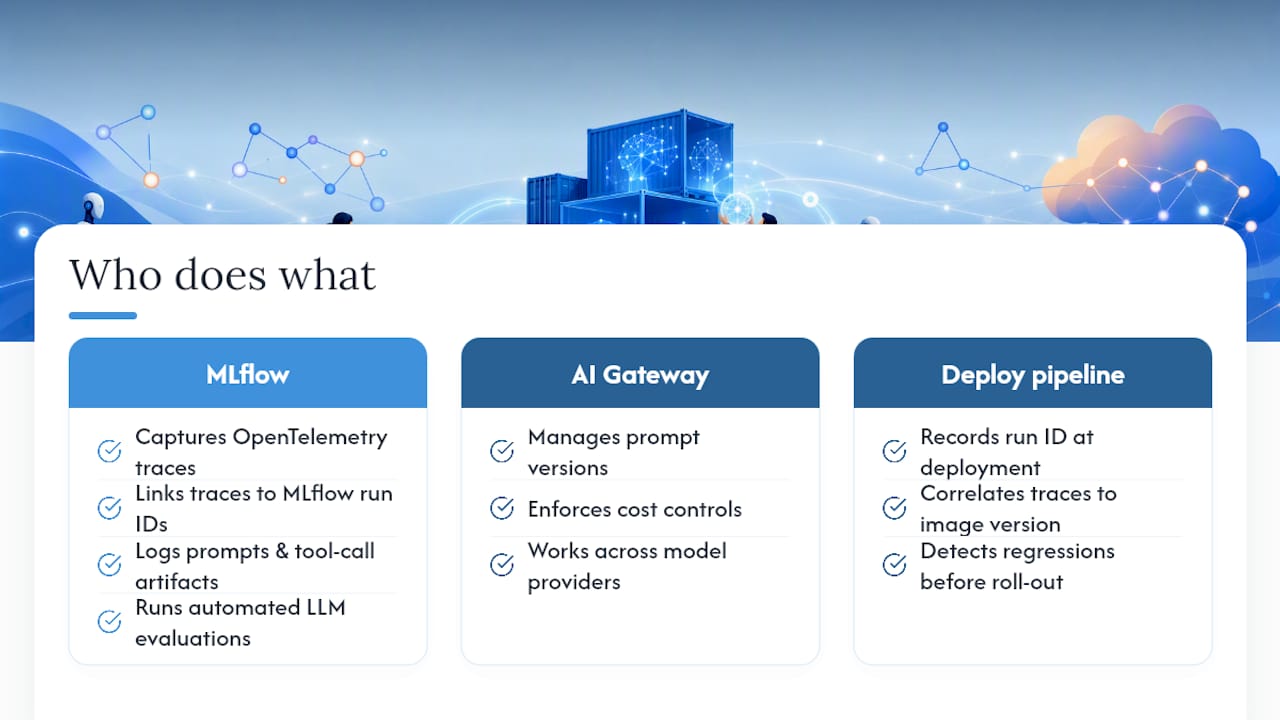
MLflow captures the observability layer this article has been building toward: OpenTelemetry traces linked to MLflow run IDs, prompts and tool calls logged as artifacts, and automated LLM-as-a-judge evaluation running against every version you ship. In a BYOC flow, that means your deploy pipeline can record a run ID at the moment of deployment, then correlate every trace back to that specific image version, letting you catch a regression before it reaches every user. The MLflow AI observability tools handle the tracing and evaluation side, while the AI Gateway manages prompt versions and cost controls across whichever model providers your agents call. If your team is past the "does it run" stage and into "can we trust what it's doing," start with the MLflow AI platform overview to see how the pieces connect to your existing container pipeline.
Frequently Asked Questions
Do I need to containerize an AI agent that only runs locally for testing? No. Containerization pays off once the agent moves into networked, multi-user, or production environments where reproducibility and governance matter. Local experiments can stay uncontainerized until you're ready to deploy.
What's the difference between containerizing a regular app and containerizing AI agent workloads? Agent workloads add GPU dependency management, large model artifacts, autonomous tool-calling behavior, and a need for reasoning-level tracing, none of which a typical web service has to handle.
Is Kubernetes required for container orchestration for AI agents? It's the dominant control plane for good reason: it handles GPU scheduling, autoscaling, and node pool separation natively. Smaller deployments can run on simpler orchestrators, but most production agent fleets end up on Kubernetes.
How does MLflow help with deploying AI agents specifically? MLflow logs agent runs, prompts, tool calls, and evaluation results as linked artifacts, and connects to OpenTelemetry traces so you can debug a specific reasoning chain instead of guessing from raw logs.
Sources
- Using containers to bring software engineering rigor to AI workloads
- Deploy containerized agent to Agent Runtime (codelab)
- AI Workload Management and Best Practices | Mirantis
- Kubernetes for agentic AI (Teleport blog)