Can Jev replace your LLM judge? Part 2: Testing harder answers


In Part 1, we compared Jev with GPT, Claude, and DeepSeek as judges for MLflow QA answers. Jev matched all 30 human labels, with the lowest measured latency and estimated cost in that test. We wanted to see whether it would still catch errors in answers that were almost right.
Recap: What is Jev?
Jev is TypeSafe's model for structured decisions. Given a question, relevant documentation, and a candidate answer, it returns the probability that the answer is correct, without a written explanation. In Part 1, we used that probability to turn each decision into a pass or fail.
Challenging Jev with a harder test set
We built 12 questions, each with one correct answer and two subtly incorrect ones, in both English and Japanese (72 answers total). Some answers named the right API but explained it incorrectly.
We compared typesafe/jev-1.13 with gpt-oss-120b using the same criterion: was each answer factually and technically correct given a documentation excerpt? For Jev, a probability of at least 0.5 counted as “correct.” The incorrect answers included wrong API names, reversed source and target roles, missing permissions, and correct statements followed by a false qualification. For three questions, we also paraphrased the correct answers to see whether different wording would cause a rejection.
Result
We ran the full dataset twice. Jev agreed with human labels on 64/72 answers in each run. GPT-OSS-120B agreed on all 72.
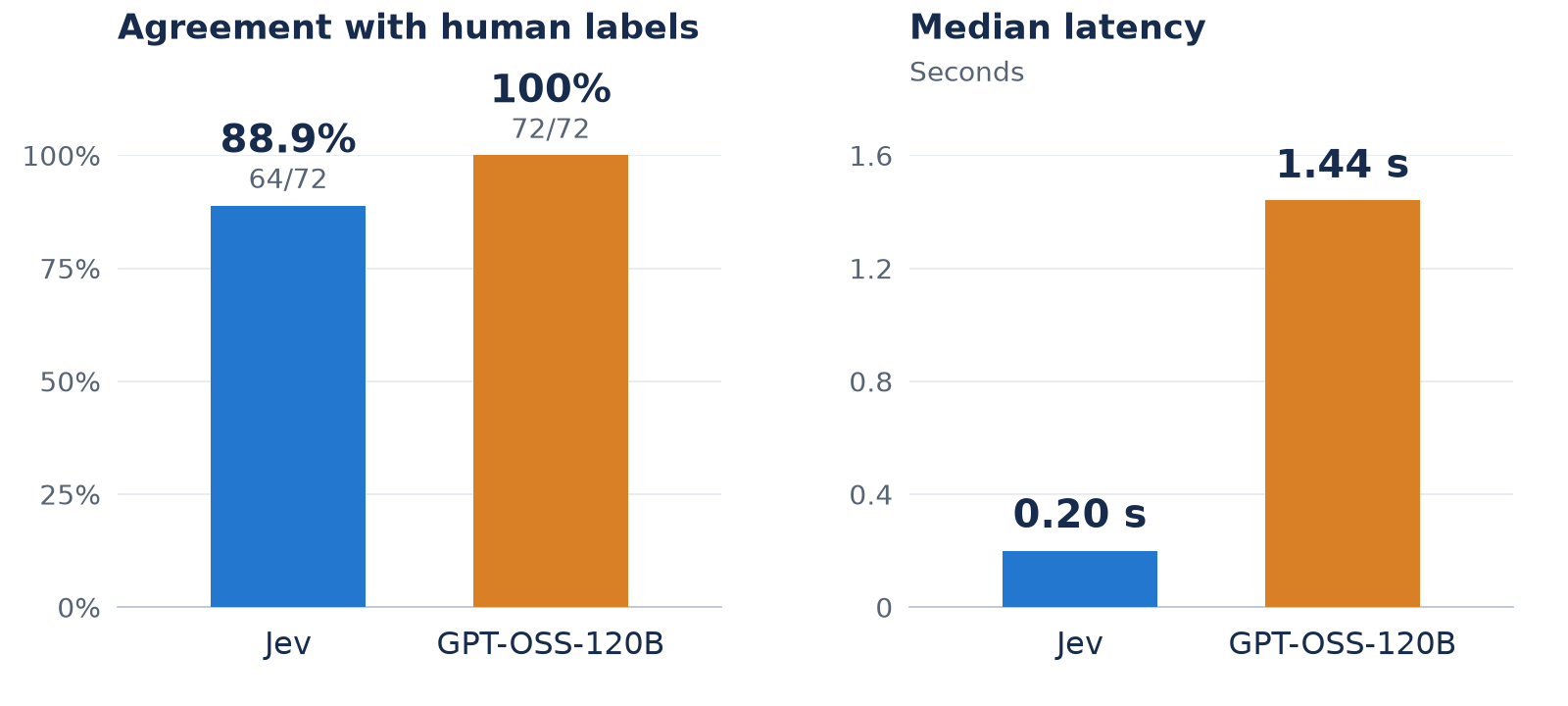
Jev scored 32/36 in each language in both runs. It accepted every correct answer, including the paraphrases, and caught errors such as a wrong retention period or a reversed yes/no conclusion. Its mistakes were almost correct answers with one material error. Here are three incorrect answers Jev accepted, quoted from the English test set:
A correct clause with its meaning reversed
Use
WHEN NOT MATCHED THEN INSERT. It applies to target rows that have no matching row in the source.
The clause is right, but the explanation reverses the roles. It inserts source rows that have no match in the target.
A missing permission
CREATE SECRETandUSE SCHEMAonmain.defaultare enough.
For a user who does not own the schema, this omits the required USE CATALOG permission.
A correct explanation followed by a wrong command
Question: Does a DELETE on a table with deletion vectors immediately rewrite the Parquet files?
No. The rows are physically removed later when you run
VACUUM ... APPLY (PURGE).
The “No” is correct, but the command is wrong. According to the documentation excerpt, rows are physically removed when files are rewritten, for example by OPTIMIZE or REORG TABLE ... APPLY (PURGE).
Speed and cost
Jev's median latency was 0.20 seconds, compared with 1.44 seconds for GPT-OSS-120B: about seven times faster in this setup.
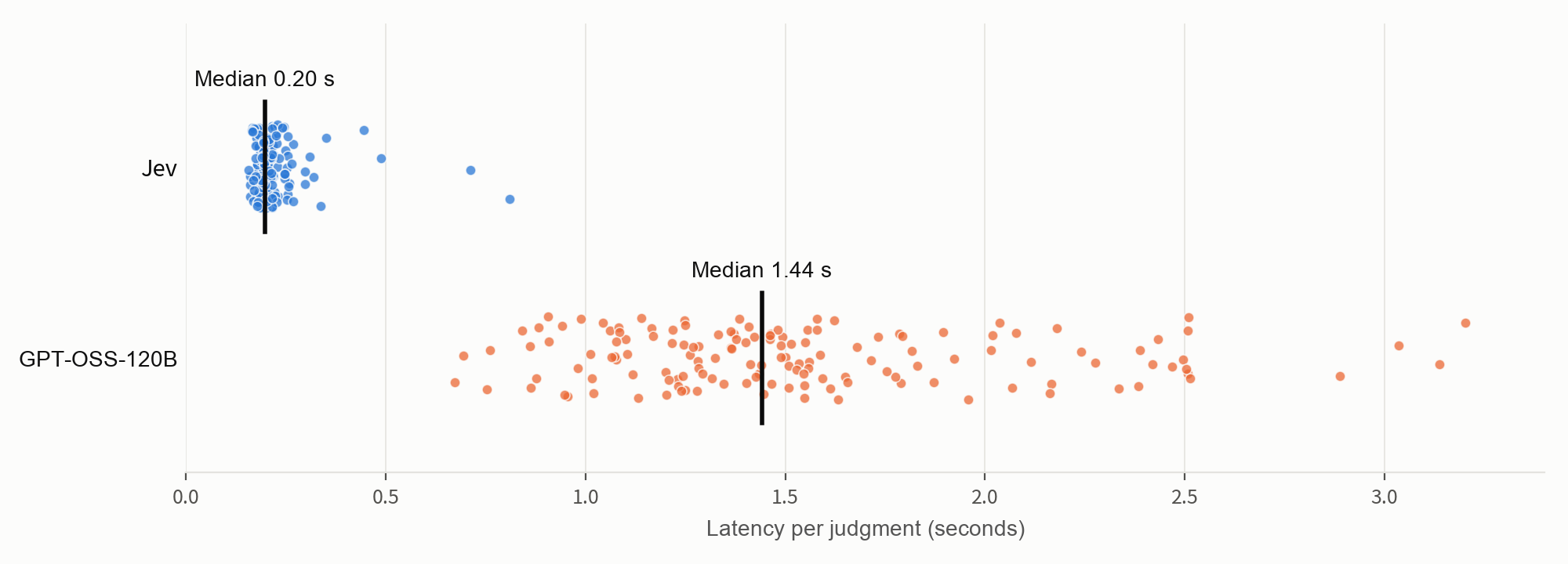
Two runs, with 144 measurements per judge. Black lines mark the medians. Labels translated from the original chart.
Jev's estimated inference cost was about $0.020 per 1,000 judgments, excluding credit-purchase fees. GPT-OSS produced an average of 224 output tokens per judgment, including reasoning.
Send uncertain judgments to another model
Jev missed some harder answers, but its speed and cost are still appealing. Could its probabilities tell us which judgments need a second check?
In the two benchmark runs, every false acceptance had a probability of roughly 0.5–0.8, while every correct answer scored at least 0.91. We calculated what would have happened if judgments in the 0.2–0.8 range had been sent to GPT-OSS for a second opinion. Fewer than 20% of judgments would have needed that second check, and the combined verdicts would have matched all human labels in this dataset.
| Run | Judgments sent to GPT-OSS | Agreement after routing |
|---|---|---|
| 1 | 12/72 | 72/72 (100%) |
| 2 | 13/72 | 72/72 (100%) |
This range was chosen after looking at the same data, so treat it as a starting point rather than a rule. In repeated calls on the same inputs, one false acceptance scored 0.82 and would have fallen outside the range.
A similar approach is discussed in JEV-as-a-Judge: Accept When Confident, Escalate When Unsure.
Run Jev with make_judge
MLflow 3.17.0 supports Jev in built-in scorers and custom judges through the typesafe:/ model URI. See the TypeSafe judge guide for Boolean and finite-category assessments. The release also adds TypeSafe SDK tracing with mlflow.typesafe.autolog() and Jev endpoints in AI Gateway.
Install MLflow 3.17.0 or later and set TYPESAFE_API_KEY in your environment:
pip install "mlflow>=3.17.0"
export TYPESAFE_API_KEY="your-typesafe-api-key"
Then define the same correctness check as a Boolean judge:
import mlflow
from mlflow.genai.judges import make_judge

jev_correctness = make_judge(
    name="jev_correctness",
    model="typesafe:/jev-latest",
    instructions=(
        "Is the answer in {{ outputs }} factually and technically correct for "
        "the question and documentation in {{ inputs }}? Respect any version "
        "specified in the question. Answer yes or no. Mark it incorrect if any "
        "material claim or instruction is wrong."
    ),
    feedback_value_type=bool,
)

eval_data = [
    {
        "inputs": {
            "question": "What is the default retention period for VACUUM?",
            "context": "The default retention period for VACUUM is 7 days.",
        },
        "outputs": "The default retention period is 30 days.",
    }
]

result = mlflow.genai.evaluate(data=eval_data, scorers=[jev_correctness])
MLflow records Jev's true/false verdict as jev_correctness and its probability in the feedback metadata under typesafe.probability. Keep human labels separate from the inputs sent to the judge, then compare the verdicts with those labels to measure agreement.
The benchmark used typesafe/jev-1.13; the make_judge example uses typesafe:/jev-latest and slightly different instructions, so its results may differ.
Try it on your answers
Jev was fast and inexpensive in this test, but its mistakes matter: an answer can sound right and still give a user the wrong command or incomplete permissions. Include those cases in your judge evaluation.
Start with your existing correctness criterion and a small labeled dataset. Run Jev alongside your current judge, inspect the false acceptances, and test any routing threshold on new examples. The MLflow evaluation quickstart can help you set up the comparison.