Multi-Harness AI Agents Need Multi-Layer Observability: Omnigent in MLflow

The value proposition of AI agents is autonomy: give the agent a goal and let it discover the steps. The reality of getting them to work in the wild is, however, far messier. Different teams choose different frameworks. A workflow that initially started in Codex now has a new requirement that makes it easier to achieve with Claude Code; Pi does certain things in a way no other tool does. You might find yourself starting the planning phase in Cursor, building it in Claude code, having Pi write tests, and then making Codex review the code. All of that happens through tedious copy-pasting of prompts and outputs from one harness to another. Your production stack ends up having agents on many different harnesses, each with their own conventions, logging output, and blind spots. That's the multi-harness problem. It's more than an engineering problem: it creates a massive observability hole in your AI stack, making it harder to debug, harder to audit, and harder to trust.
The Visibility Gap
Whenever an agent fails, there are a set of questions that you need to answer: What did the user ask for? What did the model do? Which tools did it decide to use? What arguments did it pass? How many tokens (and how much time) did each step consume? And, was any of these steps unnecessary?
This problem is hard enough to solve with a single-harness agent. When it comes to multiple harnesses, it can easily slide into a complete mess, each agent generating different data in different structures. Piecing the puzzle together becomes a monumental task, and this is where most teams would choose to abandon observability. But here's the good news: this problem has recently been solved.
One API, Many Harnesses
Omnigent was recently released and has quickly climbed up the ranks in popularity among devs, reaching 6k GitHub stars in under a month. Its core idea is to unify the interface across the different harnesses in use. It allows you to orchestrate different agent harnesses that each spin up to do what it does best. You could have Claude Code write the code and Codex review it. You could use Cursor to devise a coding plan and execute it with a minimalistic approach in Pi, and most importantly, you could do all of this in a single interface.
This unification matters a lot, not only for development, but also for observability. Now that all the agents are flowing through a single layer, all the traces are standardized and can be passed through an observability layer without all the mess. This is exactly what Omnigent does with MLflow Tracing.
Automatic Tracing Without Code Changes
This integration is seamless. Omnigent ships with MLflow as an optional dependency. To install it:
uv tool install omnigent mlflow
Then point it to your running MLflow tracking server and set the environment variables:
export OTEL_EXPORTER_OTLP_ENDPOINT="http://localhost:5000"  # or wherever your MLflow server runs
export OTEL_EXPORTER_OTLP_PROTOCOL="http/protobuf"
export OTEL_EXPORTER_OTLP_TRACES_HEADERS="x-mlflow-experiment-id=0"  # your experiment id
export OMNIGENT_TELEMETRY_ENABLED="true"
export OMNIGENT_OTEL_HTTP_CLIENT_INSTRUMENTATION="false"
export OMNIGENT_OTEL_CAPTURE_CONTENT="true"
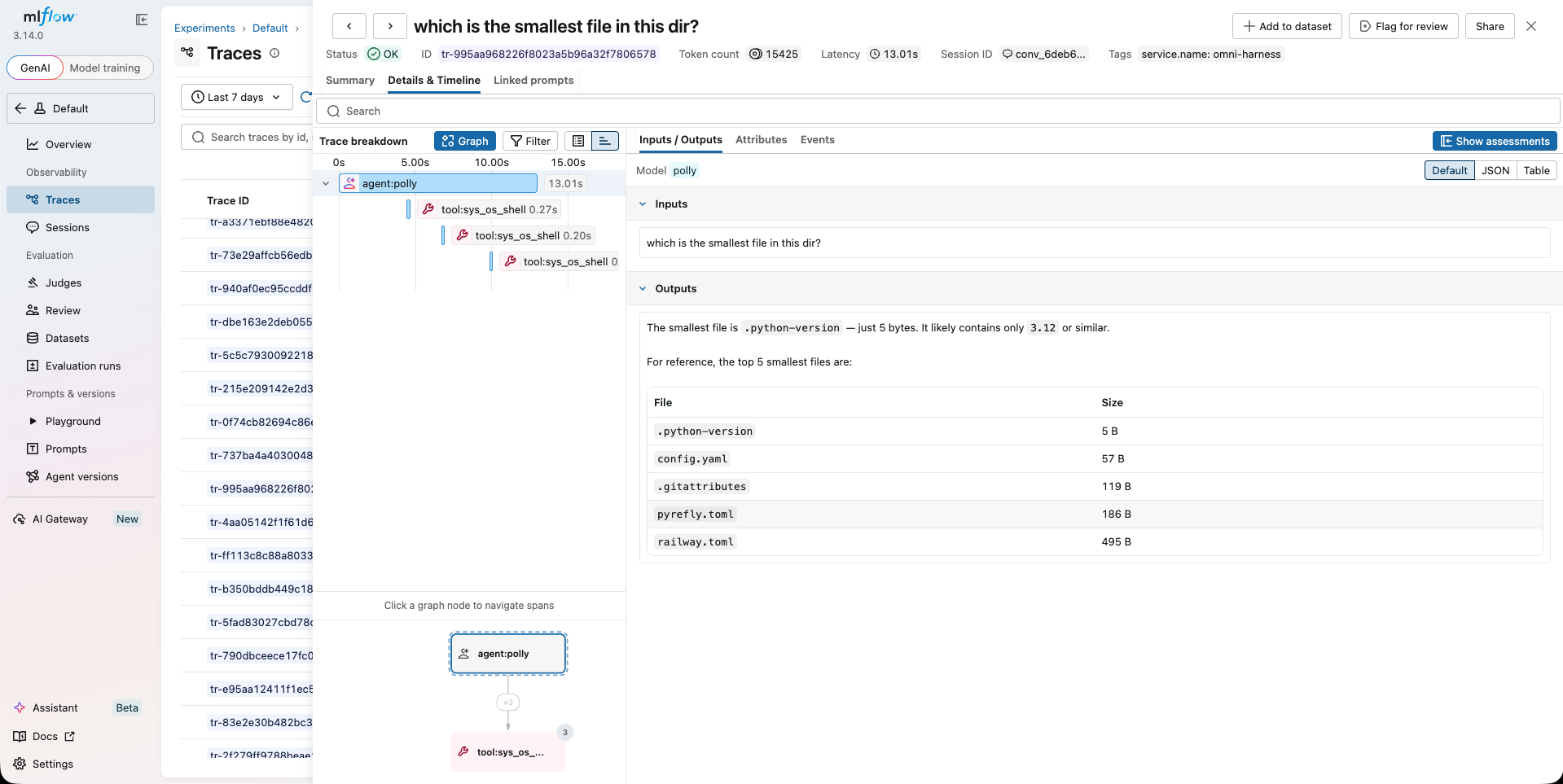
Then, run omnigent run and you're good to go. Everything is wired automatically. With this setup, in MLflow you get:
- Agent turns, including prompts and responses
- Tool invocations along with the arguments, results, and how long each took
- Per-turn token consumption
- Session metadata (model name, agent name, etc.)
What You Can Do With This
Now for the most exciting part: here's the universe of possibilities that lies ahead. With all the agentic harnesses being traced, you are no longer flying blind. Instead of relying on personal judgment to gauge whether a workflow change is good, you can now actually measure it.
Take an example where a new, cheap, open-source model is released and you want to analyze whether its performance is good enough to replace your expensive LLM across your harnesses. You swap the model in Omnigent and run a before-vs-after analysis on the traces in MLflow. Not only can you determine which model is better in absolute terms, but you can analyze which harnesses and tool invocations perform best under different LLMs.
Just like data analytics dramatically changed the market by allowing businesses to uncover hidden opportunities and cut unnecessary costs, AI observability does the same for the AI-native business. For example, if you use an MCP server to enable your agents to perform specific actions, you could now A/B test different providers and analyze which one offers the best bang for the buck.
Additionally, it allows you to become a better engineer by answering the right questions:
- How much of your work has been spent on building new features vs. fixing bugs over time?
- Was there any commonality in those bugs?
- Which types of requests took the agents a lot of time to complete?
- Which harness is best for planning vs. analyzing the codebase vs. executing?
Answering these questions gives you an edge to ship faster, at higher quality, and at lower cost.
Closing the Gap
Multi-harness orchestrators are here to stay. Developers and teams are going to keep on the lookout for the best tool to get the job done, and each job will have a different tool that does it better than any other. The solution is not to force all the work into a single framework, but rather to orchestrate and coordinate them. This requires an observability layer to keep an eye on everything and to spot opportunities and inefficiencies. Omnigent's MLflow integration is that eye, a small shift in architecture, but a big shift in what you and your team spend your time on.
Get started: MLflow Tracing for Omnigent
Questions or feedback? Drop a note by opening an issue or join the MLflow community discussions.
⭐ Star us on GitHub, show your support for the project!