Introducing DeepEval, RAGAS, and Phoenix Judges in MLflow





Building the initial version of an agent is easier than ever, thanks to coding assistants and dedicated agent development toolkits. However, ensuring that an agent meets production quality standards remains a significant challenge. To meet quality standards, developers need to spend substantial time and effort identifying bugs in agents and addressing them.
Challenges
A common technique for identifying quality issues is LLM-as-a-judge, where a language model evaluates the outputs of another model or agent. This approach reduces reliance on costly human review while providing consistent, scalable evaluation. Evaluation frameworks like DeepEval, RAGAS, Arize Phoenix, as well as MLflow provide LLM-as-a-judge with specialized metrics. However, if you've used them, you've likely hit these pain points:
- Can't combine frameworks. You might find that one evaluation framework works well for RAG metrics, but using it in another framework means writing custom wrappers or reimplementing metrics yourself.
- Can't compare across frameworks. Comparing results side-by-side requires stitching together outputs from different tools.
- Can't visualize trends. Evaluation frameworks give you metrics, but comparing them across iterations means manually building your own dashboards or staring at terminal output.
To turn evaluation results into actionable insights and real improvements, agent developers need more than just metrics. They need a complete AI agent platform with a visual UI, search and filtering capabilities, datasets for reproducing issues and testing fixes, and tools for iterating on fixes. MLflow provides exactly this.
Over the last few releases, MLflow has integrated DeepEval, RAGAS, and Arize Phoenix into the MLflow Scorer API. You can now use over 50 metrics from these evaluation frameworks through mlflow.genai.evaluate, all in one API and one UI. After this integration, you can:
- Access all metrics through one interface
- Run metrics from different evaluation frameworks together in a single evaluation
- Compare judges side-by-side in MLflow UI
- Integrate with your existing MLflow experiments and traces
In this blog, we explore how to improve your agents' quality using MLflow with judges from these evaluation frameworks. With trustworthy evaluations from whichever framework you prefer, you can deploy your agents with confidence.
What are DeepEval, RAGAS, and Phoenix?
First, let's understand what these evaluation frameworks offer:
DeepEval is an open-source LLM evaluation framework similar to Pytest but specialized for unit testing LLM outputs. It incorporates the latest research to evaluate LLM applications—whether AI agents, RAG pipelines, or chatbots—using metrics such as G-Eval, task completion, answer relevance, and hallucination detection. MLflow integrates a subset of DeepEval's extensive metrics covering conversational agents, RAG systems, safety, and agentic workflows.
RAGAS (Retrieval Augmented Generation Assessment) is a specialized evaluation framework for RAG evaluation. Based on research by Shahul Es et al., RAGAS provides metrics such as Faithfulness, ContextRecall, and ContextPrecision specifically designed to evaluate retrieval quality and answer generation. MLflow integrates RAGAS metrics, including those for RAG and agent evaluation.
Phoenix (Arize) provides an open-source evaluation library with multiple LLM-as-a-judge metrics for assessing LLM application quality. MLflow integrates Phoenix's core evaluation metrics, including Hallucination detection, Relevance, Toxicity, QA correctness, and Summarization quality.
How can I use DeepEval, RAGAS, and Phoenix in MLflow?
All three evaluation frameworks use LLM-as-a-judge approaches. MLflow exposes their metrics as scorers through mlflow.genai.scorers.deepeval.*, mlflow.genai.scorers.ragas.*, and mlflow.genai.scorers.phoenix.*.
These third-party judges function the same as MLflow native judges, and can be used individually or passed into mlflow.genai.evaluate().
Individual scorer usage
Here's a simple example using DeepEval's AnswerRelevancy metric to evaluate whether a response appropriately addresses the user's question:
from mlflow.genai.scorers.deepeval import AnswerRelevancy

relevancy = AnswerRelevancy(threshold=0.7, model="openai:/gpt-5-mini")
feedback = relevancy(
    inputs="What is MLflow?",
    outputs="MLflow is an open-source platform for managing machine learning workflows."
)

print(feedback.value)      # Score between 0.0 and 1.0
print(feedback.rationale)  # Explanation of the score
Using multiple evaluation frameworks together
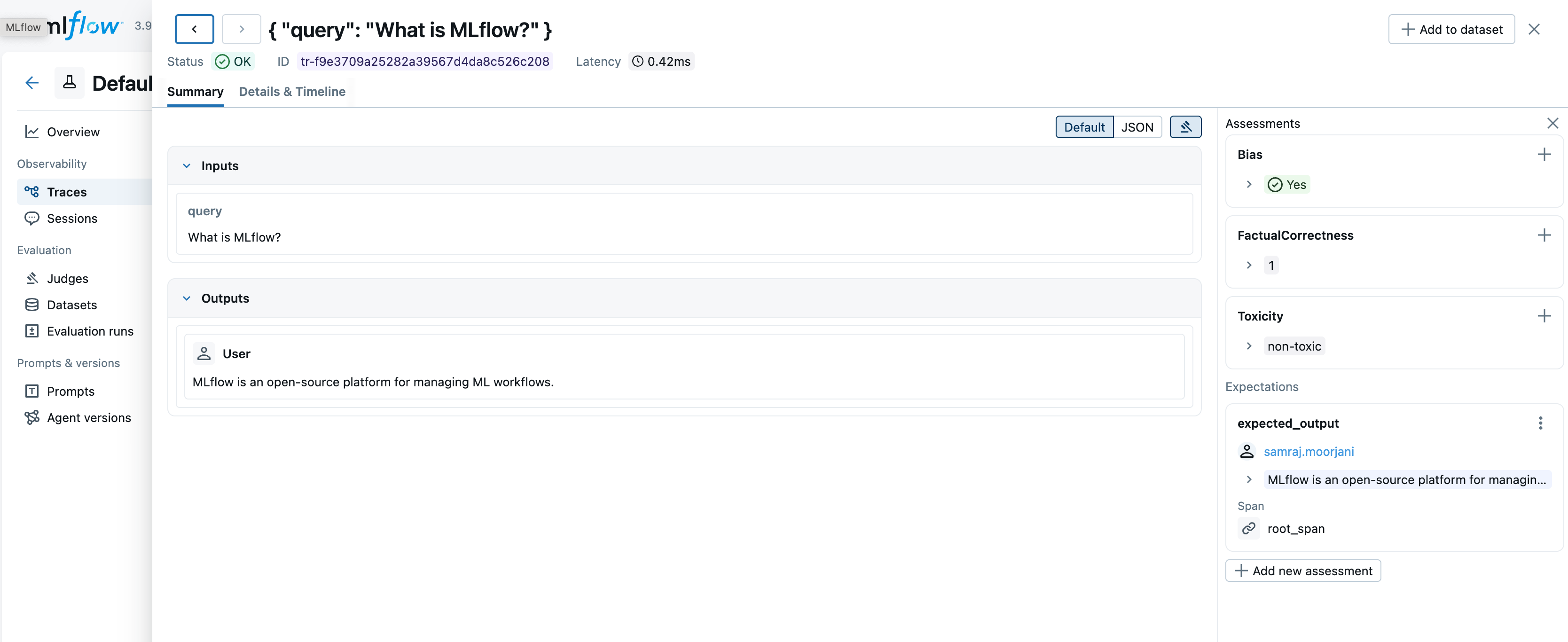
You can easily combine metrics from different evaluation frameworks in a single evaluation. This example uses DeepEval for answer quality and safety, RAGAS for RAG-specific metrics, and Phoenix for hallucination detection:
import mlflow
from mlflow.genai.scorers.deepeval import Bias
from mlflow.genai.scorers.ragas import FactualCorrectness
from mlflow.genai.scorers.phoenix import Toxicity

eval_dataset = [
    {
        "inputs": {"query": "What is MLflow?"},
        "outputs": "MLflow is an open-source platform for managing ML workflows.",
        "expectations": {
            "expected_output": "MLflow is an open-source platform for managing machine learning workflows."
        },
    },
]

results = mlflow.genai.evaluate(
    data=eval_dataset,
    scorers=[
        Bias(threshold=0.7, model="openai:/gpt-5-mini"),
        FactualCorrectness(model="openai:/gpt-5-mini"),
        Toxicity(model="openai:/gpt-5-mini"),
    ],
)
What Judge Should I Choose?
With over 70 judges now available across MLflow native judges and third-party integrations, it can be overwhelming to determine which judge to use for your evaluation needs.
-
Start with MLflow native judges. These are optimized for common scenarios and integrate with advanced features such as Judge Alignment, which lets you improve judges with human feedback.
-
Use third-party judges when you need specialized metrics not covered by native judges, or if you have experience with DeepEval, RAGAS, or Phoenix from previous work.
-
Compare and experiment. MLflow's UI lets you easily compare results across different judges and different judge models side-by-side, so you can pick the judge and model that best suit your use case.
-
Customize when needed. For domain-specific requirements, MLflow provides the make_judge and guidelines APIs, allowing you to create judges tailored to your specific business logic or evaluation criteria.
from typing import Literal
from mlflow.genai.judges import make_judge

quality_judge = make_judge(
    name="response_quality",
    instructions="Evaluate if the response in {{ outputs }} correctly answers {{ inputs }}.",
    model="openai:/gpt-5-mini",
    feedback_value_type=Literal["yes", "no"],
)
However simple or complex your agent's workflow trajectory, this provides you with a mental model and intuition for selecting the type of MLflow judges for your agent's workflow evaluation.
Example: Evaluate Multi-turn Conversations with DeepEval
This example illustrates how to use some of the DeepEval MLflow judges within a conversational bot, such as a customer technical support system, particularly in multi-turn scenarios. It helps gauge metrics like Conversational Completeness, Knowledge Retention, and Topic Adherence.
The idea is simple: evaluate the entire conversation traces in a single session using MLflow-integrated DeepEval Metrics. This code snippet demonstrates how to define the three judges and utilize them with mlflow.genai.evaluate.
The complete example and instructions on how to use it can be found in this GitHub Repository, along with an IPython Notebook.
import mlflow
from mlflow.genai.scorers.deepeval import (
    ConversationCompleteness, KnowledgeRetention, TopicAdherence
)

judge_model = "gemini:/gemini-3-flash"

completeness = ConversationCompleteness(model=judge_model)
knowledge_retention = KnowledgeRetention(model=judge_model)
topic_adherence = TopicAdherence(
    model=judge_model,
    relevant_topics=[
        "account management",
        "customer support",
        "tech support",
        "printer_support",
    ],
)
scorers = [completeness, knowledge_retention, topic_adherence]

# Search for all traces in an experiment
traces = mlflow.search_traces(
    experiment_ids=["<experiment-id>"],
    max_results=200
)

# Evaluate with DeepEval scorers
eval_results = mlflow.genai.evaluate(
    data=traces,
    scorers=scorers,
)
Here is the run from our Customer Support Agent session, where a user interacts with the agent about why she can’t log into her account.
uv run python customer_support_simple_deepeval_agent.py --scenario account

Scenario: Account Access Issue
======================================================================
Running 4-turn conversation (Session: session-account-002)
======================================================================
Turn 1/4
  User: I can't log into my account. It says my password is incorrect.
  Agent: Try these steps:

[...]

3) Click **Forgot password** and reset it (check spam/junk for the email).

[...]

Turn 2/4
  User: I used the reset link but didn't receive the email yet. It's been 10 minutes.
  Agent: Check these in order:
1) Verify the email address you entered (any typos/old address).
2) Check **Spam/Junk/Promotions** and search your inbox for "TechCorp" and "reset".

[...]

Turn 3/4
  User: I checked spam folder too, nothing there. My email is john.doe@email.com.
  Agent: Thanks. A few things to check:
1) Confirm you requested the reset for **john.doe@email.com** (no alias like john.doe+tag@…).
2) Search your mailbox for **from: techcorp** and keywords "password" or "verify".
3) Wait 5 more minutes, then request **one** new reset email and don't retry again for 10 minutes.

[...]

Turn 4/4
  User: Great, I got the email now and reset my password. I'm able to log in. Thanks!
  Agent: Glad you're back in.

[...]

[Step 6] Evaluating session 'session-account-002' with DeepEval
Evaluating: 100%|███████████████████████████████████████████████████████████████████████████████| 5/5 [Elapsed: 00:09, Remaining: 00:00]
[..]

Completeness score          📊: 1.0
-----------------------------------
Knowledge Retention score   📊: 1.0
-----------------------------------------
Topic Adherence score       📊: 1.0
-----------------------------------
Once the session is complete, you can examine and explore more deeply in the MLflow UI, all the metrics, scores, traces, rationale, and the multi-turn conversational flow.
What's Next
Try MLflow 3.9.0 with pip install mlflow>=3.9.0.
We'd love to hear your experience with these new evaluation capabilities. Share your feedback and uses:
- GitHub Issues: Report bugs or request features and enhancements
- Discussions: Share your experiences
Join us for an MLflow webinar where we'll deep-dive into MLflow 3.9 features and showcase some of them.
We continually improve our MLflow GenAI capabilities, including even more judge integrations coming out soon! Stay tuned for discussions on GitHub for roadmap updates. For more information, check out the documentation and references below.