Automatic Evaluation
Automatically evaluate traces and multi-turn conversations as they're logged - no code required
Automatic evaluation runs your LLM judges automatically on traces and multi-turn conversations as they're logged to MLflow, without requiring manual execution of code. This enables two key use cases:
- Streamlined Quality Iteration: Seamlessly measure quality as you iterate on your agent or LLM application in development, getting immediate feedback and quality insights without extra evaluation steps
- Production Monitoring: Continuously monitor for issues like hallucinations, PII leakage, or user frustration on live traffic (often referred to as online evaluation)
Automatic vs Offline Evaluation
| Automatic Evaluation | Offline Evaluation | |
|---|---|---|
| When it runs | Automatically, as traces and conversations are logged | Manually, when you call mlflow.genai.evaluate() |
| Use case | Production quality tracking, continuous monitoring, internal QA, interactive testing | Regression testing, bug fix verification, pre-deployment testing, comparing agent versions |
| Data source | Live traces and conversations from your application | Curated datasets or historical traces |
Prerequisites
Before setting up automatic evaluation, ensure that:
- The MLflow Server is running
- MLflow Tracing is enabled in your agent or LLM application
- For multi-turn conversation evaluation, traces must include session IDs
- An AI Gateway endpoint is configured for LLM judge execution
- LLM judges require an LLM to perform evaluations, and AI Gateway endpoints provide secure, managed access to LLMs
Setting Up Automatic Evaluation
These examples show how to set up LLM judges that automatically evaluate traces and multi-turn conversations as they're logged to an MLflow Experiment, and how to update or disable existing judges. For more details on creating LLM judges, see LLM-as-a-Judge.
- Automatic evaluation only supports LLM judges. Code-based scorers (using the
@scorerdecorator orScorerclass) are not supported. Use built-in judges or create custom judges withmake_judge(). - When a judge is created or enabled, it evaluates traces and sessions that are at most one hour old. Updating a judge's configuration does not trigger re-evaluation of previously assessed traces.
- UI
- SDK
-
Navigate to your experiment and select the Judges tab

-
Click + New LLM judge

-
Select scope:
- Traces: Evaluate individual traces
- Sessions: Evaluate entire multi-turn conversations
-
Configure the judge:
- LLM judge: Select a built-in judge or create a custom one
- Name: A unique name for the judge
- Instructions: Define evaluation criteria for the judge
- Output type: Select the type of value the judge will return
- Model: Select an AI Gateway endpoint (LLM) to run the judge
-
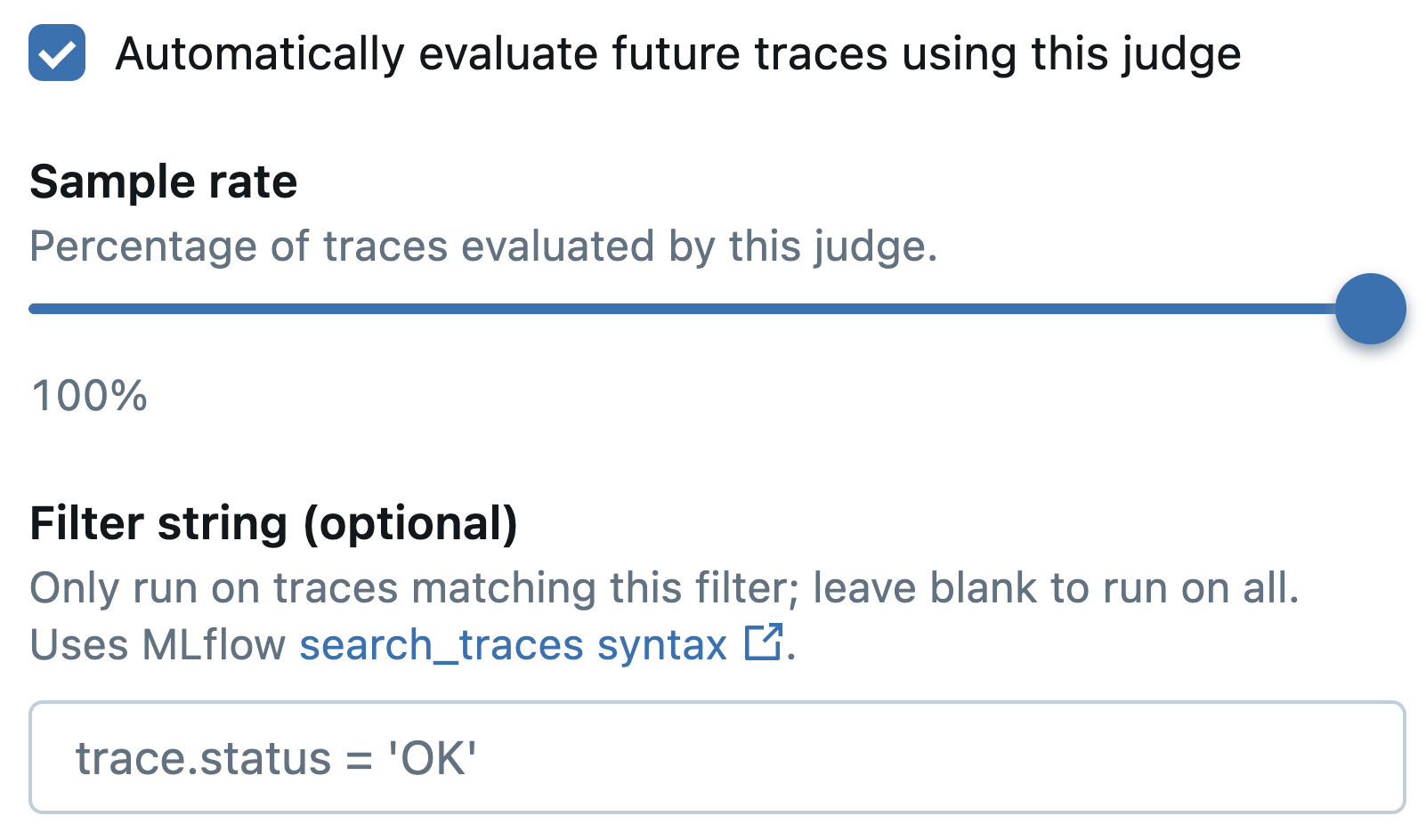
Evaluation settings:
- Check "Automatically evaluate future traces using this judge"
- Set the Sample rate (percentage of traces or sessions to evaluate)
- Optionally add a Filter string to target specific traces or sessions
-
Click Save
-
To edit or disable an existing judge, select it in the Judges tab.

For more details about the APIs used in this example, see mlflow.genai.scorers.Scorer.start(), mlflow.genai.scorers.Scorer.update(), and mlflow.genai.scorers.Scorer.stop().
1. Specify the experiment for automatic evaluation
import mlflow

mlflow.set_experiment("my-experiment")
2. Start automatic evaluation for a trace-level judge
from mlflow.genai.scorers import ToolCallCorrectness, ScorerSamplingConfig

tool_judge = ToolCallCorrectness(model="gateway:/my-llm-endpoint")
registered_tool_judge = tool_judge.register(name="tool_call_correctness")
registered_tool_judge.start(
    sampling_config=ScorerSamplingConfig(sample_rate=0.5),  # Evaluate 50% of traces
)
3. Start automatic evaluation for a multi-turn (session-level) judge
from mlflow.genai.scorers import ConversationalGuidelines, ScorerSamplingConfig

frustration_judge = ConversationalGuidelines(
    name="user_frustration",
    guidelines="The user should not express frustration, confusion, or dissatisfaction during the conversation.",
    model="gateway:/my-llm-endpoint",
)
registered_frustration_judge = frustration_judge.register(name="user_frustration")
registered_frustration_judge.start(
    sampling_config=ScorerSamplingConfig(sample_rate=1.0),  # Evaluate all conversations
)
4. Update or disable automatic evaluation for an existing judge
from mlflow.genai.scorers import get_scorer, ScorerSamplingConfig

judge = get_scorer(name="tool_call_correctness")
judge.update(sampling_config=ScorerSamplingConfig(sample_rate=0.3))  # Change sample rate
judge.stop()  # Or, disable the judge
Viewing Results
Assessments from automatic evaluation appear directly in the MLflow UI. For traces, assessments typically appear within a minute or two of logging. Multi-turn sessions are evaluated after 5 minutes of inactivity (no new traces have been added to the session) by default—this is configurable.
Navigate to your experiment in the MLflow UI to see results.
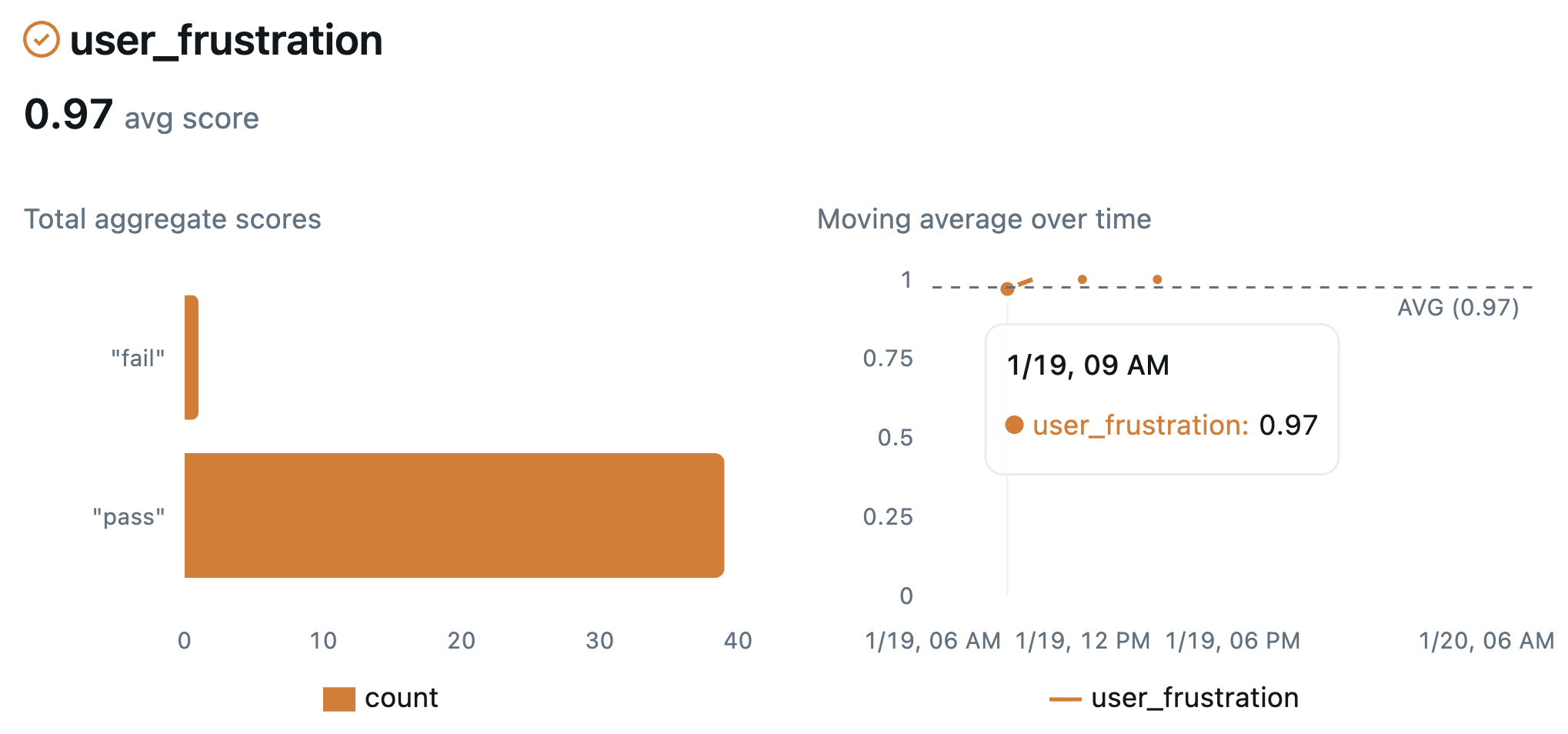
Charts in the Overview tab display quality and performance trends over time
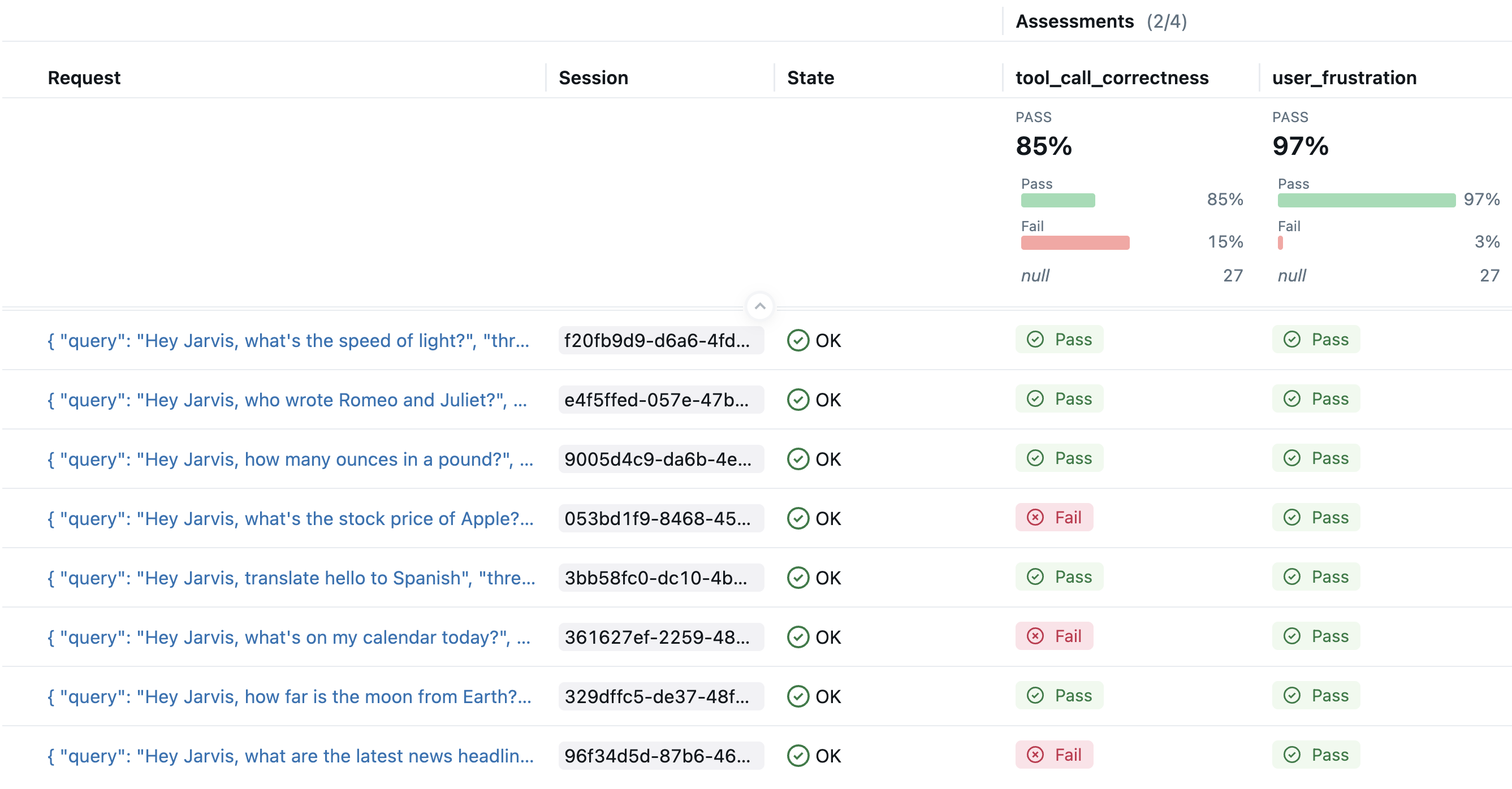
Assessments from automatic evaluation appear as columns in the Traces tab
Configuration Options
Sampling Rate
Control what percentage of traces are evaluated (0-100%). Balance cost and coverage based on your needs:
- Development: Use a high sampling rate to detect as many issues as possible before production deployment
- Production: Consider using lower rates if necessary to control costs
Filtering Traces
Use trace search syntax to target specific traces. Examples:
# Only evaluate successful traces
filter_string = "trace.status = 'OK'"

# Only evaluate traces from production environment
filter_string = "metadata.environment = 'production'"
For session-level evaluation, filters apply to the first trace in the session.
Session-Level Evaluation
Automatic evaluation can assess entire multi-turn conversations (sessions), in addition to individual traces.
- Session completion: A session is considered complete (ready for automatic evaluation) after no new traces arrive for 5 minutes (configurable)
- Re-evaluation: If new traces are added to the session after evaluation, the session is re-evaluated and previous automatic evaluation results are replaced
For more information about session evaluation, see Evaluate Conversations.
Best Practices
- Combine judges: Use multiple judges for comprehensive quality coverage
- Start with a high sampling rate, then scale down as needed: Use a high sampling rate during development to detect as many issues as possible before production deployment, then reduce for production if necessary to control costs
- Monitor costs: LLM-based evaluation has associated costs—adjust sampling accordingly
- Use filters strategically in production: Focus evaluation on high-value or high-risk traces
How It Works
LLM judges are periodically executed securely within the MLflow server as new traces and multi-turn conversations are received. Evaluation happens asynchronously and does not block trace logging, so your application's performance is unaffected.
The MLflow Server uses AI Gateway endpoints to access LLMs for judge execution, ensuring secure and managed model access. Only the relevant trace or session data required by the judge (such as inputs, outputs, and context) is sent to the LLM.
Troubleshooting
| Issue | Solution |
|---|---|
| Missing assessments | Verify that the judge is active, the filter matches your traces, the sampling rate is greater than zero, and the traces are less than one hour old |
| Unexpected or unsatisfactory judge results | Edit the judge's instructions or use the align() method to optimize them automatically |
| Evaluation errors | Check trace/session assessments in the UI or SDK, or server logs, for details. Failed evaluations are not retried automatically |
For further debugging, enable debug logging on the MLflow server by setting the MLFLOW_LOGGING_LEVEL=DEBUG environment variable and checking the MLflow server logs.