Evaluate Conversations
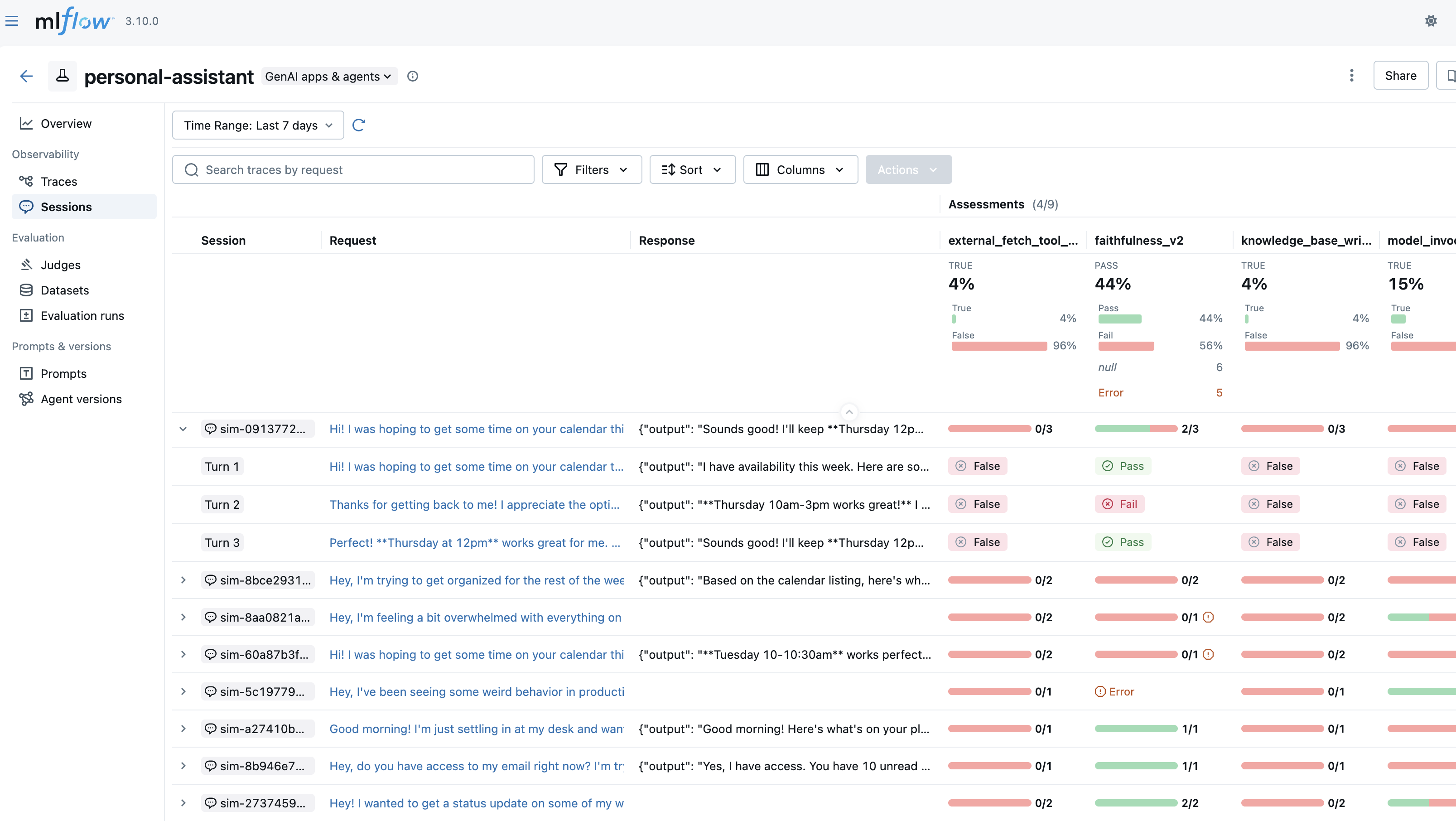
Conversation evaluation enables you to assess entire conversation sessions rather than individual turns. This is essential for evaluating conversational AI systems where quality emerges over multiple interactions, such as user frustration patterns, conversation completeness, or overall dialogue coherence.
Multi-turn evaluation is experimental in MLflow 3.10.0. The API and behavior may change in future releases.
Two Approaches
MLflow supports two approaches for evaluating conversations:
- Evaluating Pre-Generated Conversations
- Simulating Conversations during Evaluation
Evaluate existing conversations that have already been traced.
Use this when you have:
- Production conversation data to analyze
- Pre-recorded test conversations
- Conversations from a previous agent version
import os
import mlflow
from mlflow.genai.scorers import ConversationCompleteness, UserFrustration

os.environ["OPENAI_API_KEY"] = "your-api-key-here"  # Replace with your API key

# Get existing traces grouped by session
traces = mlflow.search_traces(
    experiment_ids=["<your-experiment-id>"],
    return_type="list",
)

# Evaluate the conversations
results = mlflow.genai.evaluate(
    data=traces,
    scorers=[ConversationCompleteness(), UserFrustration()],
)
Generate new conversations by simulating user interactions with your agent.
Use this when you want to:
- Test a new agent version systematically
- Generate diverse test scenarios at scale
- Stress-test your agent with specific user behaviors
import os
import mlflow
from mlflow.genai.simulators import ConversationSimulator
from mlflow.genai.scorers import ConversationCompleteness, UserFrustration

os.environ["OPENAI_API_KEY"] = "your-api-key-here"  # Replace with your API key

# Define test scenarios
simulator = ConversationSimulator(
    test_cases=[
        {"goal": "Learn about MLflow tracking"},
        {"goal": "Debug deployment issue", "persona": "Frustrated engineer"},
    ],
    max_turns=5,
)

# Simulate and evaluate conversations
results = mlflow.genai.evaluate(
    data=simulator,
    predict_fn=your_agent_fn,
    scorers=[ConversationCompleteness(), UserFrustration()],
)
Overview
Traditional single-turn evaluation assesses each agent response independently. However, many important qualities can only be evaluated by examining the full conversation:
- User Frustration: Did the user become frustrated? Was it resolved?
- Conversation Completeness: Were all user questions answered by the end of the conversation?
- Knowledge Retention: Does the agent remember information from earlier in the conversation?
- Dialogue Coherence: Does the conversation flow naturally?
Multi-turn evaluation addresses these needs by grouping traces into conversation sessions and applying judges that analyze the entire conversation history.
Prerequisites
First, install the required packages by running the following command:
pip install --upgrade 'mlflow[genai]>=3.10'
MLflow stores evaluation results in a tracking server. Connect your local environment to the tracking server by one of the following methods.
- Local (uv)
- Local (pip)
- Local (docker)
Install the Python package manager uv
(that will also install uvx command to invoke Python tools without installing them).
Start a MLflow server locally.
uvx mlflow server
Python Environment: Python 3.10+
Install the mlflow Python package via pip and start a MLflow server locally.
pip install --upgrade 'mlflow[genai]'
mlflow server
MLflow provides a Docker Compose file to start a local MLflow server with a PostgreSQL database and a MinIO server.
git clone --depth 1 --filter=blob:none --sparse https://github.com/mlflow/mlflow.git
cd mlflow
git sparse-checkout set docker-compose
cd docker-compose
cp .env.dev.example .env
docker compose up -d
Refer to the instruction for more details (e.g., overriding the default environment variables).
Finally, configure your LLM provider credentials. The built-in multi-turn scorers default to using OpenAI:
import os

os.environ["OPENAI_API_KEY"] = "your-api-key-here"  # Replace with your API key
Evaluating Pre-Generated Conversations
Evaluate conversations that have already been traced. This is useful for evaluating production data or pre-recorded test conversations.
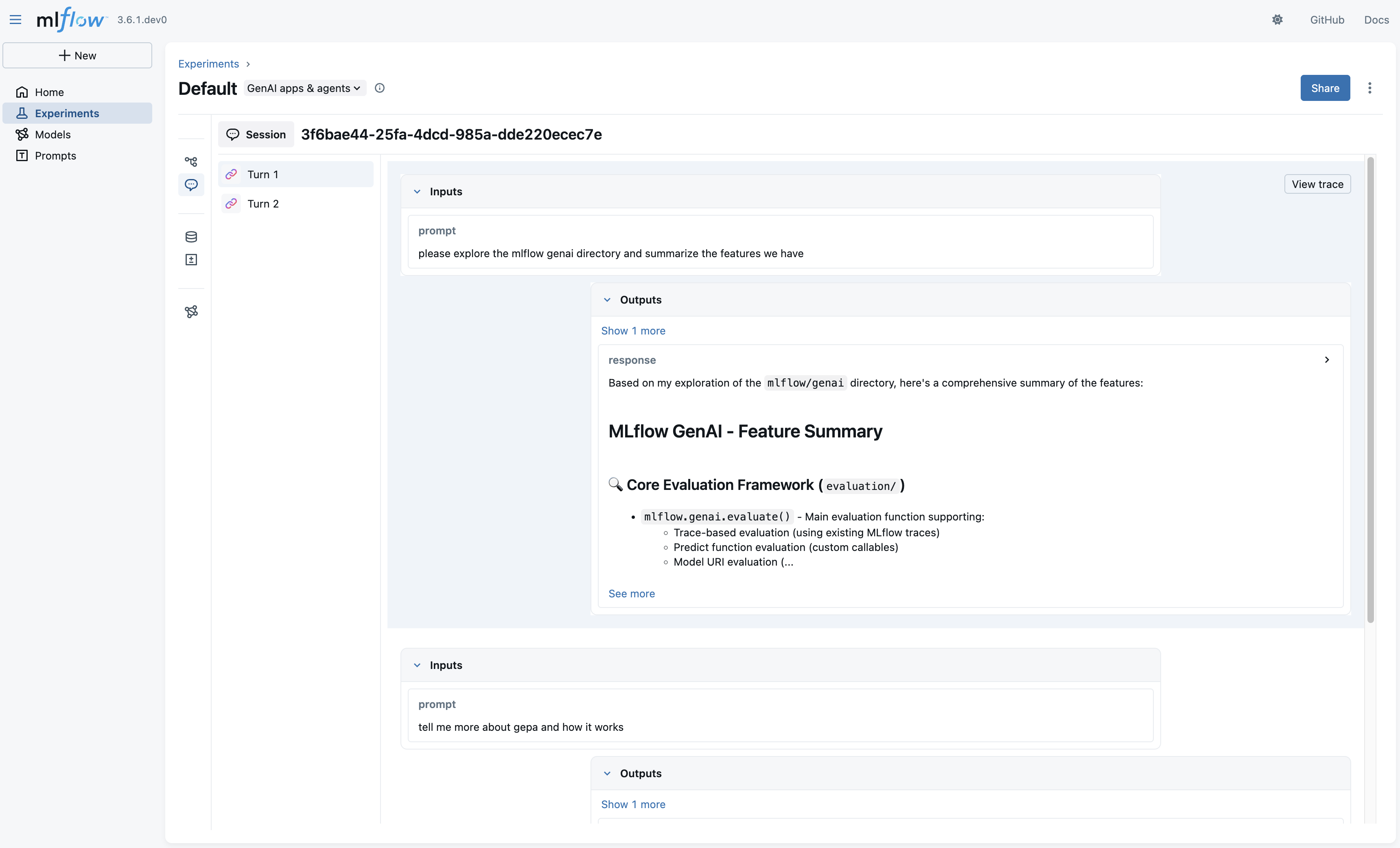
Step 1: Tag traces with session IDs
When building your agent, set session IDs on traces to group them into conversations:
import mlflow


@mlflow.trace
def my_chatbot(question, session_id):
    mlflow.update_current_trace(metadata={"mlflow.trace.session": session_id})
    return generate_response(question)
Step 2: Retrieve and evaluate sessions
Get traces from your experiment and pass them to mlflow.genai.evaluate. MLflow automatically groups traces by session ID:
from mlflow.genai.scorers import ConversationCompleteness, UserFrustration

# Get all traces
traces = mlflow.search_traces(
    experiment_ids=["<your-experiment-id>"],
    return_type="list",
)

# Evaluate all sessions - MLflow automatically groups by session ID
results = mlflow.genai.evaluate(
    data=traces,
    scorers=[
        ConversationCompleteness(),
        UserFrustration(),
    ],
)
You can also retrieve complete sessions directly using mlflow.search_sessions:
import mlflow

# Get complete sessions (each session is a list of traces)
sessions = mlflow.search_sessions(
    locations=["<your-experiment-id>"],
    max_results=50,
)

# Flatten for evaluation
all_traces = [trace for session in sessions for trace in session]

results = mlflow.genai.evaluate(
    data=all_traces,
    scorers=[ConversationCompleteness(), UserFrustration()],
)
Simulating Conversations during Evaluation
Generate new conversations by simulating user interactions. This enables testing different agent versions with consistent goals and personas.
import mlflow
from mlflow.genai.simulators import ConversationSimulator
from mlflow.genai.scorers import ConversationCompleteness, Safety

# Define test scenarios
simulator = ConversationSimulator(
    test_cases=[
        {"goal": "Get help setting up experiment tracking"},
        {"goal": "Troubleshoot a model deployment error"},
        {
            "goal": "Learn about model versioning",
            "persona": "You are a beginner who needs detailed explanations",
        },
    ],
    max_turns=5,
)


# Your agent's predict function
def predict_fn(input: list[dict], **kwargs) -> str:
    # input is the conversation history
    response = your_agent.chat(input)
    return response


# Simulate conversations and evaluate
results = mlflow.genai.evaluate(
    data=simulator,
    predict_fn=predict_fn,
    scorers=[
        ConversationCompleteness(),
        Safety(),
    ],
)
For complete documentation on conversation simulation, including test case definition, predict function interfaces, and configuration options, see the Conversation Simulation guide.
Multi-Turn Judges
Built-in Judges
MLflow provides built-in multi-turn judges including ConversationCompleteness, UserFrustration, KnowledgeRetention, and more. See the Built-in Judges page for the full list, usage examples, and API documentation.
Custom Judges
You can create custom multi-turn judges using make_judge with the {{ conversation }} template variable:
from mlflow.genai.judges import make_judge
from typing import Literal

# Create a custom multi-turn judge
politeness_judge = make_judge(
    name="conversation_politeness",
    instructions=(
        "Analyze the {{ conversation }} and determine if the agent maintains "
        "a polite and professional tone throughout all interactions. "
        "Rate as 'consistently_polite', 'mostly_polite', or 'impolite'."
    ),
    feedback_value_type=Literal["consistently_polite", "mostly_polite", "impolite"],
    model="openai:/gpt-5-mini",
)

# Use in evaluation
results = mlflow.genai.evaluate(
    data=traces,
    scorers=[politeness_judge],
)
The {{ conversation }} variable injects the complete conversation history in a structured format.
The variable can only be used with {{ expectations }}, not with {{ inputs }}, {{ outputs }}, or {{ trace }}.
How Assessments Are Stored
Multi-turn assessments are stored on the first trace (chronologically) in each session. This design ensures:
- Assessments remain stable even as new turns are added to a conversation
- You can easily find conversation-level assessments by looking at session start traces
- The Sessions UI can efficiently display conversation metrics
Assessments include metadata identifying them as conversation-level:
session_id: The session ID linking the assessment to the full conversation
Working with Specific Sessions
To evaluate a specific session, use mlflow.search_traces with a filter string:
import mlflow
from mlflow.genai.scorers import ConversationCompleteness, UserFrustration

# Get traces for a specific session using filter
traces = mlflow.search_traces(
    experiment_ids=["<your-experiment-id>"],
    filter_string="metadata.`mlflow.trace.session` = '<your-session-id>'",
    return_type="list",
)

# Evaluate the session
results = mlflow.genai.evaluate(
    data=traces,
    scorers=[ConversationCompleteness(), UserFrustration()],
)
Next Steps
Session Tracing Guide
Learn how to track users and sessions in your conversational AI applications for better evaluation.
Built-in Judges
Explore built-in judges for conversation completeness, user frustration, and other multi-turn metrics.
Conversation Simulation
Generate synthetic conversations to test your agent with diverse scenarios and user behaviors.