MLflow AI Gateway
MLflow's AI Gateway provides a unified interface for deploying and managing multiple LLM providers within your organization. It simplifies interactions with services like OpenAI, Anthropic, and others through a single, secure endpoint.
The gateway excels in production environments where organizations need to manage multiple LLM providers securely while maintaining operational flexibility. Advanced routing capabilities enable traffic splitting for A/B testing and automatic failover chains for high availability.
MLflow AI Gateway also offers passthrough endpoints, enabling requests to be forwarded in providers' native formats. This feature allows you to access provider-specific capabilities as soon as they become available.
Unified Interface
Access multiple LLM providers through a single endpoint, eliminating the need to integrate with each provider individually.
Centralized Security
Store LLM provider API keys in one secure location with request/response logging for audit trails and compliance.
Advanced Routing
Traffic splitting for A/B testing and automatic fallbacks ensure high availability across providers.
Zero-Downtime Updates
Add, remove, or modify endpoints dynamically without restarting the server or disrupting running applications.
Cost Optimization
Monitor usage across providers and optimize costs by routing requests to the most efficient models.
Team Collaboration
Shared endpoint configurations and standardized access patterns across development teams.
Try the MLflow LLMs and Agents Demo
The quickest way to learn about MLflow for LLMs and AI Agents is to try the demo. Click to launch the demo ↓
Public Demo
Visit demo.mlflow.org to explore a publicly hosted MLflow instance pre-loaded with sample data.
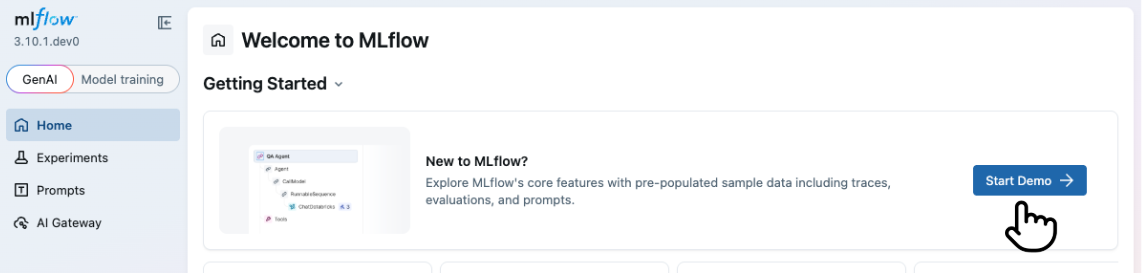
Starting from UI
To start the demo, click on the "Start Demo" button on the top page of the MLflow UI.
Starting from CLI
Alternatively, you can start the demo from the command line using the mlflow demo command. This option does
not require you to have a running MLflow server.
uvx mlflow demo
Next Steps
Quickstart
Get your AI Gateway running in minutes with a simple walkthrough
LLM Connections
Create and manage LLM connections to securely store provider API keys
Endpoints
Create, configure, and query AI model endpoints
Traffic Routing
Configure traffic splitting and fallbacks for high availability
Usage Tracking
Monitor endpoint usage, performance, token consumption, and costs
Budget Alerts & Limits
Set spending limits and configure alerts for cost management
Guardrails
Enforce content policies with LLM-powered judges that block or sanitize requests and responses
Authentication
Configure HTTP Basic Authentication for AI Gateway resources
Performance & Benchmarks
Benchmark results and how to measure gateway overhead in your own environment
LLM Playground
Test endpoints interactively from the MLflow UI with multi-turn chat, sampling parameters, tools, and structured output