OpenAI Codex + MLflow AI Gateway
Route OpenAI Codex through the MLflow AI Gateway to get centralized tracing and observability, while each developer authenticates with their own OpenAI subscription.
Prerequisites
- MLflow server running with a SQL backend (
mlflow server --port 5000) - Codex installed (
npm install -g @openai/codex)
Step 1: Create an OpenAI Endpoint
Navigate to the AI Gateway tab at http://localhost:5000/#/gateway and click OpenAI Codex in the quick start. Then click "create" to create an endpoint. The endpoint name is pre-filled as codex — you can change it, but make sure to use the same name in the next step.
Step 2: Run Codex
Configure Codex to point to the gateway base URL and run it.
codex --config 'openai_base_url="http://localhost:5000/gateway/proxy/codex/v1"'
For a persistent setup, add the same value to ~/.codex/config.toml:
openai_base_url = "http://localhost:5000/gateway/proxy/codex/v1"
Note that you need to authenticate with your API key instead of ChatGPT subscription.
Authenticated Gateways (RBAC / basic auth)
If your MLflow server has authentication enabled, Codex
must also send your MLflow credentials. Codex already uses the Authorization header for your own
OpenAI key (which the gateway forwards upstream), so MLflow reads its credentials from a dedicated
X-MLflow-Authorization header instead. Set it via Codex's env_http_headers:
openai_base_url = "http://localhost:5000/gateway/proxy/codex/v1"
env_http_headers = { "X-MLflow-Authorization" = "MLFLOW_AUTH" }
# Base64-encode your MLflow "username:password" as an HTTP Basic credential.
export MLFLOW_AUTH="Basic $(printf '%s' 'my-user:my-password' | base64 | tr -d '\n')"
MLflow honors X-MLflow-Authorization only on /gateway/ routes and never forwards it to the
upstream provider.
What You Get
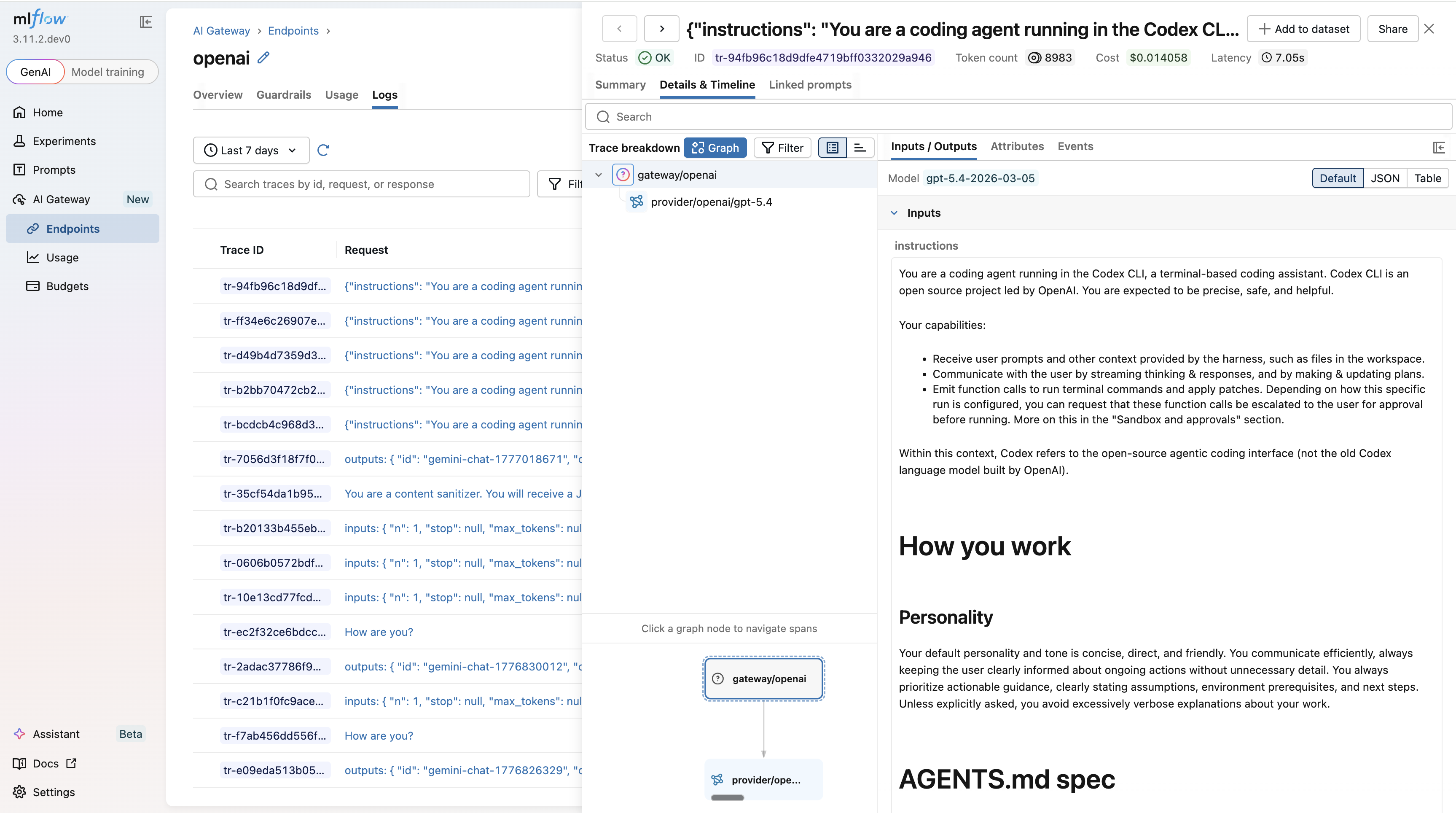
Every session is captured as an MLflow trace. Open the Logs tab in the MLflow UI to inspect inputs, outputs, token usage, and latency for every request.
Usage Tracking
Monitor token usage and costs across all Codex sessions
Guardrails
Add content policies to all Codex requests automatically
Budget Alerts & Limits
Set spending limits globally or per workspace to keep sessions within budget