Query Endpoints
Once you've created an endpoint, you can call it through several different API styles depending on your needs.
Viewing Usage Examples
To see code examples for your endpoint, navigate to the Endpoints list and click either the Use button or the endpoint name itself. This opens a modal with comprehensive usage examples tailored to your specific endpoint.
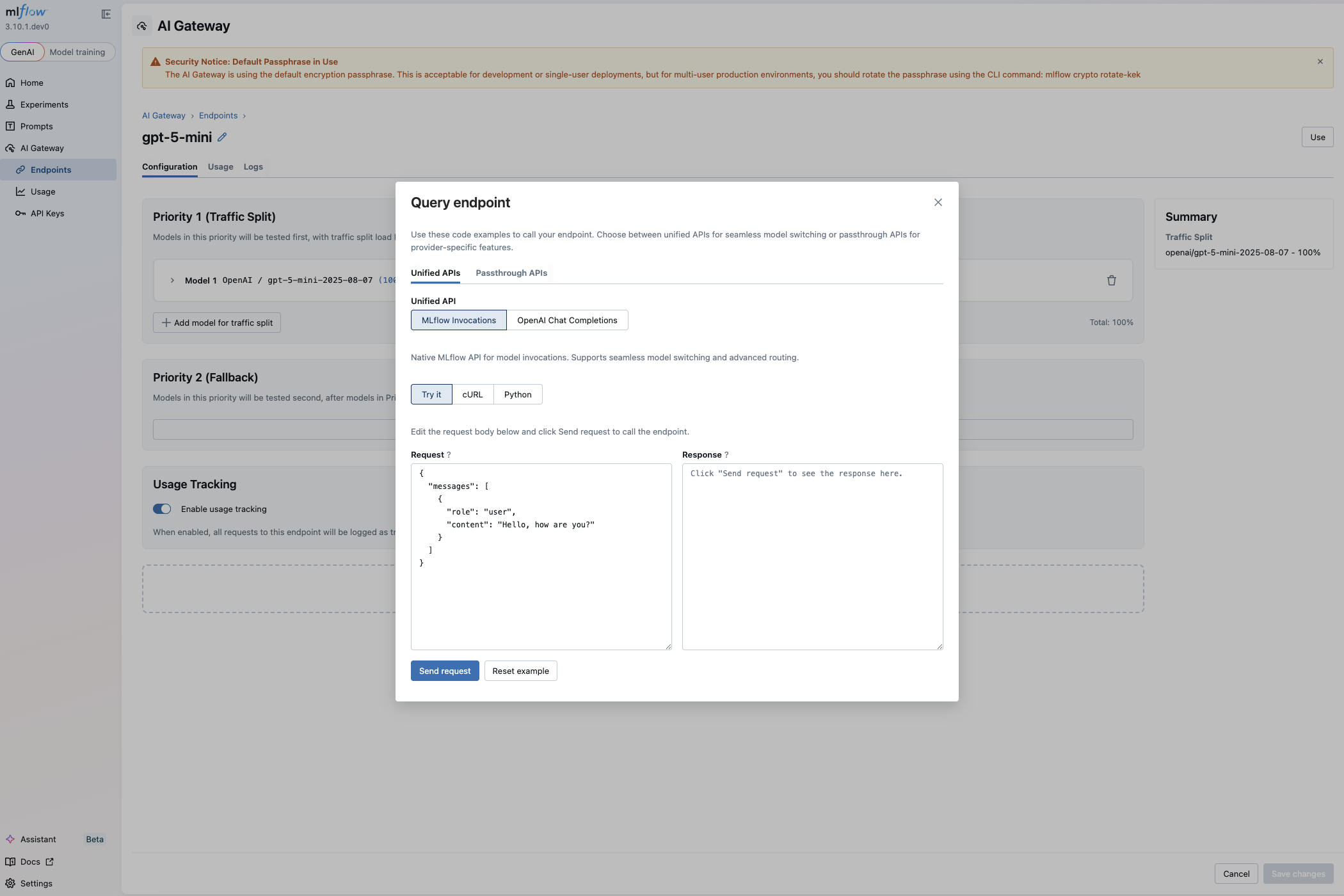
The usage modal organizes examples into two categories: unified APIs that work across any provider, and passthrough APIs that expose provider-specific features. Within each category, the Try it tab lets you send a test request directly from the UI.
Unified APIs
Unified APIs provide a consistent interface regardless of the underlying model provider. These APIs make it easy to switch between different models or providers without changing your application code.
MLflow Invocations API
The MLflow Invocations API is the native interface for calling gateway endpoints. This API seamlessly handles model switching and advanced routing features like traffic splitting and fallbacks:
- cURL
- Python
curl -X POST http://localhost:5000/gateway/my-endpoint/mlflow/invocations \
  -H "Content-Type: application/json" \
  -d '{
    "messages": [{"role": "user", "content": "Hello!"}],
    "temperature": 0.7
  }'
import requests

response = requests.post(
    "http://localhost:5000/gateway/my-endpoint/mlflow/invocations",
    json={"messages": [{"role": "user", "content": "Hello!"}], "temperature": 0.7},
)
print(response.json())
API Specification
The MLflow Invocations API supports both OpenAI-style chat completions and embeddings endpoints.
Endpoint URL Pattern:
POST /gateway/{endpoint_name}/mlflow/invocations
Chat Completions Request Body:
The request body follows the OpenAI chat completions format with these supported parameters. See OpenAI Chat Completions API Reference for complete documentation.
| Parameter | Type | Required | Description |
|---|---|---|---|
messages | array | Yes | Array of message objects with role and content fields |
temperature | number | No | Sampling temperature between 0 and 2. Higher values make output more random. |
max_tokens | integer | No | Maximum number of tokens to generate. |
top_p | number | No | Nucleus sampling parameter between 0 and 1. Alternative to temperature. |
n | integer | No | Number of completions to generate. Default is 1. |
stream | boolean | No | Whether to stream responses. |
stream_options | object | No | Options for streaming responses. |
stop | array | No | List of sequences where the API will stop generating tokens. |
presence_penalty | number | No | Penalizes new tokens based on presence in text so far. Range: -2.0 to 2.0. |
frequency_penalty | number | No | Penalizes new tokens based on frequency in text so far. Range: -2.0 to 2.0. |
tools | array | No | List of tools the model can call. Each tool includes type, function with name, description, and parameters. |
response_format | object | No | Format for the model output. Can specify "text", "json_object", or "json_schema" with schema definition. |
Response Format:
{
  "id": "chatcmpl-123",
  "object": "chat.completion",
  "created": 1677652288,
  "model": "gpt-5",
  "choices": [{
    "index": 0,
    "message": {
      "role": "assistant",
      "content": "Hello! How can I assist you today?"
    },
    "finish_reason": "stop"
  }],
  "usage": {
    "prompt_tokens": 9,
    "completion_tokens": 12,
    "total_tokens": 21
  }
}
Streaming Responses:
When stream: true is set, the response is sent as Server-Sent Events (SSE):
data: {"id":"chatcmpl-123","object":"chat.completion.chunk","created":1677652288,"model":"gpt-5","choices":[{"index":0,"delta":{"content":"Hello"},"finish_reason":null}]}

data: {"id":"chatcmpl-123","object":"chat.completion.chunk","created":1677652288,"model":"gpt-5","choices":[{"index":0,"delta":{"content":"!"},"finish_reason":null}]}

data: [DONE]
Embeddings Request Body:
For embeddings endpoints, the request body follows the OpenAI embeddings format. See OpenAI Embeddings API Reference for complete documentation.
| Parameter | Type | Required | Description |
|---|---|---|---|
input | string or array | Yes | Input text(s) to embed. Can be a single string or array of strings. |
encoding_format | string | No | Format to return embeddings. Options: "float" (default) or "base64". |
Embeddings Response Format:
{
  "object": "list",
  "data": [{
    "object": "embedding",
    "embedding": [0.0023064255, -0.009327292, ...],
    "index": 0
  }],
  "model": "text-embedding-ada-002",
  "usage": {
    "prompt_tokens": 8,
    "total_tokens": 8
  }
}
OpenAI-Compatible Chat Completions API
For teams already using the OpenAI chat completion style APIs, the gateway provides an OpenAI-compatible interface. Simply point your OpenAI client to the gateway's base URL and use your endpoint name as the model parameter. This lets you leverage existing OpenAI-based code while gaining the gateway's routing capabilities.
See OpenAI Chat Completions API Reference for complete documentation.
- cURL
- Python
curl -X POST http://localhost:5000/gateway/mlflow/v1/chat/completions \
  -H "Content-Type: application/json" \
  -d '{
    "model": "my-endpoint",
    "messages": [{"role": "user", "content": "Hello!"}],
    "temperature": 0.7
  }'
from openai import OpenAI

client = OpenAI(
    base_url="http://localhost:5000/gateway/mlflow/v1",
    api_key="",  # API key not needed, configured server-side
)

response = client.chat.completions.create(
    model="my-endpoint",
    messages=[{"role": "user", "content": "Hello!"}],
    temperature=0.7,
)
print(response.choices[0].message.content)
Passthrough APIs
The Passthrough API relays requests to the provider's LLM endpoint using its native formats, allowing you to use their native client SDKs with the MLflow Gateway. While unified APIs work for most use cases, passthrough APIs give you full access to provider-specific features that may not be available through the unified interface.
For detailed information on passthrough APIs for each provider, see Model Providers.
OpenAI Passthrough
The OpenAI passthrough API exposes the full OpenAI API including Chat Completions, Embeddings, and Responses endpoints. See OpenAI API Reference for complete documentation.
- cURL
- Python
# Chat Completions API
curl -X POST http://localhost:5000/gateway/openai/v1/chat/completions \
  -H "Content-Type: application/json" \
  -d '{
    "model": "my-endpoint",
    "messages": [{"role": "user", "content": "Hello!"}]
  }'

# Responses API
curl -X POST http://localhost:5000/gateway/openai/v1/responses \
  -H "Content-Type: application/json" \
  -d '{
    "model": "my-endpoint",
    "input": "Hello!"
  }'
from openai import OpenAI

client = OpenAI(
    base_url="http://localhost:5000/gateway/openai/v1",
    api_key="dummy",  # API key not needed, configured server-side
)

# Chat Completions API
response = client.chat.completions.create(
    model="my-endpoint", messages=[{"role": "user", "content": "Hello!"}]
)
print(response.choices[0].message.content)

# Responses API
response = client.responses.create(
    model="my-endpoint",
    input="Hello!",
)
print(response.output_text)
Anthropic Passthrough
Access Anthropic's Messages API directly through the gateway. See Anthropic API Reference for complete documentation.
- cURL
- Python
curl -X POST http://localhost:5000/gateway/anthropic/v1/messages \
  -H "Content-Type: application/json" \
  -d '{
    "model": "my-endpoint",
    "max_tokens": 1024,
    "messages": [{"role": "user", "content": "Hello!"}]
  }'
import anthropic

client = anthropic.Anthropic(
    base_url="http://localhost:5000/gateway/anthropic",
    api_key="dummy",  # API key not needed, configured server-side
)

response = client.messages.create(
    model="my-endpoint",
    max_tokens=1024,
    messages=[{"role": "user", "content": "Hello!"}],
)
print(response.content[0].text)
Google Gemini Passthrough
The Gemini passthrough API follows Google's API structure. See Google Gemini API Reference for complete documentation.
- cURL
- Python
curl -X POST http://localhost:5000/gateway/gemini/v1beta/models/my-endpoint:generateContent \
  -H "Content-Type: application/json" \
  -d '{
    "contents": [{
      "parts": [{"text": "Hello!"}]
    }]
  }'
from google import genai

client = genai.Client(
    api_key="dummy",
    http_options={
        "base_url": "http://localhost:5000/gateway/gemini",
    },
)

response = client.models.generate_content(
    model="my-endpoint",
    contents={"text": "Hello!"},
)
client.close()
print(response.candidates[0].content.parts[0].text)
Framework Integrations
The MLflow AI Gateway's OpenAI-compatible API makes it easy to integrate with popular LLM frameworks. Simply point your framework to the gateway's base URL and use your endpoint name as the model.
- LiteLLM
- LangChain
- LangGraph
- DSPy
- OpenAI Agents SDK
import litellm

response = litellm.completion(
    model="openai/my-endpoint",
    messages=[{"role": "user", "content": "Hello!"}],
    api_base="http://localhost:5000/gateway/mlflow/v1",
    api_key="not-needed",
)
print(response.choices[0].message.content)
from langchain_openai import ChatOpenAI

llm = ChatOpenAI(
    model="my-endpoint",
    base_url="http://localhost:5000/gateway/mlflow/v1",
    api_key="not-needed",
)
response = llm.invoke("Hello!")
print(response.content)
from langchain_openai import ChatOpenAI
from langgraph.prebuilt import create_react_agent

llm = ChatOpenAI(
    model="my-endpoint",
    base_url="http://localhost:5000/gateway/mlflow/v1",
    api_key="not-needed",
)
graph = create_react_agent(llm, tools=[])
result = graph.invoke({"messages": [{"role": "user", "content": "Hello!"}]})
print(result["messages"][-1].content)
import dspy

lm = dspy.LM(
    model="openai/my-endpoint",
    api_base="http://localhost:5000/gateway/mlflow/v1",
    api_key="not-needed",
)
dspy.configure(lm=lm)
program = dspy.Predict("question -> answer")
print(program(question="What is MLflow?").answer)
import openai
from agents import Agent, Runner, set_default_openai_client

client = openai.AsyncOpenAI(
    base_url="http://localhost:5000/gateway/openai/v1",
    api_key="not-needed",
)
set_default_openai_client(client)

agent = Agent(name="Assistant", instructions="You are helpful.", model="my-endpoint")
result = await Runner.run(agent, input="Hello!")
print(result.final_output)
Using Gateway Endpoints with Workspaces
When workspaces are enabled on your MLflow server, you can specify the target workspace for a request by including the X-MLFLOW-WORKSPACE header.
The X-MLFLOW-WORKSPACE header is only relevant when the MLflow server is running with workspaces enabled (--enable-workspaces flag). If a default workspace is configured (often default) and you omit this header, the request will be served from that default workspace. The header is strictly required when you want to target a non-default workspace, or when no default workspace is configured.
- cURL
- Python
- OpenAI SDK
# Query endpoint in a specific workspace
curl -X POST http://localhost:5000/gateway/my-endpoint/mlflow/invocations \
  -H "Content-Type: application/json" \
  -H "X-MLFLOW-WORKSPACE: team-a" \
  -d '{
    "messages": [{"role": "user", "content": "Hello!"}],
    "temperature": 0.7
  }'
import requests

# Query endpoint in a specific workspace by including the header
response = requests.post(
    "http://localhost:5000/gateway/my-endpoint/mlflow/invocations",
    json={"messages": [{"role": "user", "content": "Hello!"}], "temperature": 0.7},
    headers={"X-MLFLOW-WORKSPACE": "team-a"},
)
print(response.json())
from openai import OpenAI

# Create OpenAI client with workspace header
# External SDKs like OpenAI must explicitly set the header via default_headers
client = OpenAI(
    base_url="http://localhost:5000/gateway/mlflow/v1",
    api_key="",
    default_headers={"X-MLFLOW-WORKSPACE": "team-a"},
)

response = client.chat.completions.create(
    model="my-endpoint",
    messages=[{"role": "user", "content": "Hello!"}],
)
print(response.choices[0].message.content)
The workspace header applies to all gateway API endpoints, including:
- MLflow Invocations API (
/gateway/{endpoint_name}/mlflow/invocations) - OpenAI-compatible API (
/gateway/mlflow/v1/*) - Passthrough APIs (
/gateway/openai/v1/*,/gateway/anthropic/v1/*,/gateway/gemini/v1beta/models/{endpoint_name}:*)
For more details on workspace configuration and management, see the Workspaces documentation.
Using Gateway Endpoints with MLflow Judges
AI Gateway endpoints can be used as the backing LLM for MLflow's LLM Judges. This allows you to run judge evaluations through the gateway, benefiting from centralized API key management and cost tracking.
To use a gateway endpoint as a judge model, use the gateway:/ prefix followed by your endpoint name:
- Built-in Judges
- Custom Judges
from mlflow.genai.scorers import Correctness

# Use a gateway endpoint for the Correctness judge
scorer = Correctness(model="gateway:/my-chat-endpoint")
from mlflow.genai.judges import make_judge
from typing import Literal

# Create a custom judge using a gateway endpoint
coherence_judge = make_judge(
    name="coherence",
    instructions=(
        "Evaluate if the response is coherent and maintains a clear flow.\n"
        "Question: {{ inputs }}\n"
        "Response: {{ outputs }}\n"
    ),
    feedback_value_type=Literal["coherent", "somewhat coherent", "incoherent"],
    model="gateway:/my-chat-endpoint",
)
For more details on creating and using LLM judges, see the LLM Judges documentation.