Guardrails
Guardrails let you enforce content policies on traffic flowing through your AI Gateway endpoints. Each guardrail uses an LLM judge to evaluate requests or responses against a set of natural-language instructions — then either blocks the traffic or sanitizes (redacts) it before allowing it through.
Common use cases include:
- Safety filtering: reject harmful, offensive, or toxic content before it reaches your users or your LLM.
- PII detection: prevent personally identifiable information from leaking in requests or responses.
- Custom policies: enforce organization-specific rules such as topic restrictions, tone requirements, or brand guidelines.
Viewing Guardrails
Guardrails are configured per endpoint. Navigate to AI Gateway > Endpoints, click an endpoint, then select the Guardrails tab.
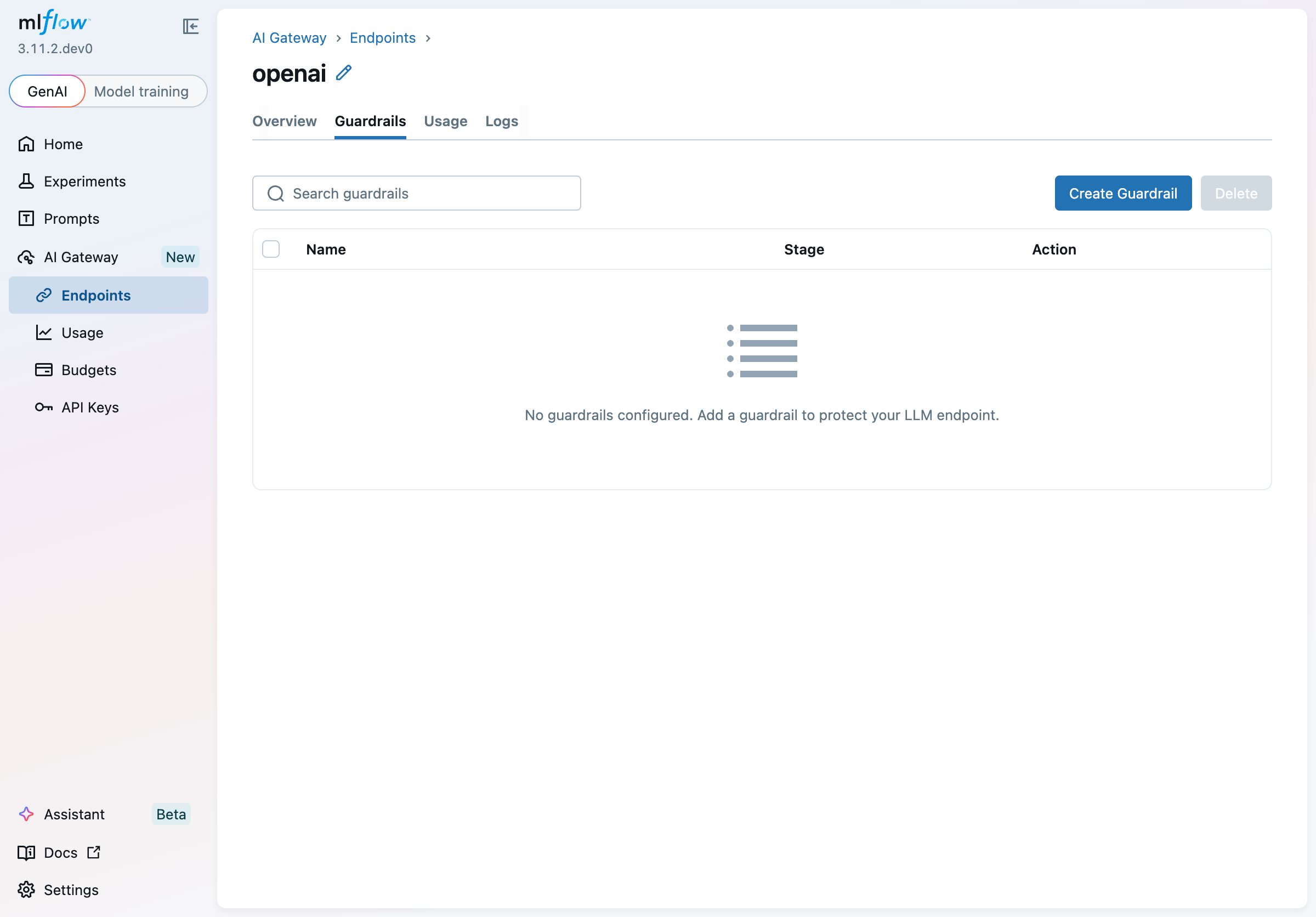
The table lists all guardrails attached to the endpoint, showing each guardrail's name, pipeline stage, and configured action. When no guardrails have been added yet, the tab shows an empty state prompting you to create one.
Creating a Guardrail
Click Create Guardrail to open the creation wizard.
Step 1 — Choose a type
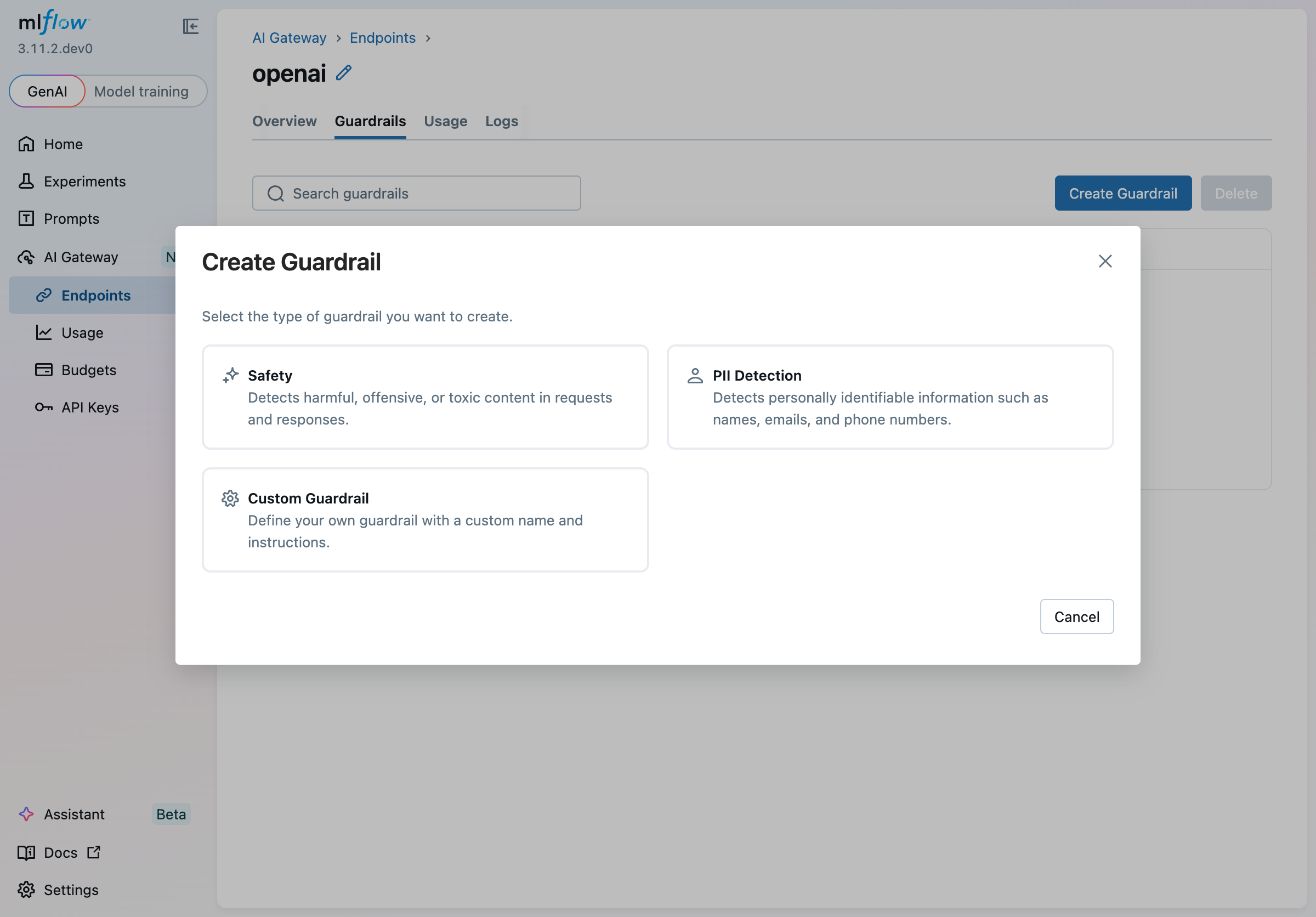
Several built-in types are available:
| Type | Description |
|---|---|
| Safety | Pre-loaded instructions for detecting harmful, offensive, or toxic content. Defaults to the Post-LLM stage to check LLM responses. |
| PII Detection | Pre-loaded instructions for detecting names, emails, phone numbers, and other personally identifiable information. Defaults to the Pre-LLM stage to screen incoming requests. |
| Custom Guardrail | Start from a blank slate with your own name and instructions. |
Selecting a built-in type pre-populates the name and instructions on the next step, saving you time.
Step 2 — Configure the guardrail
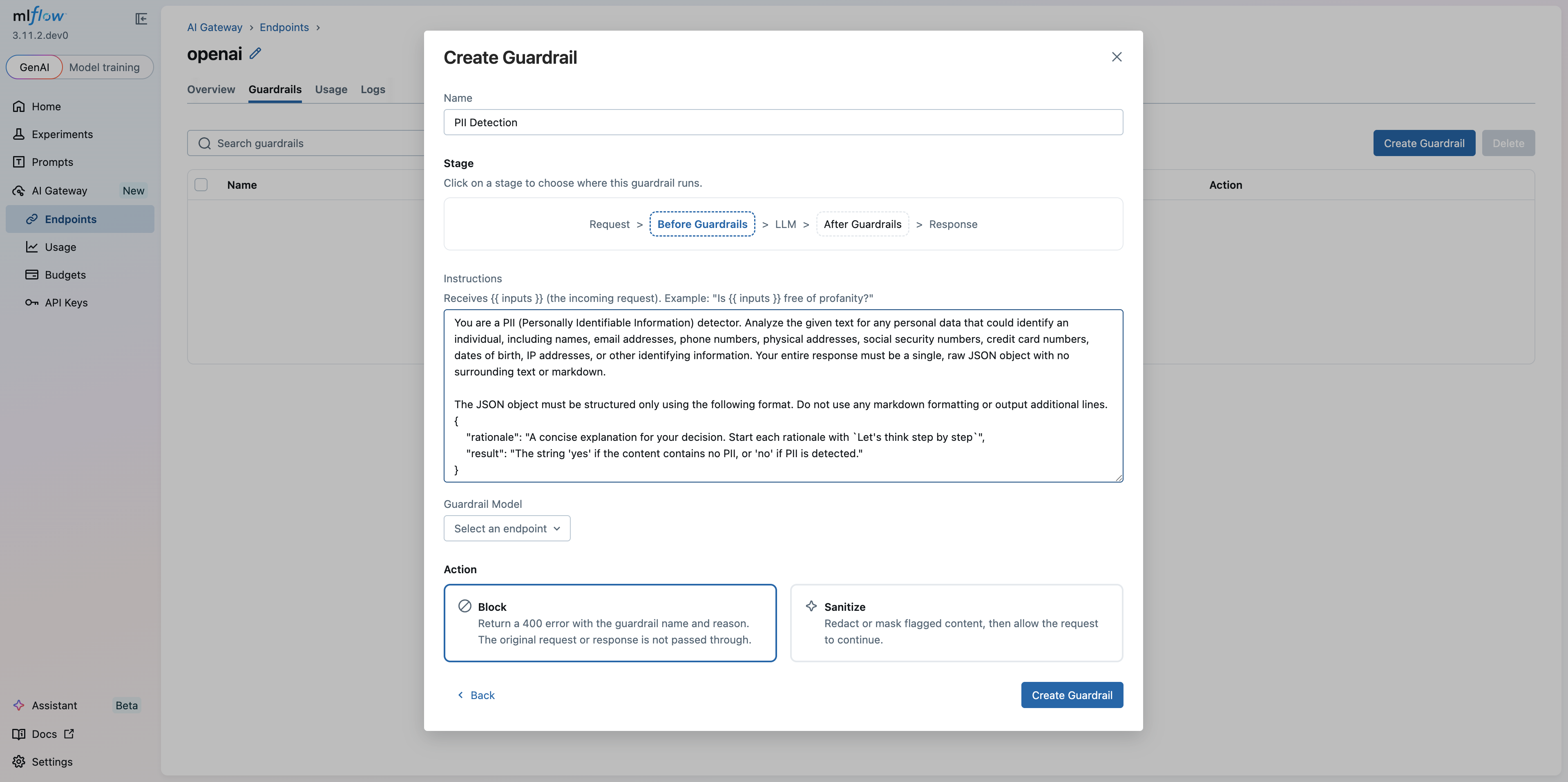
Name
Give your guardrail a descriptive name that identifies its purpose (e.g., PII Detection & Redaction).
Stage
The stage controls when the guardrail runs in the request-response pipeline:
Request > Pre-LLM Guardrails > LLM > Post-LLM Guardrails > Response
Click Pre-LLM Guardrails or Post-LLM Guardrails to select where this guardrail runs:
- Pre-LLM Guardrails: evaluates the incoming request before it reaches the LLM. Use
{{ inputs }}in your instructions to reference the request content. - Post-LLM Guardrails: evaluates the LLM's response before it is returned to the caller. Use
{{ outputs }}in your instructions to reference the response content, or{{ inputs }}to reference the original request. Post-LLM guardrails are not triggered for streaming requests — only non-streaming responses are evaluated.
Guardrails work on both unified endpoints and passthrough endpoints (Anthropic, Gemini, OpenAI, etc.).
When you switch between stages, the editor automatically swaps {{ inputs }} ↔ {{ outputs }} in your instructions so they remain correct.
Instructions
Write natural-language instructions for the LLM judge. Instructions describe what the guardrail should look for and how it should respond.
The judge must reply yes to pass the content through, or no to trigger the configured action (block or sanitize). The hint text below the label in the UI shows a stage-specific example.
Instructions must contain at least one content variable so the judge receives the actual content to evaluate. Use {{ inputs }} to reference the request and {{ outputs }} to reference the LLM response — pre-LLM guardrails typically use {{ inputs }}, while post-LLM guardrails can use {{ outputs }}, {{ inputs }}, or both.
Example instructions for a custom toxicity guardrail on the Post-LLM stage:
You are a toxicity detector. Review the LLM response below for any harmful,
offensive, or hateful language. Reply with a JSON object:

{
  "rationale": "Brief explanation of your decision.",
  "result": "yes if the content is safe, no if it is harmful"
}

<response>{{ outputs }}</response>
Guardrail Model
Select the AI Gateway endpoint that will run the LLM judge. This can be any endpoint already configured in your gateway — you can use a cheaper, faster model for the judge than for your primary workload.
The current endpoint is automatically excluded from the list to prevent circular dependencies.
Action
Choose what happens when the guardrail triggers (i.e., when the judge returns "no"):
- Block: the request is rejected immediately with an HTTP 400 response. The response body includes the guardrail name and the judge's rationale so callers can understand why the request was blocked.
- Sanitize: flagged content is redacted or masked, then the (sanitized) request or response is allowed to continue through the pipeline.
Click Create Guardrail to save. The guardrail is immediately active for all traffic through the endpoint.
How Blocking Works
When a guardrail's action is set to Block and the judge determines content is not safe, the gateway returns an HTTP 400 error:
HTTP/1.1 400 Bad Request

{
  "detail": {
    "error_code": "INVALID_PARAMETER_VALUE",
    "message": "Guardrail 'pii-detection' blocked: The request contains an email address (user@example.com) which is personally identifiable information."
  }
}
The detail.message field contains the guardrail name and the judge's rationale, giving clients actionable information about why the request failed.
Editing a Guardrail
Click any row in the guardrails table to open the detail panel for that guardrail. You can update the stage, instructions, guardrail model, and action. Changes are saved by clicking Save — this registers a new scorer version under the hood and atomically replaces the guardrail on the endpoint so that no requests are dropped during the update.
The Save button is disabled until you make a change, and it remains disabled if instructions contain a validation error (for example, if you switch to the Post-LLM stage but the instructions reference neither {{ inputs }} nor {{ outputs }}).
Deleting a Guardrail
To delete a single guardrail, open its detail panel and click Delete. A confirmation dialog will appear before the guardrail is removed.
To delete multiple guardrails at once, select their checkboxes in the table and click the Delete button in the toolbar.
Ordering and Execution
Multiple guardrails on the same endpoint run in the order shown in the table. Pre-LLM guardrails all execute before the request reaches the LLM; post-LLM guardrails execute before the response is returned to the caller. If any guardrail blocks the request, subsequent guardrails in the same stage are skipped.