Manage Versions and Aliases
MCP Registry uses semantic versioning and aliases to give you precise control over which server configurations your users and agents use. This guide covers version management, status transitions, aliases, and tags.
Semantic Versioning
Every MCP server version is identified by a semver string (e.g., 1.0.0, 2.0.0-beta.1). Versions are ordered by semantic version, so 2.0.0 is always considered newer than 1.9.0.
Status Lifecycle
Each version has a status that controls its availability:
| Status | Description |
|---|---|
| Draft | Being prepared. Not yet available for production use. |
| Active | Ready for production use. |
| Deprecated | Still accessible but should be replaced. |
| Deleted | No longer available. |
Allowed Transitions
draft→activeordeletedactive→draftordeprecateddeprecated→activeordeleted
Update Version Status
- UI
- Python
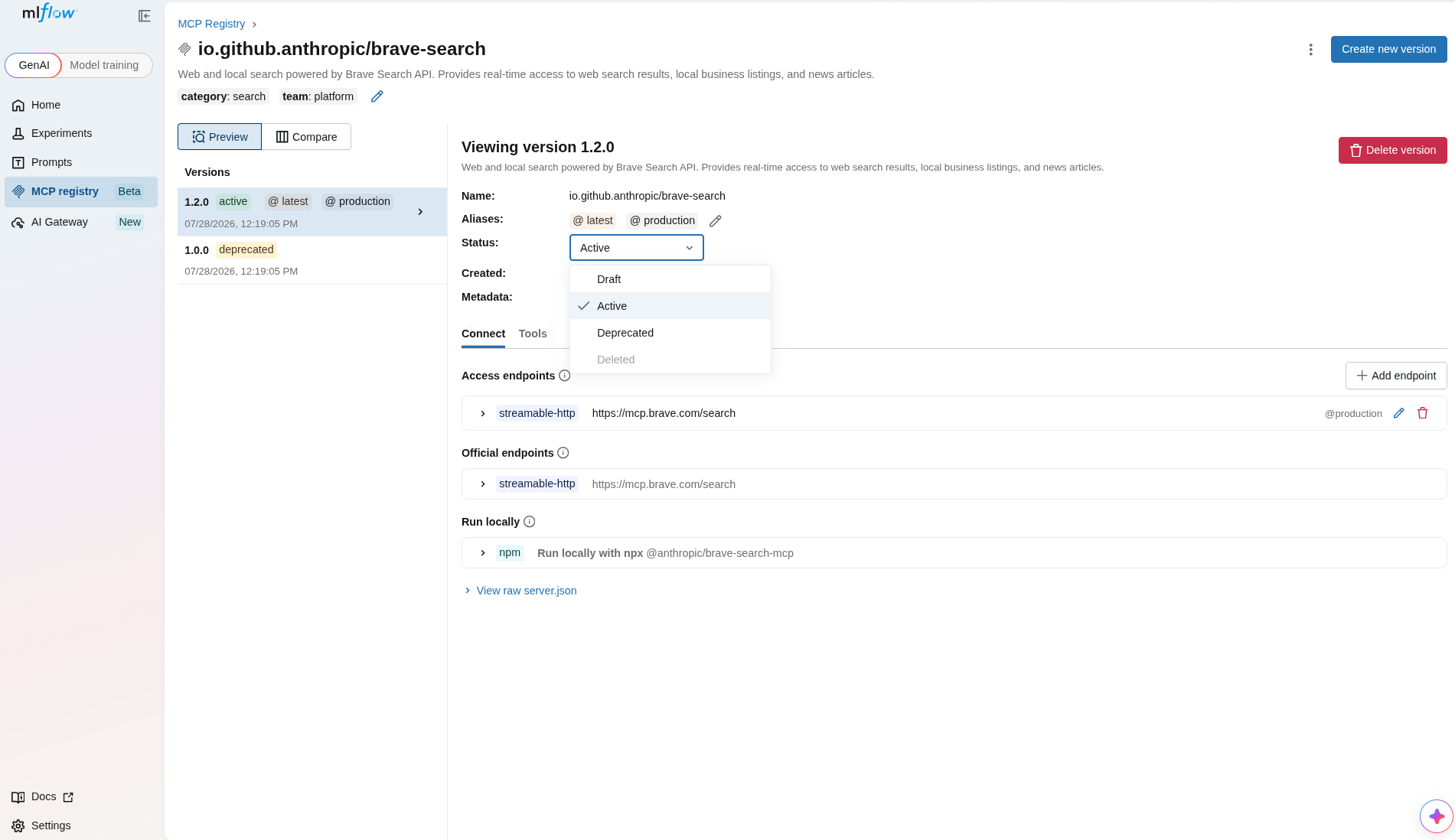
- Open the MCP server detail page.
- Select the version you want to update from the version list.
- Use the status controls to transition the version to a new status.
Use mlflow.genai.update_mcp_server_version() to change status:
import mlflow

# Promote a draft version to active
mlflow.genai.update_mcp_server_version(
    name="io.github.anthropic/brave-search",
    version="2.0.0",
    status="active",
)

# Deprecate an older version
mlflow.genai.update_mcp_server_version(
    name="io.github.anthropic/brave-search",
    version="1.0.0",
    status="deprecated",
)
Compare Versions
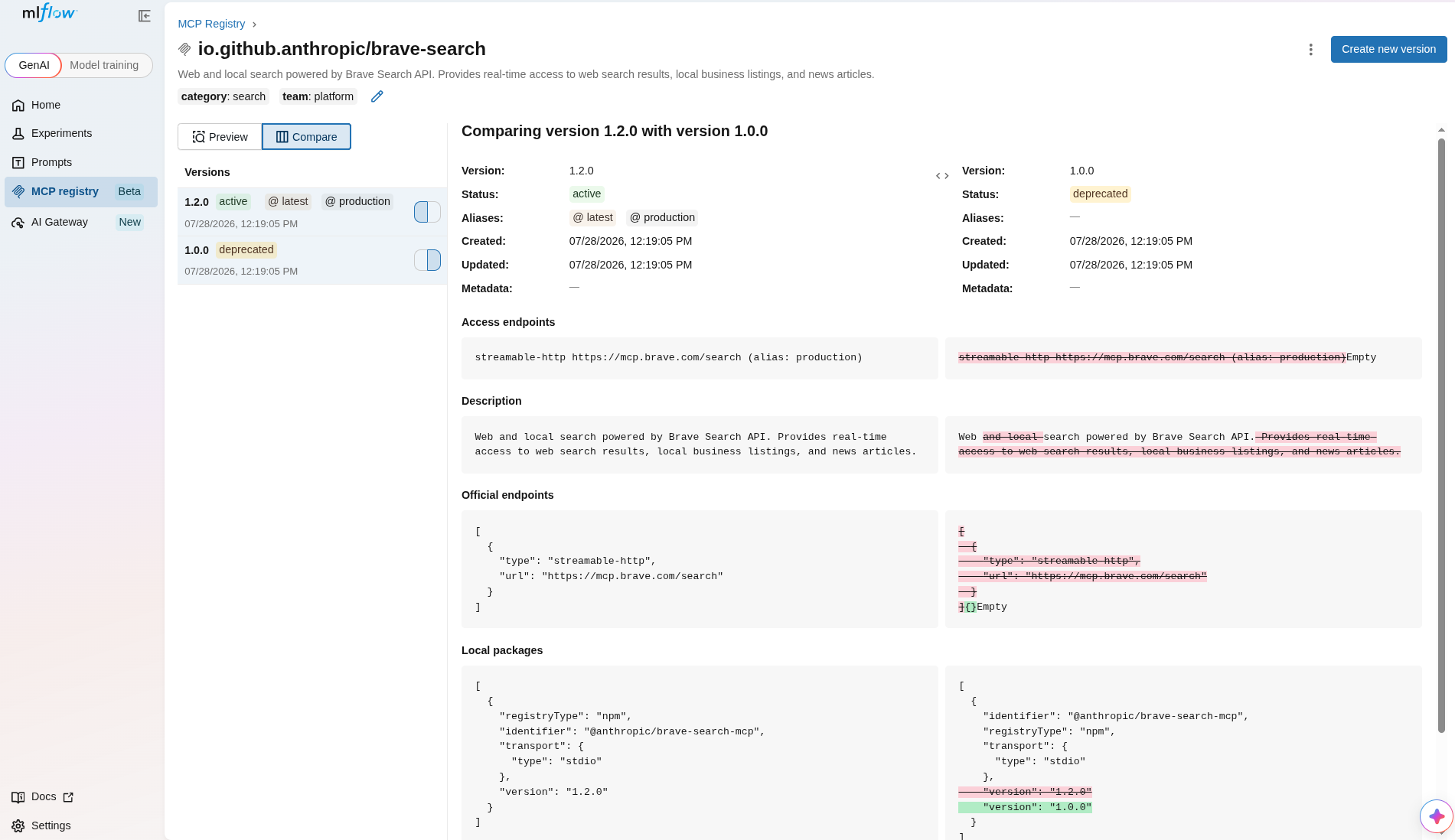
The MLflow UI provides a side-by-side comparison of server versions. On the MCP server detail page, click the Compare toggle in the version list panel to select two versions and view their differences.
Aliases
Aliases let you reference a specific version by a meaningful label (e.g., production, staging, beta) instead of a version number. This decouples your application code from specific version strings.
Create an Alias
- UI
- Python
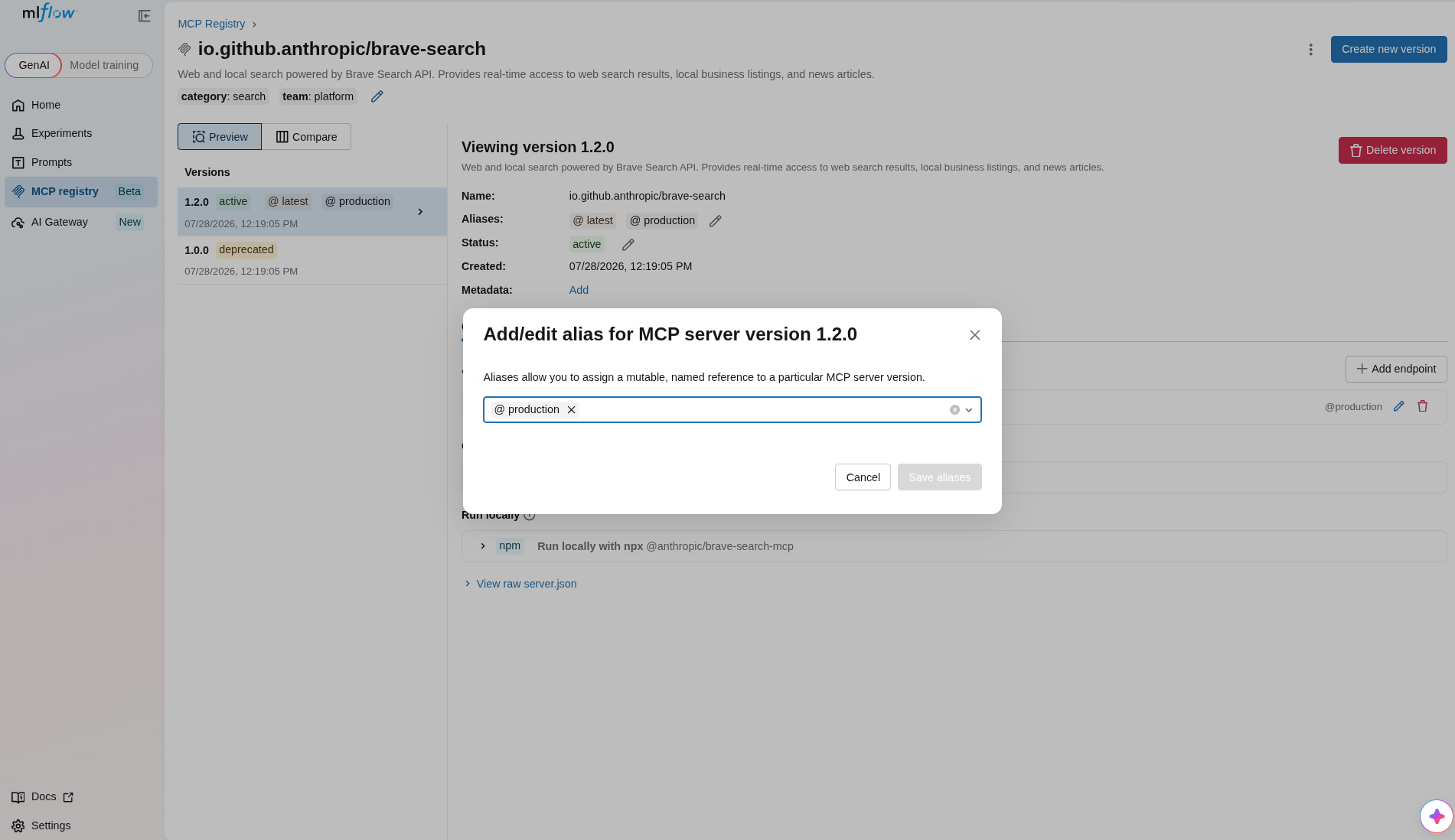
- Open the MCP server detail page.
- Click the Edit aliases button on a version.
- Enter the alias name and save.
import mlflow

# Point "production" to version 1.0.0
mlflow.genai.set_mcp_server_alias(
    name="io.github.anthropic/brave-search",
    alias="production",
    version="1.0.0",
)

# Move "production" to a newer version
mlflow.genai.set_mcp_server_alias(
    name="io.github.anthropic/brave-search",
    alias="production",
    version="2.0.0",
)
Resolve a Version by Alias
import mlflow

version = mlflow.genai.get_mcp_server_version_by_alias(
    name="io.github.anthropic/brave-search",
    alias="production",
)

print(f"Production is version {version.version}")
Reserved latest Alias
The latest alias is reserved. MLflow automatically resolves it to the highest semver version among active versions. If no version is active, it falls back to the highest non-deleted version.
import mlflow

latest = mlflow.genai.get_latest_mcp_server_version(
    name="io.github.anthropic/brave-search",
)
Delete an Alias
import mlflow

mlflow.genai.delete_mcp_server_alias(
    name="io.github.anthropic/brave-search",
    alias="staging",
)
Tags
Tags are key-value pairs you can attach to servers and versions for organization and filtering.
Server Tags
import mlflow

# Set a tag on the server
mlflow.genai.set_mcp_server_tag(
    name="io.github.anthropic/brave-search",
    key="team",
    value="platform",
)

# Delete a tag
mlflow.genai.delete_mcp_server_tag(
    name="io.github.anthropic/brave-search",
    key="team",
)
Version Tags
import mlflow

# Set a tag on a specific version
mlflow.genai.set_mcp_server_version_tag(
    name="io.github.anthropic/brave-search",
    version="1.0.0",
    key="release-notes",
    value="Initial release with web search support",
)

# Delete a version tag
mlflow.genai.delete_mcp_server_version_tag(
    name="io.github.anthropic/brave-search",
    version="1.0.0",
    key="release-notes",
)
Delete a Version
import mlflow

# Versions must be in draft or deprecated status before deletion
mlflow.genai.update_mcp_server_version(
    name="io.github.anthropic/brave-search",
    version="1.0.0",
    status="deprecated",
)

mlflow.genai.delete_mcp_server_version(
    name="io.github.anthropic/brave-search",
    version="1.0.0",
)