Register MCP Servers
This guide walks you through registering MCP servers in the MLflow MCP Registry. You can register servers from a server_json payload, from a URL, or through the UI.
Register from a server_json Payload
The most direct way to register an MCP server is by providing a server_json dictionary containing the server's configuration. Use mlflow.genai.register_mcp_server():
import mlflow

version = mlflow.genai.register_mcp_server(
    server_json={
        "name": "io.github.anthropic/brave-search",
        "version": "1.0.0",
        "description": "Brave Search MCP server for web and local search",
        "icons": [
            {"src": "https://example.com/icon-light.svg", "theme": "light"},
            {"src": "https://example.com/icon-dark.svg", "theme": "dark"},
        ],
        "packages": [
            {
                "registryType": "npm",
                "identifier": "@anthropic/brave-search-mcp",
                "transport": {"type": "stdio"},
                "version": "1.0.0",
            }
        ],
        "remotes": [
            {
                "url": "https://mcp.example.com/brave-search",
                "type": "streamable-http",
            }
        ],
    },
    status="active",
    # Optional: record the source of this server definition
    source="https://github.com/anthropic/brave-search-mcp",
)

print(f"Registered '{version.name}' version {version.version}")
If the parent MCPServer does not yet exist, it is created automatically. If you register a new version under an existing server name, a new MCPServerVersion is added.
server_json Structure
The server_json payload must contain name and version at the top level. Other fields are optional:
| Field | Required | Description |
|---|---|---|
name | Yes | Namespaced server name (e.g., io.github.anthropic/brave-search) |
version | Yes | Semantic version string (e.g., 1.0.0, 2.0.0-beta.1) |
description | No | Human-readable description of the server |
icons | No | List of icon objects with src and optional theme (light, dark, or omitted for any) |
packages | No | List of package references (npm, PyPI, Docker, etc.) for local installation |
remotes | No | List of remote endpoints where the server is deployed |
Register from a URL
If your server.json is hosted at a URL or stored as a local file, use mlflow.genai.register_mcp_server_from_url():
import mlflow

# From an HTTP URL
version = mlflow.genai.register_mcp_server_from_url(
    url="https://raw.githubusercontent.com/example/mcp-server/main/server.json",
    status="active",
)

# From a local file path
version = mlflow.genai.register_mcp_server_from_url(
    url="/path/to/server.json",
    status="draft",
)
The source field defaults to the URL when not explicitly provided, recording the provenance of the server definition.
Register via the UI
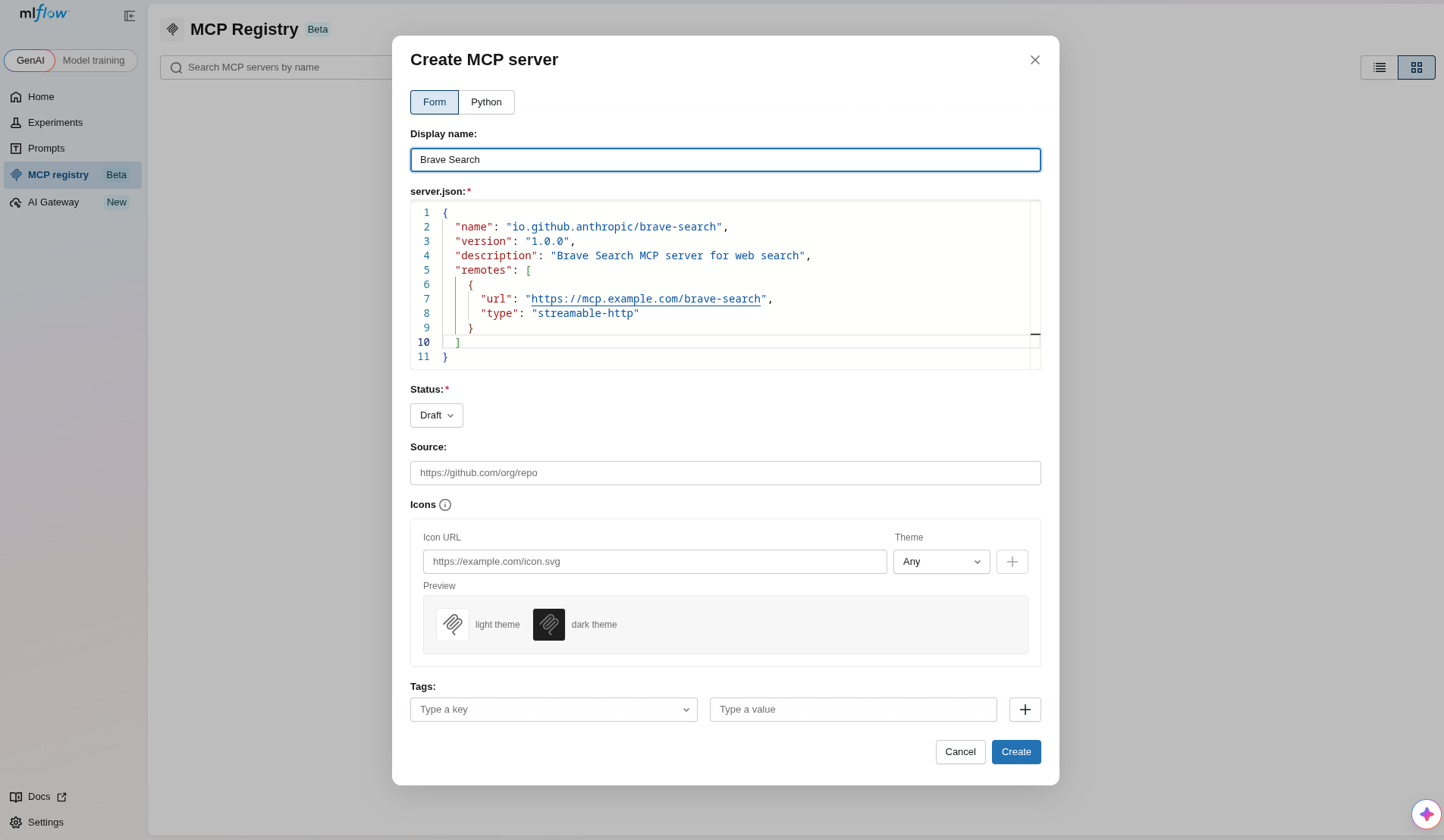
- Navigate to the MCP Registry section in the MLflow sidebar.
- Click the Create MCP server button.
- Enter a Display name for the server.
- Edit the server.json payload in the editor with the server's
name,version,description,remotes, and any other fields. - Select the initial Status and optionally provide a Source URL, icons, and tags.
- Click Create to register.
Tool Auto-Discovery
When you register a server without explicitly providing tools, MLflow automatically attempts to discover tools by connecting to the first usable remote URL in server_json.remotes[].
Tool auto-discovery requires the mcp extra: pip install 'mlflow[mcp]'. Discovery failure (network issues, auth requirements, timeouts) does not abort registration. The version is still created with tools=None.
You can control this behavior:
import mlflow

server_json = {
    "name": "io.github.anthropic/brave-search",
    "version": "1.0.0",
    "remotes": [
        {"url": "https://mcp.example.com/brave-search", "type": "streamable-http"},
    ],
}

# Let MLflow auto-discover tools (default behavior)
version = mlflow.genai.register_mcp_server(server_json=server_json)

# Skip tool discovery by passing an empty list
version = mlflow.genai.register_mcp_server(
    server_json=server_json,
    tools=[],
)

# Provide auth headers for tool discovery from a protected server
version = mlflow.genai.register_mcp_server(
    server_json=server_json,
    mcp_server_access_headers={"Authorization": "Bearer <token>"},
)
To disable tool auto-discovery globally, set the environment variable:
export MLFLOW_ENABLE_MCP_TOOL_DISCOVERY=false
Create a New Version
To add a new version of an existing server, register with the same server name but a different version:
import mlflow

version_2 = mlflow.genai.register_mcp_server(
    server_json={
        "name": "io.github.anthropic/brave-search",
        "version": "2.0.0",
        "description": "Brave Search MCP server — v2 with image search",
        "remotes": [
            {
                "url": "https://mcp.example.com/brave-search/v2",
                "type": "streamable-http",
            }
        ],
    },
    status="active",
)
Auto-Create Access Endpoints from Remotes
When registering with status="active", you can automatically create access endpoints from the remotes[] entries in server_json:
import mlflow

version = mlflow.genai.register_mcp_server(
    server_json={
        "name": "io.github.anthropic/brave-search",
        "version": "1.0.0",
        "remotes": [
            {"url": "https://mcp.example.com/brave-search", "type": "streamable-http"},
            {"url": "https://mcp-sse.example.com/brave-search", "type": "sse"},
        ],
    },
    status="active",
    create_access_endpoints_from_remotes=True,
)
This creates one MCPAccessEndpoint per remote entry, pinned to the registered version.
Update and Delete Servers
import mlflow

# Update server metadata
mlflow.genai.update_mcp_server(
    name="io.github.anthropic/brave-search",
    display_name="Brave Search",
    description="Updated description",
)

# Delete a server (all versions must be non-active first)
mlflow.genai.delete_mcp_server(name="io.github.anthropic/brave-search")