Prompt Registry
MLflow Prompt Registry is a powerful tool that streamlines prompt engineering and management in your LLM applications and AI agents. It enables you to version, track, and reuse prompts across your organization, helping maintain consistency and improving collaboration in prompt development.
Try the MLflow LLMs and Agents Demo
The quickest way to learn about MLflow for LLMs and AI Agents is to try the demo. Click to launch the demo ↓
Public Demo
Visit demo.mlflow.org to explore a publicly hosted MLflow instance pre-loaded with sample data.
Starting from UI
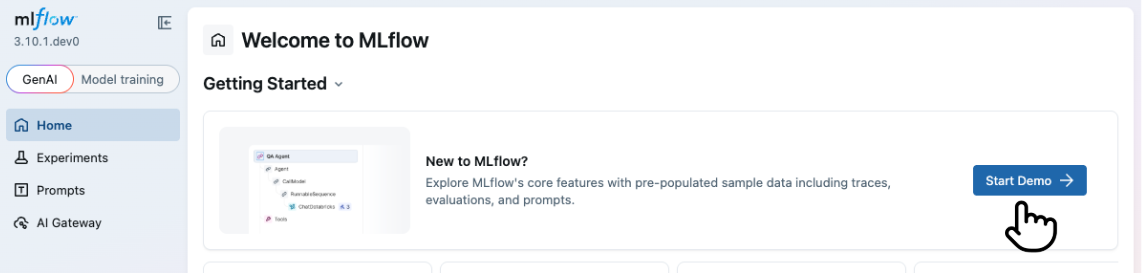
To start the demo, click on the "Start Demo" button on the top page of the MLflow UI.
Starting from CLI
Alternatively, you can start the demo from the command line using the mlflow demo command. This option does
not require you to have a running MLflow server.
uvx mlflow demo
Key Benefits
Version Control
Track the evolution of your prompts with Git-inspired commit-based versioning and side-by-side comparison with diff highlighting. Prompt versions in MLflow are immutable, providing strong guarantees for reproducibility.
Aliasing
Build robust yet flexible deployment pipelines for prompts, allowing you to isolate prompt versions from main application code and perform tasks such as A/B testing and roll-backs with ease.
Lineage
Seamlessly integrated with MLflow's Tracing, Evaluation, and Monitoring capabilities for agent observability and quality improvement.
Collaboration
Share prompts across your organization with a centralized registry, enabling teams to build upon each other's work.
Getting Started
1. Create a Prompt
- UI
- Python

- Run
mlflow serverin your terminal to start the MLflow UI. - Navigate to the Prompts tab in the MLflow UI.
- Click on the Create Prompt button.
- Fill in the prompt details such as name, prompt template text, and commit message (optional).
- Click Create to register the prompt.
Prompt template text can contain variables in {{variable}} format. These variables can be filled with dynamic content when using the prompt in your LLM application or AI agent. MLflow also provides the to_single_brace_format() API to convert templates into single brace format for frameworks like LangChain or LlamaIndex that require single brace interpolation.
To create a new prompt using the Python API, use mlflow.genai.register_prompt() API:
import mlflow

# Use double curly braces for variables in the template
initial_template = """\
Summarize content you are provided with in {{ num_sentences }} sentences.

Sentences: {{ sentences }}
"""

# Register a new prompt
prompt = mlflow.genai.register_prompt(
    name="summarization-prompt",
    template=initial_template,
    # Optional: Provide a commit message to describe the changes
    commit_message="Initial commit",
    # Optional: Specify tags for this prompt
    tags={
        "author": "author@example.com",
        "task": "summarization",
        "language": "en",
    },
)

# The prompt object contains information about the registered prompt
print(f"Created prompt '{prompt.name}' (version {prompt.version})")
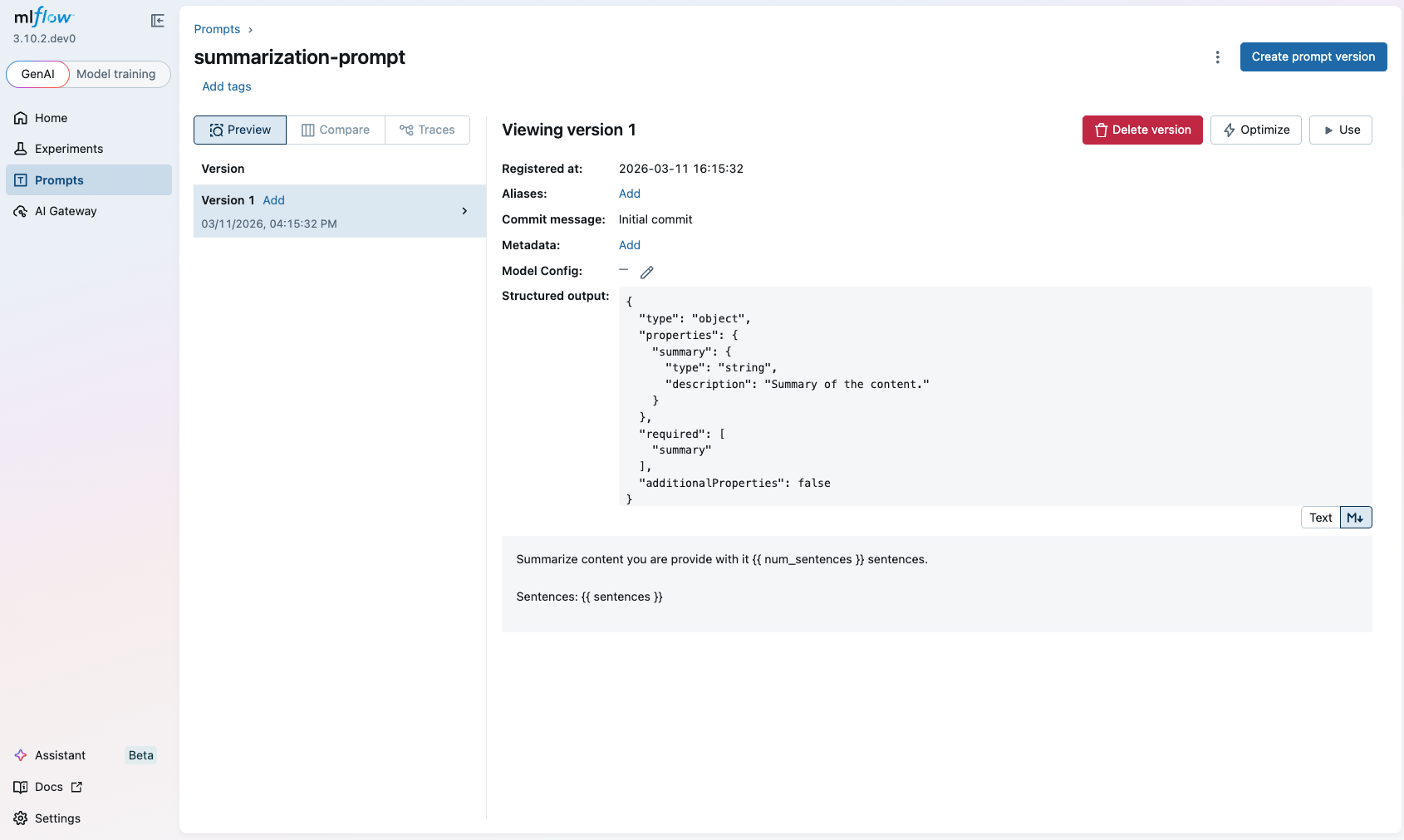
This creates a new prompt with the specified template text and metadata. The prompt is now available in the MLflow UI for further management.
2. Update the Prompt with a New Version
- UI
- Python
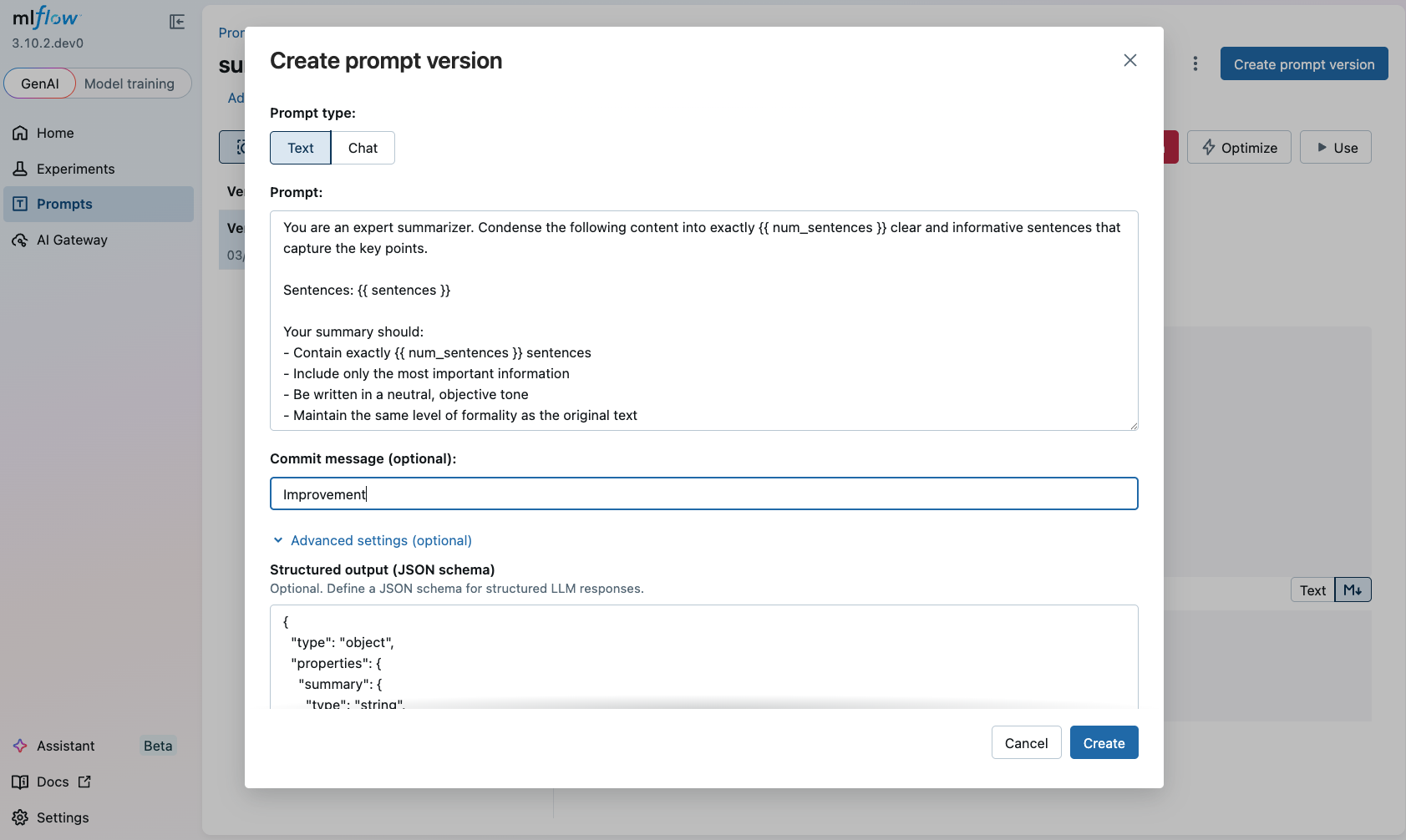
- The previous step leads to the created prompt page. (If you closed the page, navigate to the Prompts tab in the MLflow UI and click on the prompt name.)
- Click on the Create prompt Version button.
- The popup dialog is pre-filled with the existing prompt text. Modify the prompt as you wish.
- Click Create to register the new version.
To update an existing prompt with a new version, use the mlflow.genai.register_prompt() API with the existing prompt name:
import mlflow

new_template = """\
You are an expert summarizer. Condense the following content into exactly {{ num_sentences }} clear and informative sentences that capture the key points.

Sentences: {{ sentences }}

Your summary should:
- Contain exactly {{ num_sentences }} sentences
- Include only the most important information
- Be written in a neutral, objective tone
- Maintain the same level of formality as the original text
"""

# Register a new version of an existing prompt
updated_prompt = mlflow.genai.register_prompt(
    name="summarization-prompt",  # Specify the existing prompt name
    template=new_template,
    commit_message="Improvement",
    tags={
        "author": "author@example.com",
    },
)
3. Compare the Prompt Versions
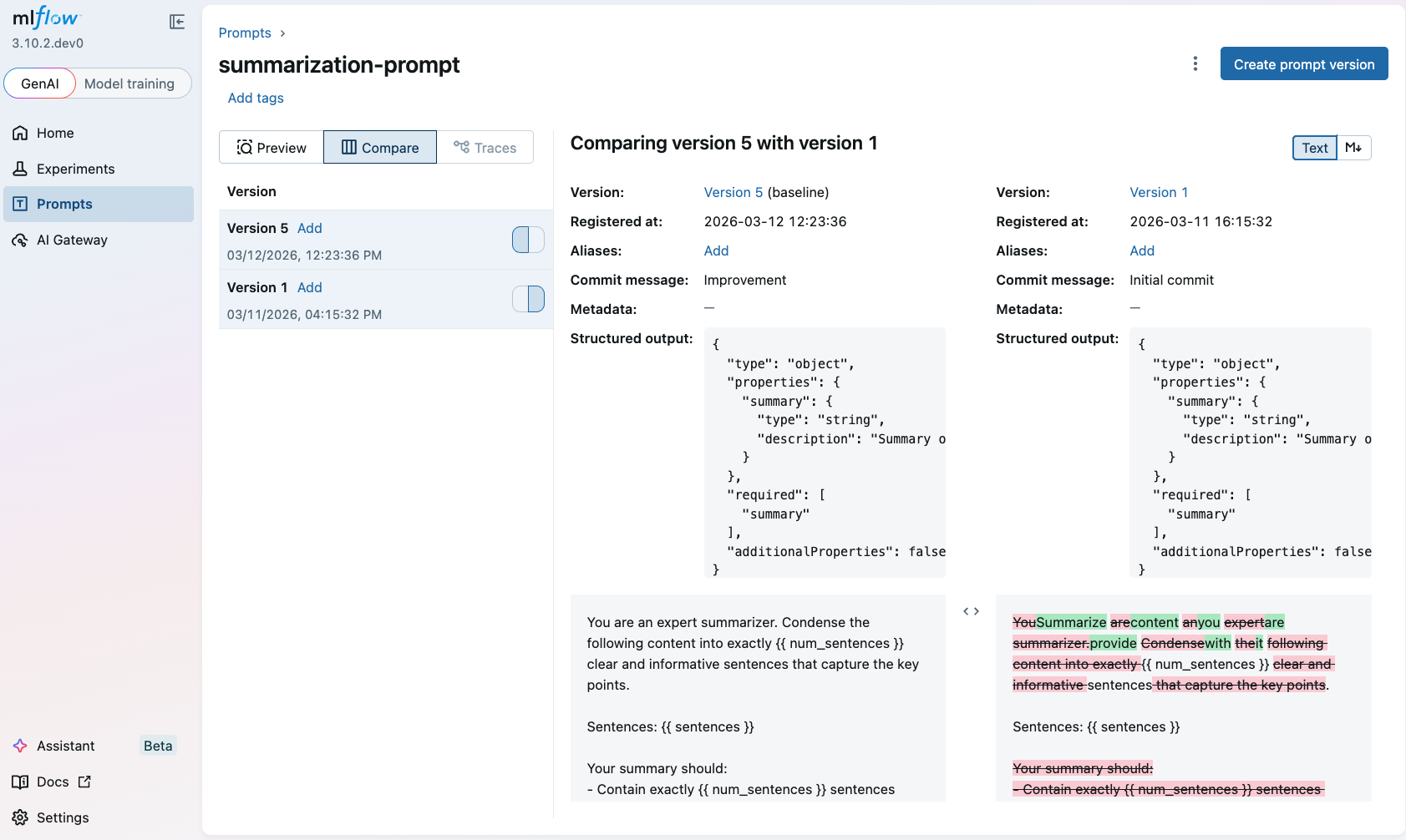
Once you have multiple versions of a prompt, you can compare them to understand the changes between versions. To compare prompt versions in the MLflow UI, click on the Compare tab in the prompt details page:
4. Load and Use the Prompt
To use a prompt in your LLM application or AI agent, you can load it with the mlflow.genai.load_prompt() API and fill in the variables using the mlflow.entities.Prompt.format() method of the prompt object.
import mlflow
import openai

target_text = """
MLflow is the largest open source AI engineering platform for agents and LLMs. It enables teams of all sizes
to debug, evaluate, monitor, and optimize production-quality AI applications,
while controlling costs and managing access to LLMs and data.
"""

# Load the prompt
prompt = mlflow.genai.load_prompt("prompts:/summarization-prompt/2")

# Use the prompt with an LLM
client = openai.OpenAI()
response = client.chat.completions.create(
    messages=[
        {
            "role": "user",
            "content": prompt.format(num_sentences=1, sentences=target_text),
        }
    ],
    model="gpt-4o-mini",
)

print(response.choices[0].message.content)
5. Search Prompts
You can discover prompts by name, tag or other registry fields:
import mlflow

# Fluent API: returns a flat list of all matching prompts
prompts = mlflow.genai.search_prompts(filter_string="task='summarization'")
print(f"Found {len(prompts)} prompts")

# For pagination control, use the client API:
from mlflow.tracking import MlflowClient

client = MlflowClient()
all_prompts = []
token = None
while True:
    page = client.search_prompts(
        filter_string="task='summarization'",
        max_results=50,
        page_token=token,
    )
    all_prompts.extend(page)
    token = page.token
    if not token:
        break
print(f"Total prompts across pages: {len(all_prompts)}")
Any registered prompt can be loaded directly into the LLM Playground for interactive testing against an AI Gateway endpoint. Chat-typed prompts preserve their full message structure, and any stored model config is applied automatically.
Prompt Object
The Prompt object is the core entity in MLflow Prompt Registry. It represents a versioned template text that can contain variables for dynamic content.
Key attributes of a Prompt object:
Name: A unique identifier for the prompt.Template: The content of the prompt, which can be either:- A string containing text with variables in
{{variable}}format (text prompts) - A list of dictionaries representing chat messages with 'role' and 'content' keys (chat prompts)
- A string containing text with variables in
Version: A sequential number representing the revision of the prompt.Commit Message: A description of the changes made in the prompt version, similar to Git commit messages.Tags: Optional key-value pairs assigned at the prompt version for categorization and filtering. For example, you may add tags for project name, language, etc, which apply to all versions of the prompt.Alias: An mutable named reference to the prompt. For example, you can create an alias namedproductionto refer to the version used in your production system. See Aliases for more details.is_text_prompt: A boolean property indicating whether the prompt is a text prompt (True) or chat prompt (False).response_format: An optional property containing the expected response structure specification, which can be used to validate or structure outputs from LLM calls.model_config: An optional dictionary containing model-specific configuration such as model name, temperature, max_tokens, and other inference parameters. See Model Configuration for more details.
Prompt Types
Text Prompts
Text prompts use a simple string template with variables enclosed in double curly braces:
text_template = "Hello {{ name }}, how are you today?"
Chat Prompts
Chat prompts use a list of message dictionaries, each with 'role' and 'content' keys:
chat_template = [
    {"role": "system", "content": "You are a helpful {{ style }} assistant."},
    {"role": "user", "content": "{{ question }}"},
]
Jinja2 Prompts
For advanced templating needs, MLflow supports Jinja2 templates with conditionals, loops, and filters. Jinja2 prompts are automatically detected when the template contains control flow syntax ({% %}):
import mlflow

# Jinja2 template with conditionals and loops
jinja_template = """\
Hello {% if name %}{{ name }}{% else %}Guest{% endif %}!

{% if items %}
Here are your items:
{% for item in items %}
- {{ item }}
{% endfor %}
{% endif %}
"""

# Register the Jinja2 prompt
prompt = mlflow.genai.register_prompt(
    name="greeting-prompt",
    template=jinja_template,
)

# Format with variables
result = prompt.format(name="Alice", items=["Book", "Pen", "Notebook"])
- Templates with only
{{ variable }}syntax are treated as text prompts and use simple string substitution - Templates containing
{% %}control flow syntax are treated as Jinja2 prompts and support the full Jinja2 feature set - Jinja2 rendering uses
SandboxedEnvironmentby default for security. Passuse_jinja_sandbox=Falsetoformat()if you need unrestricted Jinja2 features
Response Format
The response_format property allows you to specify the expected structure of responses from LLM calls. This can be either a Pydantic model class or a dictionary defining the schema:
from pydantic import BaseModel


class SummaryResponse(BaseModel):
    summary: str
    key_points: list[str]
    word_count: int


# Or as a dictionary
response_format_dict = {
    "type": "object",
    "properties": {
        "summary": {"type": "string"},
        "key_points": {"type": "array", "items": {"type": "string"}},
        "word_count": {"type": "integer"},
    },
}
Manage Prompt and Version Tags
MLflow lets you modify and inspect tags after a prompt has been registered. Tags can be applied either at the prompt level or to individual prompt versions.
import mlflow

# Prompt-level tag operations
mlflow.genai.set_prompt_tag("summarization-prompt", "language", "en")
mlflow.genai.get_prompt_tags("summarization-prompt")
mlflow.genai.delete_prompt_tag("summarization-prompt", "language")

# Prompt-version tag operations
mlflow.genai.set_prompt_version_tag("summarization-prompt", 1, "author", "alice")
mlflow.genai.load_prompt("prompts:/summarization-prompt/1").tags
mlflow.genai.delete_prompt_version_tag("summarization-prompt", 1, "author")
Model Configuration
MLflow Prompt Registry allows you to store model-specific configuration alongside your prompts, ensuring reproducibility and clarity about which model and parameters were used with a particular prompt version. This is especially useful when you want to:
- Version both prompt templates and model parameters together
- Share prompts with recommended model settings across your team
- Reproduce exact inference configurations from previous experiments
- Maintain different model configurations for different prompt versions
Basic Usage
You can attach model configuration to a prompt by passing a model_config parameter when registering:
import mlflow

# Using a dictionary
model_config = {
    "model_name": "gpt-4",
    "temperature": 0.7,
    "max_tokens": 1000,
    "top_p": 0.9,
}

mlflow.genai.register_prompt(
    name="qa-prompt",
    template="Answer the following question: {{question}}",
    model_config=model_config,
    commit_message="QA prompt with model config",
)

# Load and access the model config
prompt = mlflow.genai.load_prompt("qa-prompt")
print(f"Model: {prompt.model_config['model_name']}")
print(f"Temperature: {prompt.model_config['temperature']}")
Using PromptModelConfig Class
For better type safety and validation, you can use the mlflow.entities.model_registry.PromptModelConfig() class:
import mlflow
from mlflow.entities.model_registry import PromptModelConfig

# Create a validated config object
config = PromptModelConfig(
    model_name="gpt-4-turbo",
    temperature=0.5,
    max_tokens=2000,
    top_p=0.95,
    frequency_penalty=0.2,
    presence_penalty=0.1,
    stop_sequences=["END", "\n\n"],
)

mlflow.genai.register_prompt(
    name="creative-prompt",
    template="Write a creative story about {{topic}}",
    model_config=config,
)
The PromptModelConfig class provides validation to catch errors early:
# This will raise a ValueError
config = PromptModelConfig(temperature=-1.0)  # temperature must be non-negative

# This will raise a ValueError
config = PromptModelConfig(max_tokens=-100)  # max_tokens must be positive
Supported Configuration Parameters
The following standard parameters are supported in PromptModelConfig:
model_name(str): The name or identifier of the model (e.g., "gpt-4", "claude-3-opus")temperature(float): Sampling temperature for controlling randomness (typically 0.0-2.0)max_tokens(int): Maximum number of tokens to generate in the responsetop_p(float): Nucleus sampling parameter (typically 0.0-1.0)top_k(int): Top-k sampling parameterfrequency_penalty(float): Penalty for token frequency (typically -2.0 to 2.0)presence_penalty(float): Penalty for token presence (typically -2.0 to 2.0)stop_sequences(list[str]): List of sequences that will cause the model to stop generatingextra_params(dict): Additional provider-specific or experimental parameters
Provider-Specific Parameters
You can include provider-specific parameters using the extra_params field:
# Anthropic-specific configuration with extended thinking
# See: https://docs.anthropic.com/en/docs/build-with-claude/extended-thinking
anthropic_thinking_config = PromptModelConfig(
    model_name="claude-sonnet-4-20250514",
    max_tokens=16000,
    extra_params={
        # Enable extended thinking for complex reasoning tasks
        "thinking": {
            "type": "enabled",
            "budget_tokens": 10000,  # Max tokens for internal reasoning
        },
        # User tracking for abuse detection
        "metadata": {
            "user_id": "user-123",
        },
    },
)

# OpenAI-specific configuration with reproducibility and structured output
# See: https://platform.openai.com/docs/api-reference/chat/create
openai_config = PromptModelConfig(
    model_name="gpt-4o",
    temperature=0.7,
    max_tokens=2000,
    extra_params={
        # Seed for reproducible outputs
        "seed": 42,
        # Bias specific tokens (token_id: bias from -100 to 100)
        "logit_bias": {"50256": -100},  # Discourage <|endoftext|>
        # User identifier for abuse tracking
        "user": "user-123",
        # Service tier for priority processing
        "service_tier": "default",
    },
)
Managing Model Configuration
Model configuration is mutable and can be updated after a prompt version is created. This makes it easy to fix mistakes or iterate on model parameters without creating new prompt versions.
Setting or Updating Model Config
Use mlflow.genai.set_prompt_model_config() to set or update the model configuration for a prompt version:
import mlflow
from mlflow.entities.model_registry import PromptModelConfig

# Register a prompt without model config
mlflow.genai.register_prompt(
    name="my-prompt",
    template="Analyze: {{text}}",
)

# Later, add model config
mlflow.genai.set_prompt_model_config(
    name="my-prompt",
    version=1,
    model_config={"model_name": "gpt-4", "temperature": 0.7},
)

# Or update existing model config
mlflow.genai.set_prompt_model_config(
    name="my-prompt",
    version=1,
    model_config={"model_name": "gpt-4-turbo", "temperature": 0.8, "max_tokens": 2000},
)

# Verify the update
prompt = mlflow.genai.load_prompt("my-prompt", version=1)
print(prompt.model_config)
Deleting Model Config
Use mlflow.genai.delete_prompt_model_config() to remove model configuration from a prompt version:
import mlflow

# Remove model config
mlflow.genai.delete_prompt_model_config(name="my-prompt", version=1)

# Verify removal
prompt = mlflow.genai.load_prompt("my-prompt", version=1)
assert prompt.model_config is None
Important Notes
- Model config changes are version-specific - updating one version doesn't affect others
- Model config is mutable - unlike the prompt template, it can be changed after creation
- Changes are immediate - no need to create a new version to fix model parameters
- Validation applies - The same validation rules apply when updating as when creating
Prompt Caching
MLflow automatically caches loaded prompts in memory to improve performance and reduce repeated API calls. The caching behavior differs based on whether you're loading a prompt by version or by alias.
Default Caching Behavior
- Version-based prompts (e.g.,
prompts:/summarization-prompt/1): Cached with infinite TTL by default. Since prompt versions are immutable, they can be safely cached indefinitely. - Alias-based prompts (e.g.,
prompts:/summarization-prompt@latestorprompts:/summarization-prompt@production): Cached with 60 seconds TTL by default. Aliases can point to different versions over time, so a shorter TTL ensures your application picks up updates.
Customizing Cache Behavior
Per-Request Cache Control
You can control caching on a per-request basis using the cache_ttl_seconds parameter:
import mlflow

# Custom TTL: Cache for 5 minutes
prompt = mlflow.genai.load_prompt("prompts:/summarization-prompt/1", cache_ttl_seconds=300)

# Bypass cache entirely: Always fetch from registry
prompt = mlflow.genai.load_prompt("prompts:/summarization-prompt@production", cache_ttl_seconds=0)

# Use infinite TTL even for alias-based prompts
prompt = mlflow.genai.load_prompt(
    "prompts:/summarization-prompt@latest", cache_ttl_seconds=float("inf")
)
Global Cache Configuration
You can set default TTL values globally using environment variables:
# Set alias-based prompt cache TTL to 5 minutes
export MLFLOW_ALIAS_PROMPT_CACHE_TTL_SECONDS=300

# Set version-based prompt cache TTL to 1 hour (instead of infinite)
export MLFLOW_VERSION_PROMPT_CACHE_TTL_SECONDS=3600

# Disable caching globally
export MLFLOW_ALIAS_PROMPT_CACHE_TTL_SECONDS=0
export MLFLOW_VERSION_PROMPT_CACHE_TTL_SECONDS=0
Cache Invalidation
The cache is automatically invalidated when you modify the prompt version or alias, including the following operations:
mlflow.genai.set_prompt_version_tagmlflow.genai.set_prompt_aliasmlflow.genai.delete_prompt_version_tagmlflow.genai.delete_prompt_alias
FAQ
Q: How do I delete a prompt version?
A: You can delete a prompt version using the MLflow UI or Python API:
import mlflow

# Delete a prompt version
client = mlflow.MlflowClient()
client.delete_prompt_version("summarization-prompt", version=2)
To avoid accidental deletion, you can only delete one version at a time via API. If you delete the all versions of a prompt, the prompt itself will be deleted.
Q: Can I update the prompt template of an existing prompt version?
A: No, prompt versions are immutable once created. To update a prompt, create a new version with the desired changes.
Q: How to dynamically load the latest version of a prompt?
A: You can load the latest version of a prompt by passing the name only, or using the @latest alias. This is the reserved alias name and MLflow will automatically find the latest available version of the prompt.
prompt = mlflow.genai.load_prompt("summarization-prompt")
# or
prompt = mlflow.genai.load_prompt("prompts:/summarization-prompt@latest")
Q: Can I use prompt templates with frameworks like LangChain or LlamaIndex?
A: Yes, you can load prompts from MLflow and use them with any framework. For example, the following example demonstrates how to use a prompt registered in MLflow with LangChain. Also refer to Logging Prompts with LangChain for more details.
import mlflow
from langchain.prompts import PromptTemplate

# Load prompt from MLflow
prompt = mlflow.genai.load_prompt("question_answering")

# Convert the prompt to single brace format for LangChain (MLflow uses double braces),
# using the `to_single_brace_format` method.
langchain_prompt = PromptTemplate.from_template(prompt.to_single_brace_format())
print(langchain_prompt.input_variables)
# Output: ['num_sentences', 'sentences']
Q: Can I test a registered prompt in the MLflow UI?
A: Yes. Open the LLM Playground and click Load prompt from registry to pull any prompt version into the conversation. Chat-typed prompts keep their full message structure, text-typed prompts load as a single user message, and any stored model config (model, temperature, max_tokens, response format) is applied automatically.
Q: Is Prompt Registry integrated with the Prompt Engineering UI?
A. Direct integration between the Prompt Registry and the Prompt Engineering UI is coming soon. In the meantime, you can iterate on prompt template in the Prompt Engineering UI and register the final version in the Prompt Registry by manually copying the prompt template.