Skill Registry
Skill Registry is experimental. APIs and behavior may change in future releases.
MLflow Skill Registry provides a centralized catalog for registering, versioning, and sharing agent skills. A skill contains a SKILL.md file with instructions and can include supporting files, such as scripts and reference documents. Register skills so users can discover them, track their versions, and download them for use with their agents.
You can upload a local directory or register content from Git, an OCI registry, or a ZIP URL. Uploaded content is stored as MLflow artifacts. For external sources, the registry records where to fetch the content.
Key Benefits
Centralized Catalog
Keep your organization's skills in one catalog, with descriptions, tags, and source information.
Version Control
Track changes with numbered versions. Manage draft, active, and deprecated versions, and assign aliases such as production.
Skill Discovery
Search registered skills by name, organization, status, source type, or tags. Import multiple skills from a Git repository.
Use with Your Agents
Download skills by version or alias. Get CLI and Python instructions for placing files where your agent loads skills.
Getting Started
1. Register a Skill
SKILL.md contains the skill's instructions and YAML frontmatter that declares its name. Create a directory named code-review and save this example as code-review/SKILL.md:
---
name: code-review
description: Review code changes for correctness and maintainability.
---

# Code review

Read the proposed changes and their tests. Identify bugs, explain their impact,
and suggest focused fixes. Reference the affected files in your findings.
- UI
- Python
- CLI
- Run
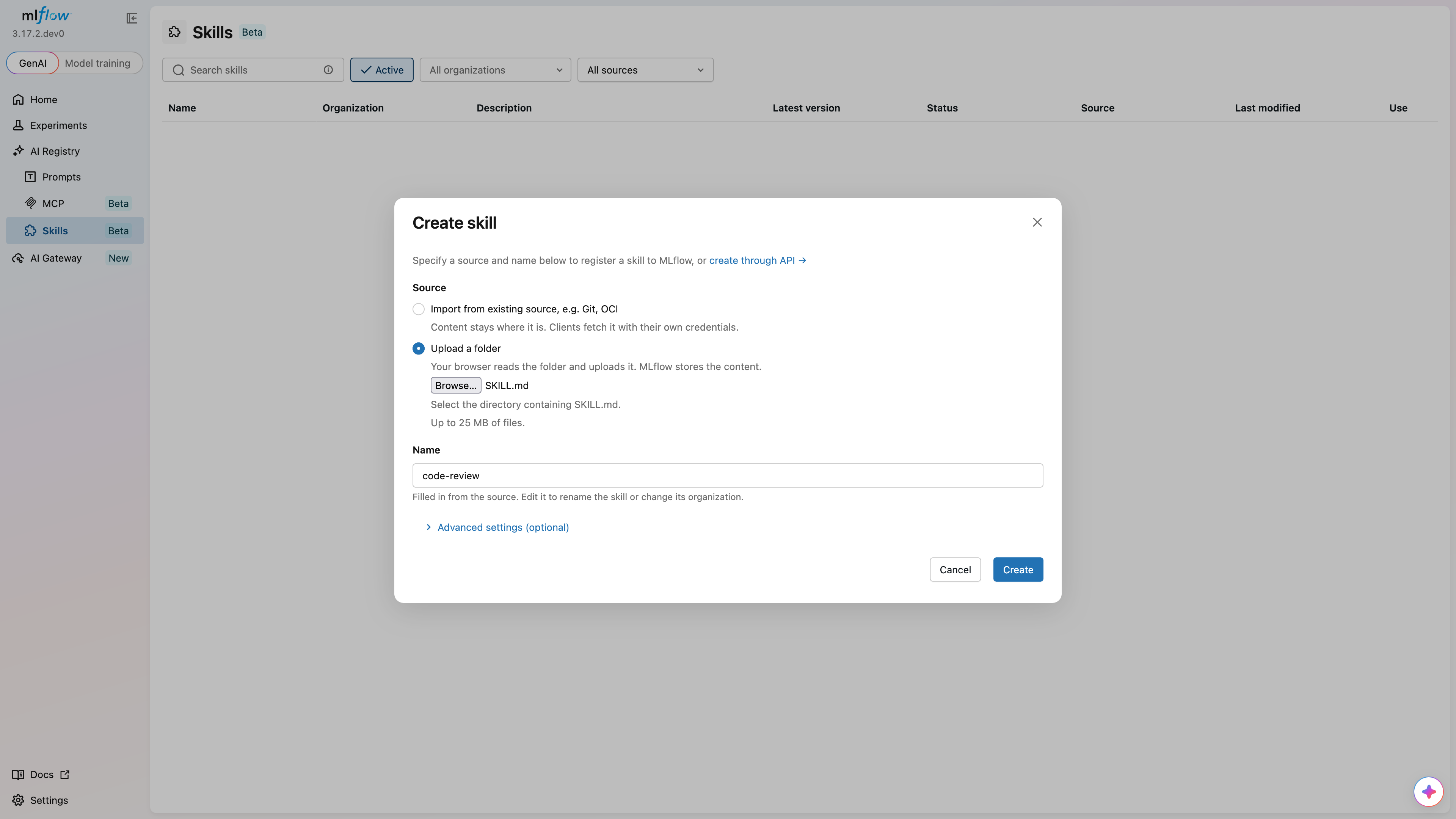
mlflow serverin your terminal to start the MLflow UI. - Navigate to Skills in the sidebar.
- Click Create skill.
- Select Upload a folder and choose the
code-reviewdirectory. - Review the name read from
SKILL.md. - Click Create to register the skill.
Set MLFLOW_TRACKING_URI to your running MLflow server before using the Python API.
Use mlflow.genai.register_skill() to inspect and upload the directory:
import mlflow

version = mlflow.genai.register_skill(source="./code-review")
print(f"Registered '{version.name}' version {version.version}")
Set MLFLOW_TRACKING_URI to your running MLflow server before using the CLI.
mlflow skills register --source ./code-review
Registration creates the parent skill if needed and defaults to active status. The first version is 1; each subsequent single-skill registration creates a new integer version.
2. Browse Registered Skills
- UI
- Python
- CLI
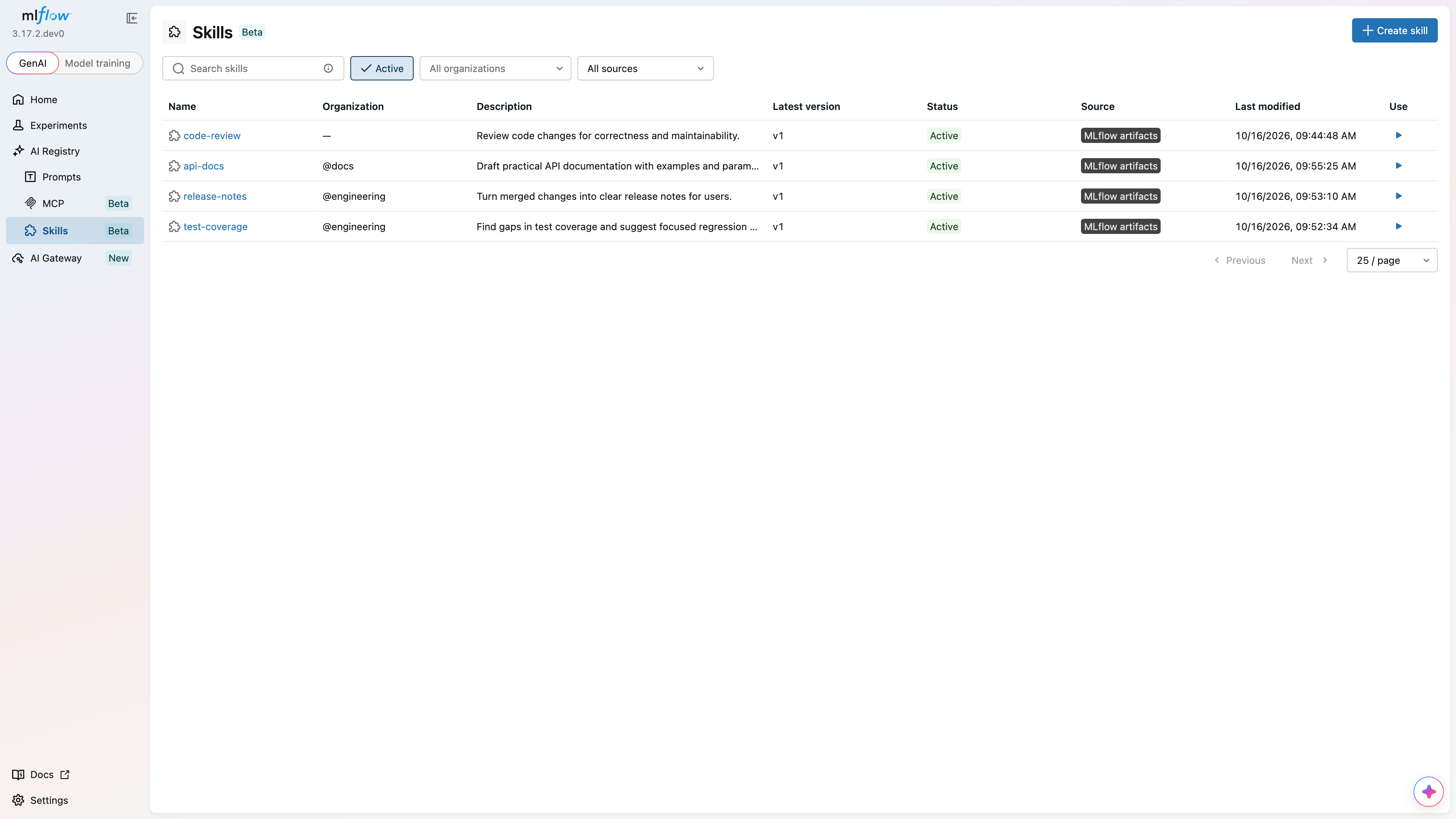
The Skills page displays the registered catalog. Search by name or filter by organization, status, and source type. Open a skill to inspect its versions, source, tags, and aliases.
Use mlflow.genai.search_skills() to find registered skills:
import mlflow

skills = mlflow.genai.search_skills()
for skill in skills:
    print(f"{skill.name}: {skill.description}")

active_skills = mlflow.genai.search_skills(filter_string="status = 'active'")
mlflow skills search --filter-string "status = 'active'" --output json
3. Pull a Skill
Pulling downloads a registered skill's files into a local directory.
- UI
- Python
- CLI
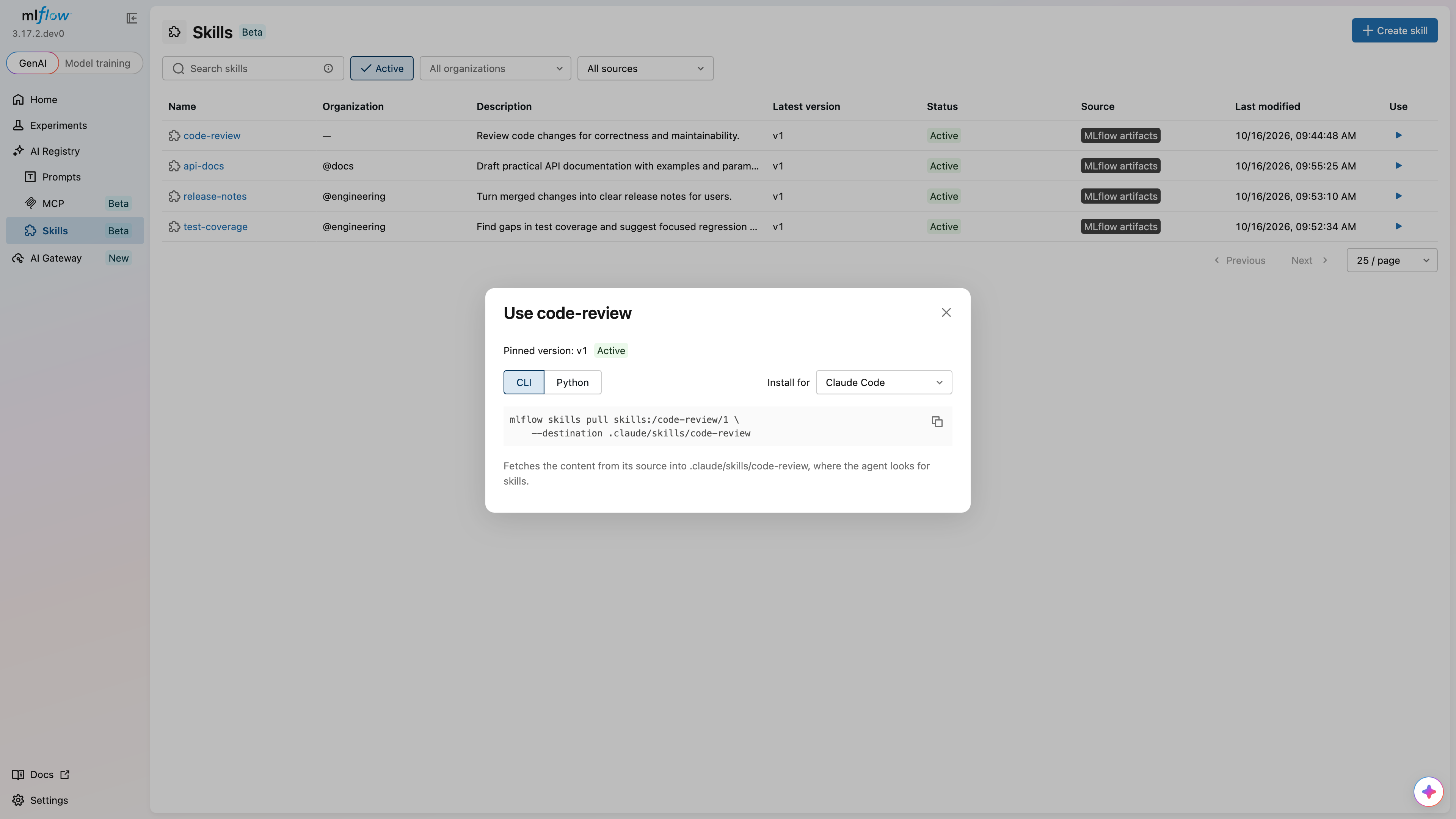
- Click Use on a skill.
- Choose your agent under Install for.
- Select CLI or Python and copy the pull command.
- Run the command in your environment to download the skill.
Use mlflow.genai.pull() to download a specific version:
import mlflow

path = mlflow.genai.pull("skills:/code-review/1", destination="./downloaded-review")
print(path)
mlflow skills pull skills:/code-review/1 --destination ./downloaded-review
The destination must be absent or an empty directory. Pulling downloads files; it does not execute the skill. Use a per-skill subdirectory, such as .claude/skills/code-review, as the destination to make the files available to your agent.
Concepts
Entity Model
| Entity | Description |
|---|---|
| Skill | The parent entry, identified by name and optional organization within a workspace. Holds metadata, tags, and aliases. |
| SkillVersion | A numbered version with a source, optional content digest, status, and version tags. Content changes require a new version. |
| Alias | A name such as production that points to a version. The reserved latest alias resolves dynamically. |
Skill Naming Convention
Skill names use 1–64 lowercase ASCII letters, digits, and hyphens. A name cannot start or end with a hyphen or contain consecutive hyphens.
An optional organization groups skills under a namespace:
code-review
@acme/code-review
These identify different skills. In Python calls, pass organization="acme" separately from name="code-review". In skill URIs, use skills:/@acme/code-review.
Status Lifecycle
Each skill version has a status:
draft ⇄ active ⇄ deprecated
  │                    │
  └───→ deleted ←──────┘
- Draft: The version is being prepared. It can still be pulled by version or alias.
- Active: The version is ready for use. Latest resolution prefers active versions.
- Deprecated: The version remains accessible but should be replaced.
- Deleted: The version is no longer available for normal reads or pulls.
Access Control
When workspaces are enabled, skill identities and permissions are scoped to the active workspace. With MLflow authentication, READ permits reading and pulling skills, EDIT permits registering versions and updating metadata, and MANAGE permits deleting skills and versions. An organization name does not itself grant access.
Access to an external source is checked separately using the pulling user's credentials.
Next Steps
- Register and Import Skills — local uploads, external sources, and Git repository imports
- Manage Versions and Aliases — versioning, status lifecycle, aliases, and tags
- Pull Skills — pull instructions, version selection, and content verification