Manage Versions and Aliases
Skill Registry uses numbered versions and aliases to control which skill content your users and agents use. This guide covers version management, status transitions, aliases, and tags.
The examples use mlflow.client.MlflowClient() and use the unscoped code-review skill created in Getting Started, which starts with an active version 1. Set the tracking URI to your MLflow server before running them.
Version Numbers
MLflow assigns each new skill version an increasing integer, starting at 1. Version numbers are not reused after a version is soft-deleted. Register updated content under the same skill name and organization to create another version.
Status Lifecycle
Each version has a status that controls its availability:
| Status | Description |
|---|---|
| Draft | Being prepared. Still readable and pullable by version or alias. |
| Active | Ready for use. Preferred when resolving the latest version. |
| Deprecated | Still accessible but should be replaced. |
| Deleted | Excluded from normal reads, searches, and pulls. |
New versions start as active unless you request draft.
Allowed Transitions
draft→activeordeletedactive→draftordeprecateddeprecated→activeordeleted
Deleted versions cannot change status. A transition to the current status is rejected.
Update Version Status
- UI
- Python
- CLI
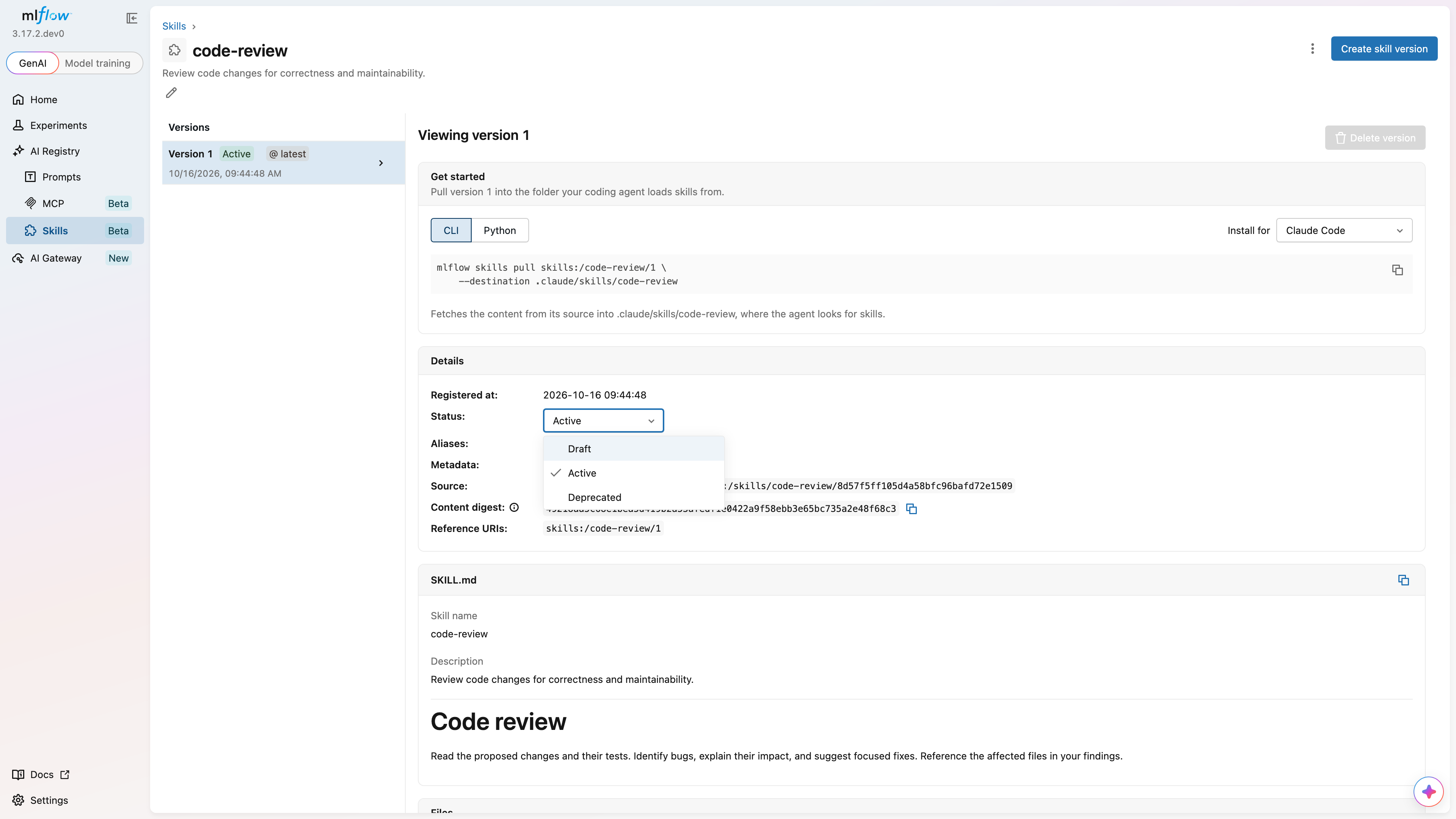
- Open the skill detail page.
- Select the version you want to update from the version list.
- Click the pencil next to Status in the Details section.
- Select the new status.
Use mlflow.client.MlflowClient.update_skill_version() to change status:
from mlflow import MlflowClient

client = MlflowClient()
client.update_skill_version(name="code-review", version=1, status="deprecated")
mlflow skills update-version skills:/code-review/1 --status deprecated
Aliases
Aliases let you reference a version by a meaningful label, such as production or staging, instead of a version number. Move an alias to a newer version without changing the URI your users pull.
Create an Alias
- UI
- Python
- CLI
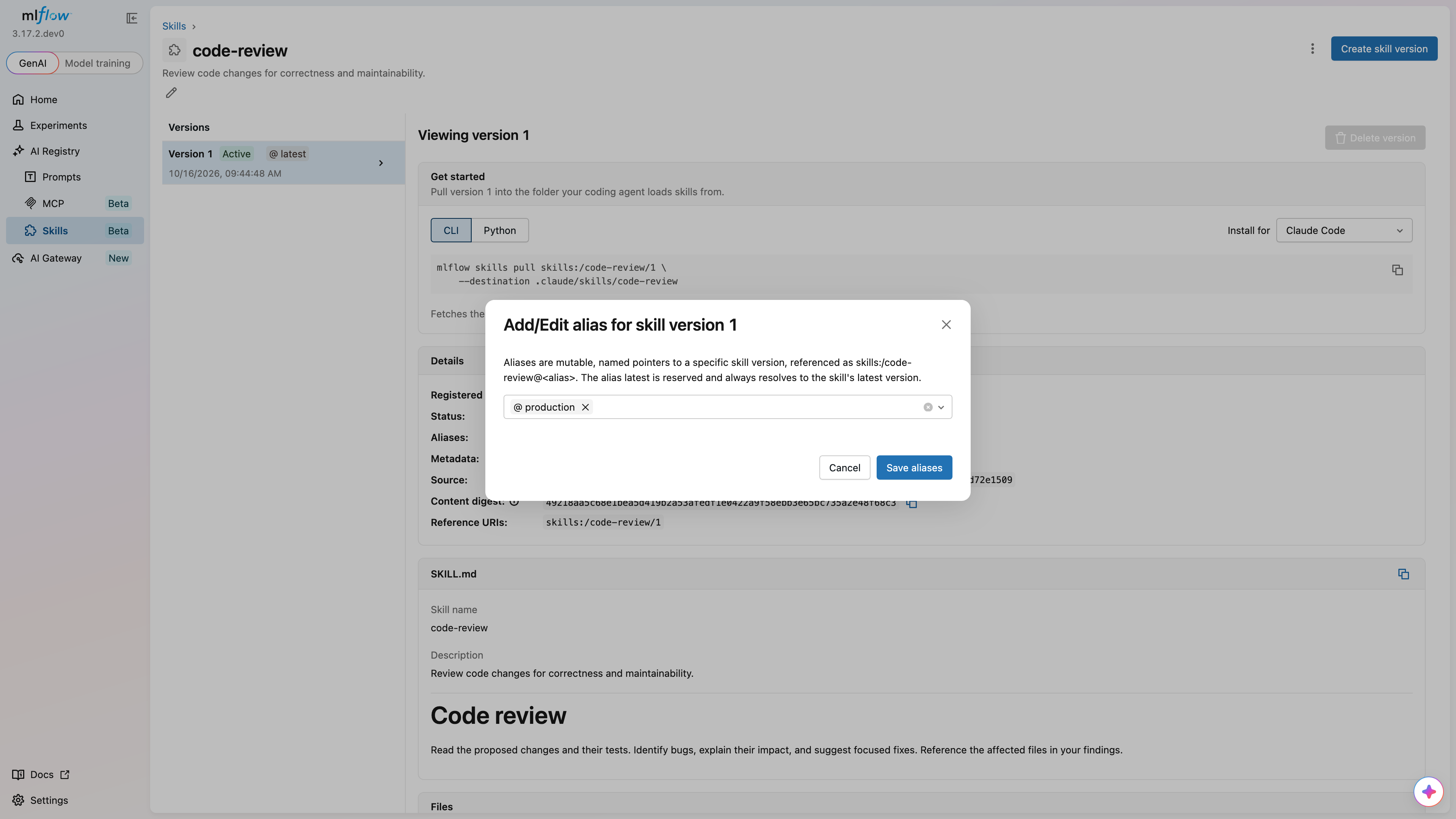
- Open the skill detail page and select a version.
- Click the pencil next to Aliases in the Details section.
- Enter an alias name and save.
from mlflow import MlflowClient

client = MlflowClient()
client.set_skill_alias(name="code-review", alias="production", version=1)
mlflow skills set-alias skills:/code-review --alias production --version 1
Setting an existing alias changes its target. Aliases can point to draft or deprecated versions. Deleting a version removes the aliases that point to it and preserves aliases to other versions.
Resolve a Version by Alias
from mlflow import MlflowClient

client = MlflowClient()
version = client.get_skill_version_by_alias(name="code-review", alias="production")
print(f"Production is version {version.version}")
mlflow skills get-version skills:/code-review@production
Reserved latest Alias
The latest alias is reserved and cannot be assigned or deleted. It follows the resolution rules below. Version-like aliases such as v1 are also reserved.
Latest Version Resolution
The latest version is selected in this order:
- The highest-numbered active version.
- If there are no active versions, the highest-numbered draft or deprecated version.
- If there are no non-deleted versions, no latest version.
For example, active version 9 takes precedence over draft version 10. If version 9 is deprecated, version 10 becomes the latest.
The parent skill's latest_version, status, and source_type are derived from this resolved version. A parent with no non-deleted versions remains accessible, but these fields are None and a latest-version lookup fails.
from mlflow import MlflowClient

client = MlflowClient()
latest = client.get_latest_skill_version(name="code-review")
print(latest.version, latest.status)
Delete an Alias
from mlflow import MlflowClient

client = MlflowClient()
client.delete_skill_alias(name="code-review", alias="production")
Tags
Tags are key-value pairs you can attach to skills and versions for organization and filtering. Parent tags and version tags are separate.
Skill Tags
- UI
- Python
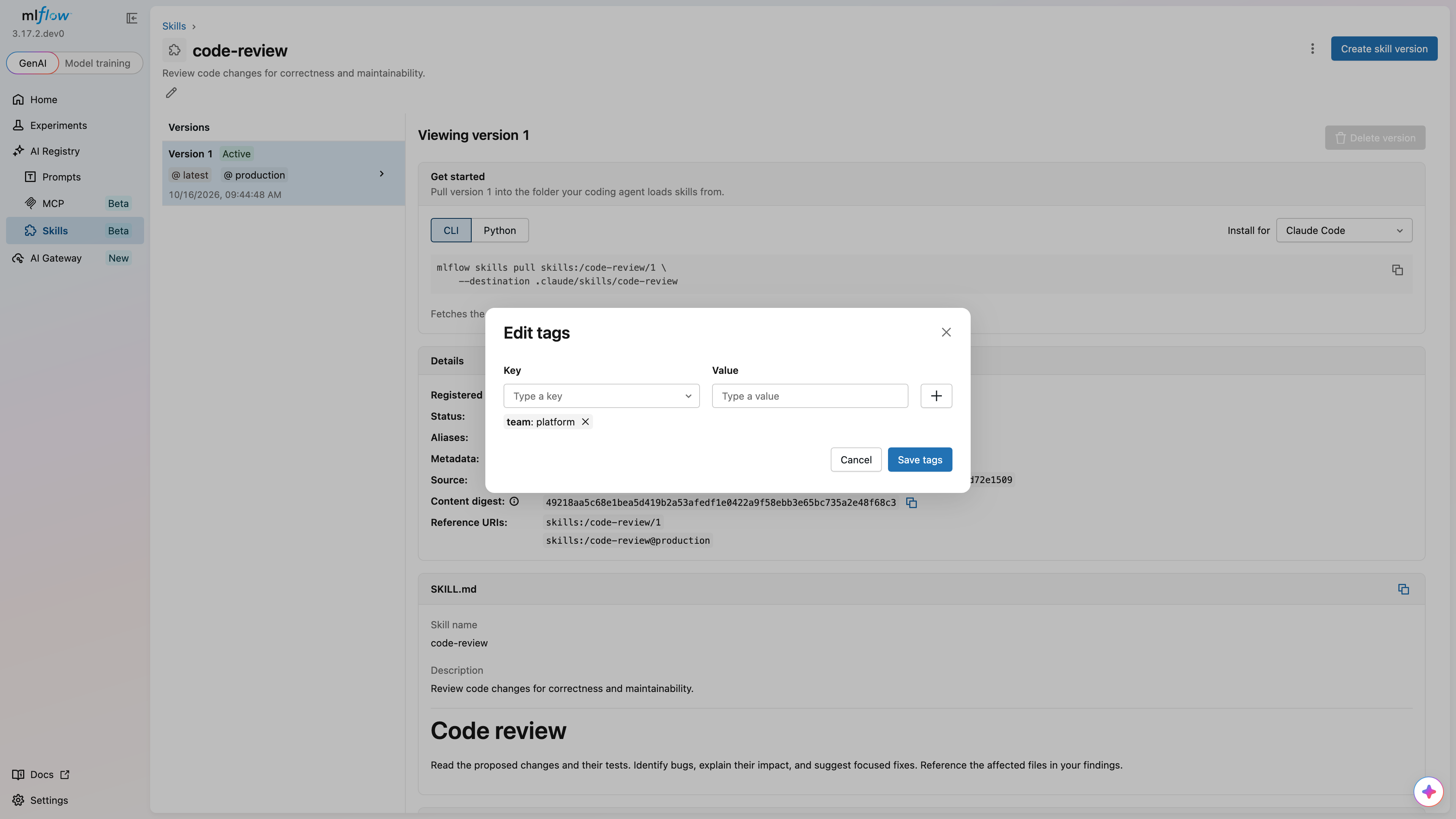
- Open the
code-reviewskill detail page. - Click the pencil below the skill description to edit skill tags.
- Enter
teamas the Key andplatformas the Value, then click +. - Click Save tags.
from mlflow import MlflowClient

client = MlflowClient()
client.set_skill_tag(name="code-review", key="team", value="platform")

# Optional cleanup when the tag is no longer needed:
# client.delete_skill_tag(name="code-review", key="team")
Version Tags
The UI labels version tags as Metadata in the version's Details section.
- UI
- Python
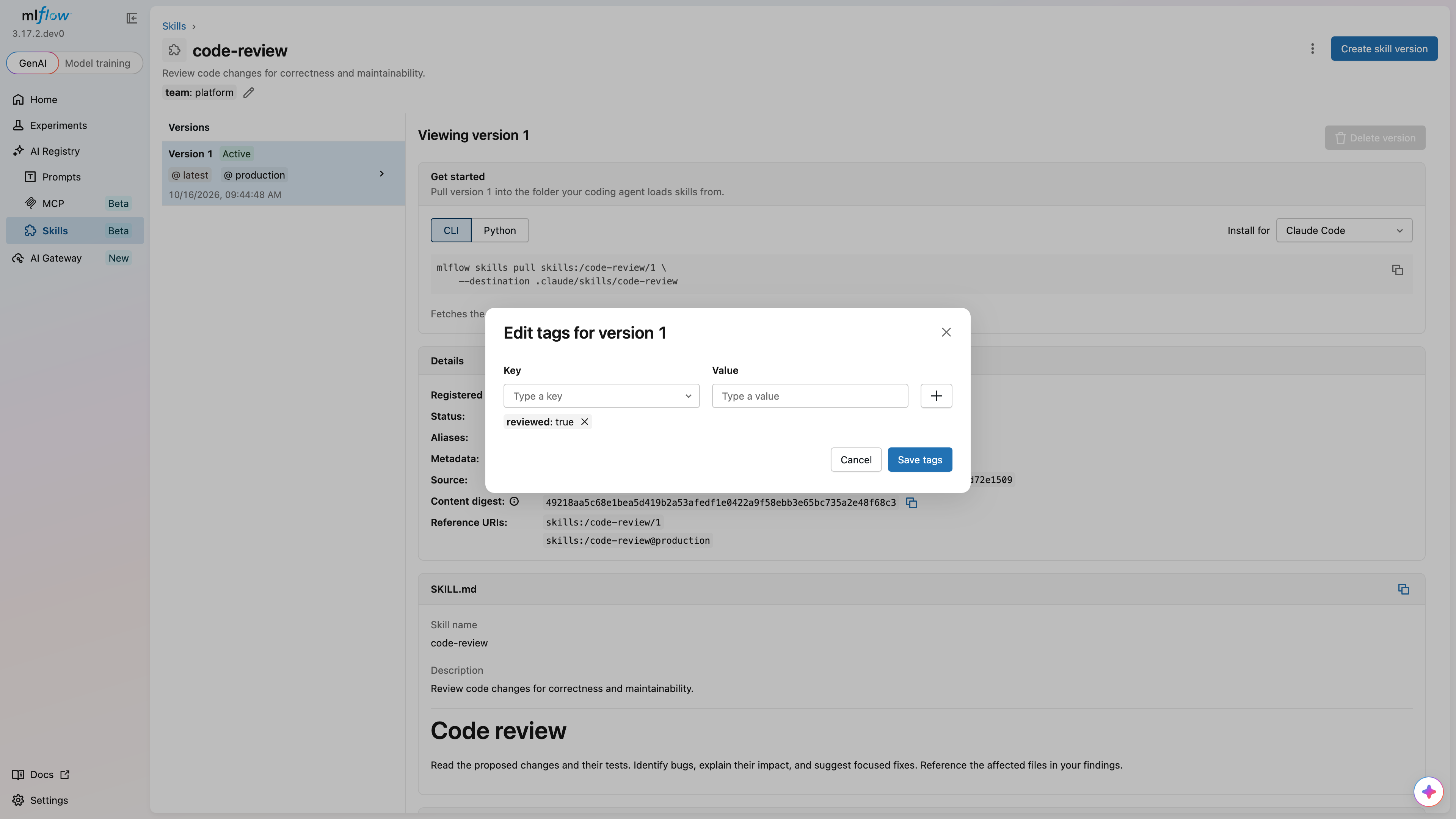
- Open the
code-reviewskill detail page and select version 1. - Click the pencil beside Metadata in the Details section.
- Enter
reviewedas the Key andtrueas the Value, then click +. - Click Save tags.
from mlflow import MlflowClient

client = MlflowClient()
client.set_skill_version_tag(name="code-review", version=1, key="reviewed", value="true")

# Optional cleanup for this version only:
# client.delete_skill_version_tag(name="code-review", version=1, key="reviewed")
Search and Pagination
Use mlflow.genai.search_skills() or MlflowClient.search_skills() to search parents:
import mlflow

page_token = None
while True:
    page = mlflow.genai.search_skills(
        filter_string="name = 'code-review' AND tags.team = 'platform'",
        order_by=["name ASC"],
        max_results=20,
        page_token=page_token,
    )
    for skill in page:
        print(skill.name, skill.latest_version, skill.status)
    page_token = page.token
    if page_token is None:
        break
Reuse the same filter and ordering when continuing with a page token. Results are limited to skills the caller can read. To select exact identities, pass include_skill_identities=["code-review"]; an empty list selects none.
Parent filters on status and source_type use the same latest-resolved version that supplies the parent's derived values. They do not match arbitrary historical versions. For example, status = 'active' AND source_type = 'git' requires the resolved version to have both values.
To search versions of one skill, use search_skill_versions(). Its tag filters apply to version tags:
from mlflow import MlflowClient

client = MlflowClient()
versions = client.search_skill_versions(
    name="code-review",
    filter_string="status = 'deprecated'",
    order_by=["version DESC"],
)
for version in versions:
    print(version.version, version.status)
mlflow skills search --filter-string "name = 'code-review'" --output json
mlflow skills search-versions skills:/code-review --order-by "version DESC"
mlflow skills list and mlflow skills view inspect skills bundled with MLflow. Use mlflow skills search for the registry catalog.
Delete a Version
An active version must move to draft or deprecated status before deletion. This example assumes version 1 has already been deprecated as shown above:
from mlflow import MlflowClient

client = MlflowClient()
client.delete_skill_version(name="code-review", version=1)
Soft deletion retains the version record and its number, but removes its aliases and makes it unavailable to normal reads and pulls. To remove the entire skill, see Update and Delete Skills.