Pull Skills
Pulling downloads a registered skill's SKILL.md and supporting files into a local directory. You can select a version, use an alias, or let MLflow resolve the latest version.
This guide covers pulling skills, generating instructions for your agent, and accessing and verifying source content. Set MLFLOW_TRACKING_URI to the server that holds the registry metadata.
Download a Skill
Use mlflow.genai.pull() or mlflow skills pull to fetch a skill:
- UI
- Python
- CLI
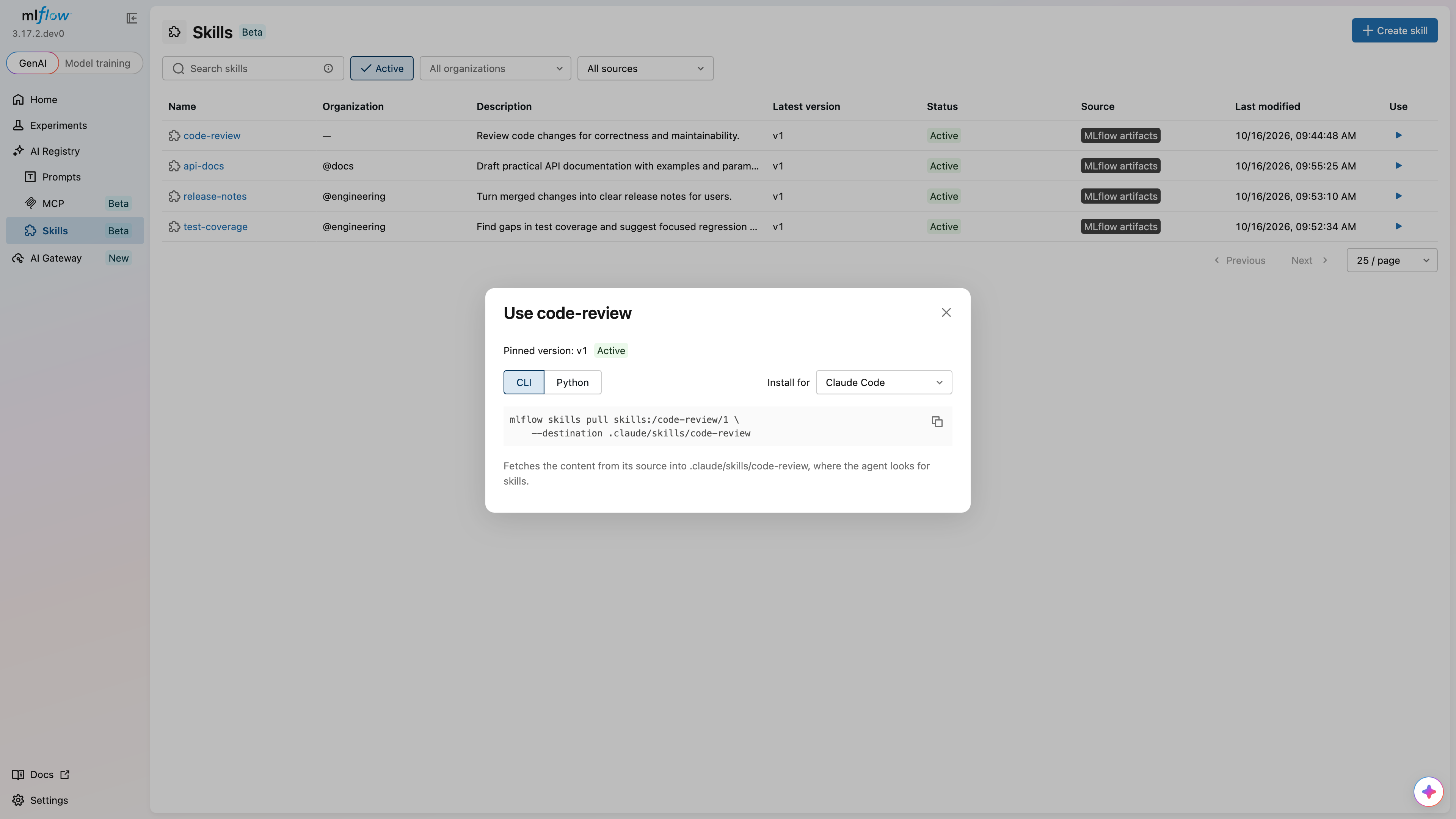
- Click Use on a skill in the catalog.
- Choose an agent under Install for.
- Select CLI or Python and copy the command.
- Run the command in your environment.
To pull a specific version, open the skill detail page, select the version, and copy the command from Get started.
import mlflow

path = mlflow.genai.pull(
    "skills:/code-review@production",
    destination="./downloaded-review",
)
print(path)
mlflow skills pull skills:/code-review@production --destination ./downloaded-review
The Python and CLI examples use the unscoped code-review skill from Getting Started and assume that its production alias exists. See Create an Alias.
Choose a Version
| URI | Selection |
|---|---|
skills:/code-review/1 | Exact version 1 of an unscoped skill |
skills:/code-review@production | The version assigned to production |
skills:/code-review | The latest-resolved version |
skills:/code-review@latest | The same dynamic latest resolution |
Choose a Destination
The default destination is a directory named after the skill in the current working directory. A destination must not exist or must be an empty directory. Files, symbolic links, and nonempty directories are rejected. Choose a fresh destination when repeating a pull.
Pull Instructions
The UI generates CLI and Python commands with a destination for the agent you select under Install for:
| Selection | Destination for code-review |
|---|---|
| Claude Code | .claude/skills/code-review |
| Codex | .agents/skills/code-review |
| Cursor | .cursor/skills/code-review |
| GitHub Copilot | .github/skills/code-review |
| Any directory | ./skills/code-review |
Run the generated command from your project directory, or change its destination to suit your setup. Pulling writes files; it does not execute scripts or change your agent's configuration. Follow your agent's instructions for loading the downloaded skill.
Source Access and Credentials
The client reads the version metadata from MLflow, then fetches the recorded source and subpath. External content is fetched directly by the client, not proxied through the registry server.
| Source | Required access |
|---|---|
| Git | Git installed and credentials that can read the repository, such as a credential helper or SSH agent |
| OCI | Access to the image, using Docker or container runtime credentials and credential helpers |
| ZIP | A publicly accessible URL; ZIP fetches do not attach credentials |
| MLflow artifacts | Access through the configured MLflow artifact repository and its authentication |
Permission to read the registry entry does not grant access to a private Git repository or OCI image. The user who pulls the skill must have the required source credentials.
Content Verification
When the version has a recorded digest, the client calculates the fetched tree's digest and requires an exact match. If the source has changed, the pull fails. Register the changed content as a new version, or restore access to the original content before retrying.
A version registered without a digest can still be pulled, but content verification is skipped. High-level register_skill() and import_skills() calls calculate digests automatically.
Content is staged and checked before it is written to the destination. A source, authorization, or digest failure leaves an absent destination absent and an existing empty destination empty. The selected tree must contain only regular files and directories.
Draft and deprecated versions can be pulled by number or alias. Deleted versions cannot be pulled. A bare skill URI follows the latest resolution rules, which prefer active versions even when a newer draft exists.