Register and Import Skills
This guide covers registering skills from a local directory, an external source, or the UI, and importing several skills from a Git repository. Configure MLFLOW_TRACKING_URI to point to your MLflow server before running these examples.
For CLI registration, use mlflow skills register --source <directory> for a local directory. For an external source, use the git, oci, or zip subcommand.
Run mlflow skills register --help for local registration options. For external sources, use the subcommand's help, such as mlflow skills register git --help.
Register from a Local Directory
Use mlflow.genai.register_skill() to upload a directory containing SKILL.md and its supporting files:
- Python
- CLI
import mlflow

version = mlflow.genai.register_skill(
    source="./code-review",
    organization="acme",
    status="draft",
)
print(version.name, version.version)
mlflow skills register \
  --source ./code-review \
  --organization acme \
  --status draft
If the parent skill does not exist, registration creates it automatically. Registering again with the same name and organization adds a new version.
Registration requires an explicit source; it does not default to the current directory. Pass source="." to select it. Use an HTTP tracking server with artifact serving enabled for local uploads. MLflow chooses the artifact location and records an mlflow source on the returned version.
To choose a registry name different from the manifest name, pass name="team-code-review". This does not modify the files. The manifest's original name must still be valid.
SKILL.md Structure
The skill directory must contain a root SKILL.md file. Its YAML frontmatter supplies metadata, and its Markdown body contains instructions:
---
name: code-review
description: Review code changes for correctness and maintainability.
---

# Code review

Read the proposed changes and their tests. Identify bugs and suggest focused fixes.
| Field | Required by MLflow | Description |
|---|---|---|
name | Yes | 1–64 lowercase ASCII letters, digits, and hyphens. Cannot start or end with a hyphen or contain consecutive hyphens. |
description | No | A short explanation of what the skill does, stored in the manifest. |
Keep supporting files, such as scripts and reference documents, inside the skill directory. They are included with the manifest.
Register from an External Source
The high-level registration function fetches and validates the content and records its digest. The content remains at the external source. Users need access to that source when pulling the version.
Replace the example URLs and refs below with your own sources.
Git
- Python
- CLI
import mlflow
from mlflow.genai import GitSource

version = mlflow.genai.register_skill(
    source=GitSource(
        url="https://github.com/acme/skills.git",
        ref="v1.0.0",
        subpath="skills/code-review",
    ),
    organization="acme",
)
mlflow skills register git \
  --url https://github.com/acme/skills.git \
  --ref v1.0.0 \
  --subpath skills/code-review \
  --organization acme
ref selects a branch, tag, or commit. If omitted, the fetch uses the remote's HEAD. subpath selects the skill directory inside the repository. Only committed files are fetched; Git submodules are not supported. Git must be installed on the client.
OCI
- Python
- CLI
import mlflow
from mlflow.genai import OCISource

version = mlflow.genai.register_skill(
    source=OCISource(image="ghcr.io/acme/skills:v1.0.0", subpath="skills/code-review"),
    organization="acme",
)
mlflow skills register oci \
  --image ghcr.io/acme/skills:v1.0.0 \
  --subpath skills/code-review \
  --organization acme
OCI sources support tar layers and individual files named by the org.opencontainers.image.title annotation. For multi-platform images, the fetcher prefers linux/amd64.
ZIP
- Python
- CLI
import mlflow
from mlflow.genai import ZipSource

version = mlflow.genai.register_skill(
    source=ZipSource(
        url="https://example.com/skills.zip",
        subpath="skills/code-review",
    ),
    organization="acme",
)
mlflow skills register zip \
  --url https://example.com/skills.zip \
  --subpath skills/code-review \
  --organization acme
ZIP URLs must be publicly accessible. Use a subpath that matches the archive's directory layout, including any enclosing directory.
For repeatable pulls, use a Git commit, an OCI digest, or a ZIP URL whose content does not change. If a mutable reference later points to different content, pulling the registered version fails its digest check.
Register via the UI
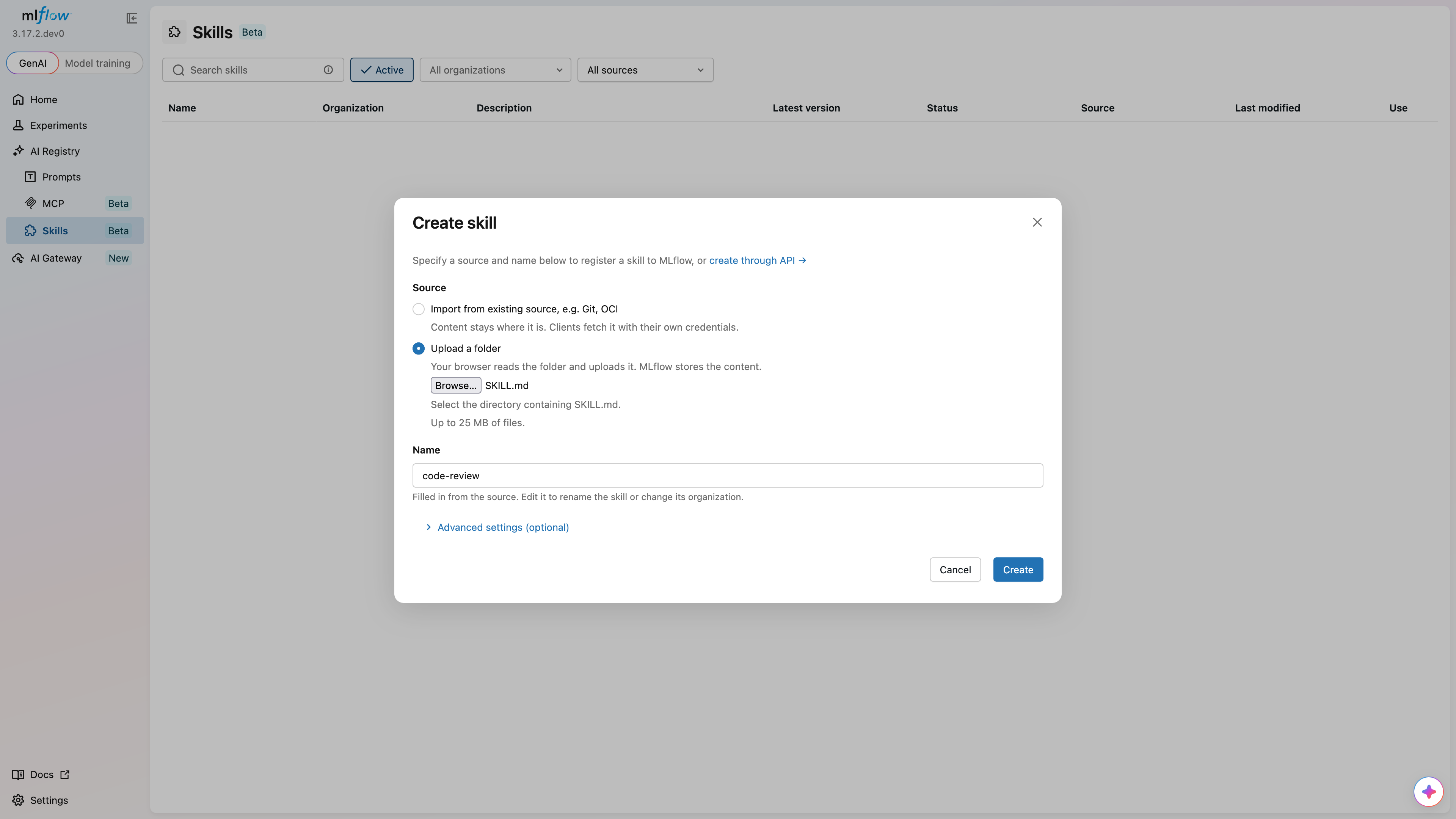
- Navigate to Skills in the MLflow sidebar.
- Click Create skill.
- Select Upload a folder to upload local files, or Import from existing source to enter a Git, OCI, or ZIP source.
- Review the skill name. To use an organization, enter a name such as
@acme/code-review. - Expand Advanced settings (optional) to set the status, metadata, and source details.
- Click Create to register.
For external sources, the UI records a reference without fetching the content. Use the Python register_skill() function to validate an external manifest and record a digest before registration.
Import Several Skills from Git
Use mlflow.genai.import_skills() to discover and register skills from a repository:
import mlflow
from mlflow.genai import GitSource

versions = mlflow.genai.import_skills(
    source=GitSource(
        url="https://github.com/acme/skills.git",
        ref="v1.0.0",
        subpath="skills",
    ),
    organization="acme",
    skill_names=["code-review", "test-coverage"],
    status="draft",
)
for version in versions:
    print(version.name, version.version, version.status)
Omit skill_names to import all discovered root skills. When supplied, the list must be nonempty and each entry must match a manifest's name, not its directory name.
mlflow skills import \
  --source https://github.com/acme/skills.git \
  --ref v1.0.0 --subpath skills --organization acme \
  --skill-name code-review --skill-name test-coverage --status draft
Discovery and Validation
Each directory containing a SKILL.md file becomes a root skill. Discovery does not descend further into that root skill, even if the skill is not selected. It continues through the rest of the tree. Nested skill manifests remain supporting files of their root skill and are not imported separately.
All discovered root manifests are validated before registration, including those excluded by skill_names. An invalid unselected manifest, a duplicate discovered name, or a requested name that is missing causes the import to fail. No skills are registered if validation fails, and the registration batch is committed as one transaction.
Repeated Imports
An import reuses a non-deleted version when the skill identity, source type, source, ref, subpath, and digest match. It preserves that version's status, even if the new call requests a different status. Otherwise, it creates a version with the requested initial status.
Changing only the Git ref creates a new version even if the content digest stays the same. Single-skill register_skill() calls always create new versions.
Create a New Version
Register the same name and organization again to create a new numbered version:
import mlflow

version = mlflow.genai.register_skill(
    source="./code-review",
    organization="acme",
    status="draft",
)
print(f"Created version {version.version}")
MLflow assigns the next version number. You do not supply a version number during registration. Use draft to prepare a version before making it active.
Content Limits
The default skill content limit is 25 MiB. Set MLFLOW_SKILL_CONTENT_MAX_DECOMPRESSED_SIZE in the client environment to change it; local uploads must also satisfy the server's configured limit. Remote downloads have size limits as well, so a small selected subdirectory does not guarantee that a large ZIP archive or OCI layer can be fetched.
For Git imports, each selected skill has its own content limit. The total tree searched, including unselected files, is limited to that size multiplied by the maximum number of skills allowed in a bulk import. Use a source subpath to reduce the tree searched. Use skill_names to select fewer skills for registration; it does not reduce the tree fetched for discovery.
Content must consist of regular files and directories. Symbolic links, hard links, and special files are rejected. Nested SKILL.md files in an individual skill are included as supporting content without separate manifest validation.
Lower-Level Registration
mlflow.client.MlflowClient.create_skill_version() can register an external source without fetching and inspecting it. Its optional digest is supplied by the caller. For a local upload, this method accepts a prepared gzip-compressed tar archive, not a directory.
Use register_skill() when you want MLflow to inspect the manifest, calculate the digest, and package a local directory. Existing MLflow artifact URIs are returned as source metadata; they cannot be supplied as registration sources.
Update and Delete Skills
Use mlflow.client.MlflowClient() to update parent metadata or delete a skill:
from mlflow import MlflowClient

client = MlflowClient()
client.update_skill(
    name="code-review", organization="acme", description="Reviews changes to our services."
)
Updating parent metadata does not change SKILL.md or the registered content. Omitted fields stay unchanged; passing None clears a field.
client.delete_skill(name="code-review", organization="acme")
Deleting a parent permanently removes the skill and all its versions, aliases, and tags. To remove only one version, see Delete a Version.