Tracing Agno
Agno is a flexible agent framework for orchestrating LLMs, reasoning steps, tools, and memory into a unified pipeline.
MLflow Tracing provides automatic tracing capability for Agno. By enabling auto tracing
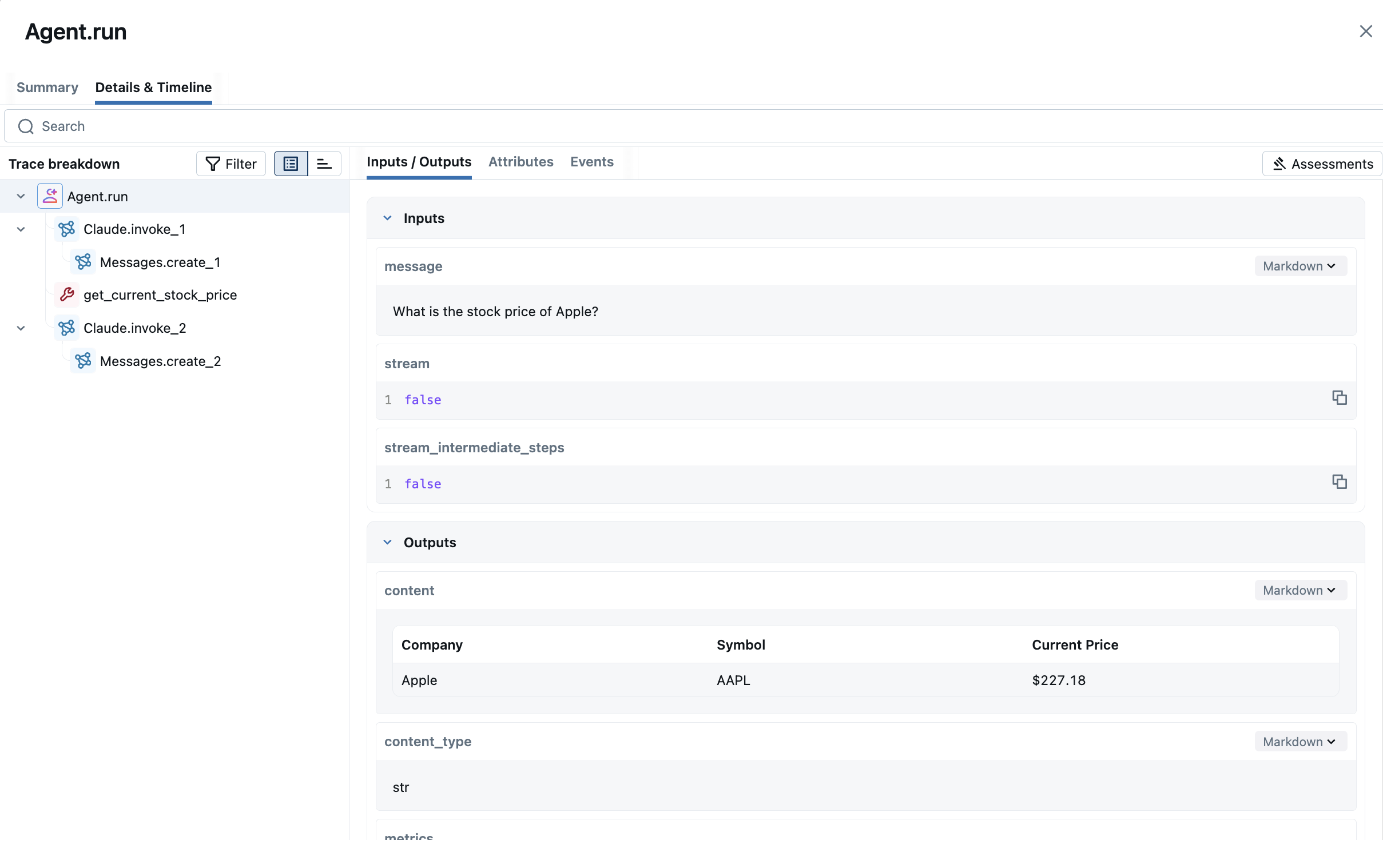
for Agno by calling the mlflow.agno.autolog() function, MLflow will capture traces for Agent invocation and log them to the active MLflow Experiment.
import mlflow

mlflow.agno.autolog()
MLflow trace automatically captures the following information about Agentic calls:
- Prompts and completion responses
- Latencies
- Metadata about the different Agents, such as function names
- Token usages and cost
- Cache hit
- Any exception if raised
Basic Example
Install the dependencies for the example:
pip install 'mlflow[genai]>=3.3' agno anthropic yfinance
Run a simple agent with mlflow.agno.autolog() enabled:
from agno.agent import Agent
from agno.models.anthropic import Claude
from agno.tools.yfinance import YFinanceTools

agent = Agent(
    model=Claude(id="claude-sonnet-4-20250514"),
    tools=[YFinanceTools(stock_price=True)],
    instructions="Use tables to display data. Don't include any other text.",
    markdown=True,
)
agent.print_response("What is the stock price of Apple?", stream=False)
Multi Agentic(Agents to Agents) Interaction
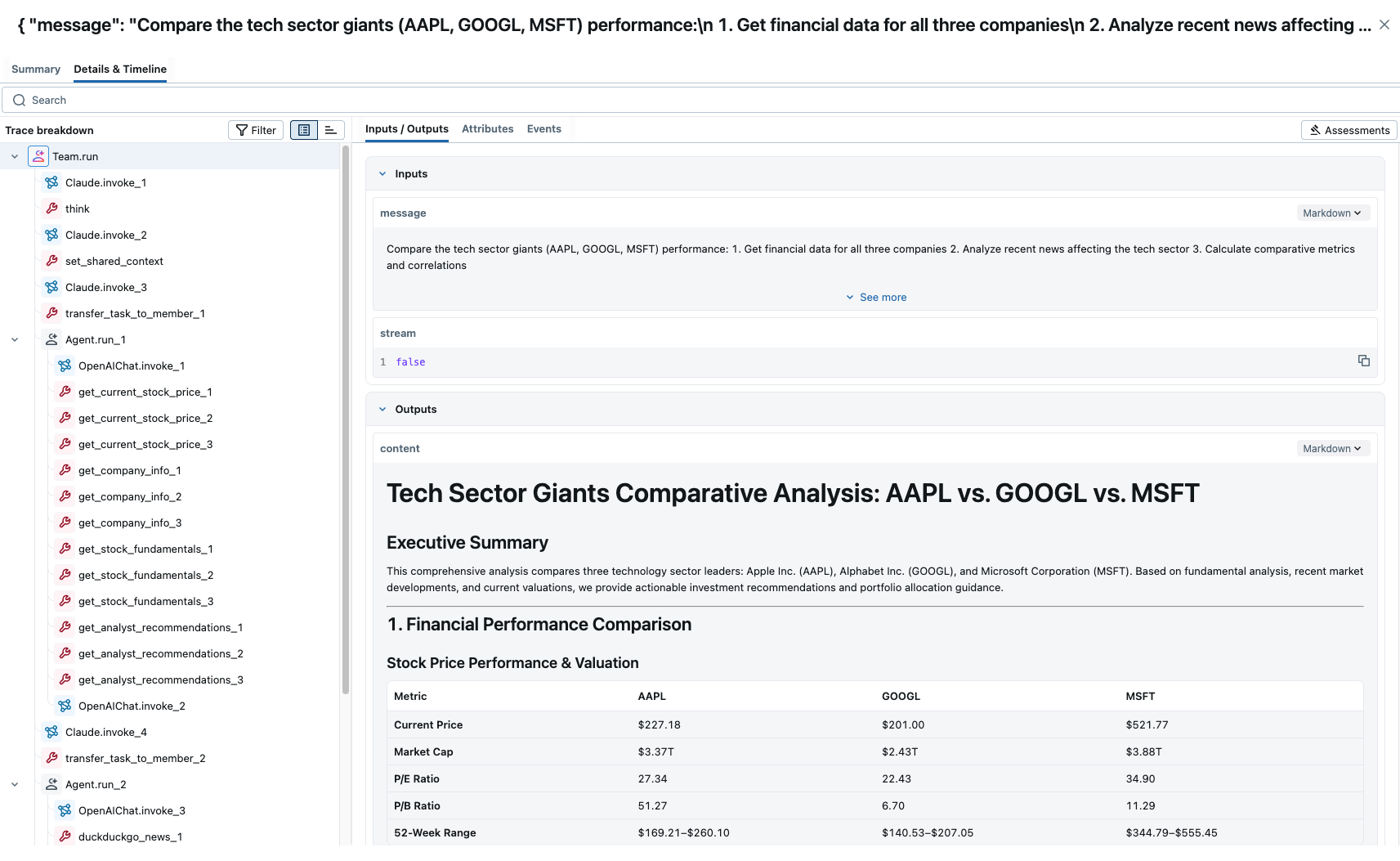
MLflow now makes it easier to track how multiple AI agents work together when using Agno API's non-streaming endpoints. It automatically records every handoff between agents, the messages they exchange, and details about any functions or tools they use—like what went in, what came out, and how long it took. This gives you a complete picture of the process, making it simpler to troubleshoot issues, measure performance, and repeat results.
Multi-agent Example
import mlflow

from agno.agent import Agent
from agno.models.anthropic import Claude
from agno.models.openai import OpenAIChat
from agno.team.team import Team
from agno.tools.duckduckgo import DuckDuckGoTools
from agno.tools.reasoning import ReasoningTools
from agno.tools.yfinance import YFinanceTools

# Enable auto tracing for Agno
mlflow.agno.autolog()


web_agent = Agent(
    name="Web Search Agent",
    role="Handle web search requests and general research",
    model=OpenAIChat(id="gpt-4.1"),
    tools=[DuckDuckGoTools()],
    instructions="Always include sources",
    add_datetime_to_instructions=True,
)

finance_agent = Agent(
    name="Finance Agent",
    role="Handle financial data requests and market analysis",
    model=OpenAIChat(id="gpt-4.1"),
    tools=[
        YFinanceTools(
            stock_price=True,
            stock_fundamentals=True,
            analyst_recommendations=True,
            company_info=True,
        )
    ],
    instructions=[
        "Use tables to display stock prices, fundamentals (P/E, Market Cap), and recommendations.",
        "Clearly state the company name and ticker symbol.",
        "Focus on delivering actionable financial insights.",
    ],
    add_datetime_to_instructions=True,
)

reasoning_finance_team = Team(
    name="Reasoning Finance Team",
    mode="coordinate",
    model=Claude(id="claude-sonnet-4-20250514"),
    members=[web_agent, finance_agent],
    tools=[ReasoningTools(add_instructions=True)],
    instructions=[
        "Collaborate to provide comprehensive financial and investment insights",
        "Consider both fundamental analysis and market sentiment",
        "Use tables and charts to display data clearly and professionally",
        "Present findings in a structured, easy-to-follow format",
        "Only output the final consolidated analysis, not individual agent responses",
    ],
    markdown=True,
    show_members_responses=True,
    enable_agentic_context=True,
    add_datetime_to_instructions=True,
    success_criteria="The team has provided a complete financial analysis with data, visualizations, risk assessment, and actionable investment recommendations supported by quantitative analysis and market research.",
)

reasoning_finance_team.print_response(
    """Compare the tech sector giants (AAPL, GOOGL, MSFT) performance:
    1. Get financial data for all three companies
    2. Analyze recent news affecting the tech sector
    3. Calculate comparative metrics and correlations
    4. Recommend portfolio allocation weights""",
    show_full_reasoning=True,
)
Tracking Token Usage and Cost
MLflow automatically tracks token usage and cost for Agno. The token usage for each LLM call will be logged in each Trace/Span and the aggregated cost and time trend are displayed in the built-in dashboard. See the Token Usage and Cost Tracking documentation for details on accessing this information programmatically.
Disable auto-tracing
Auto tracing for LiteLLM can be disabled globally by calling mlflow.agno.autolog(disable=True) or mlflow.autolog(disable=True).