Tracing LangChain Deep Agent
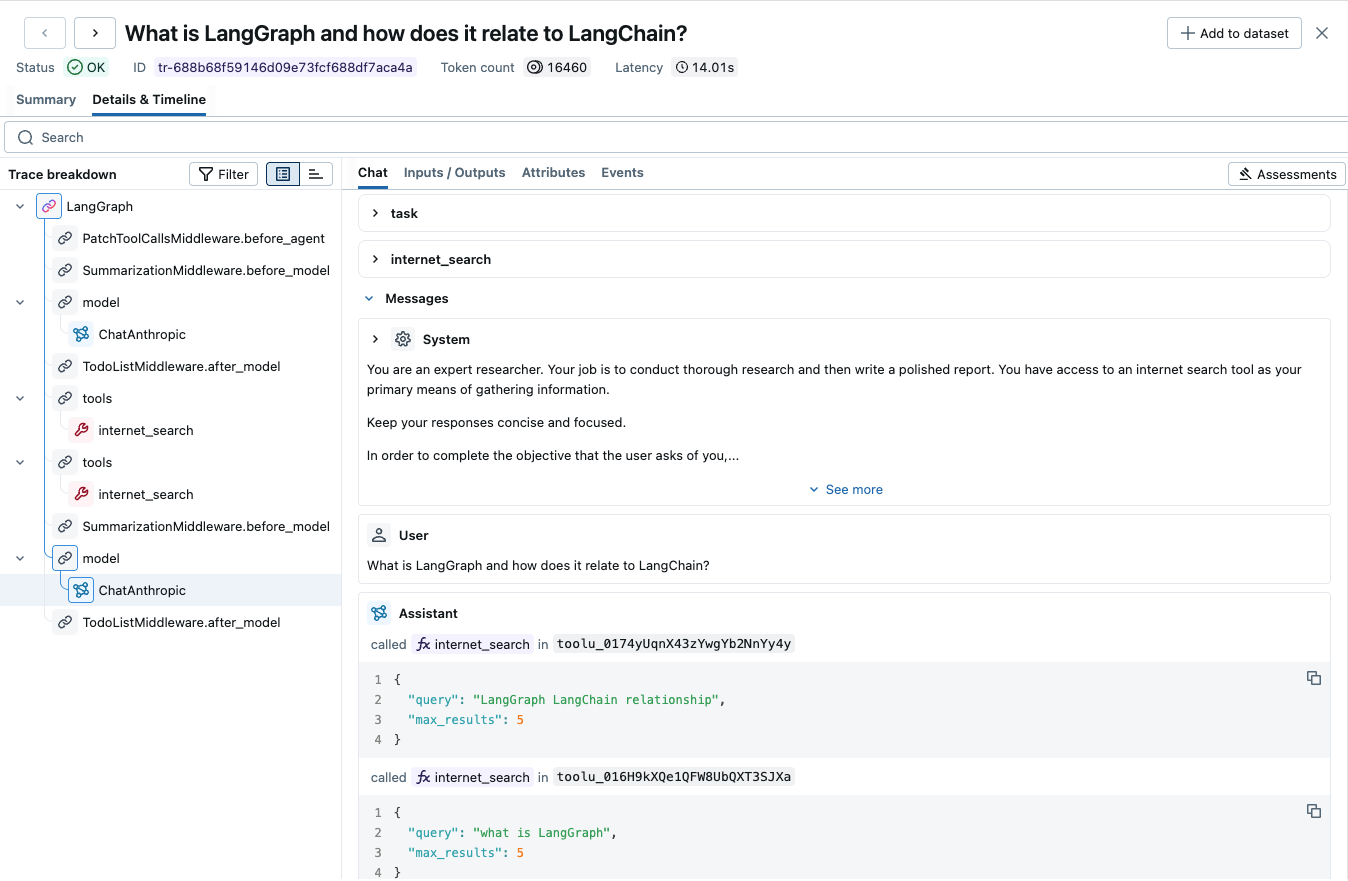
LangChain Deep Agent is an open-source library for building autonomous agents that can plan, research, and execute complex tasks. Deep Agent is built on top of LangGraph, providing a high-level abstraction for creating sophisticated agents with built-in capabilities like todo management, file operations, and spawning specialized subagents.
Since Deep Agent is built on LangGraph, MLflow Tracing works out of the box via mlflow.langchain.autolog(). This automatically captures the entire agent execution including planning, tool calls, and subagent interactions.
import mlflow

mlflow.langchain.autolog()
Getting Started
Install Dependencies
pip install deepagents tavily-python 'mlflow[genai]'
Start MLflow Server
- Local (pip)
- Local (docker)
If you have a local Python environment >= 3.10, you can start the MLflow server locally using the mlflow CLI command.
mlflow server
MLflow also provides a Docker Compose file to start a local MLflow server with a postgres database and a minio server.
git clone --depth 1 --filter=blob:none --sparse https://github.com/mlflow/mlflow.git
cd mlflow
git sparse-checkout set docker-compose
cd docker-compose
cp .env.dev.example .env
docker compose up -d
Refer to the instruction for more details, e.g., overriding the default environment variables.
Enable Tracing and Create a Deep Agent
import os
from typing import Literal

import mlflow
from deepagents import create_deep_agent
from tavily import TavilyClient

# Enable auto-tracing for LangChain (and LangGraph-based frameworks like Deep Agent)
mlflow.langchain.autolog()

# Optional: Set a tracking URI and an experiment
mlflow.set_tracking_uri("http://localhost:5000")
mlflow.set_experiment("Deep Agent")

# Initialize search provider
tavily_client = TavilyClient(api_key=os.environ["TAVILY_API_KEY"])


# Define your tool
def internet_search(
    query: str,
    max_results: int = 5,
    topic: Literal["general", "news", "finance"] = "general",
    include_raw_content: bool = False,
):
    """Run a web search to find relevant information."""
    return tavily_client.search(
        query,
        max_results=max_results,
        include_raw_content=include_raw_content,
        topic=topic,
    )


# Create agent with system instructions
research_instructions = """You are an expert researcher. Your job is to conduct
thorough research and then write a polished report. You have access to an internet
search tool as your primary means of gathering information."""

agent = create_deep_agent(tools=[internet_search], system_prompt=research_instructions)

# Invoke the agent
result = agent.invoke({
    "messages": [
        {
            "role": "user",
            "content": "What are the latest developments in AI agents?",
        }
    ]
})
print(result["messages"][-1].content)
View Traces in MLflow UI
Browse to the MLflow UI at http://localhost:5000 (or your MLflow server URL) to view the traces. The trace will capture the full agent execution including:
- Planning and task decomposition
- Tool invocations (like
internet_search) - Internal LLM calls
- Subagent spawning (if applicable)
Tracking Token Usage and Cost
MLflow automatically tracks token usage and cost for Deep Agent. The token usage for each LLM call will be logged in each Trace/Span and the aggregated cost and time trend are displayed in the built-in dashboard. See the Token Usage and Cost Tracking documentation for details on accessing this information programmatically.
Disable Auto-Tracing
Auto-tracing for Deep Agent can be disabled globally by calling mlflow.langchain.autolog(disable=True) or mlflow.autolog(disable=True).