Tracing Haystack
Haystack is an open-source AI orchestration framework developed by deepset, designed to help Python developers build production-ready LLM-powered applications. It features a modular architecture - built around components and pipelines for building everything from retrieval-augmented generation (RAG) workflows to autonomous agentic systems and scalable search engines.
MLflow Tracing provides automatic tracing capability when using Haystack pipelines and components.
When Haystack auto-tracing is enabled by calling the mlflow.haystack.autolog() function,
usage of Haystack pipelines and components will automatically record generated traces during interactive development.
import mlflow

mlflow.haystack.autolog()
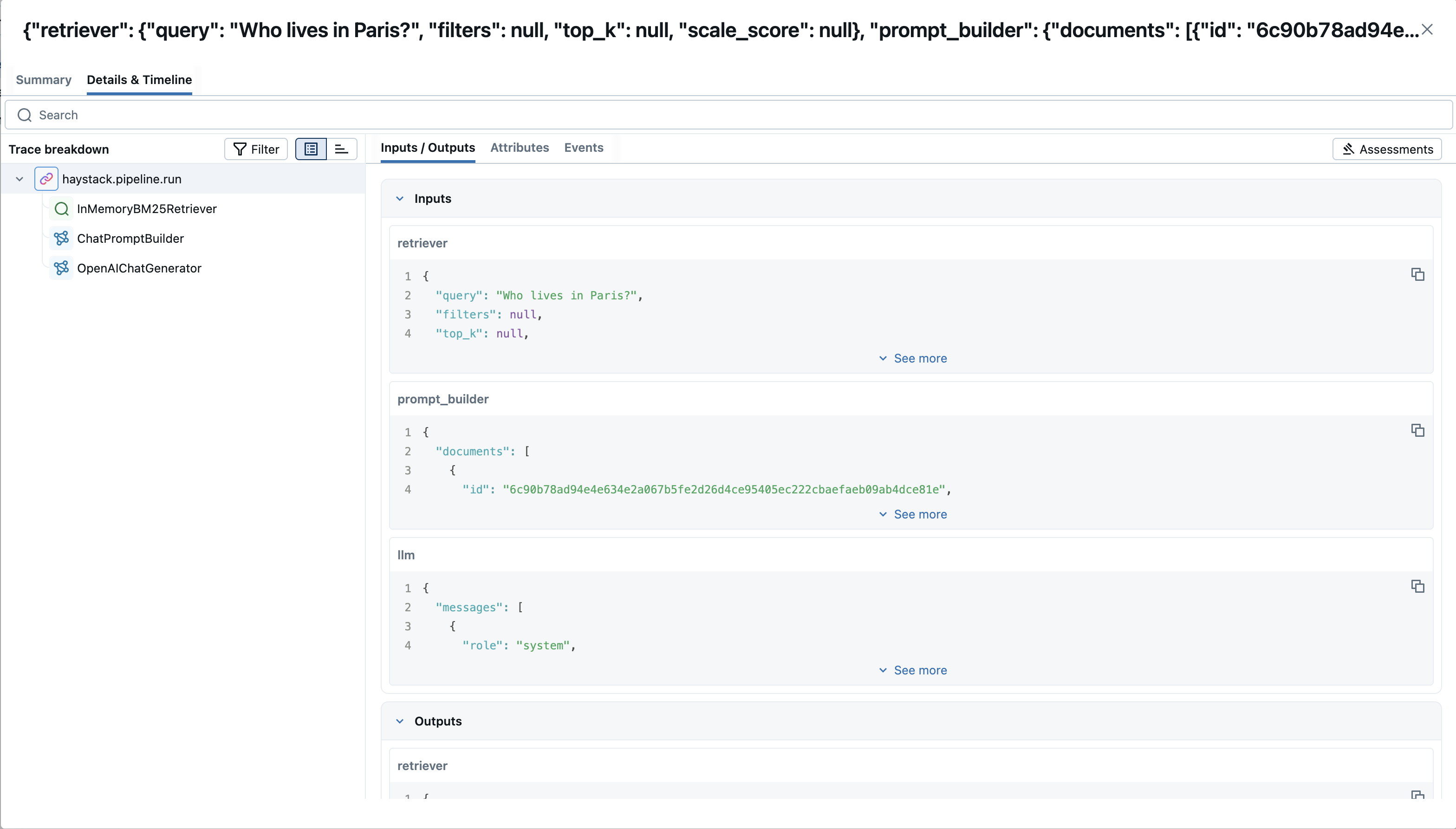
MLflow trace automatically captures the following information:
- Pipelines and Components
- Latencies
- Metadata about the different components added, such as tool names
- Token usages and cost
- Cache hit
- Any exception if raised
Basic Example
import mlflow

from haystack import Document, Pipeline
from haystack.components.builders.chat_prompt_builder import ChatPromptBuilder
from haystack.components.generators.chat import OpenAIChatGenerator
from haystack.components.retrievers.in_memory import InMemoryBM25Retriever
from haystack.dataclasses import ChatMessage
from haystack.document_stores.in_memory import InMemoryDocumentStore
from haystack.utils import Secret

mlflow.haystack.autolog()
mlflow.set_experiment("Haystack Tracing")

# Write documents to InMemoryDocumentStore
document_store = InMemoryDocumentStore()
document_store.write_documents([
    Document(content="My name is Jean and I live in Paris."),
    Document(content="My name is Mark and I live in Berlin."),
    Document(content="My name is Giorgio and I live in Rome."),
])

# Build a RAG pipeline
prompt_template = [
    ChatMessage.from_system("You are a helpful assistant."),
    ChatMessage.from_user(
        "Given these documents, answer the question.\n"
        "Documents:\n{% for doc in documents %}{{ doc.content }}{% endfor %}\n"
        "Question: {{question}}\n"
        "Answer:"
    ),
]

# Define required variables explicitly
prompt_builder = ChatPromptBuilder(
    template=prompt_template, required_variables={"question", "documents"}
)

retriever = InMemoryBM25Retriever(document_store=document_store)
llm = OpenAIChatGenerator(api_key=Secret.from_env_var("OPENAI_API_KEY"))

rag_pipeline = Pipeline()
rag_pipeline.add_component("retriever", retriever)
rag_pipeline.add_component("prompt_builder", prompt_builder)
rag_pipeline.add_component("llm", llm)
rag_pipeline.connect("retriever", "prompt_builder.documents")
rag_pipeline.connect("prompt_builder", "llm.messages")

# Ask a question
question = "Who lives in Paris?"
results = rag_pipeline.run({
    "retriever": {"query": question},
    "prompt_builder": {"question": question},
})

print(results["llm"]["replies"])
Tracking Token Usage and Cost
MLflow automatically tracks token usage and cost for Haystack. The token usage for each LLM call will be logged in each Trace/Span and the aggregated cost and time trend are displayed in the built-in dashboard. See the Token Usage and Cost Tracking documentation for details on accessing this information programmatically.
Combine with the MLflow Tracing SDK
Since this integration is built on OpenTelemetry, you can combine the automatically generated traces with the MLflow Tracing SDK to add custom spans, set tags, and log assessments within the same trace. This is useful when you want to enrich the auto-generated traces with additional application-specific context.
To enable this, set the MLFLOW_USE_DEFAULT_TRACER_PROVIDER environment variable to false and call mlflow.tracing.set_destination() to merge spans from both SDKs into a single trace.
import os

os.environ["MLFLOW_USE_DEFAULT_TRACER_PROVIDER"] = "false"

import mlflow
from mlflow.entities.trace_location import MlflowExperimentLocation

mlflow.set_tracking_uri("http://localhost:5000")
exp_id = mlflow.set_experiment("Haystack").experiment_id
mlflow.tracing.set_destination(MlflowExperimentLocation(exp_id))

mlflow.haystack.autolog()

# Add custom MLflow spans alongside the auto-generated Haystack traces
with mlflow.start_span("custom_step") as span:
    span.set_inputs({"query": "test"})
    # your application logic here
    span.set_outputs({"result": "success"})
For detailed instructions and examples, see Combining the OpenTelemetry SDK and the MLflow Tracing SDK.
Disable auto-tracing
Auto tracing for Haystack can be disabled globally by calling mlflow.haystack.autolog(disable=True) or mlflow.autolog(disable=True).