Tracing Vercel AI Gateway
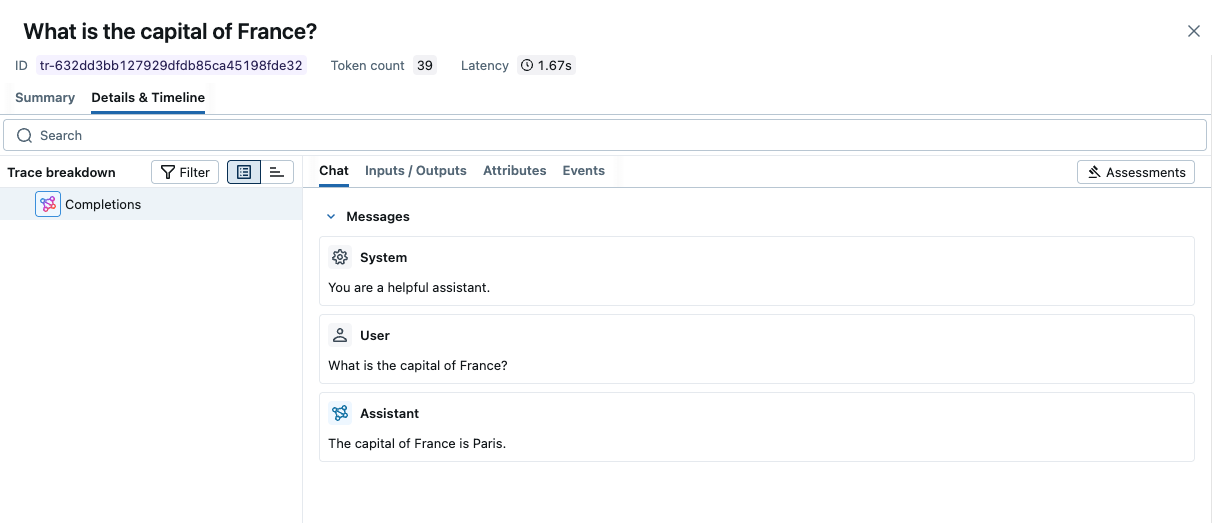
Since Vercel AI Gateway exposes an OpenAI-compatible API, you can use MLflow's OpenAI autolog integration to automatically trace all your LLM calls through the gateway.
Getting Started
Install Dependencies
- Python
- TypeScript
pip install mlflow openai
npm install @mlflow/openai openai
Start MLflow Server
- Local (pip)
- Local (docker)
If you have a local Python environment >= 3.10, you can start the MLflow server locally using the mlflow CLI command.
mlflow server
MLflow also provides a Docker Compose file to start a local MLflow server with a postgres database and a minio server.
git clone --depth 1 --filter=blob:none --sparse https://github.com/mlflow/mlflow.git
cd mlflow
git sparse-checkout set docker-compose
cd docker-compose
cp .env.dev.example .env
docker compose up -d
Refer to the instruction for more details, e.g., overriding the default environment variables.
Enable Tracing and Make API Calls
- Python
- TypeScript
Enable tracing with mlflow.openai.autolog() and configure the OpenAI client to use Vercel AI Gateway's base URL.
import mlflow
from openai import OpenAI

# Enable auto-tracing for OpenAI
mlflow.openai.autolog()

# Set tracking URI and experiment
mlflow.set_tracking_uri("http://localhost:5000")
mlflow.set_experiment("Vercel AI Gateway")

# Create OpenAI client pointing to Vercel AI Gateway
client = OpenAI(
    base_url="https://ai-gateway.vercel.sh/v1",
    api_key="<YOUR_VERCEL_AI_GATEWAY_API_KEY>",
)

# Make API calls - traces will be captured automatically
response = client.chat.completions.create(
    model="anthropic/claude-sonnet-4.5",
    messages=[
        {"role": "system", "content": "You are a helpful assistant."},
        {"role": "user", "content": "What is the capital of France?"},
    ],
)
print(response.choices[0].message.content)
Initialize MLflow tracing with init() and wrap the OpenAI client with the tracedOpenAI function.
import { init } from "@mlflow/core";
import { tracedOpenAI } from "@mlflow/openai";
import { OpenAI } from "openai";

// Initialize MLflow tracing
init({
  trackingUri: "http://localhost:5000",
  experimentId: "<experiment-id>",
});

// Wrap the OpenAI client pointing to Vercel AI Gateway
const client = tracedOpenAI(
  new OpenAI({
    baseURL: "https://ai-gateway.vercel.sh/v1",
    apiKey: "<YOUR_VERCEL_AI_GATEWAY_API_KEY>",
  })
);

// Make API calls - traces will be captured automatically
const response = await client.chat.completions.create({
  model: "anthropic/claude-sonnet-4.5",
  messages: [
    { role: "system", content: "You are a helpful assistant." },
    { role: "user", content: "What is the capital of France?" },
  ],
});
console.log(response.choices[0].message.content);
View Traces in MLflow UI
Open the MLflow UI at http://localhost:5000 to see the traces from your Vercel AI Gateway API calls.
Combining with Manual Tracing
You can combine auto-tracing with MLflow's manual tracing to create comprehensive traces that include your application logic:
- Python
- TypeScript
import mlflow
from mlflow.entities import SpanType
from openai import OpenAI

mlflow.openai.autolog()

client = OpenAI(
    base_url="https://ai-gateway.vercel.sh/v1",
    api_key="<YOUR_VERCEL_AI_GATEWAY_API_KEY>",
)


@mlflow.trace(span_type=SpanType.CHAIN)
def ask_question(question: str) -> str:
    """A traced function that calls the LLM through Vercel AI Gateway."""
    response = client.chat.completions.create(
        model="anthropic/claude-sonnet-4.5", messages=[{"role": "user", "content": question}]
    )
    return response.choices[0].message.content


# The entire function call and nested LLM call will be traced
answer = ask_question("What is machine learning?")
print(answer)
import { init, trace, SpanType } from "@mlflow/core";
import { tracedOpenAI } from "@mlflow/openai";
import { OpenAI } from "openai";

init({
  trackingUri: "http://localhost:5000",
  experimentId: "<experiment-id>",
});

const client = tracedOpenAI(
  new OpenAI({
    baseURL: "https://ai-gateway.vercel.sh/v1",
    apiKey: "<YOUR_VERCEL_AI_GATEWAY_API_KEY>",
  })
);

// Wrap your function with trace() to create a span
const askQuestion = trace(
  { name: "askQuestion", spanType: SpanType.CHAIN },
  async (question: string): Promise<string> => {
    const response = await client.chat.completions.create({
      model: "anthropic/claude-sonnet-4.5",
      messages: [{ role: "user", content: question }],
    });
    return response.choices[0].message.content ?? "";
  }
);

// The entire function call and nested LLM call will be traced
const answer = await askQuestion("What is machine learning?");
console.log(answer);
Streaming Support
MLflow supports tracing streaming responses from Vercel AI Gateway:
- Python
- TypeScript
import mlflow
from openai import OpenAI

mlflow.openai.autolog()

client = OpenAI(
    base_url="https://ai-gateway.vercel.sh/v1",
    api_key="<YOUR_VERCEL_AI_GATEWAY_API_KEY>",
)

stream = client.chat.completions.create(
    model="anthropic/claude-sonnet-4.5",
    messages=[{"role": "user", "content": "Write a haiku about machine learning."}],
    stream=True,
)

for chunk in stream:
    if chunk.choices[0].delta.content:
        print(chunk.choices[0].delta.content, end="")
import { init } from "@mlflow/core";
import { tracedOpenAI } from "@mlflow/openai";
import { OpenAI } from "openai";

init({
  trackingUri: "http://localhost:5000",
  experimentId: "<experiment-id>",
});

const client = tracedOpenAI(
  new OpenAI({
    baseURL: "https://ai-gateway.vercel.sh/v1",
    apiKey: "<YOUR_VERCEL_AI_GATEWAY_API_KEY>",
  })
);

const stream = await client.chat.completions.create({
  model: "anthropic/claude-sonnet-4.5",
  messages: [{ role: "user", content: "Write a haiku about machine learning." }],
  stream: true,
});

for await (const chunk of stream) {
  if (chunk.choices[0].delta.content) {
    process.stdout.write(chunk.choices[0].delta.content);
  }
}
MLflow will automatically capture the complete streamed response in the trace.
Next Steps
Track User Feedback
Record user feedback on traces for tracking user satisfaction.
Manage Prompts
Learn how to manage prompts with MLflow's prompt registry.
Evaluate Traces
Evaluate traces with LLM judges to understand and improve your AI application's behavior.