Image and Audio (Multimodal) Content in Traces
MLflow Tracing captures and renders images and audio from multimodal AI models. When you send images or audio to models like GPT-4o or Claude, the multimodal content is preserved in trace data and displayed inline in the MLflow UI.
Supported Content Types
MLflow's trace schema uses the OpenAI chat message format to represent multimodal content. Each content part has a type field that determines how it is stored and rendered.
| Content Type | type value | Encoding | UI Rendering |
|---|---|---|---|
| Text | text | UTF-8 string | Markdown |
| Image | image_url | HTTP(S) URL or base64 data URI | Inline image |
| Audio | input_audio | Base64-encoded WAV or MP3 | Inline audio player |
Images
Images are represented as mlflow.types.chat.ImageContentPart() objects with type image_url. The image_url.url field accepts:
- HTTP(S) URLs — a direct link to a hosted image (e.g.,
https://example.com/photo.png) - Base64 data URIs — inline image data (e.g.,
data:image/png;base64,iVBOR...)
An optional detail field controls the resolution at which the model processes the image (auto, low, or high).
Both formats are rendered inline in the Chat tab of the trace viewer.
Large base64 payloads increase trace storage size. Consider using URLs for large images when possible.
Audio
Audio is represented as mlflow.types.chat.AudioContentPart() objects with type input_audio. The input_audio.data field contains base64-encoded audio data, and input_audio.format specifies the codec (wav or mp3).
Audio content is rendered with an inline audio player in the Chat tab of the trace viewer.
Automatic Tracing
When using auto-instrumentation, multimodal content is captured automatically — no extra code is needed. MLflow normalizes provider-specific formats into the standard schema described above.
| Framework | Images | Audio | Notes |
|---|---|---|---|
| OpenAI | ✓ | ✓ | Chat Completions and Responses API |
| Anthropic | ✓ | ✗ | Native image blocks normalized to image_url |
| Bedrock | ✓ | ✗ | Image bytes converted to data URIs |
| LangChain | ✓ | ✗ | Passes image_url content parts through |
OpenAI — Image (URL)
Send an image URL in a chat completion and MLflow captures it automatically:
import mlflow
from openai import OpenAI

mlflow.openai.autolog()

client = OpenAI()
response = client.chat.completions.create(
    model="gpt-4o",
    messages=[
        {
            "role": "user",
            "content": [
                {"type": "text", "text": "What's in this image?"},
                {
                    "type": "image_url",
                    "image_url": {
                        "url": "https://upload.wikimedia.org/wikipedia/commons/thumb/3/3a/Cat03.jpg/1200px-Cat03.jpg"
                    },
                },
            ],
        }
    ],
)
OpenAI — Image (Base64)
Encode a local image file as a base64 data URI:
import base64
import mlflow
from openai import OpenAI

mlflow.openai.autolog()


def encode_image(image_path):
    with open(image_path, "rb") as f:
        return base64.b64encode(f.read()).decode("utf-8")


base64_image = encode_image("photo.png")
client = OpenAI()
response = client.chat.completions.create(
    model="gpt-4o",
    messages=[
        {
            "role": "user",
            "content": [
                {"type": "text", "text": "Describe this image in detail."},
                {
                    "type": "image_url",
                    "image_url": {
                        "url": f"data:image/png;base64,{base64_image}",
                        "detail": "high",
                    },
                },
            ],
        }
    ],
)
OpenAI — Audio
Send audio input using the gpt-4o-audio-preview model:
import base64
import mlflow
from openai import OpenAI

mlflow.openai.autolog()


def encode_audio(audio_path):
    with open(audio_path, "rb") as f:
        return base64.b64encode(f.read()).decode("utf-8")


client = OpenAI()
response = client.chat.completions.create(
    model="gpt-4o-audio-preview",
    messages=[
        {
            "role": "user",
            "content": [
                {"type": "text", "text": "What does this audio say?"},
                {
                    "type": "input_audio",
                    "input_audio": {
                        "data": encode_audio("recording.wav"),
                        "format": "wav",
                    },
                },
            ],
        }
    ],
)
Anthropic — Image
Anthropic uses a different message format, but MLflow normalizes it to the standard image_url schema automatically:
import base64
import mlflow
from anthropic import Anthropic

mlflow.anthropic.autolog()


def encode_image(image_path):
    with open(image_path, "rb") as f:
        return base64.b64encode(f.read()).decode("utf-8")


client = Anthropic()
response = client.messages.create(
    model="claude-sonnet-4-20250514",
    max_tokens=1024,
    messages=[
        {
            "role": "user",
            "content": [
                {
                    "type": "image",
                    "source": {
                        "type": "base64",
                        "media_type": "image/png",
                        "data": encode_image("photo.png"),
                    },
                },
                {"type": "text", "text": "Describe this image."},
            ],
        }
    ],
)
Manual Tracing
You can attach multimodal content to traces manually using mlflow.start_span() and set_inputs() / set_outputs(). Structure the messages with content parts lists, following the same format used by the OpenAI API:
import mlflow

with mlflow.start_span(name="multimodal-call") as span:
    messages = [
        {
            "role": "user",
            "content": [
                {"type": "text", "text": "What's in this image?"},
                {
                    "type": "image_url",
                    "image_url": {"url": "https://example.com/photo.png"},
                },
            ],
        }
    ]
    span.set_inputs({"messages": messages})

    # Call your model here
    result = "A photo of a cat."

    span.set_outputs({"content": result})
As long as the input or output messages follow the content parts format, the MLflow UI will render images and audio inline in the Chat tab.
Viewing in the UI
The MLflow trace viewer renders multimodal content in the Chat tab:
- Images — displayed inline, whether provided as URLs or base64 data URIs
- Audio — rendered with a built-in audio player for playback directly in the UI
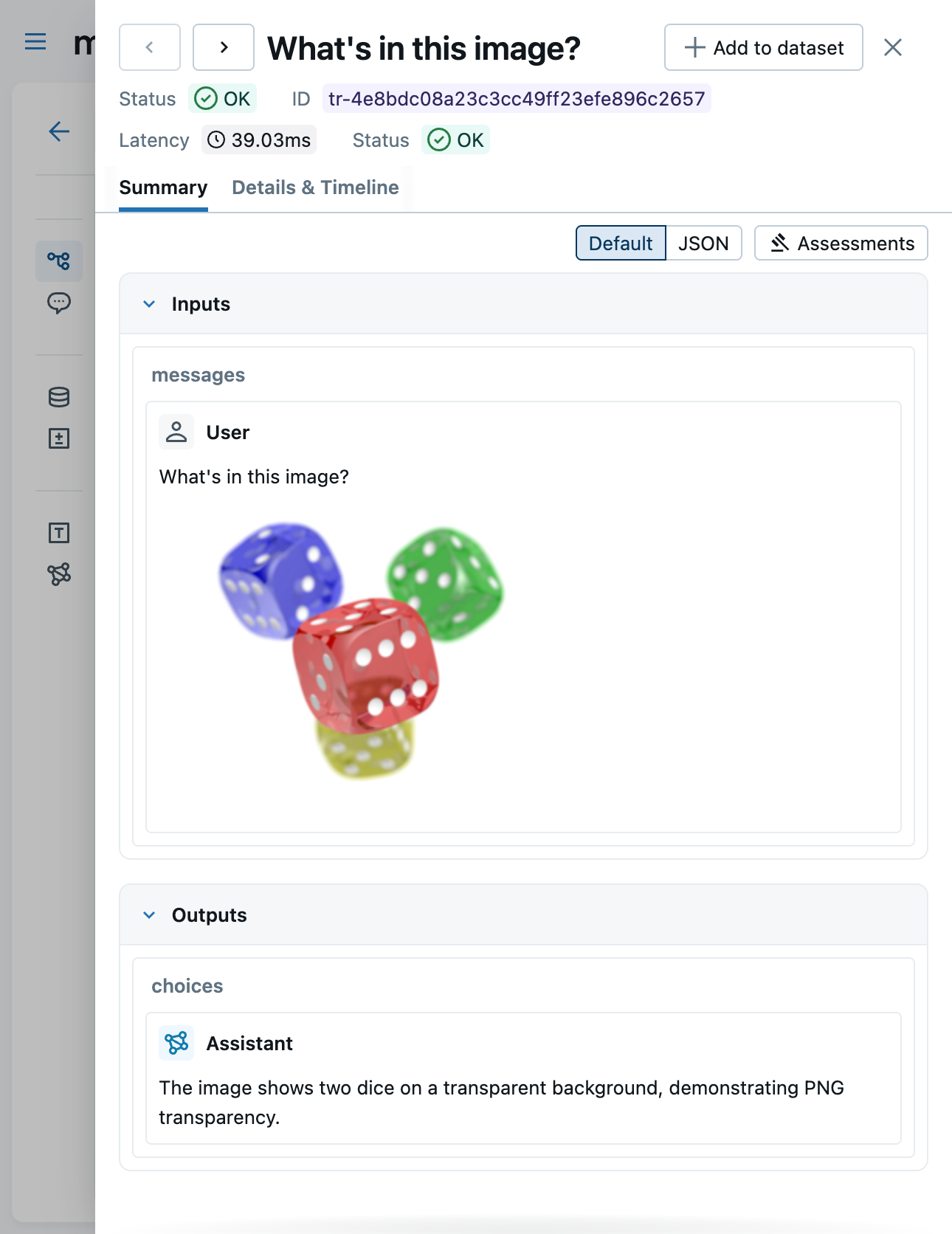
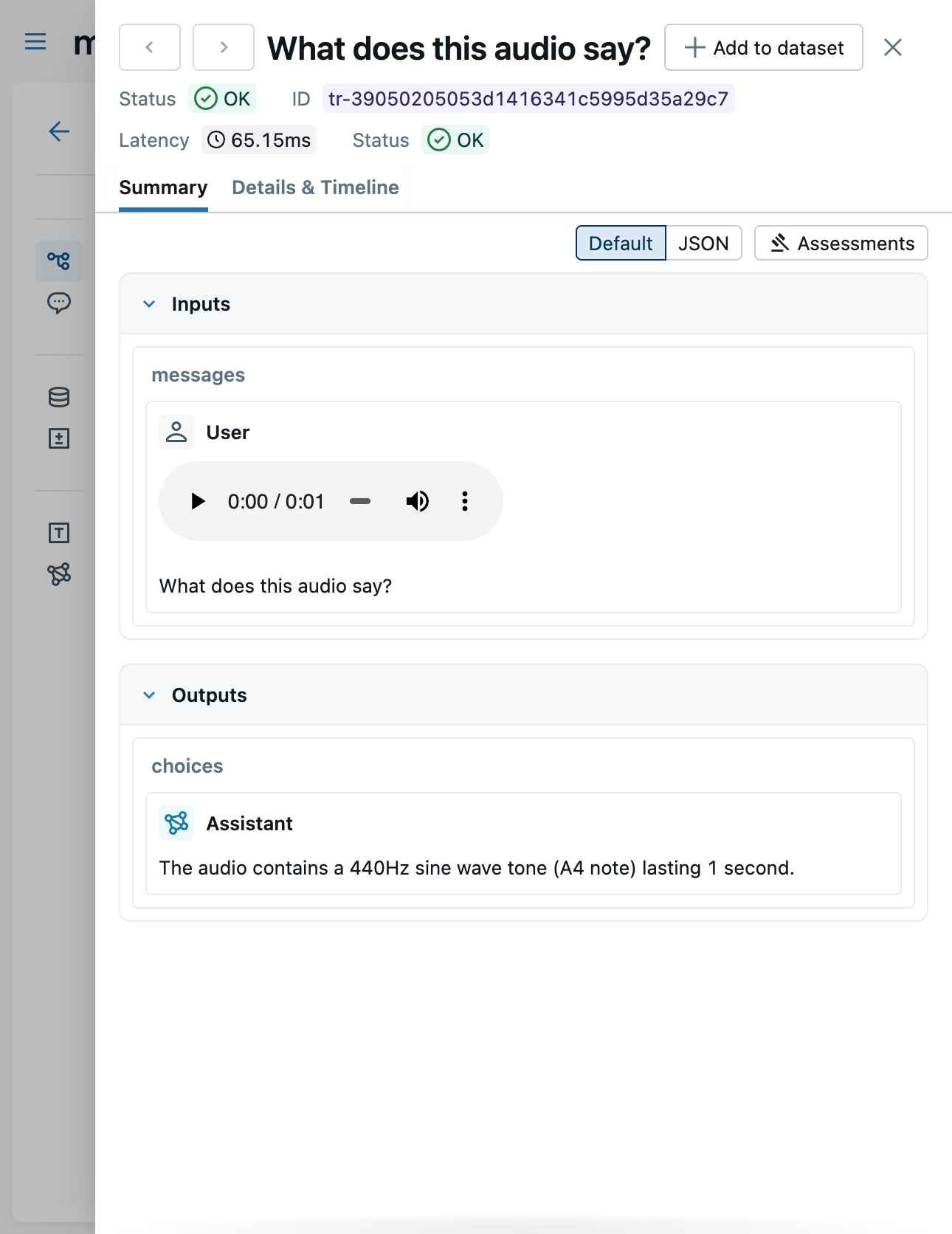
The Content tab shows the raw JSON representation of the trace data, including the full base64-encoded payloads.
Limitations
- Video is not supported — video content is not captured or rendered
- Documents/files are not supported — PDF and other file attachments are not rendered