Multimodal Content and Attachments in Traces
MLflow Tracing captures and renders images, audio, and binary attachments from multimodal AI models. When you send images or audio to models like GPT-4o or Claude, MLflow automatically extracts the binary content into lightweight attachments and displays them inline in the MLflow UI.
Supported Content Types
MLflow's trace schema uses the OpenAI chat message format to represent multimodal content. Each content part has a type field that determines how it is stored and rendered.
| Content Type | type value | Encoding | UI Rendering |
|---|---|---|---|
| Text | text | UTF-8 string | Markdown |
| Image | image_url | HTTP(S) URL or base64 data URI | Inline image |
| Audio | input_audio | Base64-encoded WAV or MP3 | Inline audio player |
Images
Images are represented as mlflow.types.chat.ImageContentPart() objects with type image_url. The image_url.url field accepts:
- HTTP(S) URLs -- a direct link to a hosted image (e.g.,
https://example.com/photo.png) - Base64 data URIs -- inline image data (e.g.,
data:image/png;base64,iVBOR...)
An optional detail field controls the resolution at which the model processes the image (auto, low, or high).
Both formats are rendered inline in the Chat tab of the trace viewer.
Audio
Audio is represented as mlflow.types.chat.AudioContentPart() objects with type input_audio. The input_audio.data field contains base64-encoded audio data, and input_audio.format specifies the codec (wav or mp3).
Audio content is rendered with an inline audio player in the Chat tab of the trace viewer.
Automatic Base64 Extraction
By default, MLflow automatically detects base64-encoded binary content in span inputs and outputs and extracts it into trace attachments. This keeps trace JSON lightweight while preserving the full binary content as downloadable artifacts.
The following patterns are detected and extracted automatically:
| Pattern | Example Source | Extracted As |
|---|---|---|
| Base64 data URIs | data:image/png;base64,... | image/png attachment |
OpenAI input_audio | {"type": "input_audio", "input_audio": {"data": "...", "format": "wav"}} | audio/wav attachment |
DALL-E b64_json output | {"b64_json": "...", "revised_prompt": "..."} | image/png attachment |
| OpenAI audio response | {"audio": {"data": "...", "transcript": "..."}} | audio/wav attachment |
| Responses API image generation | {"type": "image_generation_call", "result": "...", "output_format": "png"} | image/<format> attachment |
| Anthropic image source | {"type": "image", "source": {"type": "base64", "data": "..."}} | Attachment with original media_type |
| Bedrock image | {"image": {"format": "png", "source": {"bytes": "..."}}} | image/<format> attachment |
| Gemini inline data | {"inline_data": {"mime_type": "image/png", "data": "..."}} | Attachment with original mime_type |
| Gemini inline data (bytes repr) | {"inline_data": {"mime_type": "image/png", "data": "b'\\x89PNG...'"}} | Attachment with original mime_type |
After extraction, the base64 data in the span is replaced with a lightweight mlflow-attachment:// reference URI. The MLflow UI resolves these URIs and renders supported content types (images, audio, PDFs) inline.
Auto-extraction is enabled by default. To disable it and keep raw base64 data in trace JSON, set the environment variable:
export MLFLOW_TRACE_EXTRACT_ATTACHMENTS=false
Automatic Tracing
When using auto-instrumentation, multimodal content is captured automatically. MLflow normalizes provider-specific formats into the standard schema described above, and base64 content is extracted into attachments.
| Framework | Images | Audio | Files | Notes |
|---|---|---|---|---|
| OpenAI | ✓ | ✓ | ✓ | Chat Completions, Responses API (including input_file), and Images.generate |
| Anthropic | ✓ | ✗ | ✗ | Native image blocks normalized to image_url |
| Bedrock | ✓ | ✗ | ✗ | Image content extracted into attachments |
| Gemini | ✓ | ✗ | ✗ | inline_data extracted (base64 and Python bytes repr) |
| LangChain | ✓ | ✓ | ✗ | Audio format normalized from LangChain to OpenAI schema |
OpenAI — Image (URL)
Send an image URL in a chat completion and MLflow captures it automatically:
import mlflow
from openai import OpenAI

mlflow.openai.autolog()

client = OpenAI()
response = client.chat.completions.create(
    model="gpt-4o",
    messages=[
        {
            "role": "user",
            "content": [
                {"type": "text", "text": "What's in this image?"},
                {
                    "type": "image_url",
                    "image_url": {
                        "url": "https://upload.wikimedia.org/wikipedia/commons/thumb/3/3a/Cat03.jpg/1200px-Cat03.jpg"
                    },
                },
            ],
        }
    ],
)
OpenAI — Image (Base64)
Encode a local image file as a base64 data URI. MLflow automatically extracts the base64 data into an attachment:
import base64
import mlflow
from openai import OpenAI

mlflow.openai.autolog()


def encode_image(image_path):
    with open(image_path, "rb") as f:
        return base64.b64encode(f.read()).decode("utf-8")


base64_image = encode_image("photo.png")
client = OpenAI()
response = client.chat.completions.create(
    model="gpt-4o",
    messages=[
        {
            "role": "user",
            "content": [
                {"type": "text", "text": "Describe this image in detail."},
                {
                    "type": "image_url",
                    "image_url": {
                        "url": f"data:image/png;base64,{base64_image}",
                        "detail": "high",
                    },
                },
            ],
        }
    ],
)
OpenAI — Audio
Send audio input using the gpt-4o-audio-preview model:
import base64
import mlflow
from openai import OpenAI

mlflow.openai.autolog()


def encode_audio(audio_path):
    with open(audio_path, "rb") as f:
        return base64.b64encode(f.read()).decode("utf-8")


client = OpenAI()
response = client.chat.completions.create(
    model="gpt-4o-audio-preview",
    messages=[
        {
            "role": "user",
            "content": [
                {"type": "text", "text": "What does this audio say?"},
                {
                    "type": "input_audio",
                    "input_audio": {
                        "data": encode_audio("recording.wav"),
                        "format": "wav",
                    },
                },
            ],
        }
    ],
)
OpenAI — Image Generation
DALL-E image generation is also traced automatically. The b64_json output is extracted into an image attachment:
import mlflow
from openai import OpenAI

mlflow.openai.autolog()

client = OpenAI()
response = client.images.generate(
    model="dall-e-3",
    prompt="a white siamese cat",
    n=1,
    response_format="b64_json",
)
Anthropic — Image
Anthropic uses a different message format, but MLflow normalizes it to the standard image_url schema automatically:
import base64
import mlflow
from anthropic import Anthropic

mlflow.anthropic.autolog()


def encode_image(image_path):
    with open(image_path, "rb") as f:
        return base64.b64encode(f.read()).decode("utf-8")


client = Anthropic()
response = client.messages.create(
    model="claude-sonnet-4-20250514",
    max_tokens=1024,
    messages=[
        {
            "role": "user",
            "content": [
                {
                    "type": "image",
                    "source": {
                        "type": "base64",
                        "media_type": "image/png",
                        "data": encode_image("photo.png"),
                    },
                },
                {"type": "text", "text": "Describe this image."},
            ],
        }
    ],
)
Manual Tracing
You can attach multimodal content to traces manually using mlflow.start_span() and set_inputs() / set_outputs(). Structure the messages with content parts lists, following the same format used by the OpenAI API:
import mlflow

with mlflow.start_span(name="multimodal-call") as span:
    messages = [
        {
            "role": "user",
            "content": [
                {"type": "text", "text": "What's in this image?"},
                {
                    "type": "image_url",
                    "image_url": {"url": "https://example.com/photo.png"},
                },
            ],
        }
    ]
    span.set_inputs({"messages": messages})

    # Call your model here
    result = "A photo of a cat."

    span.set_outputs({"content": result})
Base64 data URIs in image_url.url fields and input_audio.data fields are automatically extracted into attachments when set_inputs() or set_outputs() is called.
Viewing in the UI
The MLflow trace viewer renders multimodal content in the UI:
- Images -- displayed inline with click-to-expand for a full-size preview
- Audio -- rendered with a built-in audio player for playback directly in the UI
- PDFs -- displayed in an embedded viewer
Image URLs render in the Chat view. Trace attachments (images, audio, PDFs) render inline across all views -- Chat, Details, and Timeline.
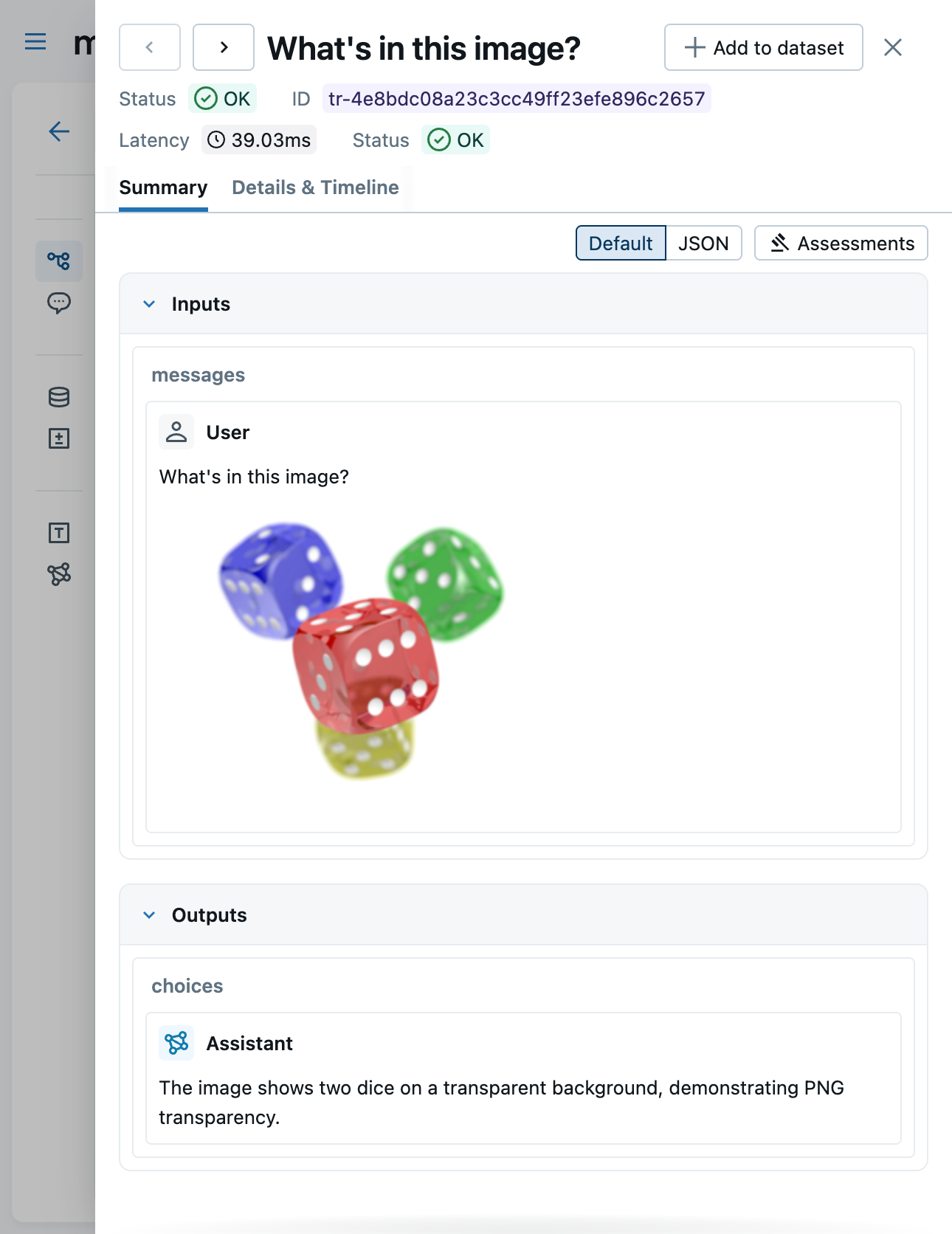
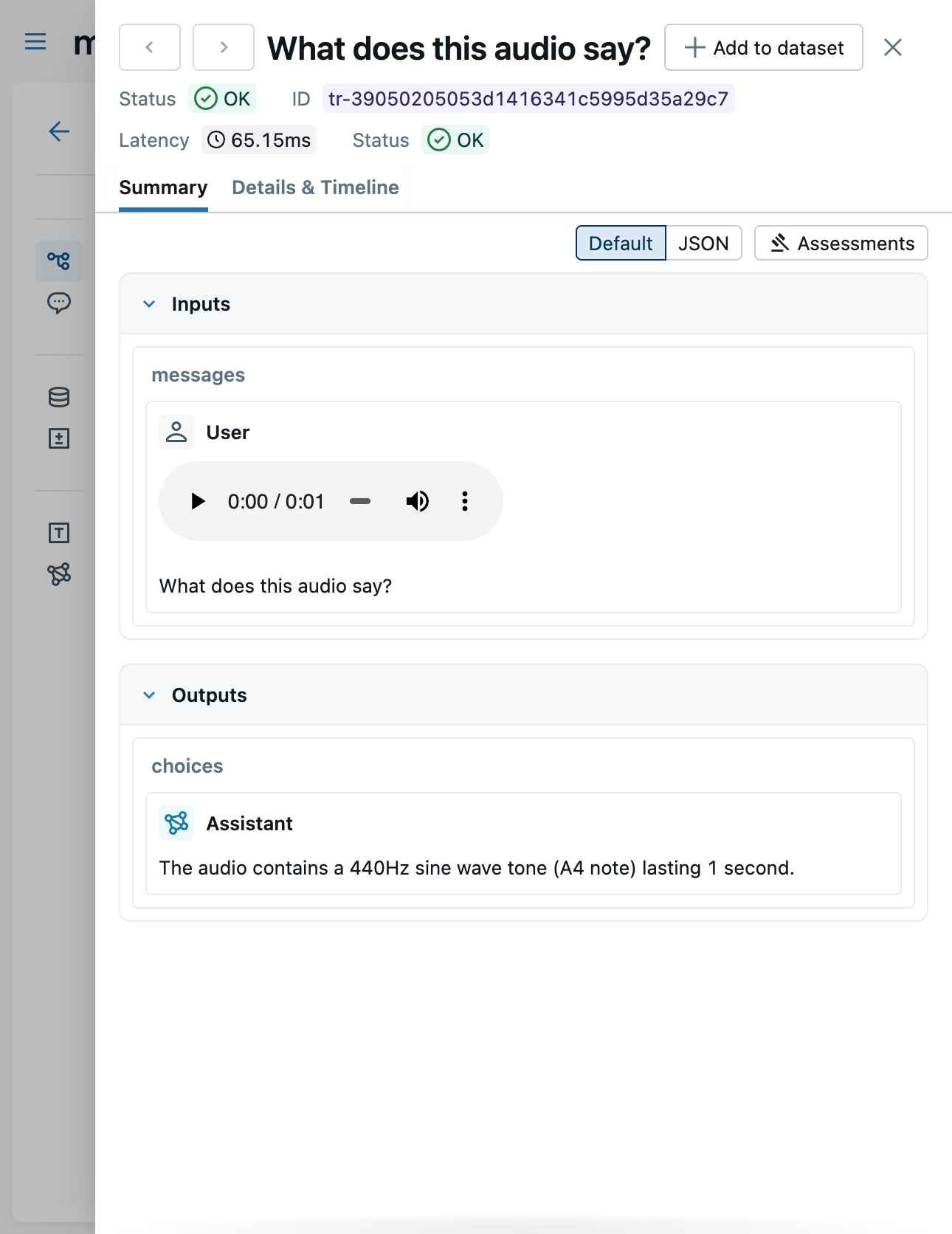
When base64 content has been extracted into attachments, the Content tab shows lightweight mlflow-attachment:// reference URIs instead of large base64 payloads. The UI automatically fetches and renders the attachment content.
Very large attachments are shown as a download link instead of rendering inline to prevent browser performance issues. The thresholds are:
| Content Type | Max Inline Size |
|---|---|
image/* | 10 MB |
audio/* | 50 MB |
application/pdf | 20 MB |
Trace Attachments
MLflow stores binary content as separate artifact files alongside trace data, keeping the trace JSON lightweight while supporting rich media. There are two ways to create attachments:
- Automatic extraction (default) -- base64-encoded content in span inputs/outputs is detected, extracted, and replaced with
mlflow-attachment://reference URIs. See Automatic Base64 Extraction. - Manual
Attachmentcreation -- for binary content that does not follow recognized autologging formats (e.g., for custom tracing use cases). See Creating Attachments for instructions.
How It Works
When binary content is stored as an attachment, MLflow:
- Replaces the content with a lightweight reference URI (
mlflow-attachment://...) in the span data - Uploads the binary content as a separate artifact file when the trace is exported
This means trace JSON stays small regardless of attachment size, and the MLflow UI can render supported content types inline.
Supported Content Types
Attachments support any binary content type. The MLflow UI renders the following types inline (files exceeding the size threshold show a download link instead):
| Content Type | UI Rendering | Max Inline Size |
|---|---|---|
image/* | Inline image | 10 MB |
audio/* | Inline audio player | 50 MB |
application/pdf | Embedded PDF viewer | 20 MB |
| Other | Download link | -- |
Creating Attachments
Use the Attachment class to wrap binary content with an explicit content type, or use Attachment.from_file() to load from a file path (the content type is inferred automatically):
from mlflow.tracing.attachments import Attachment

# From raw bytes with explicit content type
image_attachment = Attachment(content_type="image/png", content_bytes=png_bytes)

# From a file path (content type is inferred from the file extension)
pdf_attachment = Attachment.from_file("report.pdf")

# From a file path with explicit content type override
audio_attachment = Attachment.from_file("recording.bin", content_type="audio/wav")
Using Attachments in Spans
Pass Attachment objects directly to set_inputs() or set_outputs(). MLflow handles the extraction and replacement automatically, including within nested dicts, lists, and tuples:
import mlflow
from mlflow.tracing.attachments import Attachment


@mlflow.trace
def generate_image(prompt: str) -> dict:
    # Call your image generation model
    image_bytes = my_model.generate(prompt)

    return {"image": Attachment(content_type="image/png", content_bytes=image_bytes)}


# The trace will show:
# - Input: {"prompt": "a sunset over mountains"}
# - Output: {"image": "mlflow-attachment://<uuid>?content_type=image/png&trace_id=..."}
# The actual image bytes are uploaded as a separate artifact.
result = generate_image("a sunset over mountains")
You can also use attachments with the context manager API:
import mlflow
from mlflow.tracing.attachments import Attachment

with mlflow.start_span(name="text-to-speech") as span:
    span.set_inputs({"text": "Hello, world!"})

    # Generate audio
    audio_bytes = tts_model.synthesize("Hello, world!")

    span.set_outputs({
        "audio": Attachment(content_type="audio/wav", content_bytes=audio_bytes),
    })
Multiple Attachments
You can include multiple attachments in a single span. Each attachment is extracted and uploaded independently:
import mlflow
from mlflow.tracing.attachments import Attachment

with mlflow.start_span(name="multi-output") as span:
    span.set_outputs({
        "image": Attachment(content_type="image/png", content_bytes=image_bytes),
        "audio": Attachment(content_type="audio/mp3", content_bytes=audio_bytes),
        "report": Attachment.from_file("output.pdf"),
    })
When to Use Explicit Attachments
In most cases, you do not need to create Attachment objects manually. Auto-extraction handles base64 content in chat messages automatically. Use explicit Attachment wrapping when:
- The binary content is not base64-encoded (e.g., raw bytes from an API response)
- The content is in a format not recognized by auto-extraction (see supported patterns)
- You want to attach files like PDFs, CSVs, or other documents
If you are using auto-tracing with OpenAI, Anthropic, or LangChain, images and audio in chat messages are captured and extracted into attachments automatically. No Attachment wrapping needed.
Limitations
- Video is not supported -- video content is not captured or rendered
- Large attachments are shown as download links rather than rendered inline when they exceed the size thresholds listed in Viewing in the UI