Token Usage and Cost Tracking
MLflow automatically tracks token usage and cost for LLM calls within your traces. This enables you to monitor resource consumption and optimize costs across your LLM applications and AI agents.
Overview
When tracing is enabled, MLflow captures:
- Token Usage: The number of input tokens, output tokens, and total tokens for each LLM call
- Cost: The estimated cost in USD for each LLM call, calculated based on model pricing
This information is available at both the span level (individual LLM calls) and aggregated at the trace level.
Requirements
| Feature | MLflow Version |
|---|---|
| Token Usage Tracking | >= 3.2.0 |
| Cost Tracking | >= 3.10.0 |
To enable cost tracking, you need to start MLflow Tracking Server with the [genai] extra installed.
- pip
- uv
pip install 'mlflow[genai]>=3.10.0'
mlflow server
uv add 'mlflow[genai]>=3.10.0'
uv run mlflow server
The [genai] extra enables other powerful features such as AI Gateway, Automatic Evaluation, and Prompt Optimization. It is recommended to start your MLflow server with the extra installed, even if you don't need cost tracking.
When using Databricks managed MLflow, the cost computation requires the client application to install LiteLLM or manually set the cost attributes on spans. This is not required for self-hosted MLflow.
Viewing in the UI
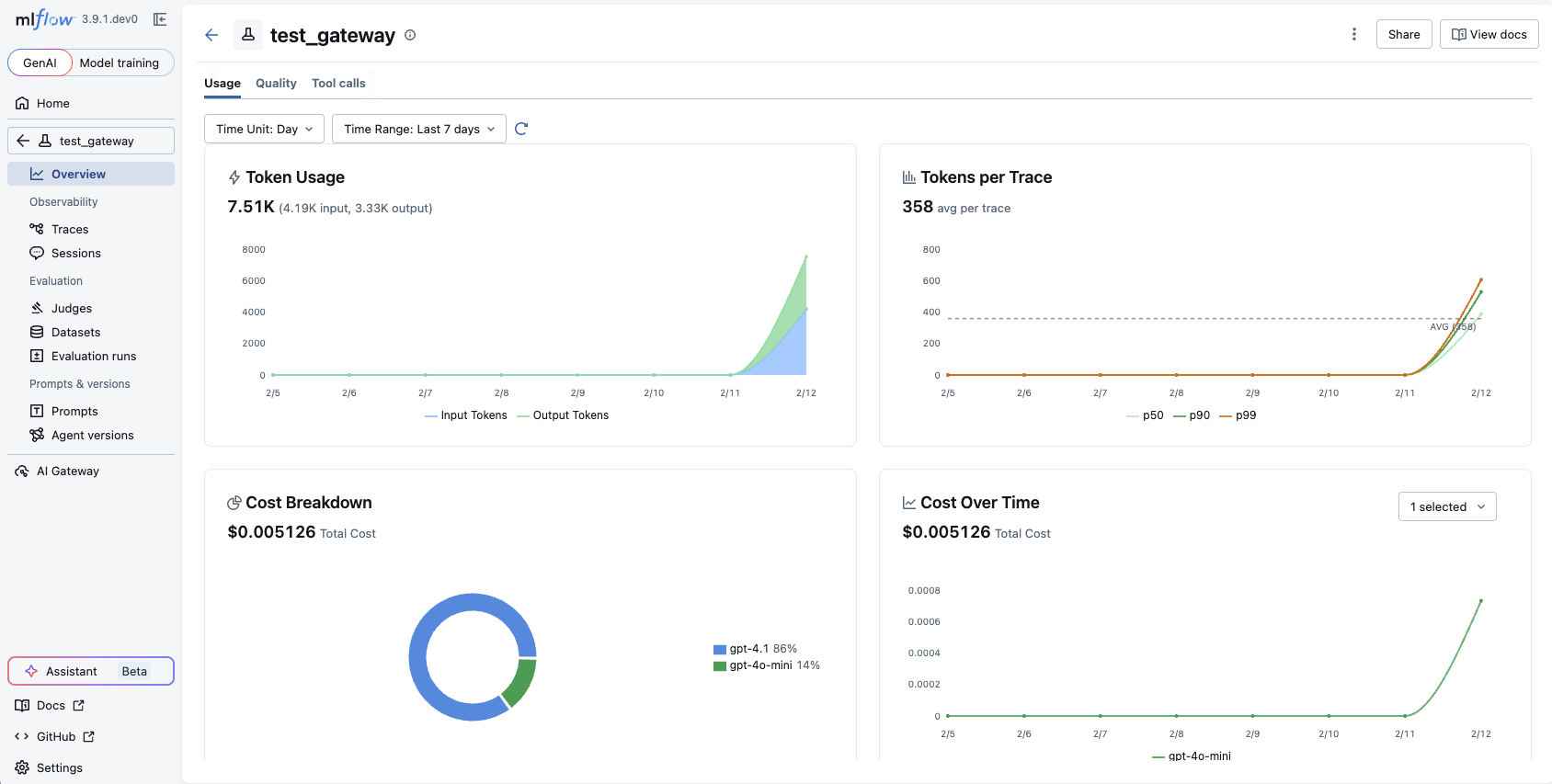
Token usage and cost information is displayed in the MLflow Trace UI.
The aggregated cost and trend charts are available in the Overview tab of the experiment page.
Accessing Programmatically
Python SDK
- Trace Level
- Span Level
import mlflow

# Get the most recent trace
last_trace_id = mlflow.get_last_active_trace_id()
trace = mlflow.get_trace(trace_id=last_trace_id)

# Access token usage
total_usage = trace.info.token_usage
if total_usage:
    print("== Total token usage: ==")
    print(f"  Input tokens: {total_usage['input_tokens']}")
    print(f"  Output tokens: {total_usage['output_tokens']}")
    print(f"  Total tokens: {total_usage['total_tokens']}")

# Access cost (requires MLflow >= 3.10.0 and LiteLLM)
total_cost = trace.info.cost
if total_cost:
    print("\n== Total cost (USD): ==")
    print(f"  Input cost: ${total_cost['input_cost']:.6f}")
    print(f"  Output cost: ${total_cost['output_cost']:.6f}")
    print(f"  Total cost: ${total_cost['total_cost']:.6f}")
import mlflow

# Get the most recent trace
last_trace_id = mlflow.get_last_active_trace_id()
trace = mlflow.get_trace(trace_id=last_trace_id)

# Access token usage and cost for each LLM call
print("== Token usage and cost for each LLM call: ==")
for span in trace.data.spans:
    usage = span.get_attribute("mlflow.chat.tokenUsage")
    cost = span.llm_cost
    print(f"{span.name}:")
    if usage:
        print(f"  Input tokens: {usage['input_tokens']}")
        print(f"  Output tokens: {usage['output_tokens']}")
        print(f"  Total tokens: {usage['total_tokens']}")
    if cost:
        print(f"  Input cost: ${cost['input_cost']:.6f}")
        print(f"  Output cost: ${cost['output_cost']:.6f}")
        print(f"  Total cost: ${cost['total_cost']:.6f}")
TypeScript / JavaScript SDK
Cost tracking support for TypeScript SDK will come soon. Token usage is currently available.
import * as mlflow from "mlflow-tracing";

// Flush any pending spans then fetch the most recent trace
await mlflow.flushTraces();
const lastTraceId = mlflow.getLastActiveTraceId();

if (lastTraceId) {
  const client = new mlflow.MlflowClient({ trackingUri: "http://localhost:5000" });
  const trace = await client.getTrace(lastTraceId);

  // Access token usage
  console.log("== Total token usage: ==");
  console.log(trace.info.tokenUsage); // { input_tokens, output_tokens, total_tokens }

  // Per-span usage
  console.log("\n== Usage for each LLM call: ==");
  for (const span of trace.data.spans) {
    const usage = span.attributes?.["mlflow.chat.tokenUsage"];
    if (usage) {
      console.log(`${span.name}:`, usage);
    }
  }
}
Example Output
== Total token usage: ==
  Input tokens: 84
  Output tokens: 22
  Total tokens: 106

== Total cost (USD): ==
  Input cost: $0.000013
  Output cost: $0.000013
  Total cost: $0.000026

== Token usage for each LLM call: ==
Completions_1:
  Input tokens: 45
  Output tokens: 14
  Total tokens: 59
Completions_2:
  Input tokens: 39
  Output tokens: 8
  Total tokens: 47
Data Structure
Token Usage
The token_usage field in the TraceInfo object returns a dictionary with the following keys:
| Key | Type | Description |
|---|---|---|
input_tokens | int | Number of tokens in the input/prompt |
output_tokens | int | Number of tokens in the output/completion |
total_tokens | int | Sum of input and output tokens |
Cost
The cost field returns a dictionary with the following keys:
| Key | Type | Description |
|---|---|---|
input_cost | float | Cost of input tokens in USD |
output_cost | float | Cost of output tokens in USD |
total_cost | float | Sum of input and output costs in USD |
Supported Integrations
Token usage and cost tracking is supported for most MLflow tracing integrations. See the individual integration pages for specific support details.
Some providers or models may not return token usage information. In these cases, the token_usage and cost fields will be None.
Manually Setting Token and Cost Information
If automatic cost tracking is not available for your model or you want to override the calculated cost, you can manually set token and cost information on a span:
import mlflow


@mlflow.trace
def my_llm_call():
    # Get the current span
    span = mlflow.get_current_active_span()

    # Your LLM call logic here...

    # Manually set token usage
    span.set_attribute(
        "mlflow.chat.tokenUsage",
        {
            "input_tokens": 100,
            "output_tokens": 50,
            "total_tokens": 150,
        },
    )

    # Manually set cost (in USD)
    span.set_attribute(
        "mlflow.llm.cost",
        {
            "input_cost": 0.0001,
            "output_cost": 0.0002,
            "total_cost": 0.0003,
        },
    )

    return "response"