Authentication with Username and Password
MLflow supports basic HTTP authentication to enable access control over experiments, registered models, and scorers. Once enabled, any visitor will be required to login before they can view any resource from the Tracking Server.
MLflow Authentication provides Python and REST API for managing users and permissions.

Overview
First, install all dependencies required for the basic auth app:
pip install 'mlflow[auth]'
The basic auth app requires a secret key for CSRF protection. Please set the MLFLOW_FLASK_SERVER_SECRET_KEY environment
variable before running the mlflow server command. For example:
export MLFLOW_FLASK_SERVER_SECRET_KEY="my-secret-key"
If your setup uses multiple servers, please make sure that this key is consistent between them. Otherwise, you may run into unexpected validation errors.
MLflow ships no default admin password. The first time the server starts with authentication enabled, it creates the
admin user with the password from the MLFLOW_AUTH_ADMIN_PASSWORD environment variable (or admin_password in a
custom configuration file) and refuses to start if neither is set. Passwords must be at least
12 characters.
export MLFLOW_AUTH_ADMIN_PASSWORD="<strong-password>"
See Admin Users for details.
To enable MLflow authentication, launch the MLflow UI with the following command:
mlflow server --app-name basic-auth
Server admin can choose to disable this feature anytime by restarting the server without the app-name flag.
Any users and permissions created will be persisted on a SQL database and will be back in service once the feature is re-enabled.
Due to the nature of HTTP authentication, it is only supported on a remote Tracking Server, where users send requests to the server via REST APIs.
How It Works
Permissions
The available permissions are:
| Permission | Can read | Can use | Can update | Can delete | Can manage |
|---|---|---|---|---|---|
| READ | Yes | No | No | No | No |
| USE | Yes | Yes | No | No | No |
| EDIT | Yes | Yes | Yes | No | No |
| MANAGE | Yes | Yes | Yes | Yes | Yes |
| NO_PERMISSIONS | No | No | No | No | No |
The default permission for all users is READ. It can be changed in the configuration file.
Permissions are granted via roles. See Role-Based Access Control
for the model, scenarios, and API reference. For workspace-wide access controls
specifically, see Workspace Permissions.
Supported resources include Experiment, Registered Model, Prompt,
Scorer, and the AI Gateway resource types (secrets, endpoints, model
definitions). Prompt is its own resource type even though prompts share
the model-registry wire surface with registered models: a
(registered_model, foo, READ) grant does not satisfy a request that
targets a prompt with the same name, and vice versa.
To access an API endpoint, a user must have the required permission.
Otherwise, a 403 Forbidden response will be returned.
Note: RBAC - the role-based model, role API, and admin UI - is available from MLflow 3.13.0. MLflow versions before 3.13 only support the legacy per-resource permission APIs documented below.
The following surfaces are removed from MLflow 3.13.0 onwards. Calls return 404 or the client method no longer exists. The auth-store backfill migration moves existing grants into the new synthetic-role storage automatically, so existing access survives the upgrade, only the API shape changes.
See Migrating from the legacy permission model for the detailed guidance on how to migrate to the new RBAC permission model.
Required permissions for accessing experiments
| API | Endpoint | Method | Required permission |
|---|---|---|---|
| Create Experiment | 2.0/mlflow/experiments/create | POST | None |
| Get Experiment | 2.0/mlflow/experiments/get | GET | can_read |
| Get Experiment By Name | 2.0/mlflow/experiments/get-by-name | GET | can_read |
| Delete Experiment | 2.0/mlflow/experiments/delete | POST | can_delete |
| Restore Experiment | 2.0/mlflow/experiments/restore | POST | can_delete |
| Update Experiment | 2.0/mlflow/experiments/update | POST | can_update |
| Search Experiments | 2.0/mlflow/experiments/search | POST | None |
| Search Experiments | 2.0/mlflow/experiments/search | GET | None |
| Set Experiment Tag | 2.0/mlflow/experiments/set-experiment-tag | POST | can_update |
| Create Run | 2.0/mlflow/runs/create | POST | can_update |
| Get Run | 2.0/mlflow/runs/get | GET | can_read |
| Update Run | 2.0/mlflow/runs/update | POST | can_update |
| Delete Run | 2.0/mlflow/runs/delete | POST | can_delete |
| Restore Run | 2.0/mlflow/runs/restore | POST | can_delete |
| Search Runs | 2.0/mlflow/runs/search | POST | None |
| Set Tag | 2.0/mlflow/runs/set-tag | POST | can_update |
| Delete Tag | 2.0/mlflow/runs/delete-tag | POST | can_update |
| Log Metric | 2.0/mlflow/runs/log-metric | POST | can_update |
| Log Param | 2.0/mlflow/runs/log-parameter | POST | can_update |
| Log Batch | 2.0/mlflow/runs/log-batch | POST | can_update |
| Log Model | 2.0/mlflow/runs/log-model | POST | can_update |
| List Artifacts | 2.0/mlflow/artifacts/list | GET | can_read |
| Get Metric History | 2.0/mlflow/metrics/get-history | GET | can_read |
Required Permissions for accessing prompt optimization jobs:
Prompt optimization jobs inherit permissions from their parent experiment. When you create a job within an experiment, the job's permissions are determined by your permissions on that experiment.
| API | Endpoint | Method | Required permission |
|---|---|---|---|
| Create Prompt Optimization Job | 3.0/mlflow/prompt-optimization/jobs | POST | can_update (on experiment) |
| Get Prompt Optimization Job | 3.0/mlflow/prompt-optimization/jobs/{job_id} | GET | can_read |
| Search Prompt Optimization Jobs | 3.0/mlflow/prompt-optimization/jobs/search | POST | can_read (on experiment) |
| Search Prompt Optimization Jobs | 3.0/mlflow/prompt-optimization/jobs/search | GET | can_read (on experiment) |
| Cancel Prompt Optimization Job | 3.0/mlflow/prompt-optimization/jobs/{job_id}/cancel | POST | can_update |
| Delete Prompt Optimization Job | 3.0/mlflow/prompt-optimization/jobs/{job_id} | DELETE | can_delete |
Required Permissions for accessing registered models:
| API | Endpoint | Method | Required permission |
|---|---|---|---|
| Create Registered Model | 2.0/mlflow/registered-models/create | POST | None |
| Rename Registered Model | 2.0/mlflow/registered-models/rename | POST | can_update |
| Update Registered Model | 2.0/mlflow/registered-models/update | PATCH | can_update |
| Delete Registered Model | 2.0/mlflow/registered-models/delete | DELETE | can_delete |
| Get Registered Model | 2.0/mlflow/registered-models/get | GET | can_read |
| Search Registered Models | 2.0/mlflow/registered-models/search | GET | None |
| Get Latest Versions | 2.0/mlflow/registered-models/get-latest-versions | POST | can_read |
| Get Latest Versions | 2.0/mlflow/registered-models/get-latest-versions | GET | can_read |
| Set Registered Model Tag | 2.0/mlflow/registered-models/set-tag | POST | can_update |
| Delete Registered Model Tag | 2.0/mlflow/registered-models/delete-tag | DELETE | can_update |
| Set Registered Model Alias | 2.0/mlflow/registered-models/alias | POST | can_update |
| Delete Registered Model Alias | 2.0/mlflow/registered-models/alias | DELETE | can_delete |
| Get Model Version By Alias | 2.0/mlflow/registered-models/alias | GET | can_read |
| Create Model Version | 2.0/mlflow/model-versions/create | POST | can_update |
| Update Model Version | 2.0/mlflow/model-versions/update | PATCH | can_update |
| Transition Model Version Stage | 2.0/mlflow/model-versions/transition-stage | POST | can_update |
| Delete Model Version | 2.0/mlflow/model-versions/delete | DELETE | can_delete |
| Get Model Version | 2.0/mlflow/model-versions/get | GET | can_read |
| Search Model Versions | 2.0/mlflow/model-versions/search | GET | None (results filtered by parent model permission) |
| Get Model Version Download Uri | 2.0/mlflow/model-versions/get-download-uri | GET | can_read |
| Set Model Version Tag | 2.0/mlflow/model-versions/set-tag | POST | can_update |
| Delete Model Version Tag | 2.0/mlflow/model-versions/delete-tag | DELETE | can_delete |
AI Gateway Permissions
AI Gateway resources (API keys, model definitions, and endpoints) support the same permission model as experiments and registered models. When a user creates a resource, they automatically receive MANAGE permission on it and can grant permissions to other users.
| API | Endpoint | Method | Required permission |
|---|---|---|---|
| List API Keys | 3.0/mlflow/gateway/secrets/list | GET | None |
| Get API Key | 3.0/mlflow/gateway/secrets/get | GET | can_read |
| Create API Key | 3.0/mlflow/gateway/secrets/create | POST | None |
| Update API Key | 3.0/mlflow/gateway/secrets/update | PATCH | can_update |
| Delete API Key | 3.0/mlflow/gateway/secrets/delete | DELETE | can_delete |
| List Model Definitions | 3.0/mlflow/gateway/model-definitions/list | GET | None |
| Get Model Definition | 3.0/mlflow/gateway/model-definitions/get | GET | can_read |
| Create Model Definition | 3.0/mlflow/gateway/model-definitions/create | POST | None (can_use on referenced API key) |
| Update Model Definition | 3.0/mlflow/gateway/model-definitions/update | PATCH | can_update |
| Delete Model Definition | 3.0/mlflow/gateway/model-definitions/delete | DELETE | can_delete |
| List Endpoints | 3.0/mlflow/gateway/endpoints/list | GET | None |
| Get Endpoint | 3.0/mlflow/gateway/endpoints/get | GET | can_read |
| Create Endpoint | 3.0/mlflow/gateway/endpoints/create | POST | None (can_use on referenced model definitions) |
| Update Endpoint | 3.0/mlflow/gateway/endpoints/update | PATCH | can_update |
| Delete Endpoint | 3.0/mlflow/gateway/endpoints/delete | DELETE | can_delete |
| Query Endpoint | gateway/{endpoint_name}/... | POST | can_use |
When creating AI Gateway resources, the creator automatically receives MANAGE permission. To grant access to other users, use the permission management APIs listed below.
Required Permissions for accessing scorers:
| API | Endpoint | Method | Required permission |
|---|---|---|---|
| Register Scorer | 3.0/mlflow/scorers/register | POST | can_update (on experiment) |
| List Scorers | 3.0/mlflow/scorers/list | GET | can_read (on experiment) |
| Get Scorer | 3.0/mlflow/scorers/get | GET | can_read |
| Delete Scorer | 3.0/mlflow/scorers/delete | POST | can_delete |
| List Scorer Versions | 3.0/mlflow/scorers/list-versions | GET | can_read |
MLflow Authentication provides API endpoints to manage users and permissions.
| API | Endpoint | Method | Required permission |
|---|---|---|---|
| Create User | 2.0/mlflow/users/create | POST | None |
| Get User | 2.0/mlflow/users/get | GET | Only readable by that user |
| Update User Password | 2.0/mlflow/users/update-password | PATCH | Only updatable by that user |
| Update User Admin | 2.0/mlflow/users/update-admin | PATCH | Only admin |
| Delete User | 2.0/mlflow/users/delete | DELETE | Only admin |
| Grant User Permission | 3.0/mlflow/users/permissions/grant | POST | can_manage on the target resource (or admin) |
| Revoke User Permission | 3.0/mlflow/users/permissions/revoke | POST | can_manage on the target resource (or admin) |
| Check User Permission | 3.0/mlflow/auth/check | POST | self / admin / workspace MANAGE in the resource's workspace |
| Create Webhook | 2.0/mlflow/webhooks | POST | Only admin |
| List Webhooks | 2.0/mlflow/webhooks | GET | Only admin |
| Get Webhook | 2.0/mlflow/webhooks/{webhook_id} | GET | Only admin |
| Update Webhook | 2.0/mlflow/webhooks/{webhook_id} | PATCH | Only admin |
| Delete Webhook | 2.0/mlflow/webhooks/{webhook_id} | DELETE | Only admin |
| Test Webhook | 2.0/mlflow/webhooks/{webhook_id}/test | POST | Only admin |
Some APIs will also have their behaviour modified.
For example, the creator of an experiment will automatically be granted MANAGE permission
on that experiment, so that the creator can grant or revoke other users' access to that experiment.
| API | Endpoint | Method | Effect |
|---|---|---|---|
| Create Experiment | 2.0/mlflow/experiments/create | POST | Automatically grants MANAGE permission to the creator. |
| Create Registered Model | 2.0/mlflow/registered-models/create | POST | Automatically grants MANAGE permission to the creator. |
| Search Experiments | 2.0/mlflow/experiments/search | POST | Only returns experiments which the user has READ permission on. |
| Search Experiments | 2.0/mlflow/experiments/search | GET | Only returns experiments which the user has READ permission on. |
| Search Runs | 2.0/mlflow | POST | Only returns experiments which the user has READ permission on. |
| Search Registered Models | 2.0/mlflow/registered-models/search | GET | Only returns registered models which the user has READ permission on. |
| Search Model Versions | 2.0/mlflow/model-versions/search | GET | Only returns model versions whose parent registered model the user has READ permission on. |
Permissions Database
All users and permissions are stored in a database in basic_auth.db, relative to the directory where MLflow server is launched.
The location can be changed in the configuration file. To run migrations, use the following command:
python -m mlflow.server.auth db upgrade --url <database_url>
Admin Users
Admin users have unrestricted access to all MLflow resources,
including creating or deleting users, updating password and admin status of other users,
granting or revoking permissions from other users, and managing permissions for all
MLflow resources, even if NO_PERMISSIONS is explicitly set to that admin account.
MLflow has a built-in admin user that is created the first time the server starts with authentication enabled
against an empty user store. Its username defaults to admin and can be changed with admin_username in the
configuration file or the MLFLOW_AUTH_ADMIN_USERNAME environment variable.
There is no default admin password. Set one with the MLFLOW_AUTH_ADMIN_PASSWORD environment variable or with
admin_password in the configuration file before the first start; the server refuses to start otherwise. Both
settings are only used to create the admin user (and to replace its password if it is still the legacy default
described below) and are ignored otherwise. After the first successful start, unset MLFLOW_AUTH_ADMIN_PASSWORD (or
remove admin_password from the file) so the secret does not linger in the server's environment or configuration, and
rotate the password with the 2.0/mlflow/users/update-password endpoint.
Earlier MLflow versions shipped the admin password password1234 in basic_auth.ini
(GHSA-gq3w-7jj3-x7gr). That password is no longer accepted: the
server rejects logins by admin users that present it, never uses it to create an admin user, and logs a warning at
startup while an admin user still has it. If you upgraded an existing deployment whose admin user still has that
password, set MLFLOW_AUTH_ADMIN_PASSWORD (or admin_password) to a new password and restart the server once; the
stored password is replaced and the setting can be unset again. Alternatively, another admin can update or delete the
user.
Multiple admin users can exist by promoting other users to admin, using the 2.0/mlflow/users/update-admin endpoint.
# authenticate as built-in admin user
export MLFLOW_TRACKING_USERNAME=admin
export MLFLOW_TRACKING_PASSWORD=password
from mlflow.server import get_app_client

tracking_uri = "http://localhost:5000/"

auth_client = get_app_client("basic-auth", tracking_uri=tracking_uri)
auth_client.create_user(username="user1", password="pw1")
auth_client.update_user_admin(username="user1", is_admin=True)
Managing Permissions
MLflow provides REST APIs
and a client class AuthServiceClient
for managing users and permissions. To instantiate AuthServiceClient, use mlflow.server.get_app_client().
Permissions are granted via the role API. The three methods you need are:
create_role(name, workspace, description=None): create a roleadd_role_permission(role_id, resource_type, resource_pattern, permission): attach a grantassign_role(username, role_id): assign a user to the role
This is the path for every grant: one user or many, one resource or
wildcard, one-off or reusable. For one-user one-resource direct grants
use auth_client.grant_user_permission(username, resource_type, resource_id, permission); for shared sets use the role API
(create_role + add_role_permission + assign_role). The legacy
per-resource methods (create_experiment_permission(),
update_registered_model_permission(), etc.) are removed — see the
warning above. For one-off grants, the admin UI's Direct permissions
section is the simplest path (no role to author). See
Role-Based Access Control
for the full model, the
API reference,
and worked scenarios (one-off direct grants, team roles, promoting a user to
Workspace Manager, onboarding). For workspace-scoped permissions, see
Workspace Permissions.
export MLFLOW_TRACKING_USERNAME=admin
export MLFLOW_TRACKING_PASSWORD=password
from mlflow import MlflowClient
from mlflow.server import get_app_client

tracking_uri = "http://localhost:5000/"

auth_client = get_app_client("basic-auth", tracking_uri=tracking_uri)
auth_client.create_user(username="user1", password="pw1")
auth_client.create_user(username="user2", password="pw2")

client = MlflowClient(tracking_uri=tracking_uri)
experiment_id = client.create_experiment(name="experiment")

# Grant user2 MANAGE on this experiment by creating a single-permission role
# and assigning it. The same pattern (``create_role`` -> ``add_role_permission``
# -> ``assign_role``) scales to any number of users and permissions; reuse the
# same role to grant the same access to more users with one ``assign_role``
# call each.
role = auth_client.create_role(name="experiment-manager", workspace="default")
auth_client.add_role_permission(
    role_id=role.id,
    resource_type="experiment",
    resource_pattern=experiment_id,
    permission="MANAGE",
)
auth_client.assign_role(username="user2", role_id=role.id)
Authenticating to MLflow
Using MLflow UI
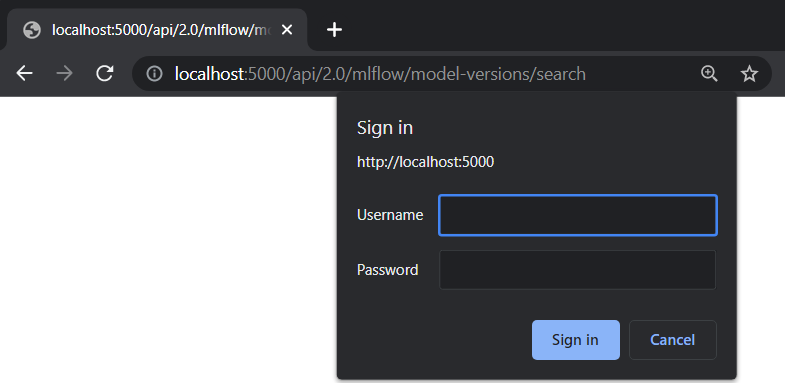
When a user first visits the MLflow UI on a browser, they will be prompted to login. There is no limit to how many login attempts can be made.
Currently, MLflow UI does not display any information about the current user. Once a user is logged in, the only way to log out is to close the browser.
Using Environment Variables
MLflow provides two environment variables for authentication: MLFLOW_TRACKING_USERNAME and MLFLOW_TRACKING_PASSWORD.
To use basic authentication, you must set both environment variables.
export MLFLOW_TRACKING_USERNAME=username
export MLFLOW_TRACKING_PASSWORD=password
import mlflow

mlflow.set_tracking_uri("https://<mlflow_tracking_uri>/")
with mlflow.start_run():
    ...
Using Credentials File
You can save your credentials in a file to remove the need for setting environment variables every time.
The credentials should be saved in ~/.mlflow/credentials using INI format. Note that the password
will be stored unencrypted on disk, and is protected only by filesystem permissions.
If the environment variables MLFLOW_TRACKING_USERNAME and MLFLOW_TRACKING_PASSWORD are configured,
they override any credentials provided in the credentials file.
[mlflow]
mlflow_tracking_username = username
mlflow_tracking_password = password
Using REST API
A user can authenticate using the HTTP Authorization request header.
See https://developer.mozilla.org/en-US/docs/Web/HTTP/Authentication for more information.
In Python, you can use the requests library:
import requests

response = requests.get(
    "https://<mlflow_tracking_uri>/",
    auth=("username", "password"),
)
Creating a New User
To create a new user, you are required to authenticate with admin privileges.
Using MLflow UI
MLflow UI provides a simple page for creating new users at <tracking_uri>/signup.
Using REST API
Alternatively, you can send POST requests to the Tracking Server endpoint 2.0/users/create.
In Python, you can use the requests library:
import requests

response = requests.post(
    "https://<mlflow_tracking_uri>/api/2.0/mlflow/users/create",
    json={
        "username": "username",
        "password": "password",
    },
)
Using MLflow AuthServiceClient
MLflow AuthServiceClient
provides a function to create new users easily.
import mlflow

auth_client = mlflow.server.get_app_client(
    "basic-auth", tracking_uri="https://<mlflow_tracking_uri>/"
)
auth_client.create_user(username="username", password="password")
Configuration
Authentication configuration is located at mlflow/server/auth/basic_auth.ini:
| Variable | Description |
|---|---|
default_permission | Default permission on all resources |
grant_default_workspace_access | When workspaces are enabled: if false, the default workspace ignores default_permission and new users need explicit workspace ACLs; if true, the default workspace inherits default_permission for all users (pre-workspaces behavior). |
database_uri | Database location to store permission and user data |
admin_username | Username of the admin user created on first start. Overridden by MLFLOW_AUTH_ADMIN_USERNAME. |
admin_password | Password of the admin user created on first start; also replaces that user's password on upgrade while it
is still the legacy default. Overridden by |
authorization_function | Function to authenticate requests |
Alternatively, assign the environment variable MLFLOW_AUTH_CONFIG_PATH to point
to your custom configuration file.
The authorization_function setting supports pluggable authentication methods
if you want to use another authentication method than HTTP basic auth. The value
specifies module_name:function_name. The function has the following signature:
def authenticate_request() -> Union[Authorization, Response]: ...
The function should return a werkzeug.datastructures.Authorization object if
the request is authenticated, or a Response object (typically
401: Unauthorized) if the request is not authenticated. For an example of how
to implement a custom authentication method, see tests/server/auth/jwt_auth.py.
NOTE: This example is not intended for production use.
Connecting to a Centralized Database
By default, MLflow Authentication uses a local SQLite database to store user and permission data. In the case of a multi-node deployment, it is recommended to use a centralized database to store this data.
To connect to a centralized database, you can set the database_uri configuration variable to the database URL.
[mlflow]
database_uri = postgresql://username:password@hostname:port/database
Then, start the MLflow server with the MLFLOW_AUTH_CONFIG_PATH environment variable
set to the path of your configuration file.
MLFLOW_AUTH_CONFIG_PATH=/path/to/my_auth_config.ini mlflow server --app-name basic-auth
The database must be created before starting the MLflow server. The database schema will be created automatically when the server starts.
Auth migrations use a separate version table (alembic_version_auth) from tracking migrations (alembic_version).
This allows you to safely use the same database for both tracking data and auth data without migration conflicts.
To use separate databases instead, configure database_uri to point to a different database than --backend-store-uri.
By default, auth uses basic_auth.db (SQLite) while tracking uses the database specified by --backend-store-uri.