Role-Based Access Control (RBAC)
In MLflow, admins grant users permissions by assigning them roles.
A role is a named group of permissions defined once and used multiple times.
With workspaces (--enable-workspaces), roles become workspace-scoped.
Prerequisite
Authentication enabled (mlflow server --app-name basic-auth).
For setting up authentication and managing users (login, signup, admin status, password updates), see Username and Password; this page picks up once users exist.
Concepts
Three entities - users, roles, resources - connected by two relations: role assignment and permission grants. Roles (and the grants they carry) are workspace-scoped when workspaces are enabled; see Workspace isolation for the on/off delta.
- User - an actor who wants to access resources.
- Resource - a target entity in MLflow that permissions are managed on, such as an experiment, a registered model, a prompt, a scorer, or an AI Gateway resource (a secret, an endpoint, or a model definition). Some resources live inside another one - a run inside an experiment, a version inside a registered model - and are granted on their own tier; see Sub-resource tiers.
- Role - a named bundle of permissions on resources.
Roles
A role is a named list of (resource_type, resource_pattern, permission) grants.
Grants can target a single resource (experiment:42) or every resource of
a type (experiment:*), so one role can express both fine-grained and broad
access. For example, an editor role might carry (experiment, *, EDIT) to
let its members edit every experiment, while a narrower role could combine
(experiment, 42, READ) with (prompt, 7, EDIT).
Permission levels
The grantable permission levels for resource-scoped permissions are:
| Permission | Can read | Can use | Can update | Can delete | Can manage |
|---|---|---|---|---|---|
READ | Yes | No | No | No | No |
USE | Yes | Yes | No | No | No |
EDIT | Yes | Yes | Yes | No | No |
MANAGE | Yes | Yes | Yes | Yes | Yes |
DENY | No | No | No | No | No |
USE is for consuming a resource without modifying it (invoking a gateway
endpoint, referencing a model definition, creating new experiments /
registered models within a workspace).
NO_PERMISSIONS is the resolver's deny sentinel for workspace-boundary
cases - e.g., a user with no workspace membership when
grant_default_workspace_access is off. It is not grantable as a role
permission or a direct grant; the auth server rejects attempts to assign
it. The effective permission when no role grant matches is the server's
default_permission (READ by default; see
Permission resolution).
DENY is an explicit-deny override. Unlike the levels above it is not a
point on the capability ladder: it carries no capabilities, and it wins over
any positive grant that applies to the same resource, so it can carve an
exception out of a broad grant. (experiment, *, EDIT) together with
(experiment, 42, DENY) edits every experiment except 42.
DENY is available from MLflow 3.17. Earlier releases have no explicit-deny
level; the only way to withhold access is to leave the grant out.
Two limits are worth knowing before relying on it:
- A workspace administrator is not restrictable. A
(workspace, *, MANAGE)grant short-circuits resolution toMANAGEbeforeDENYis considered, so it cannot be excepted this way. Remove the workspace grant instead. DENYapplies at the tier it is granted on. It does not cascade from a parent to an unrelated resource type; see Permission resolution for how a grant on one tier overrides another.
Sub-resource tiers
A resource that lives inside another can be granted on separately, so access to the container and access to its contents are not the same decision. The sub-resource tiers below are available from MLflow 3.17; before that, access to a container implied access to everything inside it. The sub-resource types are:
| Tier | Inside |
|---|---|
run | experiment |
trace | experiment |
assessment | experiment (via a trace) |
logged_model | experiment |
review_queue | experiment |
registered_model_version | registered_model |
prompt_version | prompt |
scorer_version | scorer |
mcp_server_version | mcp_server |
Sub-resource tiers are wildcard grain only. A grant must use the *
pattern - (run, *, DENY) is valid, while (run, r-abc123, READ) is
rejected with a 400. A per-id grant here could be honoured on a point route
but not in a search, and a grant that holds in one place and silently lapses
in another is worse than no grant, so the server refuses it at the source
rather than dropping it later. The admin UI reflects this: picking a tier
disables the specific-resource scope, so the pickers cannot compose a grant
the server would reject.
Editing a run in experiment 42, to show how the two combine. The first five rows have
an explicit grant on the experiment, so the container check is settled whatever
default_permission is. They assume that default is READ or NO_PERMISSIONS: a
higher default floors positive grants upward, which would raise row 2's
(run, *, READ) and let it edit after all.
| Grants | Read run | Edit run | Why |
|---|---|---|---|
(experiment, 42, EDIT) | yes | yes | no run grant, so the container decides |
(experiment, 42, EDIT) + (run, *, READ) | yes | no | the run tier decides, and it is lower |
(experiment, 42, READ) + (run, *, EDIT) | yes | yes | the run tier decides, and it is higher |
(experiment, 42, MANAGE) + (run, *, DENY) | no | no | DENY on the tier is not rescued by the container |
(experiment, 42, DENY) + (run, *, MANAGE) | no | no | DENY on the container blocks every tier grant |
(run, *, EDIT) alone | see below | see below | the container check falls to default_permission |
The shape to remember: the tier grant sets the verb, the container grants set
the reach. (experiment, 42, READ) + (run, *, MANAGE) deletes runs in
experiment 42 and nowhere else, even though the run grant names no experiment.
Anything that leaves the container below READ therefore blocks every operation
on its contents, whatever the tier grant says - DENY on the container, or a
NO_PERMISSIONS floor.
The last row depends on configuration, and is worth understanding because it is
the common case. With no grant on the experiment, the container check falls through
to default_permission: on a default server that is READ, which satisfies the
container check, so a run grant alone is enough to edit runs. Set
default_permission = NO_PERMISSIONS, or run in multi-workspace mode where an
absent grant is a denial rather than a default, and the same grant is refused.
Permission resolution below gives the full ordering these rows follow.
Permission resolution
For each authorization check, MLflow evaluates the user's effective permission as follows. An operation on a sub-resource is authorized against the tier and its container, which is what steps 3 and 5 cover.
- Platform Admin bypass -
is_admin = trueshort-circuits to allow. - Workspace admin - a
(workspace, *, MANAGE)grant resolves every resource in the workspace toMANAGE, ahead of every rule below includingDENY.(workspace, *, USE)does not fold into per-resource checks; it confers workspace membership and create rights only (see Workspace isolation). - Container READ - an operation on a sub-resource also requires READ on its
container. This is a separate check from the tier, and it is what bounds a
sub-resource grant to the containers the caller can already see. A tier grant
names no container, because the grain is wildcard-only, so without this check
(run, *, READ)would read every run in every experiment in the workspace. RequiringREADcosts nothing, because every permission level carrying update, delete or manage already carries read. - Grants on the same tier fold together - all of the user's roles in the
request's workspace contribute. Grants that apply to the same resource fold via a
max, and the highest-priority permission wins
(
MANAGE>EDIT>USE>READ) - except that a matchingDENYwins outright, whatever it is folded with. - The tier decides; the container is its fallback - the sub-resource tier is
consulted first. If it holds any grant, that grant decides the action and the
container's own level is not consulted for it. The container decides only when
the tier holds no grant at all - that is the fallback. Tiers are therefore
not max'd together, so a tier grant overrides its container whether it is more
or less permissive, and
(run, *, DENY)is not rescued by(experiment, 42, MANAGE). In a longer chain - anassessmentinside atraceinside anexperiment- each tier holding no grant is silent and the next one decides. The step 3 READ check applies either way: a tier grant does not waive it. - Server
default_permission(defaults toREAD) - a floor max'd into the resolution result, and the final answer when no role grant matches at all. It floors a tier grant as readily as a container grant, so a default aboveREADraises a deliberately narrow tier grant and a tier cannot be used to restrict below the default - useDENY, which is exempt. The floor does not liftNO_PERMISSIONS- when the resolver returns it for a workspace-boundary reason (no workspace membership, missing workspace, lookup error), that deny stands - and it does not liftDENYeither, since flooring an explicit deny would void it. See Workspace isolation for when the floor applies in multi-workspace mode.
Steps 5 and 6 are what make a tier grant optional: with no grant on the tier, the container decides exactly as it did before these types existed.
Workspace isolation
A workspace is an
isolated container for MLflow resources. Workspaces are off by default. To
turn them on, start the server with --enable-workspaces. Once enabled,
every experiment, registered model, prompt, scorer, and AI Gateway resource
belongs to exactly one workspace, and nothing crosses the boundary.
Roles and permissions follow the same boundary. A role named editor in
workspace foo is a completely separate row from editor in workspace
bar, and a permission grant made in one workspace has no effect in any
other. How that boundary shows up depends on whether multi-workspace
support is enabled.
Default (no --enable-workspaces). A single reserved default
workspace exists. All roles, all assignments, all permissions live there.
The server's default_permission config (when set) applies as a floor
for any (user, resource) pair.
Multi-workspace (--enable-workspaces). Named workspaces become
first-class. The home page renders a workspace switcher; the admin UI gets
a per-workspace entry point (/admin/ws?workspace=<name>); roles must be
created in a specific workspace. The server's default_permission applies
as the floor in named workspaces only when grant_default_workspace_access
is set; otherwise the effective floor in each named workspace is deny.
Two grants on the special (resource_type='workspace', resource_pattern='*') slot define workspace-wide access:
USEon(workspace, *)- the Workspace Member grant.- Confers workspace membership: the user can list and enter the workspace.
- Allows creating new resources (e.g., experiments, registered models) within it.
- Does not itself grant per-resource access. Read access on
individual resources comes from the server
default_permissionfloor (defaults toREAD); higher tiers require an explicit per-resource or resource-type wildcard grant.
MANAGEon(workspace, *)- the Workspace Manager grant. Full authority within the workspace, including creating roles, granting permissions, and managing role assignments. Cannot perform system-wide operations such as deleting users.
The seeded admin and user roles each carry one of these grants; see
Default roles.
User tiers
The admin UI uses Platform Admin for the first tier and Workspace Manager for the second; the doc uses the same labels.
| Tier | How it's expressed | Capability |
|---|---|---|
| Platform Admin | is_admin = true on the user row | Unrestricted system-wide. Sole bearer of user delete and bulk operations. |
| Workspace Manager | Holds (workspace, *, MANAGE) via any role | Full authority within those workspaces; can manage roles, users, and grants. |
| Regular user | Any other authenticated identity | No admin UI access; authorization flows through role-derived permissions only. |
Direct grants without a role
For the one-user one-resource case, you don't need to author a single-user
role. Each user has a reserved per-user role that holds their direct
grants; the grant_user_permission / revoke_user_permission APIs and the
admin UI's Direct permissions section write to it directly. From an
operator's perspective it's one call or one form field - the reserved role
is an implementation detail you never touch.
Admin UI: /admin → Users → click the user → Edit access → in
the Direct permissions section, add the (resource, permission) grant →
review → apply.
API:
auth_client.grant_user_permission("alice", "experiment", "42", "EDIT")
grant_user_permission is gated by per-resource MANAGE on the target
resource - the same authority check the legacy
create_experiment_permission() family used - so an experiment owner who
holds (experiment, 42, MANAGE) can grant access without holding
workspace-wide MANAGE. The role API itself requires workspace MANAGE or
Platform Admin, since authoring a role is an administrative action.
A wildcard grant is the exception. resource_id="*" names no resource, so
there is no per-resource MANAGE to check, and granting one requires workspace
MANAGE or Platform Admin - the same bar as the role API, which writes the same
rows. This is the only grain the sub-resource tiers have,
so granting one always takes workspace authority:
auth_client.grant_user_permission("alice", "run", "*", "EDIT")
For reads, the same family includes
auth_client.get_user_permission(username, resource_type, resource_id) -
returns the resolved effective permission via the same resolver the
runtime authorization check uses - and
auth_client.list_user_permissions(username), which returns every grant
the user holds across all their roles, enriched with role_id /
role_name / workspace.
Common scenarios
The big shift from the legacy permission model: every "give X access to Y"
used to be a one-off per-resource POST. Now you build the permission set
once as a role and assign users to it. Both the admin UI and the
AuthServiceClient go through the same role-based primitives.
The examples below assume multi-workspace mode and that you've
authenticated as a Platform Admin or as a Workspace Manager of ml-research.
from mlflow.server import get_app_client

tracking_uri = "http://localhost:5000"
auth_client = get_app_client("basic-auth", tracking_uri=tracking_uri)
1. Give Alice EDIT on experiment 42
- Admin UI
- Role API
- Navigate to
/admin→ Roles. - Click Create role.
- In Permissions, add
experiment:42 → EDIT. - In Assigned users, add
alice. - Click Create.
role = auth_client.create_role(name="exp-42-editor", workspace="ml-research")
auth_client.add_role_permission(
    role_id=role.id,
    resource_type="experiment",
    resource_pattern="42",
    permission="EDIT",
)
auth_client.assign_role(username="alice", role_id=role.id)
2. Give a team READ access to every experiment in a workspace
A wildcard pattern lets the role apply to resources that don't exist yet; adding a new experiment automatically inherits the grant.
- Admin UI
- Role API
- Navigate to
/admin→ Roles. - Click Create role.
- In Permissions, add resource type
experiment, pattern*(rendered as "All experiments"), permissionREAD. - In Assigned users, add
alice,bob,carol. - Click Create.
The shape is identical to Scenario 1 with two differences:
resource_pattern="*" and a loop over the team.
role = auth_client.create_role(name="experiment-reader", workspace="ml-research")
auth_client.add_role_permission(
    role_id=role.id,
    resource_type="experiment",
    resource_pattern="*",
    permission="READ",
)
for member in ("alice", "bob", "carol"):
    auth_client.assign_role(username=member, role_id=role.id)
3. Make a user a Workspace Manager
Every newly created workspace is seeded with a default admin role (and a
user role; see Default roles). Promoting a user means
assigning them the seeded admin role for that workspace. The role
explicitly carries (workspace, *, MANAGE).
- Admin UI
- Role API
- Navigate to
/admin→ Users. - Click
alice. - Click Edit access.
- In Role assignments, add
ml-research/admin. - Review changes → apply.
# The seeded `admin` role lives in the workspace; look it up by name.
admin_role = next(r for r in auth_client.list_roles("ml-research") if r.name == "admin")
auth_client.assign_role(username="alice", role_id=admin_role.id)
4. Onboard a team of N users with the same access
Create one role with desired permissions or reuse the seeded <workspace>/user role.
- Admin UI - from the role
- Admin UI - from each user
- Role API
- Navigate to
/admin→ Roles → click the role. - Click Edit role.
- In Assigned users, add all the users.
- Review → apply.
- Navigate to
/admin→ Users → click the user. - Click Edit access.
- In Role assignments, add the role → apply.
- Repeat for each user.
One round trip per user end-to-end. Pick whichever fits the operator's mental model; the result is identical.
Loop over the team and call assign_role once per member:
user_role = next(r for r in auth_client.list_roles("ml-research") if r.name == "user")
for member in ("alice", "bob", "carol"):
    auth_client.assign_role(username=member, role_id=user_role.id)
5. Let a reviewer read an experiment but not its traces
Carve the traces out of a grant that would otherwise include them. DENY on the
sub-resource tier applies to the experiment's traces without
affecting the experiment or its runs.
- Admin UI
- Role API
- Navigate to
/admin→ Roles → Create role, namedexp-reviewer. - Add a permission: Resource type
Experiment, scope All experiments, PermissionREAD. - Add a second permission: Resource type
Trace, PermissionDENY. The scope is fixed at All traces — a tier is wildcard grain only, so the specific-resource option is disabled. - Assign
carolto the role → review changes → apply.
role = auth_client.create_role(name="exp-reviewer", workspace="ml-research")
auth_client.add_role_permission(
    role_id=role.id, resource_type="experiment", resource_pattern="*", permission="READ"
)
auth_client.add_role_permission(
    role_id=role.id, resource_type="trace", resource_pattern="*", permission="DENY"
)
auth_client.assign_role(username="carol", role_id=role.id)
Carol can read every experiment in the workspace and the runs inside them, while trace
reads and searches are refused. Note the * pattern: sub-resource tiers are wildcard
grain only, so resource_pattern="tr-abc123" is rejected with a 400.
6. Let an annotator edit runs without giving away the experiment
The mirror image: a grant on the tier can also widen access, so an annotator can work on runs while the experiment itself stays read-only.
- Admin UI
- Role API
- Navigate to
/admin→ Roles → Create role, namedrun-annotator. - Add a permission: Resource type
Experiment, scope All experiments, PermissionREAD. - Add a second permission: Resource type
Run, PermissionEDIT. - Assign
daveto the role → review changes → apply.
role = auth_client.create_role(name="run-annotator", workspace="ml-research")
auth_client.add_role_permission(
    role_id=role.id, resource_type="experiment", resource_pattern="*", permission="READ"
)
auth_client.add_role_permission(
    role_id=role.id, resource_type="run", resource_pattern="*", permission="EDIT"
)
auth_client.assign_role(username="dave", role_id=role.id)
Dave can update runs and log to them, but renaming or deleting the experiment is refused — the run tier decides run operations outright rather than being max'd against its parent.
Admin UI
The admin UI is the operator-facing surface for managing users, roles and direct permissions. It's reached from two entry points:
- Platform Admins (
is_admin = true) navigate to/adminvia the sidebarManageentry. The page renders cross-workspace: every user in the system, every role in every workspace. - Workspace Managers click a gear icon on the home-page workspaces table
next to a workspace they administer. The link lands at
/admin/ws?workspace=<name>, the per-workspace view scoped to roles and users they can see.
Both views share the same layout: a Users tab and a Roles tab.
Managing Users
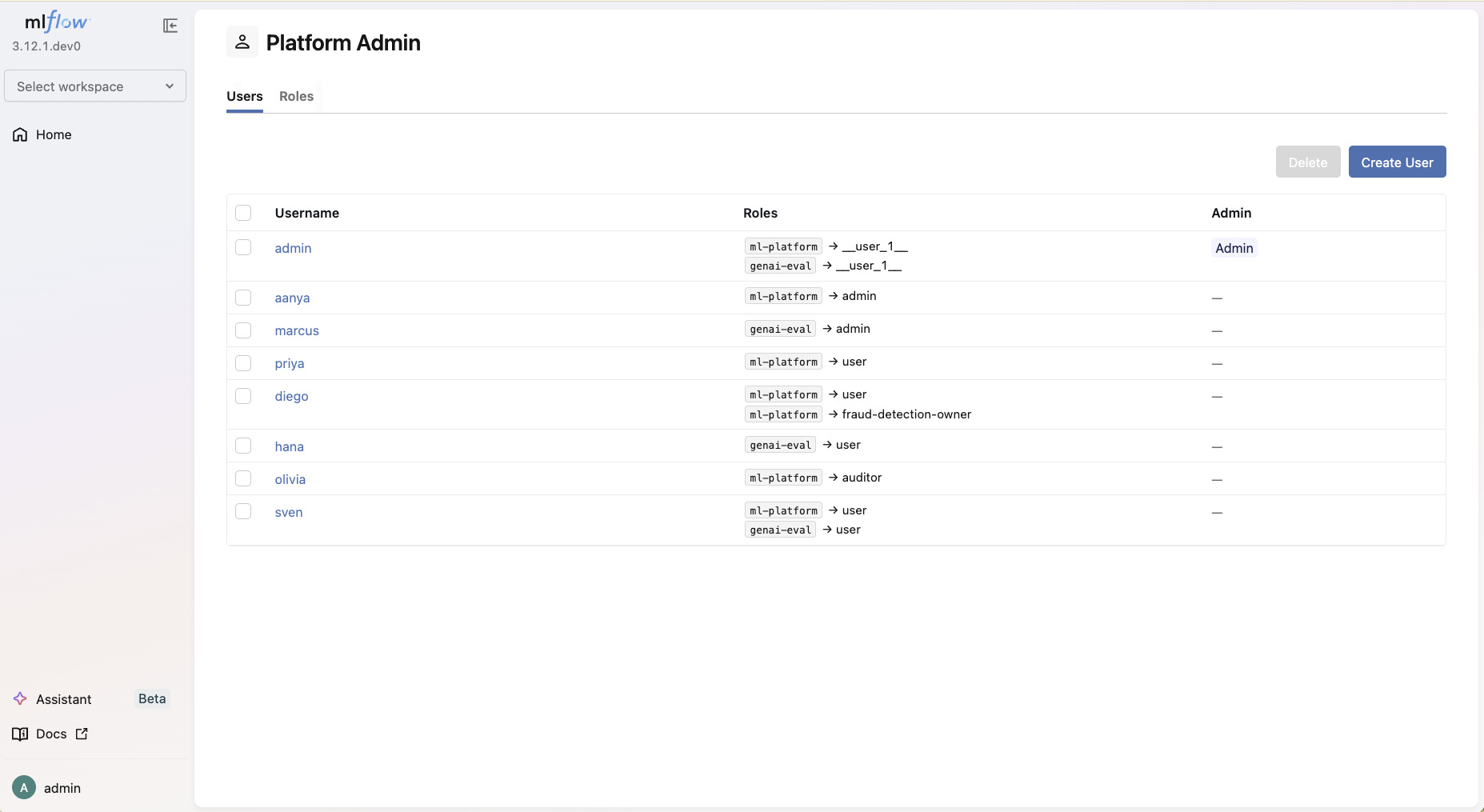
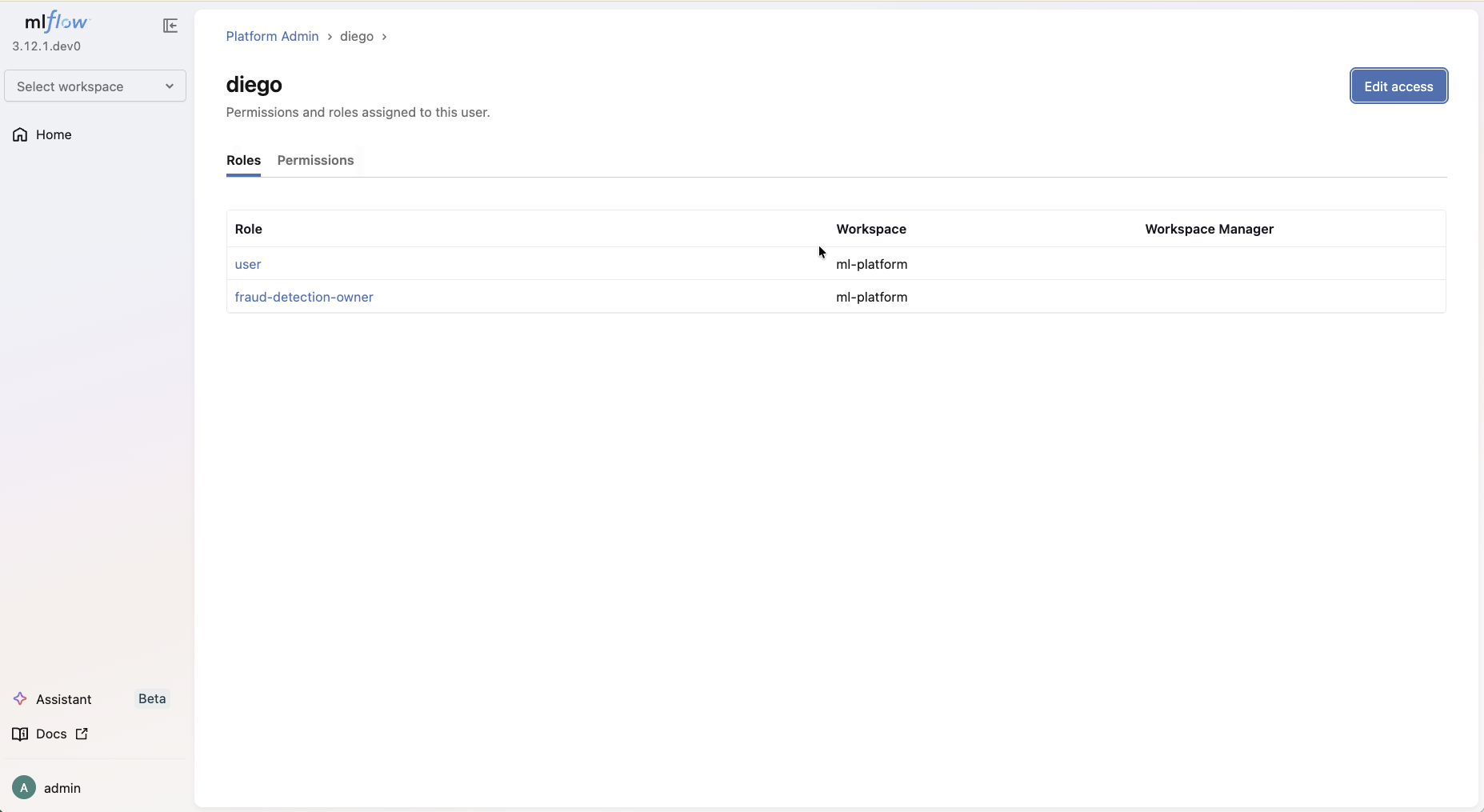
The Users tab lists every user with their visible roles. Click a username to open the user detail page, then Edit access to manage that user's roles, direct permissions, and admin status (Platform Admins only). Changes are previewed in a Review step before they're applied.
Managing Roles
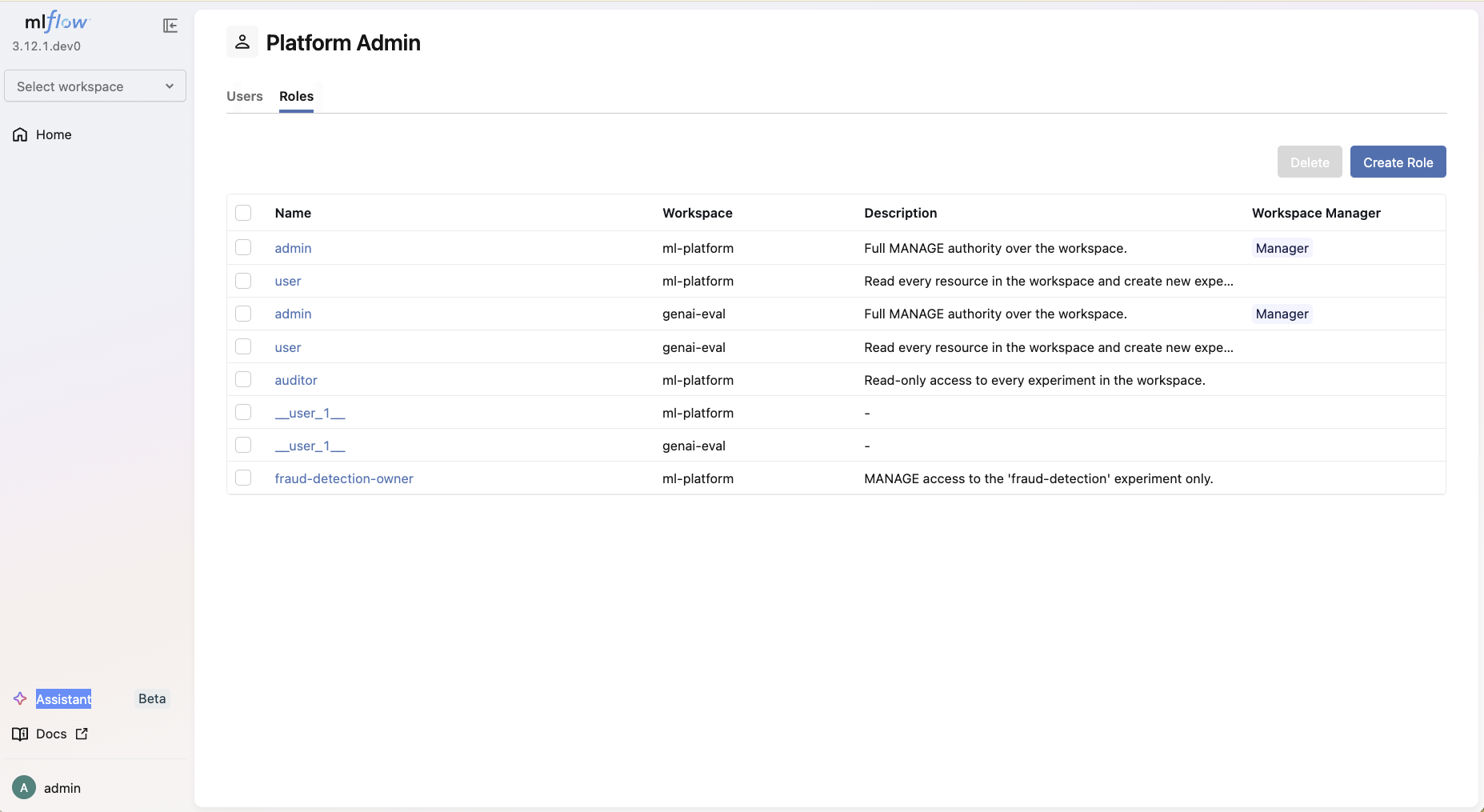
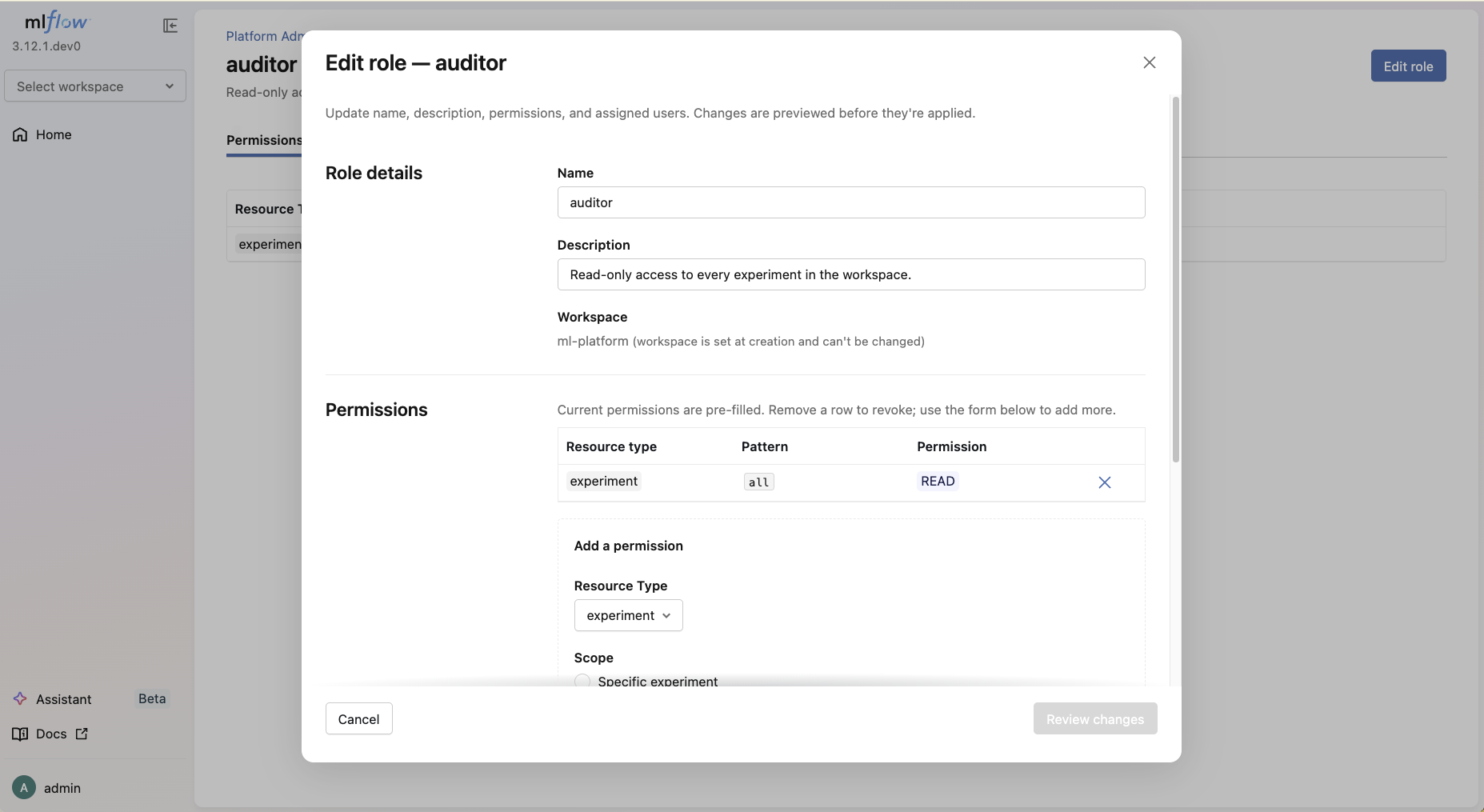
The Roles tab lists roles in the active scope (all roles for Platform Admins; the active workspace's roles for Workspace Managers). Create role opens a single-page form with three sections (Role details, Permissions, Assigned users) and submits them in one shot. Edit role on the role detail page mirrors the same shape.
Default roles
When MLFLOW_RBAC_SEED_DEFAULT_ROLES is on (it is, by default), MLflow seeds
two roles into every newly created workspace:
| Role | Permission | Intent |
|---|---|---|
admin | (workspace, *, MANAGE) | Workspace Manager. Full authority within the workspace. |
user | (workspace, *, USE) | Workspace Member. Reads every resource in the workspace; can create experiments and registered models. |
The user who creates the workspace is automatically assigned the seeded admin
role for that workspace.
To disable the seeding (for installations that prefer to define roles manually):
export MLFLOW_RBAC_SEED_DEFAULT_ROLES=false
Migrating from the legacy permission model
If you're upgrading from a release before MLflow 3.13 that used the
per-resource permission endpoints, the auth-store backfill migration
translates the legacy permission tables into role_permissions rows.
Existing grants survive the upgrade - only the API surface changes.
The wire surface and AuthServiceClient shape change as follows:
| Pre-RBAC surface | Status | Replacement |
|---|---|---|
Per-resource permission REST endpoints + AuthServiceClient methods (create_experiment_permission(), etc.) | Removed | grant_user_permission / revoke_user_permission for one-off direct grants, or the role API for shared sets. |
Workspace permission REST endpoints + AuthServiceClient methods (set_workspace_permission(), etc.) | Removed | The role API: assign the seeded admin / user role, or author a role carrying (workspace, *, ...). |
At the wire level, the ~24 legacy per-resource REST endpoints consolidated
into four under /mlflow/users/permissions/*: grant, revoke, get,
list.
There is no deprecation-warning window: basic-auth was still marked experimental, so the carry cost of dozens of deprecation-warning-emitting methods outweighed the soft-transition benefit. After the upgrade, the one-user one-resource workflow is:
# Replace this:
#   auth_client.create_experiment_permission(experiment_id, username, "EDIT")
auth_client.grant_user_permission(username, "experiment", experiment_id, "EDIT")
Per-resource MANAGE retains delegation. A user with (experiment, 42, MANAGE) can still grant other users access to experiment 42 - the new
grant_user_permission / revoke_user_permission are gated by the same
per-resource MANAGE check the legacy endpoints used.
Rollback
The legacy permission tables (experiment_permissions,
registered_model_permissions, the four gateway_*_permissions,
scorer_permissions, workspace_permissions) remain on disk for rollback
safety through at least one full release cycle. To revert the auth-store
schema:
mlflow db downgrade <previous-revision> --backend-store-uri <auth-db-uri>
The downgrade leaves the legacy tables in place and removes the
role_permissions rows the backfill produced. Re-running the upgrade
re-applies the backfill. The legacy tables are dropped in a subsequent
migration after one full release cycle, so plan upgrade timing accordingly.
API reference
The full list of role/permission/user-assignment methods and their signatures lives in the auto-generated API docs: