Workspace Permissions
Workspace-scoped permissions provide convenient access control for all resources within a workspace when authentication is enabled. Workspace authorization is expressed through MLflow's role system; see Role-Based Access Control for the full model and API reference. This page covers the workspace-scoped specifics.
Overview
A workspace-level grant is a permission on the special
(resource_type='workspace', resource_pattern='*') slot under a role. It
applies to every resource type in that workspace (experiments, registered
models, prompts, AI Gateway resources). Two levels are grantable:
USEon(workspace, *)is the Workspace Member grant. Holders get USE-level access (read + use) to every resource in the workspace, plus the ability to create new experiments and registered models. Per-resource grants can upgrade individual rows. A user without this grant doesn't get a workspace floor; they only get what their specific resource grants provide.MANAGEon(workspace, *)is the Workspace Manager grant. Full authority within the workspace, including granting permissions to other users via roles in this workspace. Cannot perform system-wide operations like deleting users.
A workspace-level grant participates in the same max as any per-resource
grants the user holds, so it acts as a floor: per-resource grants can
upgrade individual rows above the workspace level, but never downgrade them.
See Permission resolution
on the RBAC page for the full mechanic.
Example scenarios
- Workspace-level grant. Alice holds the
team-a/userrole, so she has USE-level access (read and use) on every experiment, registered model, and prompt inteam-a. - Resource-level upgrade. Bob holds the
team-a/userrole (USEworkspace-wide) plus a per-resource grant ofEDITon experimentexp-123. Bob has USE on every resource inteam-aand additionallyEDITonexp-123; the resolver folds matching grants and the higher-priorityEDITwins for that resource. - Direct resource grant without workspace access. Carol has
EDITpermission on experimentexp-456inteam-abut no role with workspace-level access. Carol can accessexp-456only, and the workspaceteam-adoes not appear in hermlflow.list_workspaces()results.
Because there is no "explicit deny" override (see
Permission levels),
a workspace-level grant covers every resource in the workspace and an absent
(or lesser) per-resource grant cannot revoke it. To restrict access to a
specific resource, give the user narrower access in the first place:
per-resource or resource-type-wildcard roles instead of the seeded
<workspace>/user role.
Default roles
When MLFLOW_RBAC_SEED_DEFAULT_ROLES is on (it is, by default), MLflow seeds
two roles into every newly created workspace:
| Role | Permission | Intent |
|---|---|---|
admin | (workspace, *, MANAGE) | Workspace Manager |
user | (workspace, *, USE) | Workspace Member |
The user who creates a workspace is automatically assigned its seeded admin
role. See Default roles
for how to disable this seeding.
Granting workspace access
Granting workspace-level access means assigning a role that carries a
(workspace, *, USE) or (workspace, *, MANAGE) permission. The default
seeded user and admin roles cover the common cases.
Prerequisites
- Workspaces enabled (
--enable-workspaces) - Authentication enabled (
--app-name basic-auth) - Either Platform Admin privileges, or an existing Workspace Manager role on the target workspace (so you can manage role assignments there)
Make a user a Workspace Member
In the admin UI: /admin → Users → click the user → Edit access → in the
Role assignments section, add <workspace>/user → review → apply.
Programmatically:
from mlflow.server import get_app_client

auth_client = get_app_client("basic-auth", tracking_uri="http://localhost:5000")

# Find the seeded ``user`` role in this workspace by listing roles and
# selecting by name.
user_role = next(r for r in auth_client.list_roles("team-a") if r.name == "user")
auth_client.assign_role(username="alice", role_id=user_role.id)
Make a user a Workspace Manager
admin_role = next(r for r in auth_client.list_roles("team-a") if r.name == "admin")
auth_client.assign_role(username="alice", role_id=admin_role.id)
Revoke workspace access
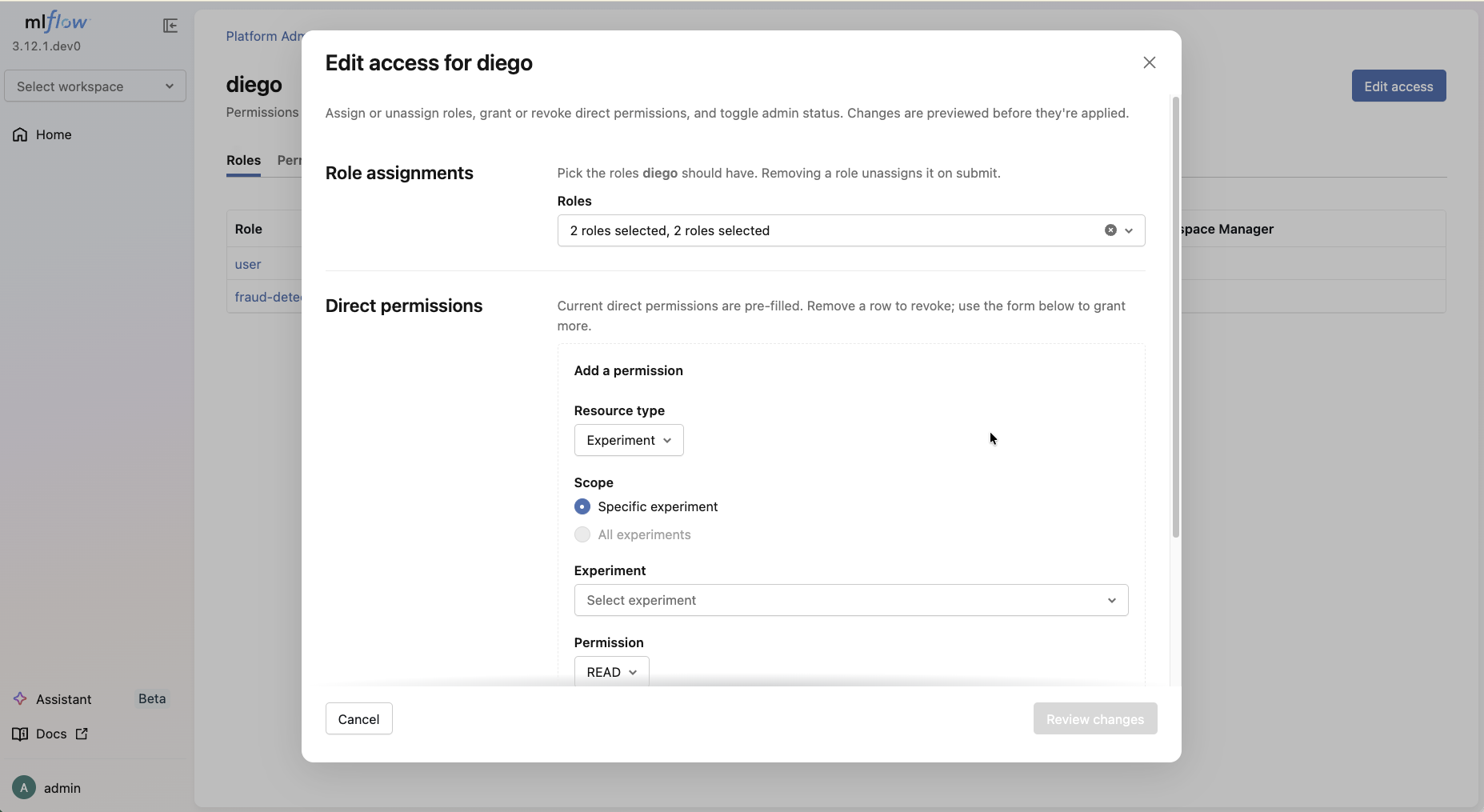
In the admin UI: /admin → Users → click the user → Edit access → in the
Role assignments section, remove the workspace's user or admin role.
Programmatically:
auth_client.unassign_role(username="alice", role_id=user_role.id)
Workspace visibility in list_workspaces()
mlflow.list_workspaces() returns workspaces based on workspace-level access:
- A user with a role that grants
(workspace, *, …)on a workspace sees that workspace in the list. - Direct resource permissions without a workspace-level grant do not make a workspace visible. The user can still access the specific resource directly.
- Platform Admins see every workspace.
- If
grant_default_workspace_access=true, the reserveddefaultworkspace is also visible (and inheritsdefault_permission).
import os
import mlflow

mlflow.set_tracking_uri("http://localhost:5000")

# alice holds the team-a/user role
os.environ["MLFLOW_TRACKING_USERNAME"] = "alice"
os.environ["MLFLOW_TRACKING_PASSWORD"] = "password"
print([w.name for w in mlflow.list_workspaces()])  # ["team-a"]

# bob holds only a per-resource grant on exp-123 in team-a
os.environ["MLFLOW_TRACKING_USERNAME"] = "bob"
os.environ["MLFLOW_TRACKING_PASSWORD"] = "password"
print([w.name for w in mlflow.list_workspaces()])  # []

# but bob can still access the specific experiment if he knows it exists
mlflow.set_workspace("team-a")
mlflow.get_experiment("123")  # works
Troubleshooting
Permission denied errors
If users hit permission-denied errors:
-
Verify the user holds a role with workspace-level access:
pythonroles = auth_client.list_user_roles("alice")for r in roles:print(r.workspace, r.name) -
Confirm the operation needs more than
USE(e.g.,EDIT/MANAGE). The resolver folds every matching grant and takes the highest-priority permission level, so a workspaceUSEgrant is the floor; if no per-resource grant upgrades it, write operations are denied. -
Verify the workspace exists and the role is assigned in the right workspace.
Workspace not visible in list_workspaces()
The user needs a role granting workspace-level access in that workspace;
direct per-resource grants don't suffice. Assign the seeded user or admin
role for the workspace, or create a custom role that carries a (workspace, *, …)
permission.
Next steps
- Role-Based Access Control. The full RBAC model and API reference
- Configuration. Server configuration options
- Workspace Providers. Implement custom providers
- Authentication. Set up MLflow authentication