MLflow 3.14.0 Highlights: One-Line Agent Onboarding, Review Queues, Pytest Integration, and the LLM Playground

MLflow 3.14.0 is a major release focused on closing the GenAI development loop, from getting an app instrumented in the first place to reviewing, testing, and iterating on it. Highlights include one-command observability onboarding with mlflow agent setup, durable low-latency tracing for Claude Code, Review Queues for collecting structured feedback on traces, a revamped evaluation dataset UI, a pytest integration that gates GenAI quality in CI, and an in-browser LLM Playground.
1. One-Command Onboarding with mlflow agent setup
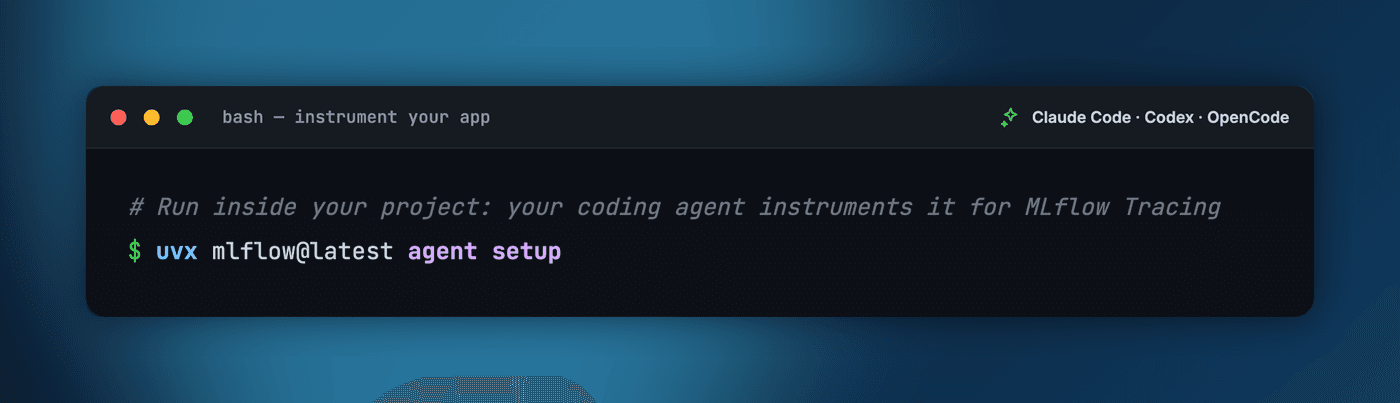
Getting an app onto MLflow observability should not mean reading setup guides and wiring things together by hand. The new mlflow agent setup command does it all in a single line: it installs a curated set of MLflow skills and launches your favorite coding agent, which installs MLflow, sets up tracing, and instruments your app for you. Run it from inside your project, choose which coding agent to drive it (Claude Code, OpenAI Codex, or OpenCode) and where traces should land (a fresh local server, a Databricks workspace, or an existing one), and the agent adds tracing to your real entry point and verifies a trace end to end.
Because the actual instrumentation is delegated to your coding agent rather than a rigid script, it adapts to whatever package manager, framework, and entry point your project uses.
# Run inside your project: your coding agent instruments it for MLflow Tracing
uvx mlflow@latest agent setup
Learn more in the Tracing Quickstart
2. Durable, Low-Latency Tracing for Claude Code
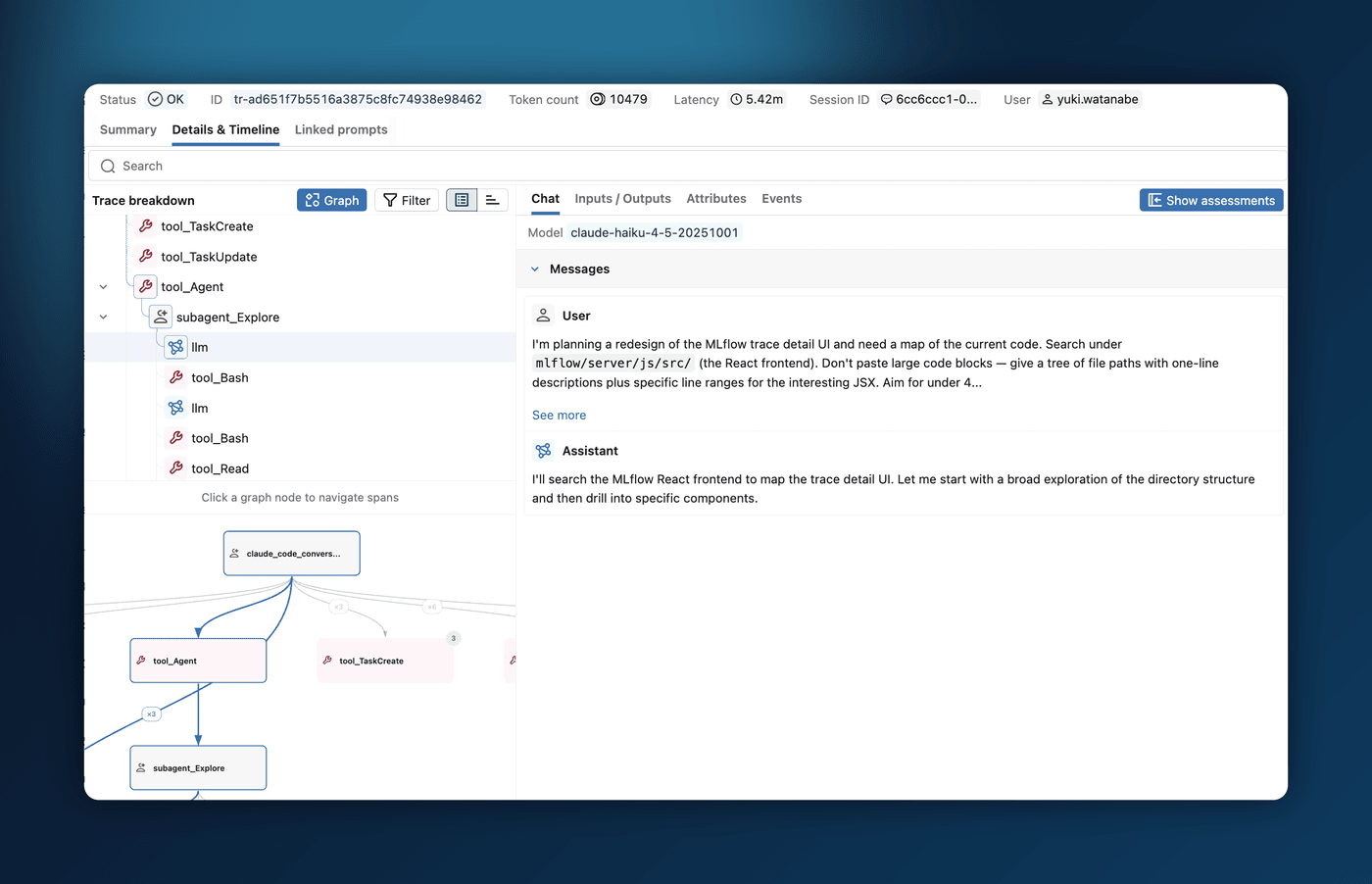
Rolling out Claude Code tracing to a whole team should be something you can switch on for everyone and stop thinking about. MLflow 3.14.0 makes it durable and low-overhead so organizations can adopt it with confidence: tracing never slows down the developer's Claude Code session, it will not overwhelm your central tracking server under load, and it does not lose traces when a network blip or a crash interrupts a session.
It achieves this with a write-ahead-log: each trace is written to local disk and uploaded by a background daemon that retries on failure, so the agent never blocks on the network and any traces already on disk are replayed even if the session exited unexpectedly. You can also send Claude Code traces to a Databricks Unity Catalog location with MLFLOW_TRACE_LOCATION.
Learn more about Claude Code tracing
3. Review Queues for Traces
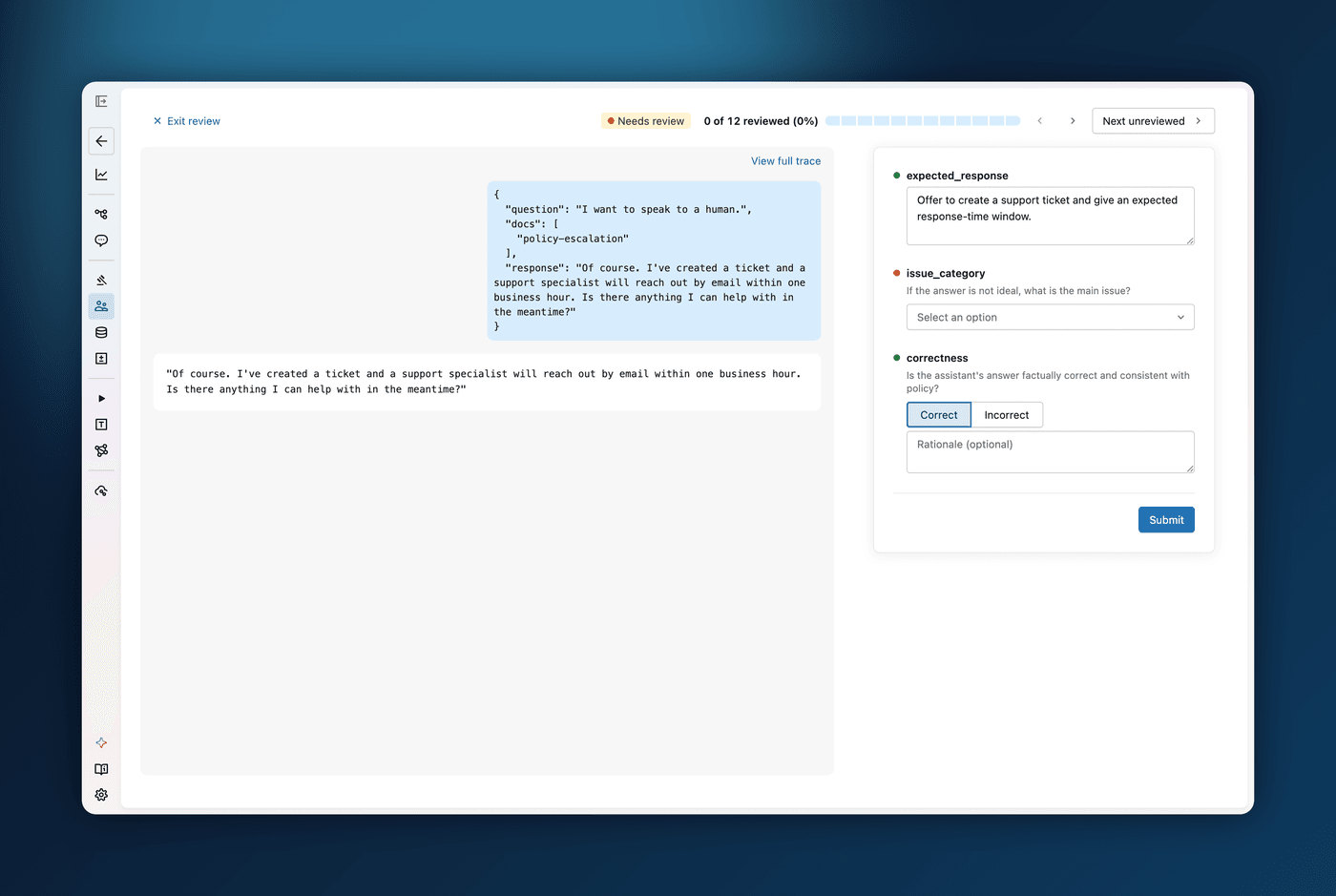
Collecting feedback on GenAI traces used to be ad-hoc: spreadsheets, side channels, and no shared sense of what had already been reviewed. Review Queues turn that into a structured, in-UI workflow, and the quickest path needs no setup at all. From the trace table, select the traces you want a second opinion on and assign them directly to teammates, who find them waiting in their personal review queue. Each reviewer opens a focused review page and works through their traces one at a time.
When you want more structure, create a custom queue with a specific set of review questions (Pass/Fail, categorical, numeric, or free text) and assign it to a group of reviewers. Because a queue's status is shared across everyone assigned to it, the first reviewer to finish a trace clears it for the whole group. Either way, answers are never stored off to the side: each one is written straight back onto the trace, with feedback questions logging assessments and expectation questions logging ground truth. That makes review output immediately usable for evaluation, for aligning an LLM judge, or for building a dataset. The whole workflow is also scriptable through the mlflow.genai.review_queues SDK.
Learn more about Review Queues
4. Revamped Evaluation Dataset UI
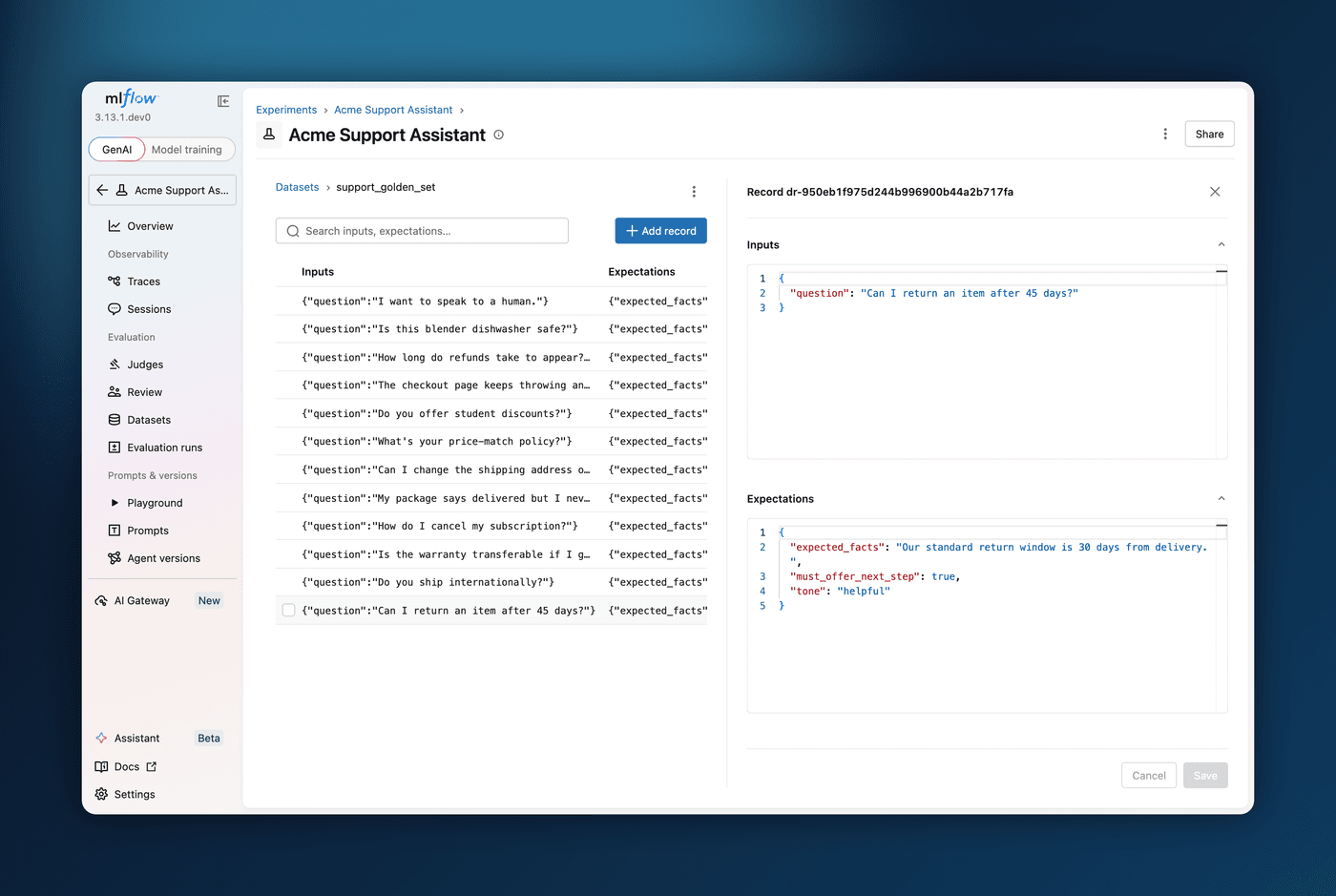
Evaluation datasets are living collections of test cases that grow from production traces and hand-curated golden examples, but inspecting and maintaining them used to mean dropping into the Python SDK. MLflow 3.14.0 ships a fully revamped evaluation dataset experience in the UI. From an experiment's Datasets tab you get a searchable list of datasets, and clicking one opens a dedicated detail page with a sortable, paginated records table.
On the detail page, each record opens in a side panel where inputs and expectations are edited as validated JSON, with an unsaved-changes guard so you do not lose work. You can add records inline, multi-select and bulk-delete, choose which columns to show, and for any record that originated from a trace, open it in an in-page trace explorer to see where the test case came from. Combined with the existing "Add to evaluation dataset" action on the Traces tab, the whole build-and-maintain loop now lives in the UI.
Learn more about evaluation datasets
5. Pytest Integration for GenAI Regression Tests
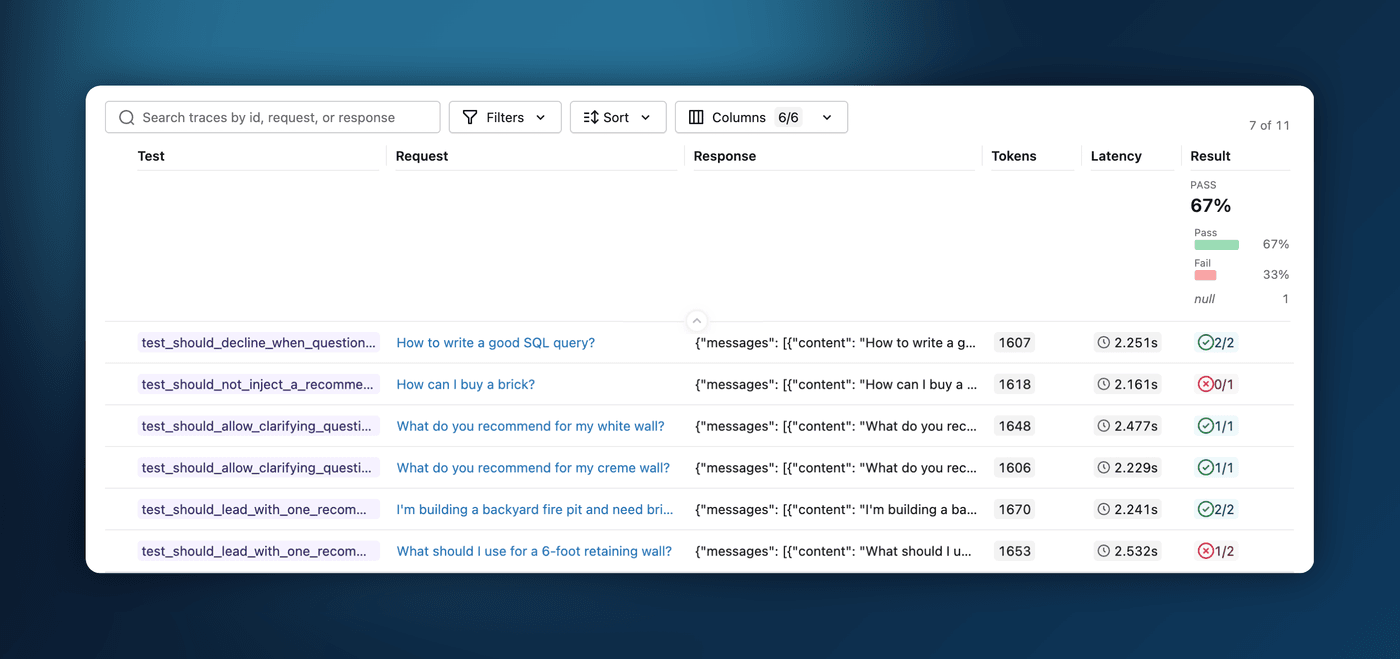
If you already evaluate your agent with mlflow.genai.evaluate() and scorers, regression testing in MLflow 3.14.0 asks you to learn nothing new: add the @mlflow.test decorator to a plain pytest function, run your existing scorers, and assert on the result with assert result.passed, result.reason. When it fails, the failing scorers and their judge rationales show up right in the pytest output.
Because it is just a decorator on an ordinary pytest function, your regression suite plugs into the whole pytest ecosystem: parametrize a test across many cases, fan it out across workers with pytest-xdist, and run it in CI like any other test. Every run is captured to MLflow, and the Evaluation runs UI shows your test history and the detailed per-assertion judge results at a glance. The recommended loop is to grow the suite from real failures: each time the agent misbehaves, capture that case as a @mlflow.test so the same issue can never silently return.
import mlflow
from mlflow.genai.scorers import Guidelines


@mlflow.test
def test_answers_concisely(agent):
    result = mlflow.genai.evaluate(
        predict_fn=agent,
        data=[{"inputs": {"question": "What are your hours?"}}],
        scorers=[Guidelines(name="concise", guidelines="Answer in one sentence.")],
    )
    assert result.passed, result.reason
Learn more about regression testing
6. LLM Playground
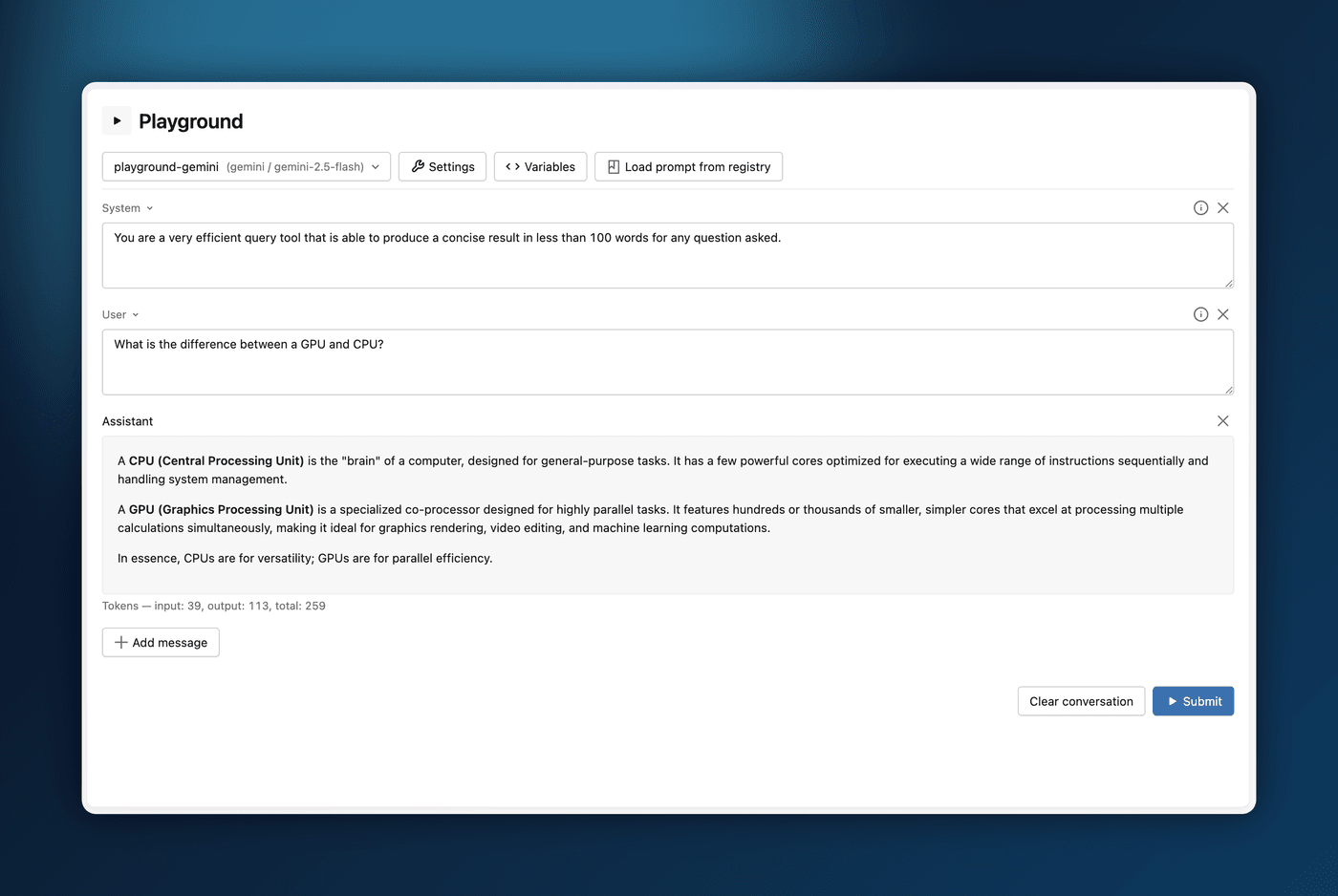
Iterating on a prompt used to mean editing code and re-running it, or jumping out to a separate vendor playground that knew nothing about your registered prompts. MLflow 3.14.0 adds an in-browser LLM Playground, wired to the same MLflow AI Gateway endpoints and Prompt Registry versions you already govern. Open it from an experiment, pick a model endpoint, and compose a multi-turn conversation with system, user, and assistant messages.
A settings drawer lets you tune temperature, max tokens, top-p, penalties, and stop sequences; supply tool definitions; and constrain output to plain text or a strict JSON schema. Messages support {{ variable }} placeholders you fill in at submit time, and "Load prompt from registry" drops any registered version straight into the conversation, applying its stored model config automatically.
Learn more about the LLM Playground
Full Changelog
For a comprehensive list of changes, see the release change log.
What's Next
Get Started
Upgrade to try these new features:
pip install mlflow==3.14.0
Share Your Feedback
We'd love to hear about your experience with these new features:
- GitHub Issues - Report bugs or request features
- MLflow Roadmap - See what's coming next and share your ideas
- ⭐ Star us on GitHub - Show your support for the project
Learn More
- Check out the MLflow documentation for detailed guides