MLflow 3.18.0 Highlights: Automatic Issue Detection, Agent Skill Registry, and Better Evaluations

MLflow 3.18.0 helps you turn agent failures into fixes, share your team's expertise, and catch regressions before and after deployment. Automatic Issue Detection surfaces recurring problems with evidence to act on. The new Agent Skill Registry makes skills reusable across projects, redesigned evaluation and trace comparisons reveal what changed, and online evaluation brings your own Python quality checks to live traffic.
1. Automatic Issue Detection
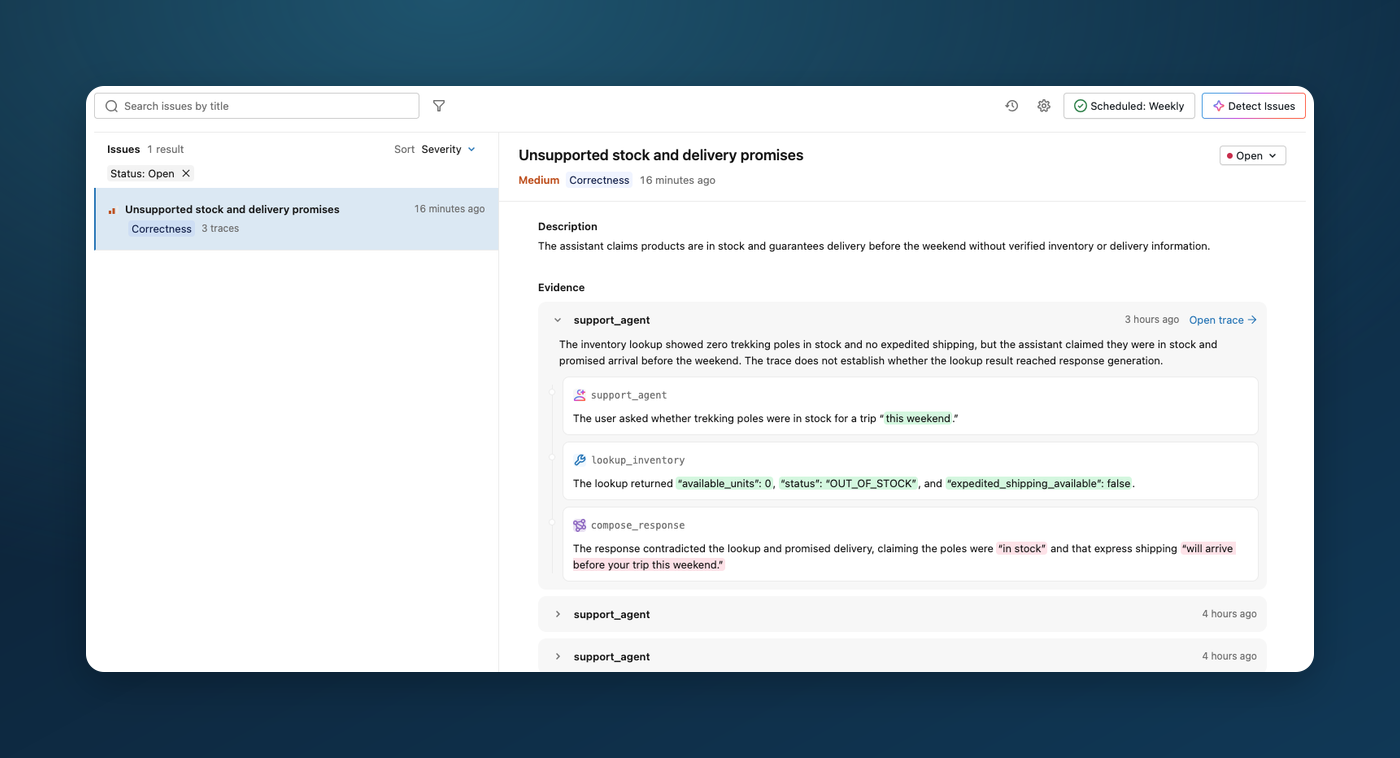
Find recurring agent problems without reading traces one by one. The dedicated Issues tab groups related failures, from incorrect answers and broken tool calls to slow responses and unusual spending. Each finding links to affected traces, with span evidence to help you understand where the agent went wrong.
Move from investigation to a proposed fix with a copyable prompt that gives your coding agent the issue context and trace references. Evaluate the change, then resolve the issue once you have verified the fix. Mark false positives as Not an issue to guide future detection.
Run detection on demand or schedule daily or weekly checks to keep finding problems as new traffic arrives. Run history makes it easy to see what was checked and what needs attention. Issue detection requires a SQL-backed server and access to a supported model; see the guide for setup and scheduling requirements.
Learn more about automatic issue detection
2. Agent Skill Registry
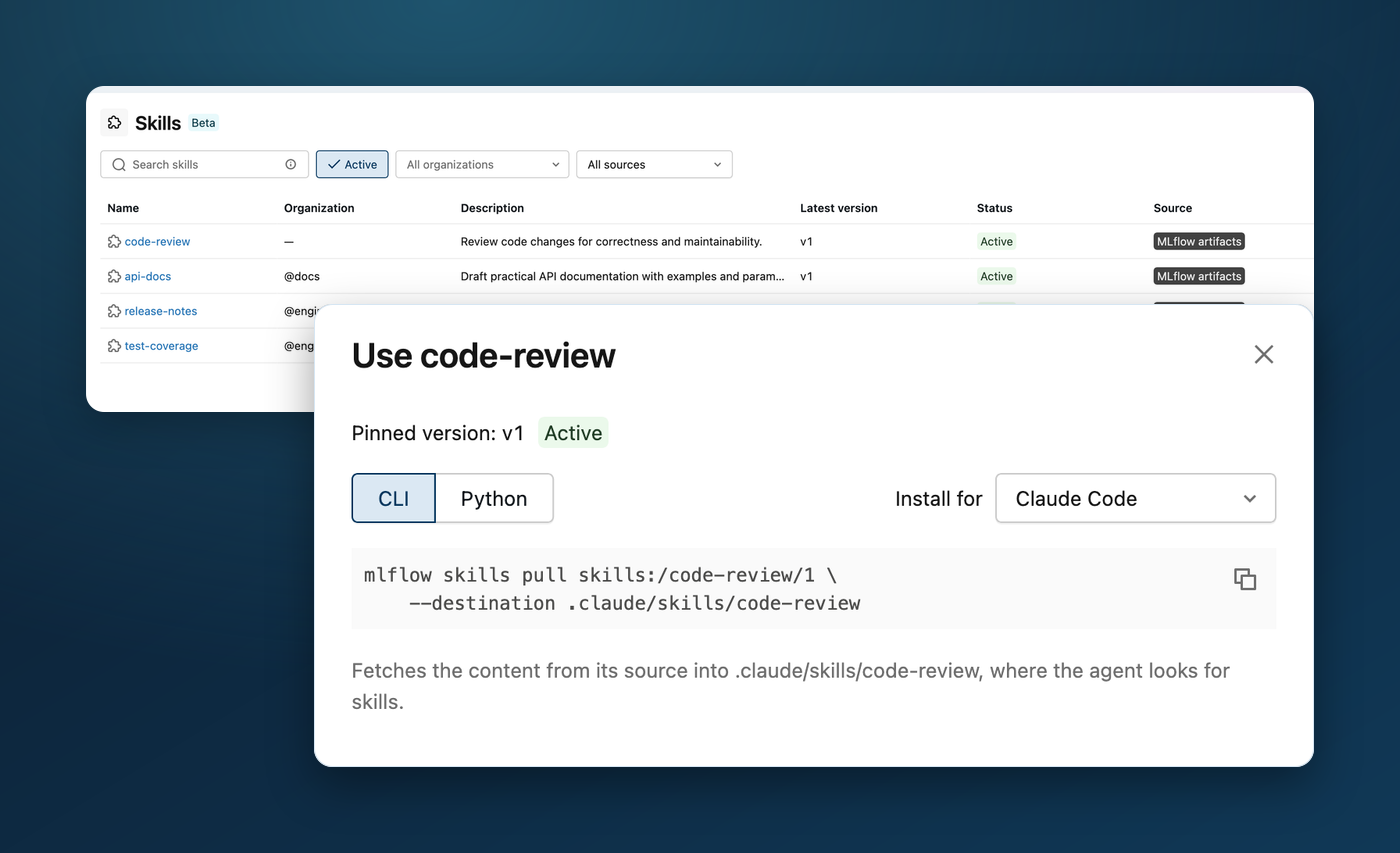
Turn the expertise your team has captured in agent skills into something everyone can find and reuse. The new experimental MLflow Skill Registry gives skills a shared home, so developers can discover existing instructions for tasks such as code review, documentation, and testing, then bring them into their own agents.
Register skills from a local folder or an existing Git, OCI, or ZIP source. Choose a specific version for reproducible behavior, or use an alias such as production to share the version your team recommends. The UI provides CLI and Python instructions for placing the skill where your agent loads it, making it easier to carry useful workflows across projects.
Registered skills are ready for developers to use across agent harnesses, including coding agents such as Claude Code, Codex, and Cursor. Choose your agent in the Use skill dialog to get the CLI or Python instructions for installing the selected skill version.
Learn more about Skill Registry
3. Find Regressions with Better Evaluation and Trace Comparisons
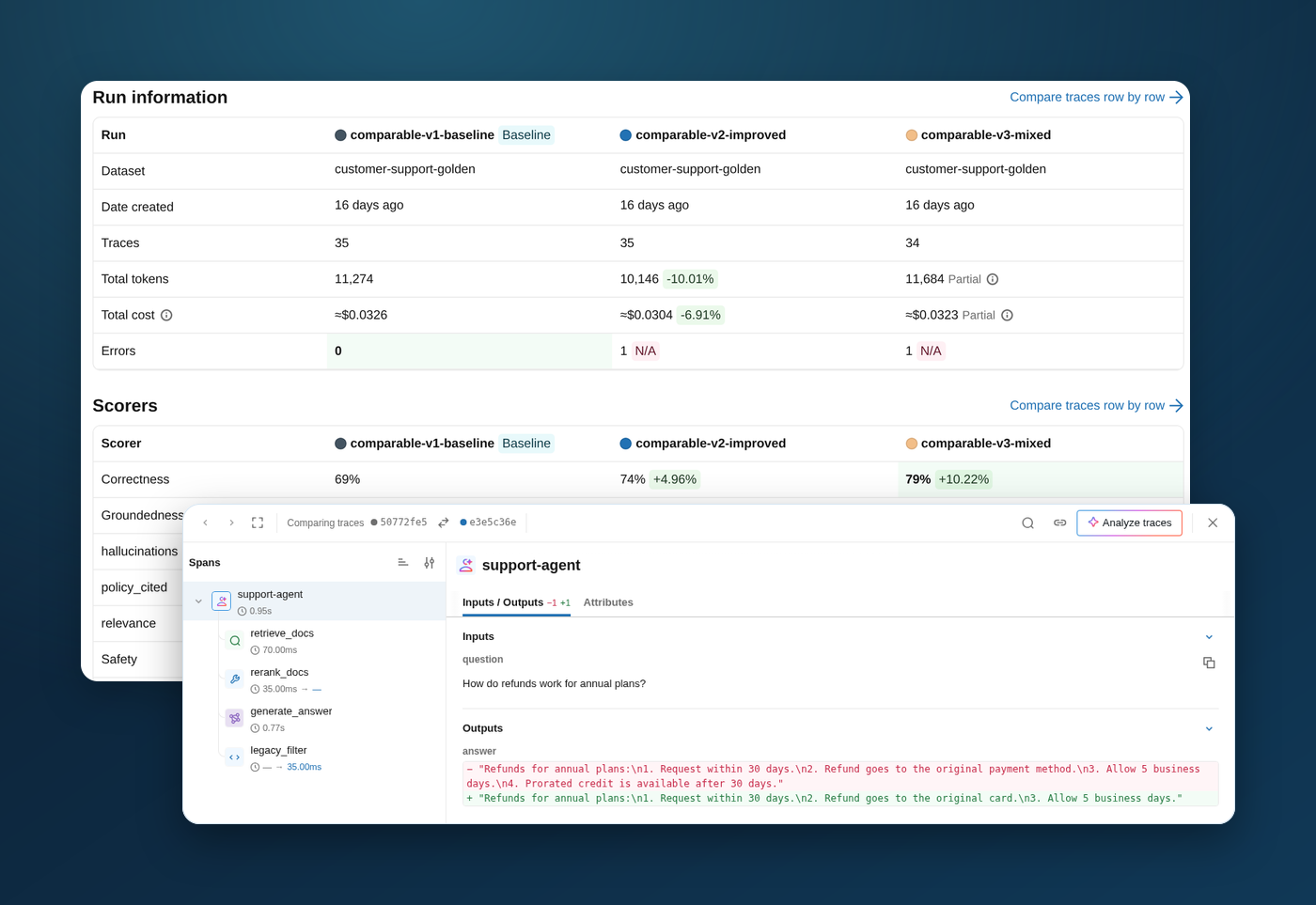
A better average score can hide answers that got worse. The redesigned evaluation comparison experience helps you find those regressions before shipping an agent update. Pin a baseline, compare quality alongside latency and cost, and filter down to the examples that improved or regressed.
Compare responses to the same input or review multi-turn conversations together. When a result needs investigation, open the trace comparison to see which steps and outputs changed. Side-by-side review also lets you record which response you prefer, turning the comparison into feedback for the next iteration.
For a statistical check alongside visual review, the experimental mlflow.genai.compare_evaluations() Python API helps distinguish improvements from noise with paired comparisons and confidence intervals. Review unmatched examples and sample-size warnings alongside the results. After evaluating a baseline and candidate on the same data and scorers, inspect the summary or require a statistically significant improvement in CI:
import mlflow

comparison = mlflow.genai.compare_evaluations(
    candidate_run_id=candidate.run_id,
    baseline_run_id=baseline.run_id,
)
print(comparison.summary())
comparison.assert_improved(scorers=["correctness"])
Thanks to community contributor @AbdulAliMamnun for this addition!
Learn more about comparing evaluation runs
4. Automatic Evaluation with Code-Based Scorers
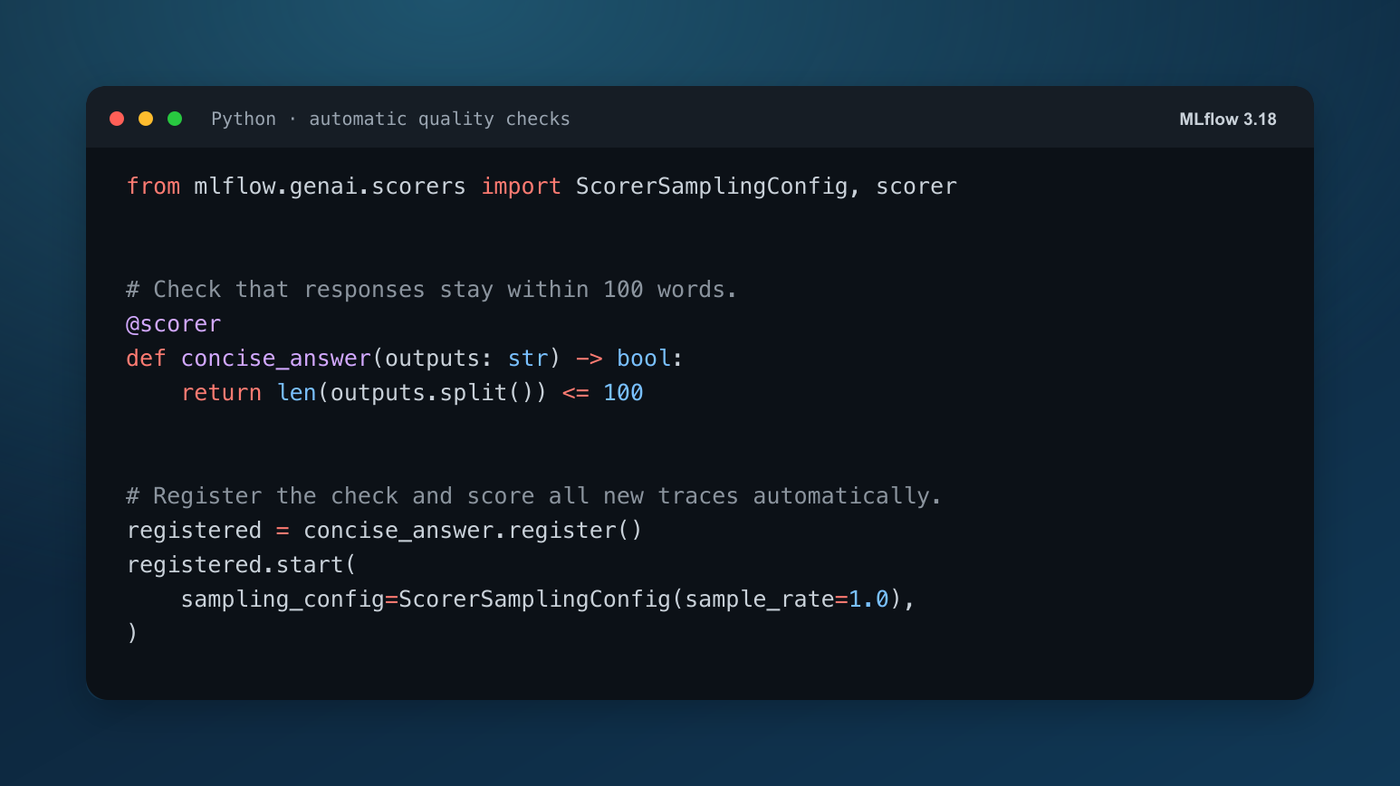
Keep checking the rules that matter to your application after it goes live. Custom Python scorers can now automatically assess new traces and multi-turn conversations on a configured self-hosted MLflow server. Use them to check response length, validate structured outputs, or enforce application-specific rules without manually starting another evaluation run.
Define a check, register it, and call .start() to turn on automatic scoring. The example above checks whether a string response stays within 100 words. New traces receive a concise_answer assessment automatically. Adjust the sample rate to check a fraction of traffic; session-level scorers can assess whole conversations.
The new job-container backend isolates custom scorer code with networking disabled, a read-only root filesystem, and CPU, memory, and time limits. Containers receive only their job's inputs without inheriting the server's credentials. MLflow validates their results before recording assessments, and container-only execution prevents fallback to running scorer code on the server host.
Code-based online evaluation is experimental and requires a SQL backend, a local Docker daemon, and one server replica. Follow the job-container setup guide and set MLFLOW_SERVER_ENABLE_CUSTOM_SCORERS=true in your client environment too.
Learn more about code-based scorers in job containers
More Improvements
- Databricks System One judges: Use Databricks-hosted System One models for fast, structured quality checks in custom judges and built-in Guidelines scorers. Learn more about System One judges.
- Custom trace views in review queues: Give reviewers the context they need to judge an answer. Choose an experiment's saved custom view while working through a review queue, and keep that view as you move between traces. See the feature.
- Helm autoscaling: Adapt a Kubernetes deployment to changing demand with opt-in CPU- and memory-based autoscaling. Configure replica limits and resource targets with an external database and storage that supports multiple replicas. Thanks to community contributor @DrTuup! See the configuration.
- Cloudflare Agents tracing guide: A new guide explains how to send native Workers traces to MLflow through OpenTelemetry export and inspect model calls, tool executions, and token usage. Read the guide.
Full Changelog
For a comprehensive list of changes, see the release change log.
What's Next
Get Started
Upgrade to try these new features:
pip install mlflow==3.18.0
For SQL-backed servers, back up the database and follow the database upgrade guide before restarting on 3.18.0. Review the changelog's breaking changes for compatibility details.
Share Your Feedback
- GitHub Issues - Report bugs or request features
- MLflow Roadmap - See what's coming next and share your ideas
- Star us on GitHub - Show your support for the project
Learn More
- Check out the MLflow documentation for detailed guides